
How to fix ERR_SSL_VERSION_INTERFERENCE on Chrome?
https://ugetfix.com/ask/how-to-fix-err_ssl_version_interference-on-chrome/
Question
Issue: How to fix ERR_SSL_VERSION_INTERFERENCE on Chrome?
Hello. I have been having problems with connecting to some websites on Google Chrome. At first, there were only few that showed me ERR_SSL_VERSION_INTERFERENCE error, but recently, the problem is getting worse. More and more sites are affected by it, and it is frustrating not to be able to browse properly. The issue occurred after I updated Windows. I am using Windows 10 and Kaspersky Internet Security 19.0.0.1088. Any solutions for this issue, please?
Solved Answer
- Solution 1. Remove or reinstall anti-malware software
- Solution 2. Delete browser data and cookies
- Solution 3. Disable hardware acceleration
- Solution 4. Reset Google Chrome
- Solution 5. Disable HTTPs scanner on your anti-virus
- Solution 6. Disable TLS 1.3 on Google Chrome
- Solution 7. Make sure your software is up to date
- About the author
- References
ERR_SSL_VERSION_INTERFERENCE is quite an old error that users get on Google Chrome browser. However, some also reported the same issue happening on Mozilla Firefox.[1] The error is closely related to The ERR_SSL_VERSION_OR_CIPHER_MISMATCH and ERR_SSL_PROTOCOL_ERROR, as all of these issues occur due to the misconfiguration of SSL certificate.
The ERR_SSL_VERSION_INTERFERENCE error might be occurring due to these issues:
- Problems with third-party anti-virus software;
- Incorrect Time and Date settings on your computer;
- Hardware acceleration[2] being on;
- Incorrect time and date settings on the computer;
- Outdated Google Chrome or antivirus versions;
- Cookies and browsing data.
While these problems among those which users said fixed ERR_SSL_VERSION_INTERFERENCE error, the solution that worked for most was disabling of the Google's TLS (Transportation Layer Security) 1.3 protocol[3] which provides privacy and performance improvements in comparison to previous versions.
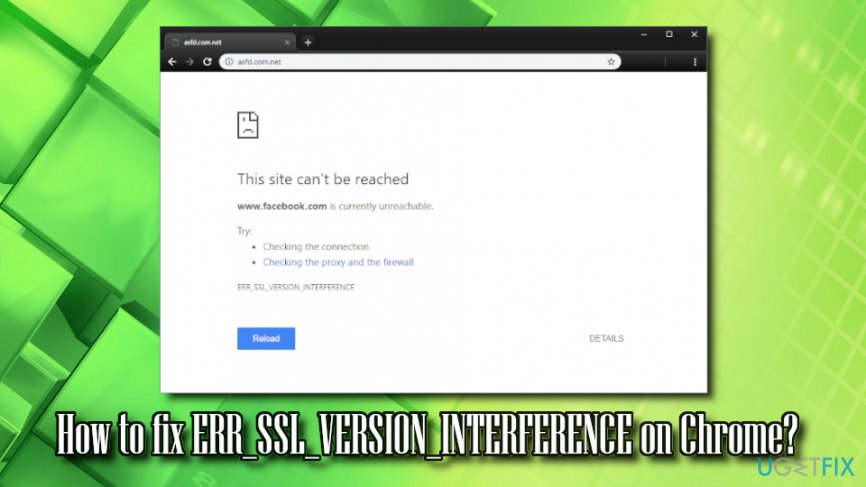
Therefore, multiple users argued if it is a solution at all, as disabling the feature does reduce online security. However, this might be a workaround to fix ERR_SSL_VERSION_INTERFERENCE error, if no other options help. We will provide the instructions on how to disable TLS 1.3 as the last solution but beware that it might decrease your online safety.
Other solution would be to disable for scanning of HTTPS in anti-virus software, as some of AVs use a man in the middle scanners that may not support the same TLS 1.3 version.
Solution 1. Remove or reinstall anti-malware software
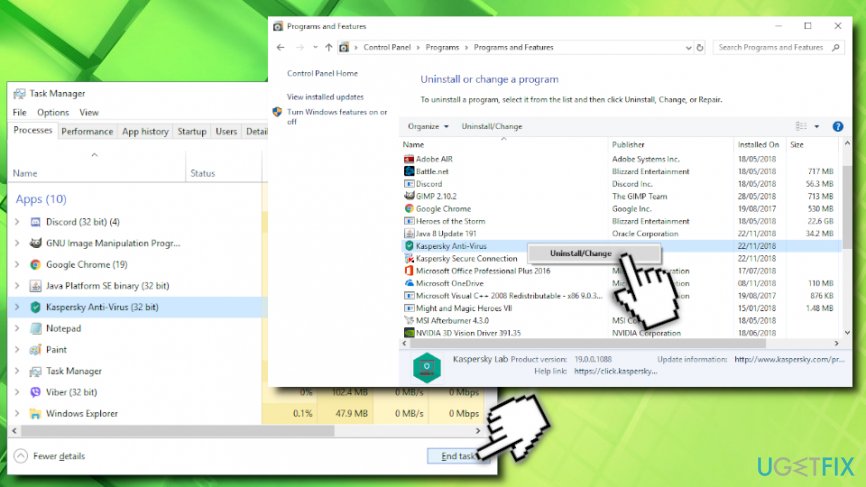
There were numerous reports that certain AV engines (like Kaspersky and Avast) were causing users to encounter ERR_SSL_VERSION_INTERFERENCE error. First of all, we highly recommend updating security software to the newest version, and see if the problem persists. If it does, reinstalling the anti-virus might help you fix ERR_SSL_VERSION_INTERFERENCE error. To uninstall AV software, follow these steps:
- In the taskbar, locate hidden trays and click on it
- Find the icon of the security software, right-click on it and select Exit
- Pres CTRL + SHIFT _ ESC to open Task manager
- Find any tasks related to your AV engine and shut them down
- Press Start and type Control Panel
- Go to Programs > Uninstall a program
- Select your anti-virus, right click on it and pick Uninstall/Change
- Follow the on-screen instructions
Note: for detailed removal of the particular AV you are using, refer to the developer's website.
If the reinstallation of the AV program did not help, we suggest you swap to another vendor. There are many to choose from, but we recommend Reimage.
Solution 2. Delete browser data and cookies
Eliminate cookies and cache from your browser:
- Open Google Chrome and click on Menu > Settings
- Scroll down and select Advanced
- Find Clear browsing data and click on it
- Select Cookies and other site data and Cached images and files, and press Clear data
Solution 3. Disable hardware acceleration
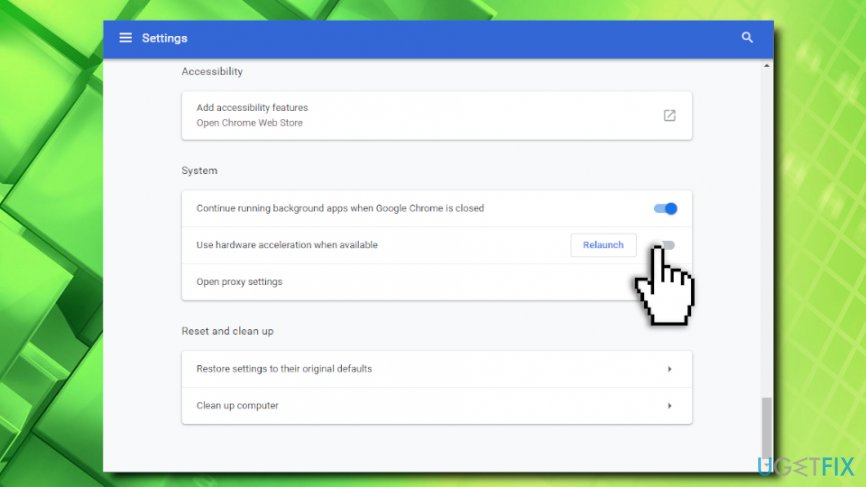
Hardware Acceleration feature is used to allow the browser to use hardware like CPU to process the tasks. However, disabling this feature might help you fix ERR_SSL_VERSION_INTERFERENCE error:
- Open Google Chrome and click on Menu > Settings > Advanced
- Scroll down to find System
- Untick Use hardware acceleration when available
Solution 4. Reset Google Chrome
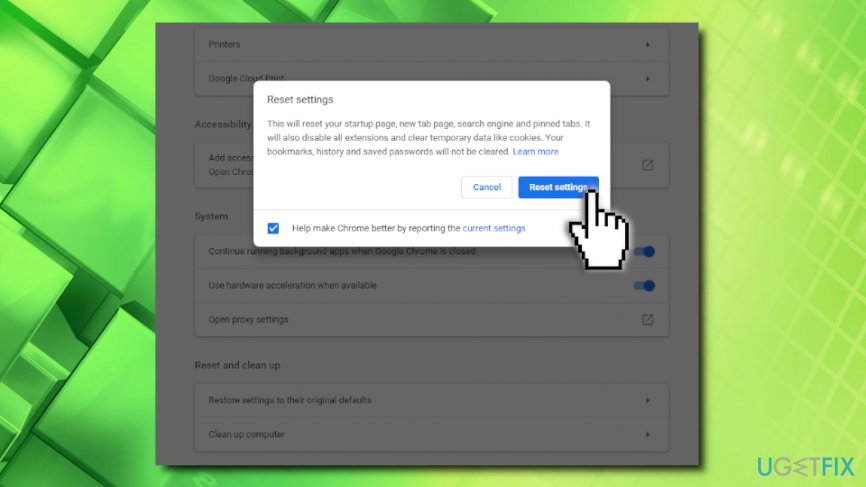
- Go to Menu > Settings > Advanced on Google Chrome once again
- Scroll down to find Reset and clean up
- Click on Restore settings to their original defaults
- Then, press Reset Settings
Solution 5. Disable HTTPs scanner on your anti-virus
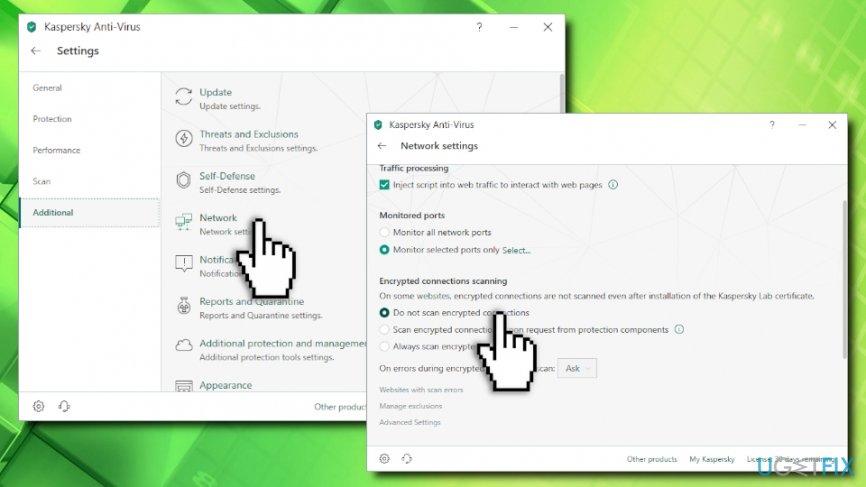
This solution is a bit risky because it decreases the security of your online browsing. However, you should not do this if you are planning to disable TLS 1.3. If you do want to disable TLS scanning, make sure you skip this step (note we provide instructions for Kaspersky Anti-virus, which may differ if you use another browser):
- Open your anti-virus app and click on Settings > Additional
- Click on Network and locate Encrypted connections scanning
- Select Do not scan encrypted connections and confirm your choice
Solution 6. Disable TLS 1.3 on Google Chrome
Do not disable TLS 1.3 if you applied solution 5. Your security might be at risk! Otherwise, follow these steps:
- Open Google Chrome, paste the following chrome://flags/ and hit Enter
- Type TLS into the search box that opened
- From the drop-down menu, select Disabled and relaunch the browser
Solution 7. Make sure your software is up to date
Finally, you should make sure that all your programs are up to date, including Windows OS, anti-virus software, Google Chrome, etc. Several bugs and security issues are fixed with every patch that is released, so it could be a solution for ERR_SSL_VERSION_INTERFERENCE error.
Repair your Errors automatically
ugetfix.com team is trying to do its best to help users find the best solutions for eliminating their errors. If you don't want to struggle with manual repair techniques, please use the automatic software. All recommended products have been tested and approved by our professionals. Tools that you can use to fix your error are listed bellow:
How to fix ERR_SSL_VERSION_INTERFERENCE on Chrome?的更多相关文章
- mac版chrome升级到Version 65.0.3325.18后无法打开百度bing搜狗
mac版本chrome升级到Version 65.0.3325.18后发现突然无法访问百度,搜狗,bing,神马等一系列的国内搜索引擎网站.连百度的儿子们比如知道,百度百科都无法访问. 1.首先想到的 ...
- HTML5 Canvas圣诞树
又逢圣诞了,为了让小站NowaMagic有点节日气氛,这里也弄一棵圣诞树放放-大家可以先看下效果. 效果演示 <canvas id="c"></canvas> ...
- html5 3D圣诞树源码
1. [代码][HTML]代码 <!DOCTYPE HTML PUBLIC "-//W3C//DTD HTML 4.01 Frameset//EN" "http ...
- WebKit中的Chrome 和 ChromeClient
原文地址:http://blog.csdn.net/dlmu2001/article/details/6208241 摘要: 浏览器的GUI接口分成两种,一种是控件的绘制,另一种则是同应用息息相关的窗 ...
- How to install 64-bit Google Chrome 28+ on 64-bit RHEL/CentOS 6 or 7
How to install 64-bit Google Chrome 28+ on 64-bit RHEL/CentOS 6 or 7 The problem Google developers s ...
- Chrome的Crash Report服务
<本文转自:http://www.cppblog.com/woaidongmao/archive/2009/10/22/99211.aspx> 本文翻译自debugInfo网站上一篇文章g ...
- centos chrome
在centos6.X和redhat enterprise 中安装chrome,我找了很久都不行,今天终于找到了可以用下脚本那安装: #! /bin/bash # Google Chrome Insta ...
- win7下Chrome有两个图标的解决方法
摘抄自:http://www.sevenforums.com/browsers-mail/238406-windows-7-taskbar-creating-double-google-chrome- ...
- Building Python 2.7.10 with Visual Studio 2010 or 2015 - Google Chrome
您的浏览器(Chrome 33) 需要更新.该浏览器有诸多安全漏洞,无法显示本网站的所有功能. 了解如何更新浏览器 × p-nand-q.com C++ Python Programming L ...
随机推荐
- Swift中的Any 与 AnyObject、AnyClass的区别?
在 Swift 中能够表示 “任意” 这个概念的除了Any .AnyObject以外,还有一个AnyClass. Any.AnyObject.AnyClass有什么区别: AnyObject是一个成员 ...
- Tensorflow高级封装
Tensorflow比较灵活,但是它提供的操作比较低级,于是许多封装库应运而生. slim 导入方式 import tensorflow as tf import tensorflow.contrib ...
- CreateThread与_beginthreadex本质区别
函数功能:创建线程 函数原型: HANDLEWINAPICreateThread( LPSECURITY_ATTRIBUTESlpThreadAttributes, SIZE_TdwStackSize ...
- POJ 2976 Dropping tests (0/1分数规划)
Dropping tests Time Limit: 1000MS Memory Limit: 65536K Total Submissions: 4654 Accepted: 1587 De ...
- jquery.inputmask 输入框input输入内容格式限制插件
jQuery Input Mask plugin http://robinherbots.github.io/jquery.inputmask README.md jquery.inputmask C ...
- 【Spring】Spring之浅析Spring框架的搭建
Spring是什么 Spring是一个开源的容器框架,用于配置bean并且维护bean之间关系的.其主要的思想就是IOC(Inversion Of Control,控制反转)或者称作DI(Depend ...
- 一些实用的php库
Idiorm – 轻量级ORM库 Snappy – 快照/PDF库 Buzz – 简单的HTTP请求库 Omnipay – 支付处理库 ShellWrap – 优美的命令行包装器
- php非阻塞服务器
<?php class PHPSocketServer { const ERROR = 0; const LOG = 1; const DEBUG = 2; private $aConfig = ...
- asp.net页面之间传值方法详解
asp.net中页面之间传值我们用得最多的就是get,post这两种了,其它的如session,appliction,cookie等这些相对来说少用也不是常用的,只是在特殊情况下在使用了. 1. Ge ...
- Java 8 Stream – Read a file line by line
In Java 8, you can use Files.lines to read file as Stream. c://lines.txt – A simple text file for te ...