
Gradle with Android
【Gradle with Android】
The Android Studio build system is based on Gradle, and the Android plugin for Gradle adds several features that are specific to building Android apps.
1、Update the Android Plugin for Gradle
You can specify the Android plugin for Gradle version in either the File > Project Structure > Project menu in Android Studio, or the top-levelbuild.gradle file. The plugin version applies to all modules built in that Android Studio project. The following example sets the Android plugin for Gradle to version 2.2.3 from the build.gradle file:
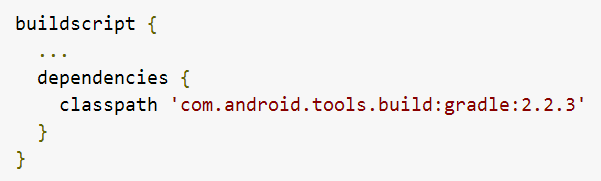
If the specified plugin version has not been downloaded, Gradle downloads it the next time you build your project or click Tools > Android > Sync Project with Gradle Files from the Android Studio menu bar.
2、Set the Application ID
Every Android app has a unique application ID that looks like a Java package name, such ascom.example.myapp. This ID uniquely identifies your app on the device and in Google Play Store. If you want to upload a new version of your app, the application ID (and the certificate you sign it with) must be the same as the original APK—if you change the application ID, Google Play Store treats the APK as a completely different app. So once you publish your app, you should never change the application ID.
参考:https://developer.android.com/studio/build/application-id.html#change_the_application_id_for_testing
3、Build System
参考:http://android.xsoftlab.net/tools/building/multidex.html
Gradle with Android的更多相关文章
- Gradle 实现 Android 多渠道定制化打包
Gradle 实现 Android 多渠道定制化打包 版权声明:本文为博主原创文章,未经博主允许不得转载. 最近在项目中遇到需要实现 Apk 多渠道.定制化打包, Google .百度查找了一些资料, ...
- [转]使用Gradle发布Android开源项目到JCenter
转自:http://blog.csdn.net/maosidiaoxian/article/details/43148643 使用Gradle发布Android开源项目到JCenter 分类: G ...
- 深入理解gradle编译-Android基础篇
深入理解gradle编译-Android基础篇 导读 Gradle基于Groovy的特定领域语言(DSL)编写的一种自动化建构工具,Groovy作为一种高级语言由Java代码实现,本文将对Gradle ...
- 用Gradle 构建android程序
前言 android gradle 的插件终于把混淆代码的task集成进去了,加上最近,android studio 用的是gradle 来构建项目, 下定决心把android gralde 构建项目 ...
- 使用Gradle构建Android项目
阅读目录 Gradle是什么? 环境需求 Gradle基本结构 任务task的执行 基本的构建定制 目录配置 签名配置 代码混淆设置 依赖配置 输出不同配置的应用 生成多个渠道包(以Umeng为例) ...
- 在内网使用Gradle构建Android Studio项目
在Android Studio项目中,默认的远程仓库为jcenter,如果在项目引用了一些类库,Gradle构建程序的时候会将这些依赖类库从jcenter网站下载到本地,如我们在 build.grad ...
- Gradle在Android中的基本使用
1.基本概念 程序开发作为一种工程作业,不光是编写代码,还涉及到工程的各种管理(依赖,打包,部署,发布,各种渠道的差异管理.....).很多时候,我们反复的build,clean,签名,打包,发布,那 ...
- Gradle for Android(二)全局设置、自定义BuildConfig
全局设置 如果有很多项目,可以设置全局来统一管理版本号或依赖库,根目录下build.gradle下: ext { compileSdkVersion = 23 buildToolsVersion = ...
- gradle打包android (实现外部导入签名文件、多渠道打包、导入ant脚本)
近期一直在做android自己主动打包,之前已经完毕了用纯命令行的形式打包.原生态ant脚本打包.和基于android的SDK的打包.而且实现了多渠道打包,后来同事推荐了gradle,网上的资料说gr ...
随机推荐
- android设备唯一码的获取,cpu号,mac地址
抄自http://blog.csdn.net/hpccn/article/details/7872141 开发Android应用中,我们常常需要设备的唯一码来确定客户端. Android 中的几中方法 ...
- Nginx+tomcat+redis实现session共享
Nginx+tomcat+redis实现session共享 1,安装nginx,使用yum -y install nginx 这是epel源中的,需要安装epel源. 2,配置nginx. 在ngin ...
- Bootstrap:教程、简介、环境安装
ylbtech-Bootstrap:教程.简介.环境安装 1. Bootstrap 教程返回顶部 1. Bootstrap 教程 Bootstrap,来自 Twitter,是目前最受欢迎的前端框架.B ...
- Spark wordcount开发并提交到集群运行
使用的ide是eclipse package com.luogankun.spark.base import org.apache.spark.SparkConf import org.apache. ...
- Python模块之shelve
shelve是python的自带model. 可以直接通过import shelve来引用. shelve类似于一个存储持久化对象的持久化字典,即字典文件. 使用方法也类似于字典. 保存对象至shel ...
- ajax 方法的使用以及方法中各参数的含义
由于近来经常在项目中使用 ajax 这个函数,在工作之余自己查找了相关的资料,并总结了 ajax 方法的使用,以及方法中各个参数的含义,供大家学习参考使用 type: 要求为String类型的参数,请 ...
- python实现定时发送系列
1.发送邮件实现 2.定时任务实现 3.定时发送邮件实现 4.微信定时发送信息 详细源代码见:https://github.com/15387062910/timing_send 参考: 廖雪峰博客 ...
- 数据库之SQL笛卡尔积
1.笛卡尔积定义 笛卡尔积在SQL中的实现方式既是交叉连接(Cross Join).所有连接方式都会先生成临时笛卡尔积表,笛卡尔积是关系代数里的一个概念,表示两个表中的每一行数据任意组合,上图中两个表 ...
- 用google-code-prettify高亮代码
示例: https://code.google.com/p/google-code-prettify/wiki/GettingStarted 主题如何使用google-code-prettify高亮代 ...
- LeaderF常用用法
常用: 搜索当前目录下的文件 :LeaderfFile <leader>f 搜索当前的Buffer :LeaderfBuffer <leader>b 搜索最近使用过的文件( s ...