
基于jQuery功能非常强大的图片裁剪插件
今天我们要来介绍一款基于jQuery功能非常强大的图片裁剪插件,这款jQuery图片裁剪插件可以选择裁剪框的尺寸比例,可以设置高宽尺寸,同时可以设置图片翻转角度,当然也支持图片的缩放,裁剪框也可以用鼠标拖动。效果图如下:
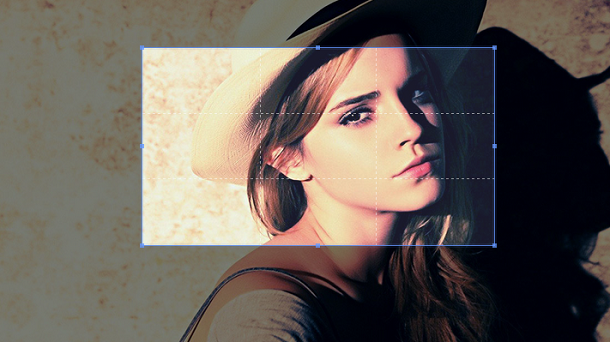
来看看实现的代码,这里我们主要来看JavaScript代码
获取图片的Canvas画布:
function getSourceCanvas(image, data) {

    var canvas = $('<canvas>')[0],

        context = canvas.getContext('2d'),

        width = data.naturalWidth,

        height = data.naturalHeight,

        rotate = data.rotate,

        rotated = getRotatedSizes({

          width: width,

          height: height,

          degree: rotate

        });

    if (rotate) {

      canvas.width = rotated.width;

      canvas.height = rotated.height;

      context.save();

      context.translate(rotated.width / 2, rotated.height / 2);

      context.rotate(rotate * Math.PI / 180);

      context.drawImage(image, -width / 2, -height / 2, width, height);

      context.restore();

    } else {

      canvas.width = width;

      canvas.height = height;

      context.drawImage(image, 0, 0, width, height);

    }

    return canvas;

  }
加载图片:
prototype.load = function (url) {

    var options = this.options,

        $this = this.$element,

        crossOrigin,

        bustCacheUrl,

        buildEvent,

        $clone;

    if (!url) {

      if ($this.is('img')) {

        if (!$this.attr('src')) {

          return;

        }

        url = $this.prop('src');

      } else if ($this.is('canvas') && SUPPORT_CANVAS) {

        url = $this[0].toDataURL();

      }

    }

    if (!url) {

      return;

    }

    buildEvent = $.Event(EVENT_BUILD);

    $this.one(EVENT_BUILD, options.build).trigger(buildEvent); // Only trigger once

    if (buildEvent.isDefaultPrevented()) {

      return;

    }

    if (options.checkImageOrigin && isCrossOriginURL(url)) {

      crossOrigin = 'anonymous';

      if (!$this.prop('crossOrigin')) { // Only when there was not a "crossOrigin" property

        bustCacheUrl = addTimestamp(url); // Bust cache (#148)

      }

    }

    this.$clone = $clone = $('<img>');

    $clone.one('load', $.proxy(function () {

      var naturalWidth = $clone.prop('naturalWidth') || $clone.width(),

          naturalHeight = $clone.prop('naturalHeight') || $clone.height();

      this.image = {

        naturalWidth: naturalWidth,

        naturalHeight: naturalHeight,

        aspectRatio: naturalWidth / naturalHeight,

        rotate: 0

      };

      this.url = url;

      this.ready = true;

      this.build();

    }, this)).one('error', function () {

      $clone.remove();

    }).attr({

      src: bustCacheUrl || url,

      crossOrigin: crossOrigin

    });

    // Hide and insert into the document

    $clone.addClass(CLASS_HIDE).insertAfter($this);

  };
预览截图:
prototype.initPreview = function () {

    var url = this.url;

    this.$preview = $(this.options.preview);

    this.$viewBox.html('<img src="' + url + '">');

    // Override img element styles

    // Add `display:block` to avoid margin top issue (Occur only when margin-top <= -height)

    this.$preview.each(function () {

      var $this = $(this);

      $this.data(CROPPER_PREVIEW, {

        width: $this.width(),

        height: $this.height(),

        original: $this.html()

      }).html('<img src="' + url + '" style="display:block;width:100%;min-width:0!important;min-height:0!important;max-width:none!important;max-height:none!important;image-orientation: 0deg!important">');

    });

  };
via:http://www.w2bc.com/Article/37726
基于jQuery功能非常强大的图片裁剪插件的更多相关文章
- js插件---强大的图片裁剪Cropper
js插件---强大的图片裁剪Cropper 一.总结 一句话总结:官网或者github里面的文档或者demo才是真的详细 使用的话找到图片裁剪后的base64数据,然后这个数据可下载可传递到服务器 1 ...
- Cropper – 简单的 jQuery 图片裁剪插件
Cropper 是一个简单的 jQuery 图像裁剪插件.它支持选项,方法,事件,触摸(移动),缩放,旋转.输出的裁剪数据基于原始图像大小,这样你就可以用它们来直接裁剪图像. 如果你尝试裁剪跨域图像, ...
- Croppic – 免费开源的 jQuery 图片裁剪插件
Croppic 这款开源的 jQuery 图片裁剪插件能够满足网站开发人员各种不同的使用需要.只需要简单的上传图片,就可以实现你想要的图像缩放和裁剪功能.因为使用了 HTML5 FormData 对 ...
- 5 款最新的 jQuery 图片裁剪插件
这篇文章主要介绍最新的 5 款 jQuery 图片裁剪插件,可以帮助你轻松的实现你网站需要的图像裁剪功能. Cropit Cropit 是一个 jQuery 插件,支持图像裁剪和缩放功能.Cropit ...
- jQuery 图片裁剪插件 Jcrop
Jcrop是一个jQuery图片裁剪插件,它能为你的WEB应用程序快速简单地提供图片裁剪的功能.特点如下: 对所有图片均unobtrusively(无侵入的,保持DOM简洁) 支持宽高比例锁定 支持 ...
- 基于 jQuery 实现的精致作品集图片导航效果
今天,我们要用 jQuery 来创建一个作品集图像的导航模板.我们的想法是,以分组的方式显示一组作品集,并通过二维的方式(水平/垂直)来浏览.任一箭头或当前图像下方的小盒子可以作为导航使用. 在线演示 ...
- 基于jQuery商城网站全屏图片切换代码
基于jQuery商城网站全屏图片切换代码.这是一款商城网站全屏多张图片滑动切换代码.效果图如下: 在线预览 源码下载 实现的代码. html代码: <div class="slid ...
- 开源JS图片裁剪插件
开源JS图片裁剪插件 一.总结 一句话总结: 要用点赞最高的插件,这样适用性最好,效果最好,出问题的概率也最低,这里电脑端和手机端都可以用的建议用 cropper.js 二.5款好用的开源JS图片裁剪 ...
- Dropdown.js基于jQuery开发的轻量级下拉框插件
Dropdown.js 前言 在SPA(Single Page Application)盛行的时代,jQuery插件的轮子正在减少,由于我厂有需求而开发了这个插件.如果觉得本文对您有帮助,请给个赞,以 ...
随机推荐
- mysql数据库热备份
使用Percona XtraBackup 先安装依赖包 yum install -y perl-DBD-MySQL perl-DBI perl-Time-HiRes libaio* 到Percona官 ...
- Redis 的安装与使用(单节点)
Redis 的安装与使用(单节点) 环境:CentOS 6.5 Redis 版本:redis-3.0 (考虑到Redis3.0 在集群和性能提升方面的特性,rc 版为正式版的候选版,而且 很快就出 ...
- IAR仿真时绿色箭头一直指向汇编界面,而C界面没有
设置如下
- STM32的JTAG下载模式
SWJ:串行线JTAG配置 (Serial wire JTAG configuration) SWJ(串行线JTAG)支持JTAG或SWD访问Cortex的调试端口. 系统复位后的默认状态是启用SW ...
- 安卓listview滚动时背景变黑的解决方法
ListView是常用的显示控件,默认背景是和系统窗口一样的透明色,如果给ListView加上背景图片,或者背景颜色时,滚动时listView会黑掉, 原因是,滚动时,列表里面的view重绘时,用的依 ...
- 启动supervisord 生成openvpn用于android的证书
service supervisord start netstat -anp | grep 你的端口号 生成证书: 进入到openvpn的证书生成文件夹,通常在/etc/openvpn/easy-r ...
- Django form入门详解--2
调整form的输出格式: 默认情况下form的格式化输出是基本table的样式的.但是django中还是为form提供发别的输出样式 1.默认的table样式输出 <html> <h ...
- LED音乐频谱之输入数据处理
转载请注明出处:http://blog.csdn.net/ruoyunliufeng/article/details/38023431 通过前面的介绍我们知道.声音信号要通过AD转换,变成我们可以处理 ...
- octave画心形曲线
octave是gnu出品和matlab兼容的科学计算软件,具有体积小,兼容性好,免费的优点. 心形曲线是根据函数:( x2 + y2 -1 )3 - x2y3=0 改编而成. clear all; c ...
- 一种3D空间的柱状多边形检测实现
最近无意中拓展出这个东西,基于之前写的2D多边形检测: http://www.cnblogs.com/hont/p/6105997.html 而判断两条线相交的方法替换成了我后来写的差乘判断: htt ...