1. one-hot编码

# 字符集的one-hot编码
import string samples = ['zzh is a pig','he loves himself very much','pig pig han']
characters = string.printable
token_index = dict(zip(range(1,len(characters)+1),characters)) max_length =20
results = np.zeros((len(samples),max_length,max(token_index.keys()) + 1))
for i,sample in enumerate(sample):
for j,character in enumerate(sample):
index = token_index.get(character)
results[i,j,index] = 1
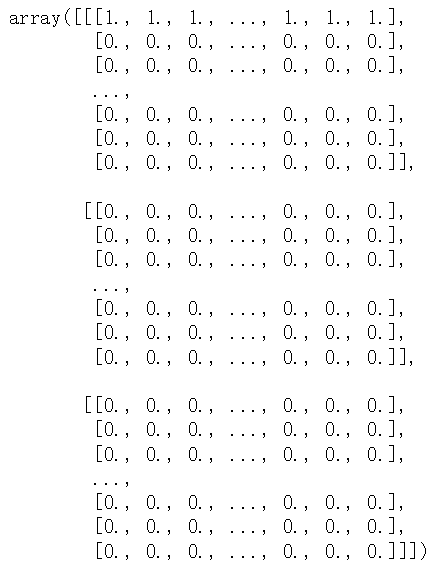
results

characters= '0123456789abcdefghijklmnopqrstuvwxyzABCDEFGHIJKLMNOPQRSTUVW

XYZ!"#$%&\'()*+,-./:;<=>?@[\\]^_`{|}~ \t\n\r\x0b\x0c'

# keras实现单词级的one-hot编码
from keras.preprocessing.text import Tokenizer
samples = ['zzh is a pig','he loves himself very much','pig pig han'] tokenizer = Tokenizer(num_words = 100)
#创建一个分词器(tokenizer),设置为只考虑前1000个最常见的单词
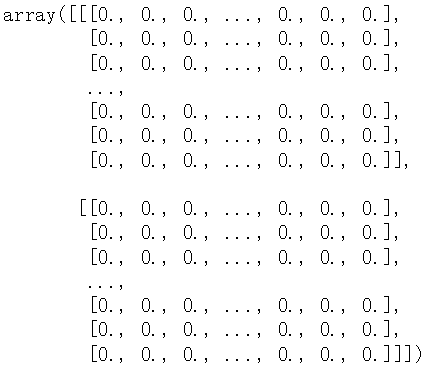
tokenizer.fit_on_texts(samples)#构建单词索引 sequences = tokenizer.texts_to_sequences(samples) one_hot_results = tokenizer.texts_to_matrix(samples,mode='binary') # one_hot_results.shape --> (3, 100) word_index = tokenizer.word_index
print('发现%s个unique标记',len(word_index))
sequences = [[2, 3, 4, 1], 
[5, 6, 7, 8, 9, 10],
[1, 1, 11]]
发现10个unique标记

word_index =
{'pig': 1, 'zzh': 2, 'is': 3, 'a': 4, 'he': 5, 
'loves': 6,'himself': 7, 'very': 8, 'much': 9,
'han': 10}

one-hot 编码的一种办法是 one-hot散列技巧(one-hot hashing trick)

如果词表中唯一标记的数量太大而无法直接处理,就可以使用这种技巧。

这种方法没有为每个单词显示的分配一个索引并将这些索引保存在一个字典中,而是将单词散列编码为固定长度的向量,通常用一个非常简单的散列函数来实现。

优点:节省内存并允许数据的在线编码(读取完所有数据之前,你就可以立刻生成标记向量)

缺点:可能会出现散列冲突

如果散列空间的维度远大于需要散列的唯一标记的个数,散列冲突的可能性会减小

import numpy as np

samples = ['the cat sat on the mat the cat sat on the mat the cat sat on the mat','the dog ate my homowork']
dimensionality = 1000#将单词保存为1000维的向量
max_length = 10 results = np.zeros((len(samples),max_length,dimensionality))
for i,sample in enumerate(samples):
for j,word in list(enumerate(sample.split()))[:max_length]:
index = abs(hash(word)) % dimensionality
results[i,j,index] = 1
 

2. 词嵌入

获取词嵌入的两种方法:

  • 在完成主任务的同时学习词嵌入。在这种情况下,一开始是随机的词向量,然后对这些词向量进行学习,其学习方式与学习神经网络的权重相同。
  • 在不同于待解决的机器学习任务上预计算好词嵌入,然后将其加载到模型中。这些词嵌入叫作预训练词嵌入

实验数据:imdb电影评论,我们添加了以下限制,将训练数据限定为200个样本(打乱顺序)。

(1)使用embedding层学习词嵌入  
# 处理imdb原始数据的标签
# _*_ coding:utf-8 _*_
import os imdb_dir = 'imdb'
train_dir = os.path.join(imdb_dir,'train') labels = []
texts = [] for label_type in ['neg','pos']:
dir_name = os.path.join(train_dir,label_type)
for fname in os.listdir(dir_name):
if fname[-4:] == '.txt':
f = open(os.path.join(dir_name,fname),encoding='UTF-8')
texts.append(f.read())
f.close()
if label_type == 'neg':
labels.append(0)
else:
labels.append(1)

len(texts)=25000

len(labels)=25000

# 对imdb原始数据的文本进行分词
from keras.preprocessing.text import Tokenizer
from keras.preprocessing.sequence import pad_sequences max_len = 100 #每句话最大长度不超过100个单词
training_samples = 200
validation_samples = 10000
max_words = 10000 #只考虑数据集中前10000个最常见的单词 tokenizer = Tokenizer(num_words=max_len)
tokenizer.fit_on_texts(texts)
sequences = tokenizer.texts_to_sequences(texts)
len(sequences)

sequence[0]

word_index = tokenizer.word_index

#88592个unique单词

word_index

data = pad_sequences(sequences,maxlen=max_len)

data.shape = (25000,100)

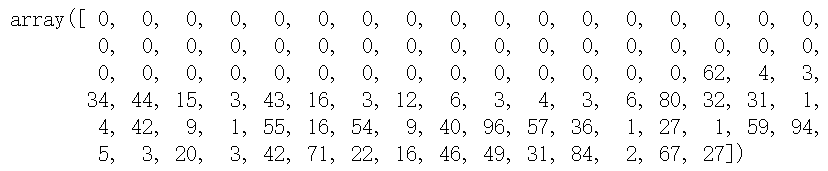
data[0]

labels = np.asarray(labels)

#asarray会跟着原labels的改变,算是浅拷贝吧,
没有新开一片内存 

indices = np.arange(data.shape[0])

np.random.shuffle(indices)

indices

array([ 2501, 4853, 2109, ..., 2357, 22166, 12397])

#将data,label打乱顺序
data = data[indices]
labels = labels[indices] x_train = data[:training_samples]
y_train = labels[:training_samples] x_val = data[training_samples:training_samples+validation_samples]
y_val = labels[training_samples:training_samples+validation_samples]

x_val.shape,y_val.shape
(10000, 100) (10000,)

#2014年英文维基百科的预计算嵌入:Glove词嵌入(包含400000个单词)
glove_dir = 'glove.6B'
embeddings_index = {} f = open(os.path.join(glove_dir,'glove.6B.100d.txt'),encoding='utf8')
for line in f:
values = line.split()
word = values[0]
coefs = np.asarray(values[1:],dtype='float32')
embeddings_index[word] = coefs
f.close()

len(embeddings_index) 400000
f.readline() #'the -0.038194 -0.24487 ...'
每个单词对应一个词向量

#准备glove词嵌入矩阵
embedding_dim = 100
# 每个单词都有编号,根据编号得到对应的矩阵
embedding_matrix = np.zeros((max_words,embedding_dim))
for word,i in word_index.items():
# print(word,i)--> the 1
if i < max_words:
embedding_vector = embeddings_index.get(word)
if embedding_vector is not None:
embedding_matrix[i] = embedding_vector # print(embedding_matrix[0])

把数据集里面的单词在glove中找到对应的词向量,组成embedding_matrix,

若在glove中不存在,那就为0向量

#定义模型
from keras.models import Sequential
from keras.layers import Embedding,Flatten,Dense model = Sequential() model.add(Embedding(max_words,embedding_dim,input_length=max_len)) model.add(Flatten())
model.add(Dense(32,activation='relu'))
model.add(Dense(1,activation='sigmoid')) model.summary() #将预训练的词嵌入加载到embedding层中,
model.layers[0].set_weights([embedding_matrix]) #embedding_matrix ==>(max_words,embedding_dim)
model.layers[0].trainable = False
 

model.compile(loss='binary_crossentropy',optimizer='rmsprop',metrics=['acc'])
history = model.fit(x_train,y_train,
epochs = 10,
batch_size = 32,
validation_data = (x_val,y_val))
model.save_weights('pre_trained_glove_model.h5')
 

import matplotlib.pyplot as plt

acc = history.history['acc']
loss = history.history['loss']
val_acc = history.history['val_acc']
val_loss = history.history['val_loss'] epochs = range(1,len(acc)+1) plt.plot(epochs,acc,'bo',label='Training acc')
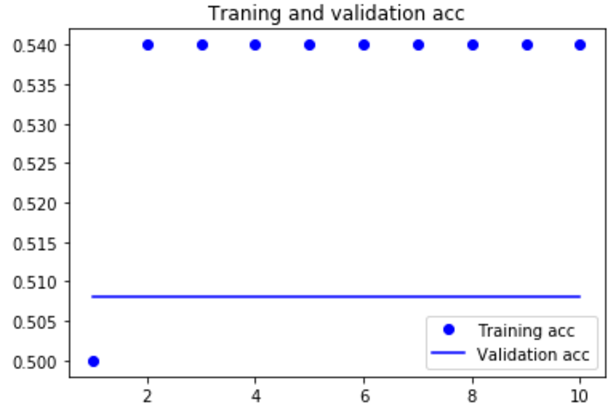
plt.plot(epochs,val_acc,'b',label='Validation acc')
plt.title('Traning and validation acc')
plt.legend() plt.figure() plt.plot(epochs,loss,'bo',label='Training loss')
plt.plot(epochs,val_loss,'b',label='Validation loss')
plt.title('Traning and validation loss')
plt.legend() plt.show()
 

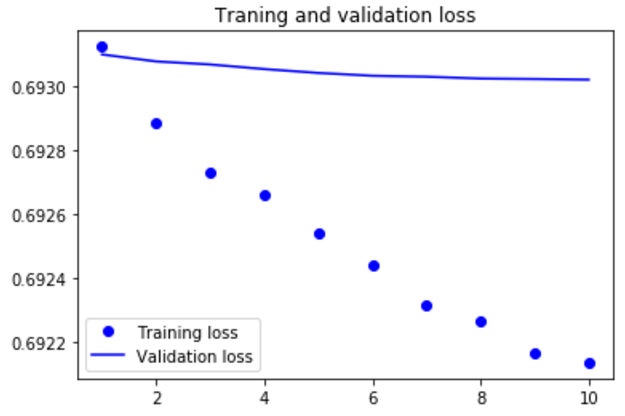
模型很快就开始过拟合,考虑到训练样本很少,这也很情有可原的

 
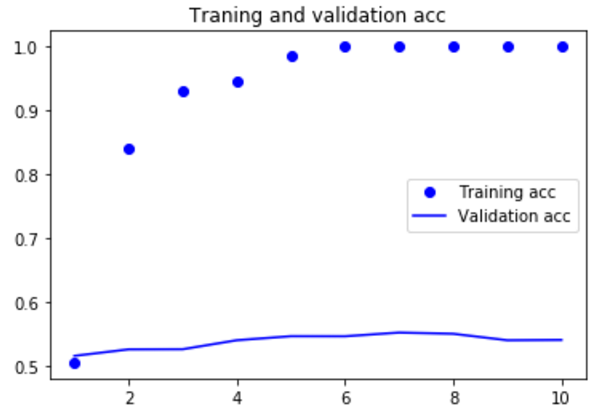
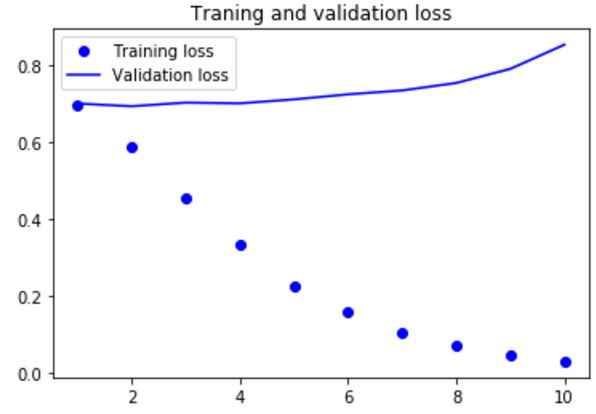
(2)下面在不使用预训练词嵌入的情况下,训练相同的模型  
#定义模型
from keras.models import Sequential
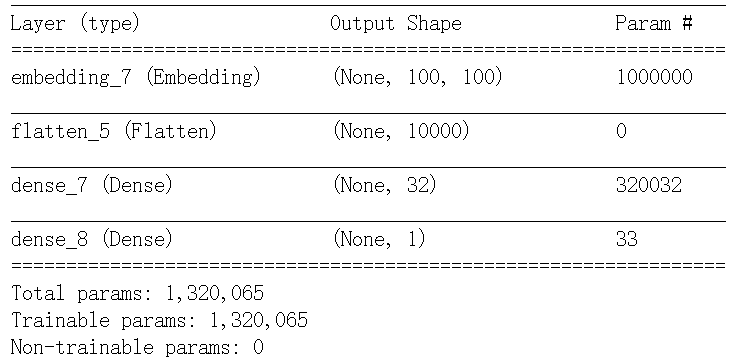
from keras.layers import Embedding,Flatten,Dense model = Sequential() model.add(Embedding(max_words,embedding_dim,input_length=max_len)) model.add(Flatten())
model.add(Dense(32,activation='relu'))
model.add(Dense(1,activation='sigmoid')) model.summary() model.compile(loss='binary_crossentropy',optimizer='rmsprop',metrics=['acc'])
history = model.fit(x_train,y_train,
epochs = 10,
batch_size = 32,
validation_data = (x_val,y_val))

import matplotlib.pyplot as plt

acc = history.history['acc']
loss = history.history['loss']
val_acc = history.history['val_acc']
val_loss = history.history['val_loss'] epochs = range(1,len(acc)+1) plt.plot(epochs,acc,'bo',label='Training acc')
plt.plot(epochs,val_acc,'b',label='Validation acc')
plt.title('Traning and validation acc')
plt.legend() plt.figure() plt.plot(epochs,loss,'bo',label='Training loss')
plt.plot(epochs,val_loss,'b',label='Validation loss')
plt.title('Traning and validation loss')
plt.legend() plt.show()
 

#在测试集上评估模型

test_dir = os.path.join(imdb_dir,'test')

labels = []
texts = [] for label_type in ['neg','pos']:
dir_name = os.path.join(test_dir,label_type)
for fname in os.listdir(dir_name):
if fname[-4:] == '.txt':
f = open(os.path.join(dir_name,fname),encoding='UTF-8')
texts.append(f.read())
f.close()
if label_type == 'neg':
labels.append(0)
else:
labels.append(1) sequence = tokenizer.texts_to_sequences(texts)
x_test = pad_sequences(sequences,maxlen = max_len)
y_test = np.asarray(labels)
 

model.load_weights('pre_trained_glove_model.h5')

model.evaluate(x=x_test,y=y_test)


 如果增加训练集样本的数量,可能使用词嵌入得到的效果会好很多。

2.keras实现-->字符级或单词级的one-hot编码 VS 词嵌入的更多相关文章

  1. 51nod图论题解(4级,5级算法题)

    51nod图论题解(4级,5级算法题) 1805 小树 基准时间限制:1.5 秒 空间限制:131072 KB 分值: 80 难度:5级算法题 她发现她的树的点上都有一个标号(从1到n),这些树都在空 ...

  2. Linux学习笔记(三):系统执行级与执行级的切换

    1.Linux系统与其它的操作系统不同,它设有执行级别.该执行级指定操作系统所处的状态.Linux系统在不论什么时候都执行于某个执行级上,且在不同的执行级上执行的程序和服务都不同,所要完毕的工作和所要 ...

  3. codewar代码练习1——8级晋升7级

    最近发现一个不错的代码练习网站codewar(http://www.codewars.com).注册了一个账号,花了几天的茶余饭后时间做题,把等级从8级升到了7级.本文的目的主要介绍使用感受及相应题目 ...

  4. [数据库事务与锁]详解五: MySQL中的行级锁,表级锁,页级锁

    注明: 本文转载自http://www.hollischuang.com/archives/914 在计算机科学中,锁是在执行多线程时用于强行限制资源访问的同步机制,即用于在并发控制中保证对互斥要求的 ...

  5. MySQL行级锁,表级锁,页级锁详解

    页级:引擎 BDB. 表级:引擎 MyISAM , 理解为锁住整个表,可以同时读,写不行 行级:引擎 INNODB , 单独的一行记录加锁 表级,直接锁定整张表,在你锁定期间,其它进程无法对该表进行写 ...

  6. 行为级和RTL级的区别(转)

    转自:http://hi.baidu.com/renmeman/item/5bd83496e3fc816bf14215db RTL级,registertransferlevel,指的是用寄存器这一级别 ...

  7. CSS 各类 块级元素 行级元素 水平 垂直 居中问题

    元素的居中问题是每个初学者碰到的第一个大问题,在此我总结了下各种块级 行级 水平 垂直 的居中方法,并尽量给出代码实例. 首先请先明白块级元素和行级元素的区别 行级元素 一块级元素 1 水平居中: ( ...

  8. 【数据库】数据库的锁机制,MySQL中的行级锁,表级锁,页级锁

    转载:http://www.hollischuang.com/archives/914 数据库的读现象浅析中介绍过,在并发访问情况下,可能会出现脏读.不可重复读和幻读等读现象,为了应对这些问题,主流数 ...

  9. MySQL中的行级锁,表级锁,页级锁

    在计算机科学中,锁是在执行多线程时用于强行限制资源访问的同步机制,即用于在并发控制中保证对互斥要求的满足. 在数据库的锁机制中介绍过,在DBMS中,可以按照锁的粒度把数据库锁分为行级锁(INNODB引 ...

随机推荐

  1. package.json字段全解(转)

    Name 必须字段. 小提示: 不要在name中包含js, node字样: 这个名字最终会是URL的一部分,命令行的参数,目录名,所以不能以点号或下划线开头: 这个名字可能在require()方法中被 ...

  2. 解决VMware安装Ubuntu的过程中窗口过小无法看到按钮的问题

    最近在用VMware安装Ubuntu的时候,发现竟然只能看到部分界面,鼠标拖拽也没有用,就是看不到完整的界面,那要我怎么按下一步啊~(真是哭笑不得%>_<%),或者按TAB键,靠自己的想象 ...

  3. SPClaimsUtility.AuthenticateFormsUser的证书验证问题

    Log Parser Studio查看IIS日志发现调用SPClaimsUtility.AuthenticateFormsUser的部分有time-taken在15秒左右的多个响应,查看call st ...

  4. ms转成00:00:00的时间格式化

    毫秒转成 00:00:00的时间格式 比如1000毫秒转成00:00:01 /** * 格式化邀请的时间 * @param time ms */ public static formatTime(ti ...

  5. 【JSP】JSP中的Java脚本

    前言 现代Web开发中,在JSP中嵌入Java脚本不是推荐的做法,因为这样 不利于代码的维护.有很多好的,替代的方法避免在JSP中写Java脚本.本文仅做为JSP体系技术的一个了解.     类成员定 ...

  6. 【CF840E】In a Trap 分块

    [CF840E]In a Trap 题意:一棵n个点的树,第i个点权值为ai,q次询问,每次给定u,v(u是v的祖先),求对于所有在u-v上的点i,$a_i\ \mathrm{xor}\ dis(i, ...

  7. Mavlink - 无人机通讯协议

    http://qgroundcontrol.org/mavlink/start mavlink协议介绍https://pixhawk.ethz.ch/mavlink/ 消息简介 MAVLink简介 M ...

  8. C 语言实现增量式PID

    一直以来,pid都是控制领域的经典算法,之前尝试理解了很久,但还是一知半解,总是不得要领,昨天模仿着别人的代码写了一个增量式pid的代码. 我的理解就是pid其实就是对你设置的预定参数进行跟踪.在控制 ...

  9. react封装组织架构递归树

    想用react实现一个递归树,但一些框架里面的有些不符合需求,于是自己写了个,功能比较简单,欢迎批评指正.. react实现这样一个组织架构递归树,下级部门的收起和展开,点击部门名称时请求接口获取下级 ...

  10. PyCharm 4.0.4 开启代码自动补全

    目前在使用的PyCharn 版本为4.0.4,在使用的过程中无法使用代码补全功能,经过Google 搜索只需要修改两处即可实现代码补全 1 选择File-Setting-Inspections 找到对 ...