
R语言plot函数参数合集
最近用R语言画图,plot 函数是用的最多的函数,而他的参数非常繁多,由此总结一下,以供后续方便查阅。
plot(x, y = NULL, type = "p", xlim = NULL, ylim = NULL,
log = "", main = NULL, sub = NULL, xlab = NULL, ylab = NULL,
ann = par("ann"), axes = TRUE, frame.plot = axes,
panel.first = NULL, panel.last = NULL, asp = NA, ...)
plot 支持R 模块有:functions,data.frames,density,factor,table等常用结构。
plot参数:
(1)type类型
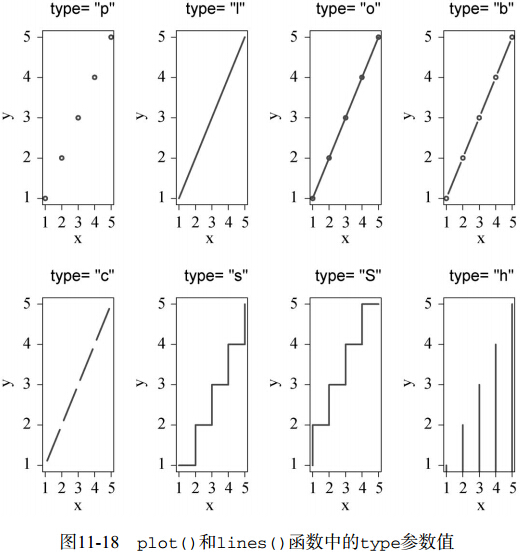
(2)xlim, x 用 (x1, x2) 限制 plot 的x 轴。同理,ylim,y 用(y1,y2)限制plot的y轴。
(3)main,给图片加标题.main="这是一幅图的标题".
或者
title("Main Title", sub = "sub title",
cex.main = 2, font.main= 4, col.main= "blue",
cex.sub = 0.75, font.sub = 3, col.sub = "red")
(4) xlab =“这是X轴表示什么”,ylab =“这是Y轴表示什么”
(5)axes指示是否两个坐标轴都画出。
(6) asp 限定 y/x aspect 比率
(7) points and lines
参数描述
pch 指定绘制点时使用的符号

cex 指定符号的大小。cex是一个数值,表示绘图符号相对于默认大小的缩放倍数。默认大小为1,1.5表示放大为默认值的1.5倍,0.5表示缩小为默认值的50%,等等
lty 指定线条类型
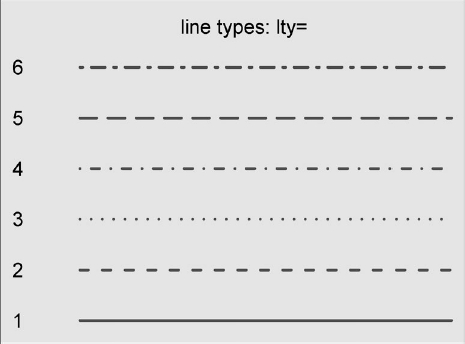
lwd 指定线条宽度。lwd是以默认值的相对大小来表示的(默认值为1)。例如,lwd=2将生成一条两倍于默认宽度的线条
(2)颜色
用于指定颜色的参数
col 默认的绘图颜色。某些函数(如lines和pie)可以接受一个含有颜色值的向量并自动循环使用。例如,如果设定col=c("red",
"blue")并需要绘制三条线,则第一条线将为红色,第二条线为蓝色,第三条线又将为红色
col.axis 坐标轴刻度文字的颜色
col.lab 坐标轴标签(名称)的颜色
col.main 标题颜色
col.sub 副标题颜色
fg 图形的前景色
bg 图形的背景色
(3)字体
用于指定文本大小的参数
cex 表示相对于默认大小缩放倍数的数值。默认大小为1,1.5表示放大为默认值的1.5倍,0.5表示缩小为默认值的50%,等等
cex.axis 坐标轴刻度文字的缩放倍数。类似于cex
cex.lab 坐标轴标签(名称)的缩放倍数。类似于cex
cex.main 标题的缩放倍数。类似于cex
cex.sub 副标题的缩放倍数。类似于cex
用于指定字体族、字号和字样的参数
font 整数。用于指定绘图使用的字体样式。1=常规,2=粗体,3=斜体,4=粗斜体,5=符号字体(以Adobe符号编码表示)
font.axis 坐标轴刻度文字的字体样式
font.lab 坐标轴标签(名称)的字体样式
font.main 标题的字体样式
font.sub 副标题的字体样式
ps 字体磅值(1磅约为1/72英寸)。文本的最终大小为 ps*cex
family 绘制文本时使用的字体族。标准的取值为serif(衬线)、sans(无衬线)和mono(等宽)
(4)图形尺寸和边界尺寸
用于控制图形尺寸和边界大小的参数
pin 以英寸表示的图形尺寸(宽和高)
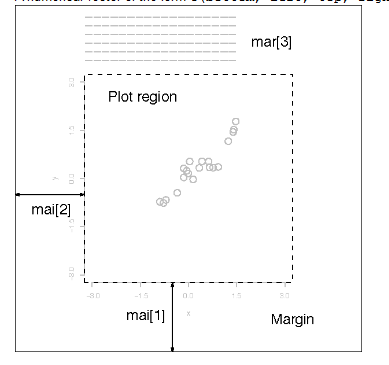
mai 以数值向量表示的边界大小,顺序为“下、左、上、右”,单位为英寸
mar 以数值向量表示的边界大小,顺序为“下、左、上、右”,单位为英分*。默认值为c(5, 4, 4, 2) + 0.1
(8) Title,text,mtext
title(main = NULL, sub = NULL, xlab = NULL, ylab = NULL,
line = NA, outer = FALSE, ...)
主要指定标题字体,大小,颜色,以及X和Y坐标轴的字体,大小,颜色。
|
main |
The main title (on top) using font, size |
|
sub |
Sub-title (at bottom) using font, size |
|
xlab |
X axis label using font, size and color par(c("font.lab", |
|
ylab |
Y axis label, same font attributes as xlab. |
|
line |
specifying a value for line overrides |
|
outer |
a logical value. If TRUE, the |
例如:title(main = list("Stopping Distance versus Speed", cex = 1.5,
col = "red", font = 3))
text(x, y = NULL, labels = seq_along(x$x), adj = NULL,
pos = NULL, offset = 0.5, vfont = NULL,
cex = 1, col = NULL, font = NULL, ...)
在给定X和Y的基础上插入一段注释,
Pos:a position specifier for the text. If specified this overrides any adj value given. Values of 1, 2, 3 and 4, respectively indicate positions below, to the left of, above and to the right of the specified coordinates.,1表示下方,2表示左方,3表示上方,4表示右方。
Labels: a character vector or expression specifying the text to be written. An attempt is made to coerce other language objects (names and calls) to expressions, and vectors and other classed objects to character vectors by as.character. If labels is longer than x and y, the coordinates are recycled to the length of labels.注释部分。
mtext(text, side = 3, line = 0, outer = FALSE, at = NA,
adj = NA, padj = NA, cex = NA, col = NA, font = NA, ...)
Text is written in one of the four margins of the current figure region or one of the outer margins of the device region。在作图的外围。
|
side |
on which side of the plot (1=bottom, 2=left, 3=top, 4=right). |
|
line |
on which MARgin line, starting at 0 counting outwards. |
Las:numeric in {0,1,2,3}; the style of axis labels. 标识坐标轴标签方向。
0:always parallel to the axis [default],
1:always horizontal,
2:always perpendicular to the axis,
3:always vertical.
R语言plot函数参数合集的更多相关文章
- R语言 plot()函数
语法: plot(x, y, ...) x,y分别是两个向量,x为横轴坐标,y为纵轴坐标 其他参数: type= "p" for points, 散点图 默认 "l&qu ...
- R语言 plot()函数 基础用法
plot(x=x轴数据,y=y轴数据,main="标题",sub="子标题",type="线型",xlab="x轴名称" ...
- Javascript 语言精粹 代码片段合集
Javascript 语言精粹 代码片段合集 标签:Douglas-Crockford Javascript 最佳实践 原文链接 更好的阅读体验 使用一个method 方法定义新方法 Function ...
- 【R】R语言常用函数
R语言常用函数 基本 一.数据管理vector:向量 numeric:数值型向量 logical:逻辑型向量character:字符型向量 list:列表 data.frame:数据框c:连接为向量或 ...
- R语言封装函数
R语言封装函数 原帖见豆瓣:https://www.douban.com/note/279077707/ 一个完整的R函数,需要包括函数名称,函数声明,函数参数以及函数体几部分. 1. 函数名称,即要 ...
- shell中调用R语言并传入参数的两种步骤
shell中调用R语言并传入参数的两种方法 第一种: Rscript myscript.R R脚本的输出 第二种: R CMD BATCH myscript.R # Check the output ...
- c语言中函数参数入栈的顺序是什么?为什么
看到面试题C语言中函数参数的入栈顺序如何? 自己不知道,边上网找资料.下面是详细解释 #include <stdio.h> void foo(int x, int y, int z){ ...
- R语言table()函数
R语言table()函数比较有用,两个示例尤其是混淆矩阵这个案例比较有用: 例子一:统计频次 z<-c(1,2,2,4,2,7,1,1);z1<-table(z);summary(z1); ...
- Matlab中plot函数参数解析
功能 二维曲线绘图 语法 plot(Y) plot(X1,Y1,...) plot(X1,Y1,LineSpec,...) plot(...,'PropertyName',PropertyValue, ...
随机推荐
- <<Joint Deep Modeling of Users and Items Using Reviews for Recommendation>> 评论打分预测
综述: 本文将 CNN 与 FM(Factorization Machine) 结合,基于评论文本来进行评分预测. 简介: 目前将神经网络应用推荐系统的研究工作中,有一类思路是把如CNN等神经网络作为 ...
- ASP.NET控件--DropDownList
设置默认值:DropDownList1.Items[i].Selected=true;绑定:DropDownList1.DataSource = dataSet.Tables["Tabl ...
- python 类的私有方法例子
#coding=utf-8 class Person(object): id=12 def __init__(self,name): self.name=name ...
- 【DIV+CSS】代码作业练习DIV+CSS太极阴阳图
1. DIV + CSS 练习:太极阴阳图. 基本思路:由三个div块元素组成: #taiji太极阴阳图底面 #yin太极阴阳图阴面小圆 #yang太极阴阳图阳面小圆 (太极阴阳图:上为阳下 ...
- Python中模块(Module)和包(Package)的区别
本文绝大部分内容转载至:廖雪峰官方网站 1. 模块(Module) 在计算机程序的开发过程中,随着程序代码越写越多,在一个文件里代码就会越来越长,越来越不容易维护. 为了编写可维护的代码,我们把很多函 ...
- C++面向对象高级开发课程(第一周)
0. 内存分区 计算机中的内存在用于编程时,被人为的进行了分区(Segment),分为: -“栈区”(Stack) -“堆区”(Heap) -全局区(静态 区,Static) -文字常量区和程序代码区 ...
- 利用脚本kill掉进程, 语法:运行脚本+进程名
下面附上脚本, 权限需要附X执行 #!/bin/sh #pid kill thread for chenglee #if fileformat=dos, update fileformat=unix ...
- python判断结构总结
1.判断结构是允许程序针对不同情况执行不同指令序列的控制结构. 2.判断在Python中用if语句实现.简单的判断是用一个简单的if来实现的.两路判断通常使用if-else.多路判断用if-elif- ...
- Go第四篇之流程控制
流程控制是每种编程语言控制逻辑走向和执行次序的重要部分,流程控制可以说是一门语言的“经脉”. Go 语言的常用流程控制有 if 和 for,而 switch 和 goto 主要是为了简化代码.降低重复 ...
- Large Division(大数)题解
Given two integers, a and b, you should check whether a is divisible by b or not. We know that an in ...