
java使用Apache POI操作excel文件
- 官方介绍
- 需要的jar包
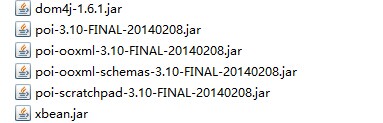
)并不包含在POI提供的jar包中,需要单独下载,否则程序会抛出异常:java.lang.ClassNotFoundException:org.apache.xmlbeans.XmlOptions。
- 具体代码
public static void createWorkbook() throws IOException {

        Workbook wb = new HSSFWorkbook();

        String safeName1 = WorkbookUtil.createSafeSheetName("[O'sheet1]");

        Sheet sheet1 = wb.createSheet(safeName1);

        CreationHelper createHelper = wb.getCreationHelper();

        // Create a row and put some cells in it. Rows are 0 based.

        Row row = sheet1.createRow((short) 0);

        // Create a cell and put a value in it.

        Cell cell = row.createCell(0);

        cell.setCellValue(1234);

        // Or do it on one line.

        row.createCell(2).setCellValue(

                createHelper.createRichTextString("This is a string"));

        row.createCell(3).setCellValue(true);

        // we style the second cell as a date (and time). It is important to

        // create a new cell style from the workbook otherwise you can end up

        // modifying the built in style and effecting not only this cell but

        // other cells.

        CellStyle cellStyle = wb.createCellStyle();

        cellStyle.setDataFormat(createHelper.createDataFormat().getFormat(

                "m/d/yy h:mm"));

        cell = row.createCell(1);

        cell.setCellValue(new Date());

        cell.setCellStyle(cellStyle);

        // you can also set date as java.util.Calendar

        CellStyle cellStyle1 = wb.createCellStyle();

        cellStyle1.setDataFormat(createHelper.createDataFormat().getFormat(

                "yyyyMMdd HH:mm:ss"));

        cellStyle1.setBorderBottom(CellStyle.BORDER_THIN);

        cellStyle1.setBottomBorderColor(IndexedColors.BLACK.getIndex());

        cellStyle1.setBorderLeft(CellStyle.BORDER_THIN);

        cellStyle1.setLeftBorderColor(IndexedColors.GREEN.getIndex());

        cellStyle1.setBorderRight(CellStyle.BORDER_THIN);

        cellStyle1.setRightBorderColor(IndexedColors.BLUE.getIndex());

        cellStyle1.setBorderTop(CellStyle.BORDER_MEDIUM_DASHED);

        cellStyle1.setTopBorderColor(IndexedColors.BLACK.getIndex());

        cell = row.createCell(4);

        cell.setCellValue(Calendar.getInstance());

        cell.setCellStyle(cellStyle1);

        FileOutputStream fileOut = new FileOutputStream("e:/test/workbook.xls");

        wb.write(fileOut);

        fileOut.close();

    }
读取excel文件的内容:
public static void readExcel() throws InvalidFormatException, IOException {

        // Use a file

        Workbook wb1 = WorkbookFactory.create(new File("e:/test/userinfo.xls"));

        Sheet sheet = wb1.getSheetAt(0);

        // Decide which rows to process

        // int rowStart = Math.min(10, sheet.getFirstRowNum());

        // int rowEnd = Math.max(40, sheet.getLastRowNum());

        int rowStart = sheet.getLastRowNum();

        int rowEnd = sheet.getLastRowNum() + 1;

        logger.info(sheet.getFirstRowNum());

        logger.info(sheet.getLastRowNum());

        for (int rowNum = rowStart; rowNum < rowEnd; rowNum++) {

            Row r = sheet.getRow(rowNum);

            int lastColumn = Math.max(r.getLastCellNum(), 10);

            logger.info(lastColumn);

            // To get the contents of a cell, you first need to know what kind

            // of cell it is (asking a string cell for its numeric contents will

            // get you a NumberFormatException for example). So, you will want

            // to switch on the cell's type, and then call the appropriate

            // getter for that cell.

            for (int cn = 0; cn < lastColumn; cn++) {

                // Cell cell = r.getCell(cn, Row.RETURN_BLANK_AS_NULL);

                Cell cell = r.getCell(cn);

                switch (cell.getCellType()) {

                case Cell.CELL_TYPE_STRING:

                    logger.info(cell.getRichStringCellValue().getString());

                    break;

                case Cell.CELL_TYPE_NUMERIC:

                    if (DateUtil.isCellDateFormatted(cell)) {

                        logger.info(cell.getDateCellValue());

                    } else {

                        logger.info(cell.getNumericCellValue());

                    }

                    break;

                case Cell.CELL_TYPE_BOOLEAN:

                    logger.info(cell.getBooleanCellValue());

                    break;

                case Cell.CELL_TYPE_FORMULA:

                    logger.info(cell.getCellFormula());

                    break;

                default:

                    logger.info("empty");

                }

            }

        }

    }
下面给出一个具体的例子,实例中的excel文件内容如下:

public static void readUserInfo() throws InvalidFormatException,

            IOException {

        String[] titles = { "收费编号", "收费性质", "姓名", "家庭住址", "工作单位", "电话", "手机",

                "小区楼号", "单元号", "楼层", "房间号", "建筑面积(㎡)", "面积依据", "A面积", "A超",

                "A轻体", "B面积", "B超", "B轻体", "用户编号", "所属楼前表表号" };

        //用来存储标题和顺序的map,key为标题,value为顺序号

        Map<String, Integer> titleMap = new HashMap<String, Integer>();

        //将既定顺序写入map

        for (int i=0 ; i<titles.length; i++) {

            titleMap.put(titles[i], i);

        }

        Workbook wb = WorkbookFactory.create(new File("e:/test/userinfo.xls"));

        for (int numSheet = 0; numSheet < wb.getNumberOfSheets(); numSheet++) {

            Sheet xSheet = wb.getSheetAt(numSheet);

            if (xSheet == null) {

                continue;

            }

            // 获取第一行的标题内容

            Row tRow = xSheet.getRow(0);

            //存储标题顺序的数组

            Integer[] titleSort = new Integer[tRow.getLastCellNum()];

            //循环标题

            for (int titleNum = 0; titleNum < tRow.getLastCellNum(); titleNum++) {

                Cell tCell = tRow.getCell(titleNum);

                String title = "";

                if (tCell == null || "".equals(tCell)) {

                } else if (tCell.getCellType() == XSSFCell.CELL_TYPE_BOOLEAN) {// 布尔类型处理

                    // logger.info(xCell.getBooleanCellValue());

                } else if (tCell.getCellType() == XSSFCell.CELL_TYPE_NUMERIC) {// 数值类型处理

                    title = doubleToString(tCell.getNumericCellValue());

                } else {// 其他类型处理

                    title = tCell.getStringCellValue();

                }

                //通过获取的标题,从map中读取顺讯号,写入保存标题顺序号的数组

                Integer ts = titleMap.get(title);

                if (ts != null) {

                    titleSort[titleNum] = ts;

                }

            }

            // 循环行Row

            for (int rowNum = 1; rowNum < xSheet.getLastRowNum() + 1; rowNum++) {

                Row xRow = xSheet.getRow(rowNum);

                if (xRow == null) {

                    continue;

                }

                // 循环列Cell

                String[] v = new String[titleSort.length];

                for (int cellNum = 0; cellNum < titleSort.length; cellNum++) {

                    Cell xCell = xRow.getCell(cellNum);

                    String value = "";

                    if (xCell == null || "".equals(xCell)) {

                    } else if (xCell.getCellType() == XSSFCell.CELL_TYPE_BOOLEAN) {// 布尔类型处理

                     logger.info(xCell.getBooleanCellValue());

                    } else if (xCell.getCellType() == XSSFCell.CELL_TYPE_NUMERIC) {// 数值类型处理

                        value = doubleToString(xCell.getNumericCellValue());

                    } else {// 其他类型处理

                        value = xCell.getStringCellValue();

                    }

                    //按照标题顺序的编号来存储每一行记录

                    v[titleSort[cellNum]] = value;

//                    logger.info("v[" + titleSort[cellNum] + "] = " + v[titleSort[cellNum]]);

                }

                //循环结果数组,获取的与既定顺序相同

                for (int i = 0; i < v.length; i++) {

                    logger.info(v[i]);

                }

            }

        }

    }
上段程序中用到的工具类doubleToString(将excel中的double类型转为String类型,处理了科学计数法形式的数):
private static String doubleToString(double d) {

        String str = Double.valueOf(d).toString();

        // System.out.println(str);

        String result = "";

        if (str.indexOf("E") > 2) {

            int index = str.indexOf("E");

            int power = Integer.parseInt(str.substring(index + 1));

            BigDecimal value = new BigDecimal(str.substring(0, index));

            value = value.movePointRight(power);

            result = value.toString();

        } else {

            if (str.indexOf(".0") > 0)

                result = str.substring(0, str.indexOf(".0"));

            else

                result = str;

        }

        return result;

    }
目前对于POI的应用只限于此,并没有再深入,以后写了新的相关内容会继续补充,请大大们批评指正!
java使用Apache POI操作excel文件的更多相关文章
- 如何用Apache POI操作Excel文件-----如何对一个单元格加注解?
有的时候,我们需要通过操作Apache POI,在生成Cell数据的同时,能对其生成的Cell,加上注解(comments),类似于下面的. 那么对于这种情况,我们的代码应该如何写呢? 借花献佛,我就 ...
- 如何用Apache POI操作Excel文件-----如何在已有的Excel文件中插入一行新的数据?
在POI的第一节入门中,我们提供了两个简单的例子,一个是如何用Apache POI新建一个工作薄,另外一个例子是,如果用Apache POI新建一个工作表.那么在这个章节里面,我将会给大家演示一下,如 ...
- 如何用Apache POI操作Excel文件-----如何用Apache POI 画一个离散图
有的时候,我们需要Excel中的数据,通过一个图画,可视化的表现出来. 那么这个时候,应该如何做呢?现在就借花献佛,以Apache POI自己提供的一个例子为例,给大家演示一下POI的API 如何画图 ...
- (6) 如何用Apache POI操作Excel文件-----POI-3.10的一个和注解(comment)相关的另外一个bug
如果POI-3.10往一个工作表(sheet)里面插入数据的话,需要注意了,其有一个不太被容易发现的bug. 被插入的工作表(sheet)里面的单元格没有包含任何的注解(comment)的时候,插入一 ...
- 使用Apache POI操作Excel文件---在已有的Excel文件中插入一行新的数据
package org.test; import java.io.File; import java.io.FileInputStream; import java.io.FileNotFoundEx ...
- java使用POI操作excel文件,实现批量导出,和导入
一.POI的定义 JAVA中操作Excel的有两种比较主流的工具包: JXL 和 POI .jxl 只能操作Excel 95, 97, 2000也即以.xls为后缀的excel.而poi可以操作Exc ...
- 项目一:第四天 1、快递员的条件分页查询-noSession,条件查询 2、快递员删除(逻辑删除) 3、基于Apache POI实现批量导入区域数据 a)Jquery OCUpload上传文件插件使用 b)Apache POI读取excel文件数据
1. 快递员的条件分页查询-noSession,条件查询 2. 快递员删除(逻辑删除) 3. 基于Apache POI实现批量导入区域数据 a) Jquery OCUpload上传文件插件使用 b) ...
- 利用Apache POI操作Excel
最近在做接口,有个功能是利用Excel导入汽车发动机所需零件信息到线上系统中.简单回顾一下之前学过的用java操作Excel. 1.maven配置Apache POI pom.xml中配置POIjar ...
- Java使用POI操作Excel文件
1.简介 Apache POI是Apache软件基金会的开放源码函式库,POI提供API给Java程序对Microsoft Office格式文件读和写的功能. 2.依赖的jar包 <!-- ex ...
随机推荐
- PHP合并数组保留key值
PHP合并数组,键值不变 尝试了好几个合并数组的函数, 但是都是把key值重置, 导致key值丢失(因为key值是要用到的) 大大说, 最好用数组的相关函数, 网上随意找了下, 还是没找到. 因为 ...
- Android发送请求到不同的Servlet,但都是一个Servlet处理
错误原因,在Servlet文件中 @WebServlet("/ServletForGETMethod") 与实际的ServletForQUERYMethod 文件名不符. @Web ...
- js设计模式(7)---装饰者模式
0.前言 下午做事效率很低,无精打采的,整个脑子就跟浆糊一样,看看时间一点点流去,心中只能无可奈何,哎,码农的激情难道就这么容易熄灭吗? 1.该模式的使用情况 假如我们想给对象增加功能,但是又不想修改 ...
- jquery.min.map详见
温故而知新,翻出来阮前辈的文章记录一下 日期:2013年1月23日 上周,jQuery 1.9发布. 这是2.0版之前的最后一个新版本,有很多新功能,其中一个就是支持Source Map. 访问 ht ...
- 纯js分页代码(简洁实用)
纯js写的分页代码. 复制代码代码如下: //每页显示字数 PageSize=5000; //分页模式 flag=2;//1:根据字数自动分页 2:根据[NextPage]分页 //默认页 start ...
- svn 清空
SVN是目前用得比较多的而且很方便的版本管理体系. 在开发过程中遇到了这样的问题: 有时我们需要一个干净的code版本,没有 .svn 这些文件夹记录的版本传到服务器上使用. 这个时候自己一个个去删除 ...
- 为ProgressBar进度条设置颜色1
可以通过xml文件来设置,方法如下: 1:先在布局文件中的ProgressBar加入下面属性: android:progressDrawable="@drawable/progress_ba ...
- TextView中gravity属性值测定
Attributes Explain top 不改变控件大小,对齐到容器顶部 bottom 不改变控件大小,对齐到容器底部 left 不改变控件大小,对齐到容器左侧 right 不改变控件大小,对齐到 ...
- .NET开发作业调度(job scheduling) - Quartz.NET
Quartz.NET是JAVA Job Scheduling框架Quartz在.NET平台上的实现,可以满足小型乃至大型企业应用中的Job Scheduling. 通过Nuget安装Quartz.NE ...
- poll实现
struct pollfd { int fd; //当前描述符 short events; //进程关心的该描述符的事件 short revents; //返回 ...