
Boost IPC Persistence Of Interprocess Mechanisms 例子
下面这一段摘抄自 Boost 1_55_0 的文档,显然标注了 每一个的生命期。
One of the biggest issues with interprocess communication mechanisms is the lifetime of the interprocess communication mechanism. It's important to know when an interprocess communication mechanism disappears from the system. In Boost.Interprocess, we can have 3 types of persistence:
- Process-persistence: The mechanism lasts until all the processes that have opened the mechanism close it, exit or crash.
- Kernel-persistence: The mechanism exists until the kernel of the operating system reboots or the mechanism is explicitly deleted.
- Filesystem-persistence: The mechanism exists until the mechanism is explicitly deleted.
Some native POSIX and Windows IPC mechanisms have different persistence so it's difficult to achieve portability between Windows and POSIX native mechanisms. Boost.Interprocess classes have the following persistence:
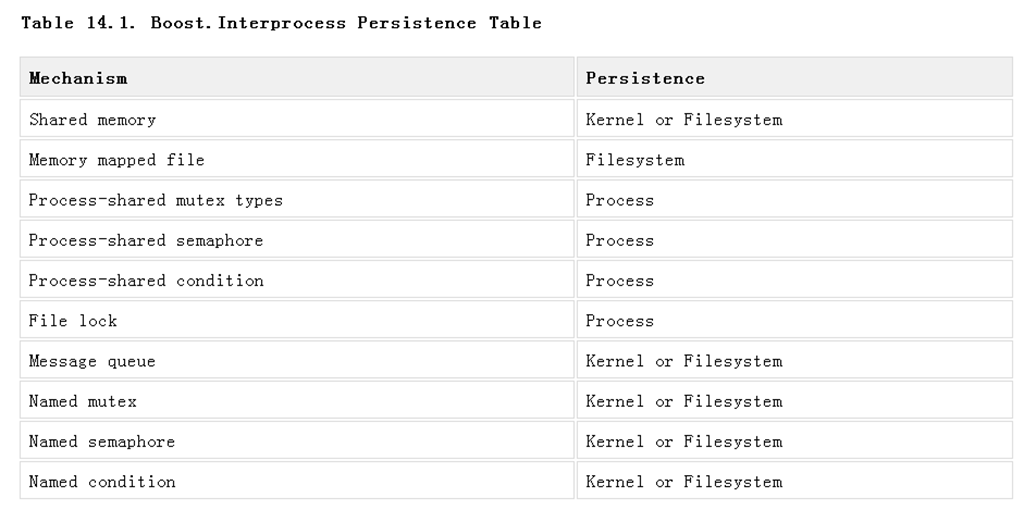
As you can see, Boost.Interprocess defines some mechanisms with "Kernel or Filesystem" persistence. This is because POSIX allows this possibility to native interprocess communication implementations. One could, for example, implement shared memory using memory mapped files and obtain filesystem persistence (for example, there is no proper known way to emulate kernel persistence with a user library for Windows shared memory using native shared memory, or process persistence for POSIX shared memory, so the only portable way is to define "Kernel or Filesystem" persistence).
最好的是下面这一个简单的example。
#include <boost/interprocess/shared_memory_object.hpp>
#include <boost/interprocess/mapped_region.hpp>
#include <cstring>
#include <cstdlib>
#include <string>
int main(int argc, char *argv[])
{
using namespace boost::interprocess;
if(argc == 1){ //Parent process
//Remove shared memory on construction and destruction
struct shm_remove
{
shm_remove() { shared_memory_object::remove("MySharedMemory"); }
~shm_remove(){ shared_memory_object::remove("MySharedMemory"); }
} remover;
//Create a shared memory object.
shared_memory_object shm (create_only, "MySharedMemory", read_write);
//Set size
shm.truncate(1000);
//Map the whole shared memory in this process
mapped_region region(shm, read_write);
//Write all the memory to 1
std::memset(region.get_address(), 1, region.get_size());
//Launch child process
std::string s(argv[0]); s += " child ";
if(0 != std::system(s.c_str()))
return 1;
}
else{
//Open already created shared memory object.
shared_memory_object shm (open_only, "MySharedMemory", read_only);
//Map the whole shared memory in this process
mapped_region region(shm, read_only);
//Check that memory was initialized to 1
char *mem = static_cast<char*>(region.get_address());
for(std::size_t i = 0; i < region.get_size(); ++i)
if(*mem++ != 1)
return 1; //Error checking memory
}
return 0;
}
.csharpcode, .csharpcode pre
{
font-size: small;
color: black;
font-family: consolas, "Courier New", courier, monospace;
background-color: #ffffff;
/*white-space: pre;*/
}
.csharpcode pre { margin: 0em; }
.csharpcode .rem { color: #008000; }
.csharpcode .kwrd { color: #0000ff; }
.csharpcode .str { color: #006080; }
.csharpcode .op { color: #0000c0; }
.csharpcode .preproc { color: #cc6633; }
.csharpcode .asp { background-color: #ffff00; }
.csharpcode .html { color: #800000; }
.csharpcode .attr { color: #ff0000; }
.csharpcode .alt
{
background-color: #f4f4f4;
width: 100%;
margin: 0em;
}
.csharpcode .lnum { color: #606060; }
在主进程中创建另一个进程,这个进程来验证之前的共享内存是否被初始化为1。 因为我们的shared memory的生命期是 Kernel 或者是filesystem,所以进程2 是可以验证的。 值得注意一点的是这里的remover,他是一个栈对象,所以每次都销毁,显式调用了 remove,如果去掉这个remover,那么只需要执行一次,以后每次输入这个显式内存都是存在的。因为他的生命期是 kernel 或者filesystem。 所以这里的remover 至关重要!
Boost IPC Persistence Of Interprocess Mechanisms 例子的更多相关文章
- IPC介绍——10个ipcs例子
IPC介绍——10个ipcs例子 semaphorearrays2010performancesystemaccess ipcs是一个uinx/linux的命令.用于报告系统的消息队列.信号量.共享内 ...
- boost库asio详解8——几个TCP的简单例子
摘于boost官网的几个例子, 做了点小修改, 笔记之. 同步客户端 void test_asio_synclient() { typedef boost::asio::io_service IoSe ...
- BOOST 线程完全攻略 - 基础篇
http://blog.csdn.net/iamnieo/article/details/2908621 2008-09-10 12:48 9202人阅读 评论(3) 收藏 举报 thread多线程l ...
- [C++Boost]程序参数项解析库Program_options使用指南
介绍 程序参数项(program options)是一系列name=value对,program_options 允许程序开发者获得通过命令行(command line)和配置文件(config fi ...
- boost::thread类
前言 标准C++线程即将到来.预言它将衍生自Boost线程库,现在让我们探索一下Boost线程库. 几年前,用多线程执行程序还是一件非比寻常的事.然而今天互联网应用服务程序普遍使用多线程来提高与多客户 ...
- Android查缺补漏(IPC篇)-- 进程间通讯基础知识热身
本文作者:CodingBlock 文章链接:http://www.cnblogs.com/codingblock/p/8479282.html 在Android中进程间通信是比较难的一部分,同时又非常 ...
- System V IPC 之共享内存
IPC 是进程间通信(Interprocess Communication)的缩写,通常指允许用户态进程执行系列操作的一组机制: 通过信号量与其他进程进行同步 向其他进程发送消息或者从其他进程接收消息 ...
- 详解 boost 库智能指针(scoped_ptr<T> 、shared_ptr<T> 、weak_ptr<T> 源码分析)
一.boost 智能指针 智能指针是利用RAII(Resource Acquisition Is Initialization:资源获取即初始化)来管理资源.关于RAII的讨论可以参考前面的文章.在使 ...
- Boost总结汇总
从开始接触Boost已经有好几年了,而对它的掌握却难言熟悉,有对它部分的源代码的剖析也是蜻蜓点水.有时间一点点梳理一下吧. 1. 概述 [Boost]C++ Boost库简介[Boost]C++ Bo ...
随机推荐
- Android_sharePreference
/** * Android的四中数据存储方式: * 1.SharePreferences * 2.SQLite * 3.Content Provider * 4.File * * SharePrefe ...
- 【排障】Outlook Express 2G收件箱大小限制
Outlook Express 2G收件箱大小限制 文:铁乐猫 ----------------------------- Outlook Express(以下简称OE)客户端收件箱大于或接近2G时, ...
- Objec类和final关键字的用法
一.在继承中,子类继承父类,那父类继承谁呢,java中如果类没有指定继承谁,那么就默认继承Object类,object类是所有对象的直接或者间接的父类,根类,或者叫做基类,它里面定义的功能所有的对象都 ...
- hadoop的相关资料链接
hadoop的资料整理博客 http://www.itpub.net/thread-1588509-1-1.html
- 史上最全的phpstorm常用配置
取消自动保存并标识修改的文件为星星标记 1.取消自动保存 进入 File -> Settings -> General,取消下面两选项的勾选: 2.星星标记 进入 File -> S ...
- HTML5 乱记
HTML5 的文档类型声明可以触发所有具备标准模式的浏览器的标准模式,包括那些对 HTML5 一无所知的浏览器,也就是说,可以在任何网页中都使用 HTML5 文档类型声明 <!DOCTYPE h ...
- GlusterFS集群文件系统概述
http://blog.csdn.net/zonelan/article/details/8468383 1. GlusterFS概述 GlusterFS是Scale-Out存储解决方案Gl ...
- extjs类的生命周期
只要extjs对应的类文件加载了,那么该类就可以构造对象或者用来继承了.
- Lodop错误汇总
代码方面 需要修改 LodopFuncs.js 里面的src地址,主要是端口号,端口号需要和服务器里面的程序的端口一样.如下: 调试错误 可以通过查看调用lodop的地方,查看lodop是否为空( ...
- 基础之ThreadStatic
public class Bean { public Bean() { } public static String Current { get { if (guid == null) guid = ...