
Arc Engine 中添加气泡提示框
一、在ArcMap中的定位操作
已知若干点的经纬度坐标,要求在地图中进行定位:
1.通过Tool 》Add X Y data 定位点,注意选择地理坐标系下的wgs 1984坐标系;
2.定位后的点不能执行查询、分析等操作,需要重新export data;
3.导出的数据最好转换成投影坐标,以便于计算。可首先把已知投影坐标的图层加载到地图中,然后加入第二步产生的点图层,然后将点图层export data,注意坐标系统选择“the data frame”
二、在ArcObject开发时定位的代码示例
2.1 代码参考1
 private void axMapControl1_OnMouseDown(object sender, IMapControlEvents2_OnMouseDownEvent e)

        {

            if (i >= )//测试目的

                return;

            i++;

            ITextElement te = createTextElement(e.mapX,e.mapY,"魁x");

            axMapControl1.ActiveView.GraphicsContainer.AddElement(te as IElement, );

            axMapControl1.Refresh(esriViewDrawPhase.esriViewGraphics, null, null);

        }

        int i;

        public IBalloonCallout createBalloonCallout(double x, double y)

        {

            IRgbColor rgb = new RgbColorClass();

            {

                rgb.Red = ;

                rgb.Green = ;

                rgb.Blue = ;

            }

            ISimpleFillSymbol sfs = new SimpleFillSymbolClass();

            {

                sfs.Color = rgb;

                sfs.Style = esriSimpleFillStyle.esriSFSSolid;

            }

            IPoint p = new PointClass();

            {

                p.PutCoords(x, y);

            }

            IBalloonCallout bc = new BalloonCalloutClass();

            {

                bc.Style = esriBalloonCalloutStyle.esriBCSRoundedRectangle;

                //

                bc.Symbol = sfs;

                //

                bc.LeaderTolerance = ;

                //

                bc.AnchorPoint = p;

            }

            return bc;

        }

        public ITextElement createTextElement(double x, double y, string text)

        {

            IBalloonCallout bc = createBalloonCallout(x, y);

            IRgbColor rgb = new RgbColorClass();

            {

                //rgb.Red = 255;

                rgb.Green = ;

            }

            ITextSymbol ts = new TextSymbolClass();

            {

                ts.Color = rgb;

            }

            IFormattedTextSymbol fts = ts as IFormattedTextSymbol;

            {

                fts.Background = bc as ITextBackground;

            }

            //fts.Size = 8;

            ts.Size = ;

            IPoint point = new PointClass();

            {

                double width = axMapControl1.Extent.Width / ;

                double height = axMapControl1.Extent.Height / ;

                point.PutCoords(x + width, y + height);

            }

            ITextElement te = new TextElementClass();

            //IMarkerElement me = new MarkerElementClass();

            {

                te.Symbol = ts;

                //ts.Text = text;

                te.Text = text;

            }

            IElement e = te as IElement;

            {

                e.Geometry = point;

            }

            return te;

        }

    }
2.2 地图中添加label以标注地图
有多种方法:
1.使用TextElement
2.使用Label属性或与lyr文件或mxd文件结合进行标注
3.使用AnnotateLayerPropertiesCollection对象进行复杂标注
其中,第二种方法的代码为:
    private void AddLabel2Map(string strField)

           {

               IGeoFeatureLayer pGeoFeatureLayer;

               ILineLabelPosition pLineLabelPosition;

               ILabelEngineLayerProperties pLabelEngineLayerProperties;

               IAnnotateLayerProperties pAnnotateLayerProperties;

               pGeoFeatureLayer = (IGeoFeatureLayer)pMapControl.get_Layer();

               pGeoFeatureLayer.AnnotationProperties.Clear();

               pLineLabelPosition = new LineLabelPositionClass();

               pLineLabelPosition.Above = false;

               pLineLabelPosition.AtEnd = false;

               pLineLabelPosition.Below = false;

               pLineLabelPosition.Horizontal = false;

               pLineLabelPosition.InLine = true;

               pLineLabelPosition.OnTop = true;

               pLineLabelPosition.Parallel = true;

               pLineLabelPosition.ProduceCurvedLabels = true;

               pLabelEngineLayerProperties = new LabelEngineLayerPropertiesClass();

               pLabelEngineLayerProperties.Symbol = new TextSymbolClass();

               pLabelEngineLayerProperties.IsExpressionSimple = true;

               pLabelEngineLayerProperties.Expression = "[" + strField + "]";//需要中括号

               pLabelEngineLayerProperties.BasicOverposterLayerProperties.LineLabelPosition = pLineLabelPosition;

               pAnnotateLayerProperties = (IAnnotateLayerProperties)pLabelEngineLayerProperties;

               pAnnotateLayerProperties.DisplayAnnotation = true;

               pAnnotateLayerProperties.FeatureLayer = pGeoFeatureLayer;

               pAnnotateLayerProperties.LabelWhichFeatures = esriLabelWhichFeatures.esriAllFeatures;

               pAnnotateLayerProperties.WhereClause = "";

               pGeoFeatureLayer.AnnotationProperties.Add(pAnnotateLayerProperties);

               pGeoFeatureLayer.DisplayAnnotation = true;

               pMapControl.ActiveView.PartialRefresh(esriViewDrawPhase.esriViewGraphics, null, null);

           }
这种方法的一个简化是,在ArcMap中事先设定好图层标记的属性,保存为mxd或lyr文件,程序中只使用
pGeoFeatureLayer.DisplayAnnotation和pGeoFeatureLayer.DisplayField设定显示的字段以及是否显示。
在ArcMap中设定的一些细节为:
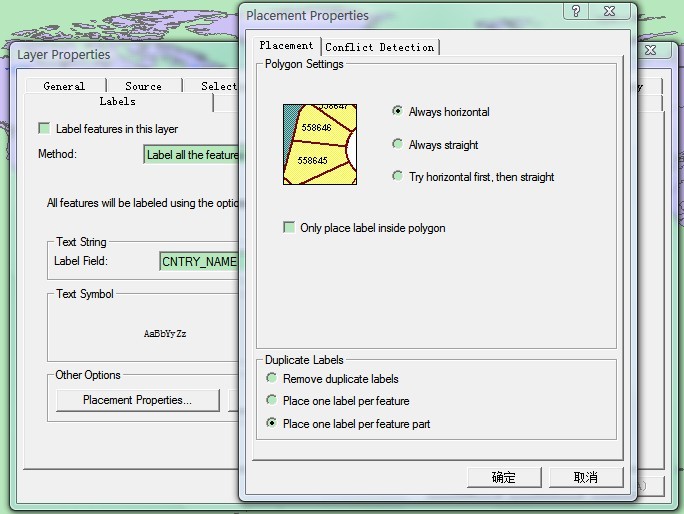
1.设定标记是否重复、是否每个图元一个标记、或每个图元的每一部分都有一个标记,如图:
2.如何设定label只保留两位小数,如图:
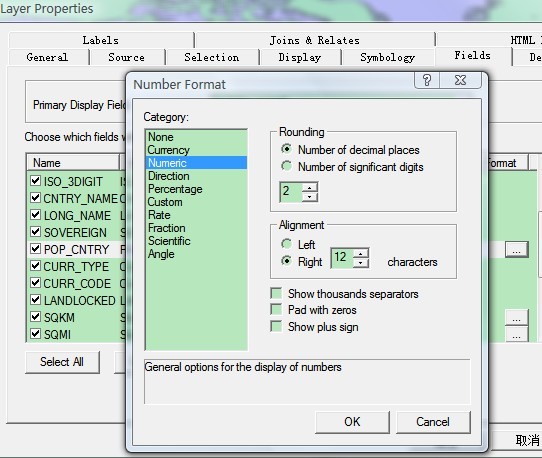
还可以设置其他更为丰富的格式。
参考文章
1. 风过 无痕.arcEngine经典代码-添加气泡提示框(标注,文本,). 2008-8.
2. 丛晓男. 在地图中添加label以标注地图. 2010-6.
Arc Engine 中添加气泡提示框的更多相关文章
- MFC中添加ToolTip提示框
PART 1 MFC 对话框中的 Buttton添加提示 例如我们想在一个对话框中的一个button控件添加tooltip,实现的方法如下: 1. 在该对话框的类中添加一个CToolTipCtrl类型 ...
- 在vue项目中添加全局提示框
1.写一个提示框组件:msg.vue (注明:这里用两个div的原因是成功和失败的提示不能用同一个div,因为他们可能紧接着出现,所以不能从始至终只有一个提示框在工作) 2.写一个调用此组建的js : ...
- Qt显示Linux desktop natification气泡提示框
在现代Linux桌面环境上我们时常可以看到类似的消息框: 这些消息框常用在如下场景: 即时聊天软件的新消息 闹钟定时提示 电池电量提示 邮件消息 长耗时操作的完成提示 在freedesktop.org ...
- iOS 灵活,简易,扩展性强的气泡提示框LFBubbleView(含源码)
一.效果图 二.使用方法 使用简单,4行代码集成. _bubbleView = [[LFBubbleView alloc] initWithFrame:CGRectMake(, , , )]; _bu ...
- JSP中添加弹出框
JSP中添加弹出框 %> <script language="javascript" type="text/javascript"> aler ...
- 在ASP.NET中引用自定义提示框
在html网页中自定义提示框 正文: 在一般的B/S架构中项目,与用户的交互信息是非常重要的.在一般的情况下,设计人员都在把用户信息呈现在html中,用div和span去弹出相关信息.对于一般的情况而 ...
- ARC工程中添加非ARC文件
转载自:http://blog.csdn.net/zhenweicao/article/details/16988543 分类: IOS2013-11-27 17:02 626人阅读 评论(0) 收藏 ...
- ArcGIS Engine中添加点、线、面元素
转自原文 ArcGIS Engine中添加点.线.面元素 此种方式为IElement的方式在axMapControl的GraphicsContainer中好绘制图形. //画点 IPoint pt = ...
- UWP中的消息提示框(一)
不管什么平台,应用内难免会出现一些消息提示框,下面就来聊聊我在UWP里用到的消息提示框. 弹窗也可按是否需要用户操作促发一些逻辑进行分为两大类. 不需要用户干涉的一类: MessageDialog:操 ...
随机推荐
- [转载]Spring Autowire自动装配介绍
转自: http://www.cnblogs.com/zhishan/p/3190757.html 在应用中,我们常常使用<ref>标签为JavaBean注入它依赖的对象.但是对于一个大型 ...
- lintcode : 二叉树的层次遍历II
题目 二叉树的层次遍历 II 给出一棵二叉树,返回其节点值从底向上的层次序遍历(按从叶节点所在层到根节点所在的层遍历,然后逐层从左往右遍历) 样例 给出一棵二叉树 {3,9,20,#,#,15,7}, ...
- AutoEventWireup解释
这一事件聚合了当前页是否自动关联某些特殊事件. 首先,从浏览器页面出发的事件不能立刻在本地得到处理,而是POST至服务器上,因此,asp.net建立了委托(代理)机制.在建立一个事件的同事,建立相应的 ...
- SaaS系列介绍之十三: SaaS系统体系架构
1 系统体系架构设计 软件开发中系统体系架构决定了一个系统稳定性.健壮性.可扩展性.兼容性和可用性,它是系统的灵魂.体系架构是架构师所关注的核心.良好的体系架构是系统成功的开端,否则,再好的代码与设计 ...
- java登陆验证码与JS无刷新验证
最近公司的项目的登陆模块由我负责,所以就做了个登陆小功能进行练手,其包括了用jQuery对用户名和密码进行不为null验证,和出于安全性考虑加了一个验证码的校验 别的不说先上代码 controller ...
- 【多媒体封装格式详解】---MKV
http://blog.csdn.net/tx3344/article/details/8162656# http://blog.csdn.net/tx3344/article/details/817 ...
- 汇编debug 截图
- Git教程之版本回退(4)
现在,我们已经学会了修改文件,然后把修改提交到Git版本库,现在再次修改readme.txt文件如下:
- Retrofit分析-漂亮的解耦套路
没耐心自己分析源码的同学,还可以参考Stay录制的视频版 Retrofit分析-漂亮的解耦套路(视频版) 万万没想到Retrofit会这么火,在没看源码之前,我简单的认为是因为它跟OkHttp同出一源 ...
- 代码自动生成工具_java版
项目结构: 这里要实现的功能是,当我们给出了bean,如:Admin,User,People等实体类后, 我想用代码自动生成我想要的代码,最后生成的效果: 也就是说为每一个bean都生成相应的Dao, ...