
使用MultipleInputs和MultipleOutputs
还是计算矩阵的乘积,待计算的表达式如下:
S=F*[B+mu(u+s+b+d)]
其中,矩阵B、u、s、d分别存放在名称对应的SequenceFile文件中。
1)我们想分别读取这些文件(放在不同的文件夹中)然后计算与矩阵F的乘积,这就需要使用MultipleInputs类,那么就需要修改main()函数中对作业的配置,首先我们回顾一下之前未使用MultipleInputs的时候,对job中的map()阶段都需要进行哪些配置,示例如下:
job.setInputFormatClass(SequenceFileInputFormat.class);

job.setMapperClass(MyMapper.class);

job.setMapOutputKeyClass(IntWritable.class);

job.setMapOutputValueClass(DoubleArrayWritable.class);
FileInputFormat.setInputPaths(job, new Path(uri));
在配置job的时候对map任务的设置有五点,分别是:输入格式、所使用的mapper类、map输出key的类型、map输出value的类型以及输入路径。
然后,使用MultipleInputs时,对map的配置内容如下:
 MultipleInputs.addInputPath(job, new Path(uri + "/b100"), SequenceFileInputFormat.class, MyMapper.class);

 MultipleInputs.addInputPath(job, new Path(uri + "/u100"), SequenceFileInputFormat.class, MyMapper.class);

 MultipleInputs.addInputPath(job, new Path(uri + "/s100"), SequenceFileInputFormat.class, MyMapper.class);

 MultipleInputs.addInputPath(job, new Path(uri + "/d100"), SequenceFileInputFormat.class, MyMapper.class);

 job.setMapOutputKeyClass(Text.class);

 job.setMapOutputValueClass(DoubleArrayWritable.class);
首先使用addInputpath()将文件的输入路径、文件输入格式、所使用的mapper类添加到job中,所以接下来我们只需要再配置map的输出key和value的类型就可以了。
2)以上就是完成了使用MultipleInputs对map任务的配置,但是当我们使用MultipleInputs时,获得文件名的方法与以前的方法不同,所以需要将map()方法中获得文件名的代码修改为如下代码(http://blog.csdn.net/cuilanbo/article/details/25722489):
 InputSplit split=context.getInputSplit();

             //String fileName=((FileSplit)inputSplit).getPath().getName();

             Class<? extends InputSplit> splitClass = split.getClass();

             FileSplit fileSplit = null;

             if (splitClass.equals(FileSplit.class)) {

                 fileSplit = (FileSplit) split;

             } else if (splitClass.getName().equals(

                     "org.apache.hadoop.mapreduce.lib.input.TaggedInputSplit")) {

                 // begin reflection hackery...

                 try {

                     Method getInputSplitMethod = splitClass

                             .getDeclaredMethod("getInputSplit");

                     getInputSplitMethod.setAccessible(true);

                     fileSplit = (FileSplit) getInputSplitMethod.invoke(split);

                 } catch (Exception e) {

                     // wrap and re-throw error

                     throw new IOException(e);

                 }

                 // end reflection hackery

             }

                String fileName=fileSplit.getPath().getName();
以上就完成了map的多路径输入,不过如果我们想要将这多个文件的计算结果也输出到不同的文件这怎么办?那就使用MultipleOutputs。
3)使用MultipleOutputs之前,我们首先考虑之前我们是怎么配置reduce任务的,示例如下:
 job.setOutputFormatClass(SequenceFileOutputFormat.class);

 job.setReducerClass(MyReducer.class);

 job.setOutputKeyClass(IntWritable.class);

 job.setOutputValueClass(DoubleArrayWritable.class);

 FileOutputFormat.setOutputPath(job,new Path(outUri));
同样的,在reduce任务的时候设置也是五点,分别是:输入格式、所使用的reduce类、renduce输出key的类型、reduce输出value的类型以及输出路径。然后,使用MultipleInputs是对reducer的配置如下:
 MultipleOutputs.addNamedOutput(job, "Sb100", SequenceFileOutputFormat.class, IntWritable.class, DoubleArrayWritable.class);

 MultipleOutputs.addNamedOutput(job,"Su100",SequenceFileOutputFormat.class,IntWritable.class,DoubleArrayWritable.class);

 MultipleOutputs.addNamedOutput(job,"Ss100",SequenceFileOutputFormat.class,IntWritable.class,DoubleArrayWritable.class);

 MultipleOutputs.addNamedOutput(job, "Sd100", SequenceFileOutputFormat.class, IntWritable.class, DoubleArrayWritable.class);

 job.setReducerClass(MyReducer.class);

 FileOutputFormat.setOutputPath(job,new Path(outUri));
使用MultipleOutputs的addNamedOutput()方法将输出文件名、输出文件格式、输出key类型、输出value类型配置到job中。然后我们再配置所使用的reduce类、输出路径。
4)使用MultipleOutputs时,在reduce()方法中写入文件使用的不再是context.write(),而是使用MultipleOutputs类的write()方法。所以需要修改redcue()的实现以及setup()的实现,修改后如下:
a.setup()方法
 public void setup(Context context){

 mos=new MultipleOutputs(context);

 int leftMatrixColumnNum=context.getConfiguration().getInt("leftMatrixColumnNum",100);

 sum=new DoubleWritable[leftMatrixColumnNum];

 for (int i=0;i<leftMatrixColumnNum;++i){

                 sum[i]=new DoubleWritable(0.0);

             }

         }
b.reduce()方法
 public void reduce(Text key,Iterable<DoubleArrayWritable>value,Context context) throws IOException, InterruptedException {

             int valueLength=0;

             for(DoubleArrayWritable doubleValue:value){

                 obValue=doubleValue.toArray();

                 valueLength=Array.getLength(obValue);

                 for (int i=0;i<valueLength;++i){

                     sum[i]=new DoubleWritable(Double.parseDouble(Array.get(obValue,i).toString())+sum[i].get());

                 }

             }

             valueArrayWritable=new DoubleArrayWritable();

             valueArrayWritable.set(sum);

             String[] xx=key.toString(). split(",");

             IntWritable intKey=new IntWritable(Integer.parseInt(xx[0]));

             if (key.toString().endsWith("b100")){

                 mos.write("Sb100",intKey,valueArrayWritable);

             }

             else if (key.toString().endsWith("u100")) {

                 mos.write("Su100",intKey,valueArrayWritable);

             }

             else if (key.toString().endsWith("s100")) {

                 mos.write("Ss100",intKey,valueArrayWritable);

             }

             else if (key.toString().endsWith("d100")) {

                 mos.write("Sd100",intKey,valueArrayWritable);

             }

             for (int i=0;i<sum.length;++i){

                 sum[i].set(0.0);

             }

         }

     }
mos.write("Sb100",key,value)中的文件名必须与使用addNamedOutput()方法配置job时使用的文件名相同,另外文件名中不能包含"-"、“_”字符。
5)在一个Job中同时使用MultipleInputs和MultipleOutputs的完整代码如下:
 /**

  * Created with IntelliJ IDEA.

  * User: hadoop

  * Date: 16-3-9

  * Time: 下午12:47

  * To change this template use File | Settings | File Templates.

  */

 import org.apache.hadoop.conf.Configuration;

 import org.apache.hadoop.fs.FileSystem;

 import java.io.IOException;

 import java.lang.reflect.Array;

 import java.lang.reflect.Method;

 import java.net.URI;

 import org.apache.hadoop.fs.Path;

 import org.apache.hadoop.io.*;

 import org.apache.hadoop.mapreduce.InputSplit;

 import org.apache.hadoop.mapreduce.Job;

 import org.apache.hadoop.mapreduce.lib.input.FileInputFormat;

 import org.apache.hadoop.mapreduce.lib.input.FileSplit;

 import org.apache.hadoop.mapreduce.lib.input.SequenceFileInputFormat;

 import org.apache.hadoop.mapreduce.lib.input.MultipleInputs;

 import org.apache.hadoop.mapreduce.lib.output.NullOutputFormat;

 import org.apache.hadoop.mapreduce.lib.output.SequenceFileOutputFormat;

 import org.apache.hadoop.mapreduce.lib.output.FileOutputFormat;

 import org.apache.hadoop.mapreduce.lib.output.MultipleOutputs;

 import org.apache.hadoop.mapreduce.Reducer;

 import org.apache.hadoop.mapreduce.Mapper;

 import org.apache.hadoop.filecache.DistributedCache;

 import org.apache.hadoop.util.ReflectionUtils;

 public class MutiDoubleInputMatrixProduct {

     public static  class MyMapper extends Mapper<IntWritable,DoubleArrayWritable,Text,DoubleArrayWritable>{

         public DoubleArrayWritable map_value=new DoubleArrayWritable();

         public  double[][] leftMatrix=null;/******************************************/

         public Object obValue=null;

         public DoubleWritable[] arraySum=null;

         public double sum=0;

         public void setup(Context context) throws IOException {

             Configuration conf=context.getConfiguration();

             leftMatrix=new double[conf.getInt("leftMatrixRowNum",10)][conf.getInt("leftMatrixColumnNum",10)];

             System.out.println("map setup() start!");

             //URI[] cacheFiles=DistributedCache.getCacheFiles(context.getConfiguration());

             Path[] cacheFiles=DistributedCache.getLocalCacheFiles(conf);

             String localCacheFile="file://"+cacheFiles[0].toString();

             //URI[] cacheFiles=DistributedCache.getCacheFiles(conf);

             //DistributedCache.

             System.out.println("local path is:"+cacheFiles[0].toString());

             // URI[] cacheFiles=DistributedCache.getCacheFiles(context.getConfiguration());

             FileSystem fs =FileSystem.get(URI.create(localCacheFile), conf);

             SequenceFile.Reader reader=null;

             reader=new SequenceFile.Reader(fs,new Path(localCacheFile),conf);

             IntWritable key= (IntWritable)ReflectionUtils.newInstance(reader.getKeyClass(),conf);

             DoubleArrayWritable value= (DoubleArrayWritable)ReflectionUtils.newInstance(reader.getValueClass(),conf);

             int valueLength=0;

             int rowIndex=0;

             while (reader.next(key,value)){

                 obValue=value.toArray();

                 rowIndex=key.get();

                 if(rowIndex<1){

                     valueLength=Array.getLength(obValue);

                 }

                 leftMatrix[rowIndex]=new double[conf.getInt("leftMatrixColumnNum",10)];

                 //this.leftMatrix=new double[valueLength][Integer.parseInt(context.getConfiguration().get("leftMatrixColumnNum"))];

                 for (int i=0;i<valueLength;++i){

                     leftMatrix[rowIndex][i]=Double.parseDouble(Array.get(obValue, i).toString());

                 }

             }

         }

         public void map(IntWritable key,DoubleArrayWritable value,Context context) throws IOException, InterruptedException {

             obValue=value.toArray();

             InputSplit split=context.getInputSplit();

             //String fileName=((FileSplit)inputSplit).getPath().getName();

             Class<? extends InputSplit> splitClass = split.getClass();

             FileSplit fileSplit = null;

             if (splitClass.equals(FileSplit.class)) {

                 fileSplit = (FileSplit) split;

             } else if (splitClass.getName().equals(

                     "org.apache.hadoop.mapreduce.lib.input.TaggedInputSplit")) {

                 // begin reflection hackery...

                 try {

                     Method getInputSplitMethod = splitClass

                             .getDeclaredMethod("getInputSplit");

                     getInputSplitMethod.setAccessible(true);

                     fileSplit = (FileSplit) getInputSplitMethod.invoke(split);

                 } catch (Exception e) {

                     // wrap and re-throw error

                     throw new IOException(e);

                 }

                 // end reflection hackery

             }

                String fileName=fileSplit.getPath().getName();

             if (fileName.startsWith("FB")) {

                 context.write(new Text(String.valueOf(key.get())+","+fileName),value);

             }

             else{

                 arraySum=new DoubleWritable[this.leftMatrix.length];

                 for (int i=0;i<this.leftMatrix.length;++i){

                     sum=0;

                     for (int j=0;j<this.leftMatrix[0].length;++j){

                         sum+= this.leftMatrix[i][j]*Double.parseDouble(Array.get(obValue,j).toString())*(double)(context.getConfiguration().getFloat("u",1f));

                     }

                     arraySum[i]=new DoubleWritable(sum);

                     //arraySum[i].set(sum);

                 }

                 map_value.set(arraySum);

                 context.write(new Text(String.valueOf(key.get())+","+fileName),map_value);

             }

         }

     }

     public static class MyReducer extends Reducer<Text,DoubleArrayWritable,IntWritable,DoubleArrayWritable>{

         public DoubleWritable[] sum=null;

         public Object obValue=null;

         public DoubleArrayWritable valueArrayWritable=null;

         private MultipleOutputs mos=null;

         public void setup(Context context){

             mos=new MultipleOutputs(context);

             int leftMatrixColumnNum=context.getConfiguration().getInt("leftMatrixColumnNum",100);

             sum=new DoubleWritable[leftMatrixColumnNum];

             for (int i=0;i<leftMatrixColumnNum;++i){

                 sum[i]=new DoubleWritable(0.0);

             }

         }

         public void reduce(Text key,Iterable<DoubleArrayWritable>value,Context context) throws IOException, InterruptedException {

             int valueLength=0;

             for(DoubleArrayWritable doubleValue:value){

                 obValue=doubleValue.toArray();

                 valueLength=Array.getLength(obValue);

                 for (int i=0;i<valueLength;++i){

                     sum[i]=new DoubleWritable(Double.parseDouble(Array.get(obValue,i).toString())+sum[i].get());

                 }

             }

             valueArrayWritable=new DoubleArrayWritable();

             valueArrayWritable.set(sum);

             String[] xx=key.toString(). split(",");

             IntWritable intKey=new IntWritable(Integer.parseInt(xx[0]));

             if (key.toString().endsWith("b100")){

                 mos.write("Sb100",intKey,valueArrayWritable);

             }

             else if (key.toString().endsWith("u100")) {

                 mos.write("Su100",intKey,valueArrayWritable);

             }

             else if (key.toString().endsWith("s100")) {

                 mos.write("Ss100",intKey,valueArrayWritable);

             }

             else if (key.toString().endsWith("d100")) {

                 mos.write("Sd100",intKey,valueArrayWritable);

             }

             for (int i=0;i<sum.length;++i){

                 sum[i].set(0.0);

             }

         }

     }

     public static void main(String[]args) throws IOException, ClassNotFoundException, InterruptedException {

         String uri="data/input";

         String outUri="sOutput";

         String cachePath="data/F100";

         HDFSOperator.deleteDir(outUri);

         Configuration conf=new Configuration();

         DistributedCache.addCacheFile(URI.create(cachePath),conf);//添加分布式缓存

         /**************************************************/

         //FileSystem fs=FileSystem.get(URI.create(uri),conf);

         //fs.delete(new Path(outUri),true);

         /*********************************************************/

         conf.setInt("leftMatrixColumnNum",100);

         conf.setInt("leftMatrixRowNum",100);

         conf.setFloat("u",0.5f);

        // conf.set("mapred.jar","MutiDoubleInputMatrixProduct.jar");

         Job job=new Job(conf,"MultiMatrix2");

         job.setJarByClass(MutiDoubleInputMatrixProduct.class);

         //job.setOutputFormatClass(NullOutputFormat.class);

         job.setReducerClass(MyReducer.class);

         job.setMapOutputKeyClass(Text.class);

         job.setMapOutputValueClass(DoubleArrayWritable.class);

         MultipleInputs.addInputPath(job, new Path(uri + "/b100"), SequenceFileInputFormat.class, MyMapper.class);

         MultipleInputs.addInputPath(job, new Path(uri + "/u100"), SequenceFileInputFormat.class, MyMapper.class);

         MultipleInputs.addInputPath(job, new Path(uri + "/s100"), SequenceFileInputFormat.class, MyMapper.class);

         MultipleInputs.addInputPath(job, new Path(uri + "/d100"), SequenceFileInputFormat.class, MyMapper.class);

         MultipleOutputs.addNamedOutput(job, "Sb100", SequenceFileOutputFormat.class, IntWritable.class, DoubleArrayWritable.class);

         MultipleOutputs.addNamedOutput(job,"Su100",SequenceFileOutputFormat.class,IntWritable.class,DoubleArrayWritable.class);

         MultipleOutputs.addNamedOutput(job,"Ss100",SequenceFileOutputFormat.class,IntWritable.class,DoubleArrayWritable.class);

         MultipleOutputs.addNamedOutput(job, "Sd100", SequenceFileOutputFormat.class, IntWritable.class, DoubleArrayWritable.class);

         FileOutputFormat.setOutputPath(job,new Path(outUri));

         System.exit(job.waitForCompletion(true)?0:1);

     }

 }

 class DoubleArrayWritable extends ArrayWritable {

     public DoubleArrayWritable(){

         super(DoubleWritable.class);

     }

     public String toString(){

         StringBuilder sb=new StringBuilder();

         for (Writable val:get()){

             DoubleWritable doubleWritable=(DoubleWritable)val;

             sb.append(doubleWritable.get());

             sb.append(",");

         }

         sb.deleteCharAt(sb.length()-1);

         return sb.toString();

     }

 }

 class HDFSOperator{

     public static boolean deleteDir(String dir)throws IOException{

         Configuration conf=new Configuration();

         FileSystem fs =FileSystem.get(conf);

         boolean result=fs.delete(new Path(dir),true);

         System.out.println("sOutput delete");

         fs.close();

         return result;

     }

 }
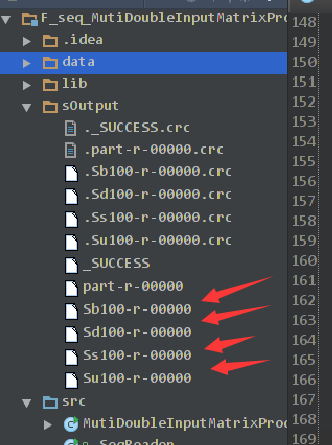
6)运行结果如下:
使用MultipleInputs和MultipleOutputs的更多相关文章
- 批处理引擎MapReduce程序设计
批处理引擎MapReduce程序设计 作者:尹正杰 版权声明:原创作品,谢绝转载!否则将追究法律责任. 一.MapReduce API Hadoop同时提供了新旧两套MapReduce API,新AP ...
- 使用hadoop multipleOutputs对输出结果进行不一样的组织
MapReduce job中,可以使用FileInputFormat和FileOutputFormat来对输入路径和输出路径来进行设置.在输出目录中,框架自己会自动对输出文件进行命名和组织,如:par ...
- 通过MultipleOutputs写到多个文件
MultipleOutputs 类可以将数据写到多个文件,这些文件的名称源于输出的键和值或者任意字符串.这允许每个 reducer(或者只有 map 作业的 mapper)创建多个文件. 采用name ...
- MapReduce 规划 六系列 MultipleOutputs采用
在前面的示例,输出文件名是默认: _logs part-r-00001 part-r-00003 part-r-00005 part-r-00007 part-r-00009 part-r-00011 ...
- hadoop1.2.1 MultipleOutputs将结果输出到多个文件或文件夹
hadoop1.2.1 MultipleOutputs将结果输出到多个文件或文件夹 博客分类:http://tydldd.iteye.com/blog/2053867 hadoop hadoop1 ...
- multipleOutputs Hadoop
package org.lukey.hadoop.muloutput; import java.io.IOException; import org.apache.hadoop.conf.Config ...
- (转)MultipleOutputFormat和MultipleOutputs
MultipleOutputFormat和MultipleOutputs http://www.cnblogs.com/liangzh/archive/2012/05/22/2512264.html ...
- MultipleOutputs新旧api
package MRNB_V4; import java.io.IOException; import java.util.Iterator; import org.apache.hadoop.con ...
- hadoop多文件输出MultipleOutputFormat和MultipleOutputs
1.MultipleOutputFormat可以将相似的记录输出到相同的数据集.在写每条记录之前,MultipleOutputFormat将调用generateFileNameForKeyValue方 ...
随机推荐
- Centos系统修改hostname
1.用命令临时修改 hostname oier 这样,服务器的hostname就变成oier了,但是重启之后会变回去 2.编辑配置文件永久修改 vi /etc/sysconfig/network HO ...
- c++(类继承)示例[仅用于弱弱的博主巩固知识点用哦,不好勿喷]
测试代码: Animals.h: #pragma once #include<string> class Animals { protected: std::string Food; in ...
- Xamarin+vs2010部署错误:error MSB6004: 指定的任务可执行文件位置\sdk\\tools\zipalign.exe”无效
好不容易配好了Xamarin和vs2010,也搞好了GenyMotion的虚拟机配置,开始调试的时候又报出了这样的错误: error MSB6004: 指定的任务可执行文件位置"C:\Use ...
- idea讲web项目部署到tomcat,热部署
idea是自动保存文件的,不需要ctrl+s手动保存. idea使用不习惯,修改了jsp文件后,刷新浏览器并没有立刻显示出来,而是要重新编译一下代码,重新部署才会出现. 在idea tomcat 中s ...
- 【poj3415-Common Substrings】sam子串计数
题意: 给出两个串,问这两个串的所有的子串中(重复出现的,只要是位置不同就算两个子串),长度大于等于k的公共子串有多少个. 题解: 这题好像大神们都用后缀数组做..然而我在sam的题表上看到这题,做 ...
- C# 从服务器下载文件
一.//TransmitFile实现下载 protected void Button1_Click(object sender, EventArgs e) { /* 微软为Response对象提供了一 ...
- PL/SQL 03 流程控制
--IF语法IF condition THEN statements;[ELSIF condition THEN statements;][ELSE statements;]END IF; -- ...
- JSP(1) - JSP简介、原理、语法 - 小易Java笔记
1.JSP简介 (1)JSP的全称是Java Server Pages(运行在服务器端的页面),实际就是Servlet(学习JSP的关键就是时刻联想到Servlet) (2)JSP.Servlet各自 ...
- python常用内置函数整理
1.最常见的内置函数是print print("Hello World!") 2.数学运算 abs(-5) # 取绝对值,也就是5 round(2.6) # 四舍五入取整,也就是3 ...
- Java语言中的协变和逆变(zz)
转载声明: 本文转载至:http://swiftlet.net/archives/1950 协变和逆变指的是宽类型和窄类型在某种情况下的替换或交换的特性.简单的说,协变就是用一个窄类型替代宽类型,而逆 ...