
ntroducing K-Pattern: A Rapid Way to Make CRUD Operations with Entity Framework
Introduction
Earlier in the last year I made a different approach to work on Entity Framework and in that I made some classes to handle the ObjectContext in single request scope and some extension methods to handle Insert / Update / Delete for all the edmx designer classes. Using that way I realized that how fast we can make applications with it but there are some things which are missing on that way. I worked on those drawbacks and now it’s in front of you.
This article is a remake of my earlier Article/Tip "Best way to use Entity Framework". I’ll describe new features and methods of “Helper.cs” class and will also compare this approach with some other approaches in the market in this article.
Background
Please go through the Part 1 before reading this article to understand the “Global Context” and “Helper” classes. After writing the 1st part, Debates were done among the developers that are is this the “Best way to use Entity Framework”? So to make it more understand it is best because of below things:
- DataContext alive and disposes on
HttpContextbasis so you do not need to write the code for initialize and dispose again and again in code blocks. - The Insert, Delete and Update methods are attached with Data Context Entity classes without any change effect in the original designer file. So developer does not need to write individual functions for these operations for each entity class.
- Single Method for Insert and Update.
- Easy and Fast to implement
However, there are some other patterns that also follow the same rule but there are lot of code involves to making it happen.
What's New?
The previous “Helper.cs” doesn’t allow Insert/Update/Delete operations on relational entities therefore It only works on Single Entity. This was the major drawback but now I have added some new methods to get overcome this issue. There is a new enum Operation introduce to define EntitySet Operations like Added, Modified and Deleted. New extension methods have been defined for three classes EntityObject, EntityCollection<T> and ObjectContext. The list of methods with their classes and signatures are mentioned below:
| Class | Methods | Description |
EntityObject |
AttachMe(this EntityObject objEntity) | Attach the current entity object with defined Global Context in Global.cs. |
| AttachMe(this EntityObject objEntity, Operation oper) | Attach the current entity object with defined Global Context in Global.cs and Change its state according to the provided Operation enum | |
| DetachMe(this EntityObject entity) | Detach the current entity object with defined Global Context in Global.cs | |
EntityCollection<T> |
AttachUs<T>(this EntityCollection<T> entities, Operation oper) where T : EntityObject | Generic method to attach the whole collection with define Global Context in Global.cs |
| DetachUs<T>(this EntityCollection<T> entities) where T : EntityObject | Generic method to attach the whole collection with define Global Context in Global.cs | |
ObjectContext |
AttachObject(this ObjectContext context, EntityObject objEntity) | Attach the provided entity with provided context. |
| AttachObject(this ObjectContext context, EntityObject objEntity, Operation oper) | Attach the provided entity with provided context and change its state according the provided operation. | |
| DetachObject(this ObjectContext Context, EntityObject entity) | Detach the provided entity with provided context. | |
Let's Get Started
To demonstrate the new methods, we are going to make a DB (db_EntityFrameworkSample) and create two tables which have One to Many Relationship between.
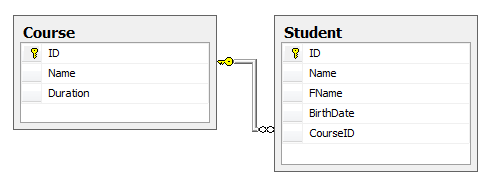

In above diagram there are two tables Course and Student and they are associated via One to Many Relationship. We are going to perform operations on these tables in following order.
Single Entity Operations
 Collapse | Copy Code
Course objCourse = new Course
{
Name = "B.Sc.",
Duration = "3 Years"
}; objCourse.Save();
Insert Parent & Insert Children
Collapse | Copy CodeCourse objCourse = new Course
{
Name = "M.Sc.",
Duration = "3 Years"
}; objCourse.AttachMe(); // Here we attached the current object with entity object context to perform operations on children entities objCourse.Students.Add(new Student { Name = "John", FName = "David" });
objCourse.Students.Add(new Student { Name = "Bob", FName = "Jason" }); objCourse.Save();
Update Parent & Insert Children
Collapse | Copy CodeCourse objCourse = Course.GetCourse(2); // Get MCA Cource
objCourse.Students.Add(new Student { Name = "Niroo", FName = "Rob" });
objCourse.Students.Add(new Student { Name = "Chirs", FName = "William" });
objCourse.Save();
Update Parent & Update Children
Collapse | Copy CodeCourse objCourse = Course.GetCourse(2); // Get MCA Course objCourse.Students.ElementAtOrDefault(0).BirthDate = new DateTime(1986, 12, 15);
objCourse.Students.ElementAtOrDefault(1).BirthDate = new DateTime(1990, 7, 15); objCourse.Save();
Update Parent & Delete Children
Collapse | Copy CodeCourse objCourse = Course.GetCourse(4); // Get M-Tech Course objCourse.Duration = "4 Years";
objCourse.Students.AttachUs(Operation.Delete); // Attach student with context and change the EntityState to Deleted objCourse.Save();
Delete Parent & Delete Children
Collapse | Copy CodeCourse objCourse = Course.GetCourse(3); // Get B-Tech Course objCourse.Students.AttachUs(Operation.Delete); // Attach student with context and change the EntityState to Deleted objCourse.Delete();
Above are sample codes which define the data operations between Parent-Child entities with different combinations using "K-Pattern".
Comparision With Repository Pattern
| Feature | K-Pattern | Repository Pattern |
| Easy to implement | YES | NO |
| Context Scope in Single Request | YES | YES (With IOC) |
| Suitable Project Types | Small and Medium Types | Large Type |
| Support for EF Approaches | Database First | Code First and Database First |
Conclusion
This is all about the K-Pattern. Thre are lot of discussion coming along with this approach and I'll be waiting for your reviews and suggestions to improve it better. Please downaload the source code, create the DB with the available SQL Script, chagne the conenction string and run it straight.
Thanks for reading. Happy coding.
License
This article, along with any associated source code and files, is licensed under The Code Project Open License (CPOL)
ntroducing K-Pattern: A Rapid Way to Make CRUD Operations with Entity Framework的更多相关文章
- Using the Repository Pattern with ASP.NET MVC and Entity Framework
原文:http://www.codeguru.com/csharp/.net/net_asp/mvc/using-the-repository-pattern-with-asp.net-mvc-and ...
- [转]Using the Repository Pattern with ASP.NET MVC and Entity Framework
本文转自:http://www.codeguru.com/csharp/.net/net_asp/mvc/using-the-repository-pattern-with-asp.net-mvc-a ...
- Generic repository pattern and Unit of work with Entity framework
原文 Generic repository pattern and Unit of work with Entity framework Repository pattern is an abstra ...
- Using Repository Pattern in Entity Framework
One of the most common pattern is followed in the world of Entity Framework is “Repository Pattern”. ...
- IMPLEMENTATION - Entity Framework Anti Pattern - High Performance EF
Good about ORM Developer is free from building T-Sql on the database tier which is not their major a ...
- 5.在MVC中使用泛型仓储模式和工作单元来进行增删查改
原文链接:http://www.c-sharpcorner.com/UploadFile/3d39b4/crud-operations-using-the-generic-repository-pat ...
- 在MVC中使用泛型仓储模式和工作单元来进行增删查改
原文链接:http://www.c-sharpcorner.com/UploadFile/3d39b4/crud-operations-using-the-generic-repository-pat ...
- 6.在MVC中使用泛型仓储模式和依赖注入实现增删查改
原文链接:http://www.c-sharpcorner.com/UploadFile/3d39b4/crud-operations-using-the-generic-repository-pat ...
- 1.【使用EF Code-First方式和Fluent API来探讨EF中的关系】
原文链接:http://www.c-sharpcorner.com/UploadFile/3d39b4/relationship-in-entity-framework-using-code-firs ...
随机推荐
- BZOJ1355:[Baltic2009]Radio Transmission
浅谈\(KMP\):https://www.cnblogs.com/AKMer/p/10438148.html 题目传送门:https://lydsy.com/JudgeOnline/problem. ...
- zabbix 3.0.2自定义脚本
http://blog.51cto.com/xiao987334176/1769766 有一个通知队列,如果超过了一定的值,就需要报警一下 查询接口可以返回队列的数量,格式是json,data后面的数 ...
- 关于yii2 REST api 的问题
首先,需要在basic/web/文件夹下添加一个.htaccess文件 这样进入项目就会自动访问index.php文件,url就不会错乱了 <IfModule mod_rewrite.c> ...
- maven help:system
lifecycle:http://maven.apache.org/guides/introduction/introduction-to-the-lifecycle.html bindings:ht ...
- 【转】JMeter基础之——一个简单的性能测试
上一节中,我们了解了jmeter的一此主要元件,那么这些元件如何使用到性能测试中呢.这一节创建一个简单的测试计划来使用这些元件.该计划对应的测试需求. 1)测试目标网站是fnng.cnblogs.co ...
- java代码初学者适用,输入学生成绩,符合要求的过~~~~注意数据范围
总结:没有基础,我从点滴开始, package com.aaa; import java.util.Scanner; //输入“repate ”次数,输入学生成绩,低于60分,输出fail.否则输入p ...
- 分布式缓存系统 Memcached 状态机之网络数据读取与解析
整个状态机的基本流程如下图所示,后续分析将按该流程来进行. 接上节分解,主线程将接收的连接socket分发给了某工作线程,然后工作线程从任务队列中取出该连接socket的CQ_ITEM,开始处理该连接 ...
- Spring Batch介绍
简介 SpringBatch 是一个大数据量的并行处理框架.通常用于数据的离线迁移,和数据处理,⽀持事务.并发.流程.监控.纵向和横向扩展,提供统⼀的接⼝管理和任务管理;SpringBatch是Spr ...
- 1024 Palindromic Number
题意: 给出一个数N(N<=10^10),最多可操作K次(K<=100),每次操作为这个数和其反转之后的数相加,若得到的结果为回文数,则输出:若在K次迭代后仍然不是回文数,在输出第K次操作 ...
- nios pio interrupt 的使能
关于nios 中的中断,因为要16c550中需要nios的中断环境去测试,所以就用到了中断. 硬件:在nios中添加硬件PIO,但是要使能中断功能.如下图所示: 系统列化,PIO的连接就不说了.但是要 ...