
ntroducing K-Pattern: A Rapid Way to Make CRUD Operations with Entity Framework
Introduction
Earlier in the last year I made a different approach to work on Entity Framework and in that I made some classes to handle the ObjectContext in single request scope and some extension methods to handle Insert / Update / Delete for all the edmx designer classes. Using that way I realized that how fast we can make applications with it but there are some things which are missing on that way. I worked on those drawbacks and now it’s in front of you.
This article is a remake of my earlier Article/Tip "Best way to use Entity Framework". I’ll describe new features and methods of “Helper.cs” class and will also compare this approach with some other approaches in the market in this article.
Background
Please go through the Part 1 before reading this article to understand the “Global Context” and “Helper” classes. After writing the 1st part, Debates were done among the developers that are is this the “Best way to use Entity Framework”? So to make it more understand it is best because of below things:
- DataContext alive and disposes on
HttpContextbasis so you do not need to write the code for initialize and dispose again and again in code blocks. - The Insert, Delete and Update methods are attached with Data Context Entity classes without any change effect in the original designer file. So developer does not need to write individual functions for these operations for each entity class.
- Single Method for Insert and Update.
- Easy and Fast to implement
However, there are some other patterns that also follow the same rule but there are lot of code involves to making it happen.
What's New?
The previous “Helper.cs” doesn’t allow Insert/Update/Delete operations on relational entities therefore It only works on Single Entity. This was the major drawback but now I have added some new methods to get overcome this issue. There is a new enum Operation introduce to define EntitySet Operations like Added, Modified and Deleted. New extension methods have been defined for three classes EntityObject, EntityCollection<T> and ObjectContext. The list of methods with their classes and signatures are mentioned below:
| Class | Methods | Description |
EntityObject |
AttachMe(this EntityObject objEntity) | Attach the current entity object with defined Global Context in Global.cs. |
| AttachMe(this EntityObject objEntity, Operation oper) | Attach the current entity object with defined Global Context in Global.cs and Change its state according to the provided Operation enum | |
| DetachMe(this EntityObject entity) | Detach the current entity object with defined Global Context in Global.cs | |
EntityCollection<T> |
AttachUs<T>(this EntityCollection<T> entities, Operation oper) where T : EntityObject | Generic method to attach the whole collection with define Global Context in Global.cs |
| DetachUs<T>(this EntityCollection<T> entities) where T : EntityObject | Generic method to attach the whole collection with define Global Context in Global.cs | |
ObjectContext |
AttachObject(this ObjectContext context, EntityObject objEntity) | Attach the provided entity with provided context. |
| AttachObject(this ObjectContext context, EntityObject objEntity, Operation oper) | Attach the provided entity with provided context and change its state according the provided operation. | |
| DetachObject(this ObjectContext Context, EntityObject entity) | Detach the provided entity with provided context. | |
Let's Get Started
To demonstrate the new methods, we are going to make a DB (db_EntityFrameworkSample) and create two tables which have One to Many Relationship between.
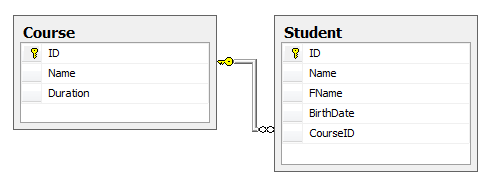

In above diagram there are two tables Course and Student and they are associated via One to Many Relationship. We are going to perform operations on these tables in following order.
Single Entity Operations
 Collapse | Copy Code
Course objCourse = new Course
{
Name = "B.Sc.",
Duration = "3 Years"
}; objCourse.Save();
Insert Parent & Insert Children
Collapse | Copy CodeCourse objCourse = new Course
{
Name = "M.Sc.",
Duration = "3 Years"
}; objCourse.AttachMe(); // Here we attached the current object with entity object context to perform operations on children entities objCourse.Students.Add(new Student { Name = "John", FName = "David" });
objCourse.Students.Add(new Student { Name = "Bob", FName = "Jason" }); objCourse.Save();
Update Parent & Insert Children
Collapse | Copy CodeCourse objCourse = Course.GetCourse(2); // Get MCA Cource
objCourse.Students.Add(new Student { Name = "Niroo", FName = "Rob" });
objCourse.Students.Add(new Student { Name = "Chirs", FName = "William" });
objCourse.Save();
Update Parent & Update Children
Collapse | Copy CodeCourse objCourse = Course.GetCourse(2); // Get MCA Course objCourse.Students.ElementAtOrDefault(0).BirthDate = new DateTime(1986, 12, 15);
objCourse.Students.ElementAtOrDefault(1).BirthDate = new DateTime(1990, 7, 15); objCourse.Save();
Update Parent & Delete Children
Collapse | Copy CodeCourse objCourse = Course.GetCourse(4); // Get M-Tech Course objCourse.Duration = "4 Years";
objCourse.Students.AttachUs(Operation.Delete); // Attach student with context and change the EntityState to Deleted objCourse.Save();
Delete Parent & Delete Children
Collapse | Copy CodeCourse objCourse = Course.GetCourse(3); // Get B-Tech Course objCourse.Students.AttachUs(Operation.Delete); // Attach student with context and change the EntityState to Deleted objCourse.Delete();
Above are sample codes which define the data operations between Parent-Child entities with different combinations using "K-Pattern".
Comparision With Repository Pattern
| Feature | K-Pattern | Repository Pattern |
| Easy to implement | YES | NO |
| Context Scope in Single Request | YES | YES (With IOC) |
| Suitable Project Types | Small and Medium Types | Large Type |
| Support for EF Approaches | Database First | Code First and Database First |
Conclusion
This is all about the K-Pattern. Thre are lot of discussion coming along with this approach and I'll be waiting for your reviews and suggestions to improve it better. Please downaload the source code, create the DB with the available SQL Script, chagne the conenction string and run it straight.
Thanks for reading. Happy coding.
License
This article, along with any associated source code and files, is licensed under The Code Project Open License (CPOL)
ntroducing K-Pattern: A Rapid Way to Make CRUD Operations with Entity Framework的更多相关文章
- Using the Repository Pattern with ASP.NET MVC and Entity Framework
原文:http://www.codeguru.com/csharp/.net/net_asp/mvc/using-the-repository-pattern-with-asp.net-mvc-and ...
- [转]Using the Repository Pattern with ASP.NET MVC and Entity Framework
本文转自:http://www.codeguru.com/csharp/.net/net_asp/mvc/using-the-repository-pattern-with-asp.net-mvc-a ...
- Generic repository pattern and Unit of work with Entity framework
原文 Generic repository pattern and Unit of work with Entity framework Repository pattern is an abstra ...
- Using Repository Pattern in Entity Framework
One of the most common pattern is followed in the world of Entity Framework is “Repository Pattern”. ...
- IMPLEMENTATION - Entity Framework Anti Pattern - High Performance EF
Good about ORM Developer is free from building T-Sql on the database tier which is not their major a ...
- 5.在MVC中使用泛型仓储模式和工作单元来进行增删查改
原文链接:http://www.c-sharpcorner.com/UploadFile/3d39b4/crud-operations-using-the-generic-repository-pat ...
- 在MVC中使用泛型仓储模式和工作单元来进行增删查改
原文链接:http://www.c-sharpcorner.com/UploadFile/3d39b4/crud-operations-using-the-generic-repository-pat ...
- 6.在MVC中使用泛型仓储模式和依赖注入实现增删查改
原文链接:http://www.c-sharpcorner.com/UploadFile/3d39b4/crud-operations-using-the-generic-repository-pat ...
- 1.【使用EF Code-First方式和Fluent API来探讨EF中的关系】
原文链接:http://www.c-sharpcorner.com/UploadFile/3d39b4/relationship-in-entity-framework-using-code-firs ...
随机推荐
- the road of app test
移动互联网测试——你应该要掌握的技能树 http://www.stuq.org/news/488 手机类型native app,hybrid app,web app http://www.uisdc. ...
- android中MediaPlayer类的用法
用法直接看sample package com.turtle920.androidaudioprocess; import android.media.MediaPlayer; import andr ...
- protobuff java 包编译(Windows)
google probuffer的强大,很多人都知道,但是官方的source 里是没有jar下载,唯有源码下载,故需自己编译得到jar. java 的jar的编译采用maven 编译的,因此需先构建m ...
- selenium中Xpath轴定位方法
1.Xpath轴:轴可定义相对于当前节点的节点集. 使用语法:轴名称::节点名称 例://input[@data-value="SXRYNAME"]/parent::td/foll ...
- 1099 Build A Binary Search Tree
1099 Build A Binary Search Tree (30)(30 分) A Binary Search Tree (BST) is recursively defined as a bi ...
- [PHP] - Laravel - CSRF token禁用方法与排除验证csrf_token的url设置
laravel5.1排除验证csrf_token的url设置 <?php namespace App\Http\Middleware; use Illuminate\Foundation\Htt ...
- oracle里的查询转换
oracle里的查询转换的作用 Oracle里的查询转换,有称为查询改写,指oracle在执行目标sql时可能会做等价改写,目的是为了更高效的执行目标sql 在10g及其以后的版本中,oracle会对 ...
- Py修行路 python基础 (二十一)logging日志模块 json序列化 正则表达式(re)
一.日志模块 两种配置方式:1.config函数 2.logger #1.config函数 不能输出到屏幕 #2.logger对象 (获取别人的信息,需要两个数据流:文件流和屏幕流需要将数据从两个数据 ...
- spring-cloud配置ribbon负载均衡
spring-cloud配置ribbon负载均衡 ribbon提供的负载均衡就是开箱即用的,简单的不能再简单了 为了顺利演示此demo,你需要如下 需要提前配置eureka服务端,具体看 https: ...
- CE学习记录1
主题 春节放假终于有空学习下怎么制作外挂啦......学习写外挂大概是我一开始学习计算机的动力吧....只是一直似懂非懂..看教学视频各种不明白为什么....也没有专门的时间学习下怎么写....春节有 ...