
ImageBox Control with Zoom/Pan Capability
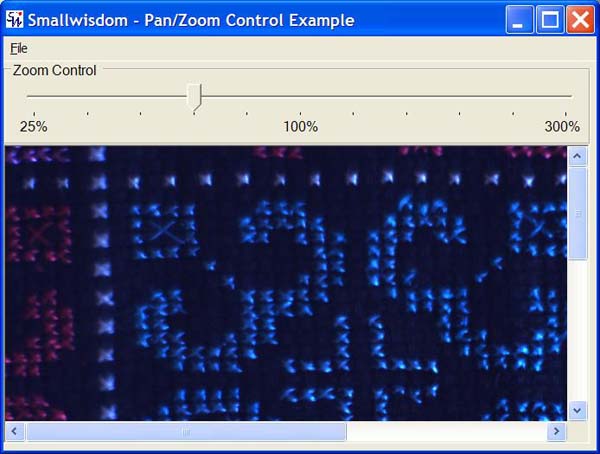
Introduction
This control extends the capability of an ImageBox by including scrollbars to pan the image and a method for zooming
the size of the image. My goal here is to show you two things:
- How to create your own controls that extend the
System.Windows.Formscontrols. - How to add zoom/pan capability to an image display in a simple fashion.
Creating the control
Using Microsoft Visual Studio .NET, the easiest way to create a control is to begin by right-clicking on the project and selecting "Add -> Add User Control".
The Zoom control was created by adding a GroupBox, TrackBar,
and three Labels for the minimum zoom (25%), center zoom (100%) and maximum zoom (300%). I set the Anchor property
of the GroupBox and TrackBar to
"Right, Top, Left" so that resizing the window will resize the width of these controls. To keep the 100% Label aligned
to the center of the GroupBox, I set the Anchor property
to "Top".
The Image control with automatic scroll bars was created by dropping a Panel onto
the control and sizing it to fill the remaining section of the control (below the Zoom control) and setting its Anchor property
to "Left, Top, Right, Bottom" so that it will resize with the control. Set the AutoScroll property to "true".
Finally, I dropped an ImageBox inside the panel with Location and
= 0,0SizeMode=StretchImage.
The properties must be set with AutoScroll=true and SizeMode=StretchImage in
order for the zoom and scroll bars to work properly.
 Collapse | Copy
Code
// zoom controls

private System.Windows.Forms.GroupBox groupBox1;

private System.Windows.Forms.TrackBar scrollZoom;

private System.Windows.Forms.Label lblMax;

private System.Windows.Forms.Label lblMin;

private System.Windows.Forms.Label lblCenter;

// image controls

private System.Windows.Forms.Panel imagePanel;

private System.Windows.Forms.PictureBox imgBox;
Developing the code
At this point it becomes very simple. By placing the ImageBox inside a Panel with AutoScroll=true,
the Panel will automatically add scrollbars when the ImageBox size
exceeds the size of the Panel. So, all you have to do is to add code to get or set the image and a little bit of code
to control the zoom.
The image is set by adding a public property. In this case, I chose to make the property available at design
time by setting Browsable(true).
I also re-center the zoom scroll when a new image is loaded and disable the zoom scroll if the image is null.
Finally, I set the size of the ImageBox equal to the size of the Image for
a zoom factor of 100%.
As mentioned in the comments below by yfoulon, adding scrollZoom.Focus() should allow the use of mousewheel to zoom
the image. (I don't have a mouse so I was unable to test this.)
Collapse | CopyCode
[Browsable(true),

Description("Image loaded into the box.")]

public Image Image

{

    get

    {

        return imgBox.Image;

    }

    set

    {

        // Set the image value

        imgBox.Image = value;

        // enable the zoom control if this is not a null image

        scrollZoom.Enabled = (value != null);

        if (scrollZoom.Enabled)

        {

            // reset zoom control

            scrollZoom.Value = this.scrollZoom.Maximum/2;

            // Initially, the zoom factor is 100% so set the

            // ImageBox size equal to the Image size.

            imgBox.Size = value.Size;

        }

        else

        {

            // If null image, then reset the imgBox size

            // to the size of the panel so that there are no

            // scroll bars.

            imgBox.Size = imagePanel.Size;

        }

    }

}
The zoom is handled with an EventHandler that calls a method when the user scrolls the zoom TrackBar.
The zoom factor is currently a hard-coded array with 11 elements which is the same as the number of positions on the TrackBar(min
= 0, center = 5, max = 10). The ImageBox is then resized by multiplying the Image size
by the new zoom factor. Because the ImageBox's SizeMode is
set to "StretchImage", the Image will
be scaled to fit the new size of theImageBox.
Collapse | CopyCode
private double[] zoomFactor =

   {.25, .33, .50, .66, .80, 1, 1.25, 1.5, 2.0, 2.5, 3.0};

private void scrollZoom_Scroll(object sender,

                                System.EventArgs e)

{

    setZoom();

}

private void setZoom()

{

    // The scrollZoom changed so reset the zoom factor

    // based on the scrollZoom TrackBar position.

    double newZoom = zoomFactor[scrollZoom.Value];

    // Set the ImageBox width and height to the new zoom

    // factor by multiplying the Image inside the Imagebox

    // by the new zoom factor.

    imgBox.Width =

             Convert.ToInt32 ( imgBox.Image.Width * newZoom);

    imgBox.Height =

             Convert.ToInt32 ( imgBox.Image.Height * newZoom );

}
Additionally, I also added a KeyDown event handler and some code to allow the user to increase or decrease the zoom
factor using the Ctrl+ and Ctrl- keys.
Collapse | CopyCode
private void ImageBoxPanZoom_KeyDown(object sender, KeyEventArgs e)

{

    // Was the key combination that was pressed Ctrl+ or Ctrl-?

    // If so, then change the zoom level (but only if the zoom

    // is enabled)

    if (scrollZoom.Enabled)

    {

        // Note: The e.KeyData is the combination of all the

        // keys currently pressed down. To find out if this is

        // the Ctrl key *and* the + key, you "or" the Keys

        // together. This is a bitwise "or" rather than the

        // || symbol used for boolean logic.

        if((e.KeyData == (Keys.Oemplus | Keys.Control)) &&

            (scrollZoom.Value != scrollZoom.Maximum))

        {

            scrollZoom.Value++;

            setZoom();

        }

        else if ((e.KeyData == (Keys.OemMinus | Keys.Control)) &&

            (scrollZoom.Value != scrollZoom.Minimum))

        {

            scrollZoom.Value--;

            setZoom();

        }

    }

}
转自:http://www.codeproject.com/Articles/12331/ImageBox-Control-with-Zoom-Pan-Capability
ImageBox Control with Zoom/Pan Capability的更多相关文章
- iphone dev 入门实例6:How To Use UIScrollView to Scroll and Zoom and Page
http://www.raywenderlich.com/10518/how-to-use-uiscrollview-to-scroll-and-zoom-content Getting Starte ...
- Scroll Segmented Control(Swift)
今天用了一个github上一个比较好用的Segmented Control但是发现不是我要效果,我需要支持scrollView.当栏目数量超过一屏幕,需要能够滑动. 由于联系作者没有回复,我就自己在其 ...
- ZedGraph 柱状图、饼图、折线图演示源码
http://code1.okbase.net/codefile/ZedGraphControl.ContextMenu.cs_201211225626_97.htm // //This librar ...
- Pyhton开源框架(加强版)
info:Djangourl:https://www.oschina.net/p/djangodetail: Django 是 Python 编程语言驱动的一个开源模型-视图-控制器(MVC)风格的 ...
- Python开源框架
info:更多Django信息url:https://www.oschina.net/p/djangodetail: Django 是 Python 编程语言驱动的一个开源模型-视图-控制器(MVC) ...
- 【Leafletjs】4.L.Map 中文API
L.Map API各种类中的核心部分,用来在页面中创建地图并操纵地图. 使用 example // initialize the map on the "map" div with ...
- 一个优秀的C#开源绘图软件 DrawTools
1.Extensions to DrawTools Author Mark Miller I develop software for a leading healthcare system in N ...
- Devexpress VCL Build v2015 vol 15.1.2发布
2015年马上过半年了.终于第一个大版出来了. What's New in 15.1.2 (VCL Product Line) New Major Features in 15.1 What's ...
- zedgraph控件的一些比较有用的属性 转
(1)zedgraph控件属性具体解释: AxisChange()() ->> This performs an axis change command on the graphPane. ...
随机推荐
- 1957 Problem F 乌鸦坐飞机
#include <iostream> #include <algorithm> #include <cmath> #include <vector> ...
- 见微知著(三):解析ctf中的pwn--Fastbin和bins的溢出
1月1号写博客,也是不容易呀!大家新年快乐呀! 先从Fastbin看起,是2015年RCTF的一道pwn题,shaxian.先看看代码的大致流程,随便输入一下: 这个题目关键之处在于堆溢出,对于堆种类 ...
- hadoop 编译代码及运行
搞定了hadoop配置之后,可以写代码运行了,首先要配一下CLASS_PATH,修改/etc/profile export JAVA_HOME=/usr/lib/jvm/java--openjdk-i ...
- [BZOJ2527]Meteors
整体二分挺好玩的...学一发 这个询问显然是可以二分的,但每次都二分就会T爆,所以我们有了“整体”二分 每次处理一些询问,要求这些询问的答案一定在$[l,r]$中 先把$l$到$mid$的操作实施,那 ...
- 【博弈论】bzoj1115 [POI2009]石子游戏Kam
差分后与阶梯博弈很类似. #include<cstdio> using namespace std; int n,T,a[1001],ans; int main() { scanf(&qu ...
- 关于SQL优化方面的一些总结
在sql查询中为了提高查询效率,我们常常会采取一些措施对查询语句进行sql优化,下面总结的一些方法,有需要的可以参考参考. 1.对查询进行优化,应尽量避免全表扫描,首先应考虑在 where 及 ord ...
- 1.4(Spring MVC学习笔记)JSON数据交互与RESTful支持
一.JSON数据交互 1.1JSON简介 JSON(JavaScript Object Notation)是一种数据交换格式. 1.2JSON对象结构 {}代表一个对象,{}中写入数据信息,通常为ke ...
- Problem R: 求斐波那契数列的前n项值
#include<stdio.h> int main() { int n; while(scanf("%d",&n)!=EOF){ int x1,x2,i,x; ...
- ubuntu下python3及idle3的安装
一.使用以下命令检查自己的系统下是否有python3 python3 --version 如果出现类似“command not found",则说明你需要安装python3.如果能够出现py ...
- <摘录>Linux下动态共享库加载时的搜索路径详解
对动态库的实际应用还不太熟悉的读者可能曾经遇到过类似“error while loading shared libraries”这样的错误,这是典型的因为需要的动态库不在动态链接器ld.so的搜索路径 ...