
css中的左右垂直居中的问题,可兼容各种版本浏览器的写法
目前主流的css布局包含:居中布局、多列布局、全屏布局。
主要样式参考:
<style type="text/css">

        html,body,p,h1,h2,ul,li{

            margin: 0;

            padding: 0;

            list-style: none;

        }

        .main ul{

            display:flex;

            flex-direction: row;

            justify-content: space-between;

            padding:20px;

        }

        .main div{

              width: 200px;

              height: 200px;

              text-align: center;

              margin-bottom: 10px;

              background-color: #faa755;

        }

        .main div p{

            width: 100px;

            height: 50px;

            background-color: #fedcbd;

        }

        /*水平居中*/

        .center-line-inline{

            display:inline-block;

            text-align: center;

        }

        .center-line-inblock{

            margin:0 auto;

            text-align: center;

        }

        .center-line-flex{

            display:flex;

            flex-direction: row;

            justify-content: center;

        }

        /*垂直居中*/

        .center-row{

            display: table-cell;

            vertical-align:middle;

        }

        .center-row-position{

            position:relative;

            margin-top:10px;

        }

        .center-row-position p{

            position: absolute;

            top:50%;

            left:0;

            margin-top: -25px;

        }

        .center-row-flex{

            display:flex;

            align-items: center;

        }

        /*水平垂直居中*/

        .center-all{

            display: table-cell;

            text-align: center;

            vertical-align:middle;

        }

        .center-all p{

            display: inline-block;

        }

        .center-all-position{

            position: relative;

            margin-top:10px;

        }

        .center-all-position p{

            position:absolute;

            left:50%;

            top:50%;

            margin-top:-25px;

            margin-left:-50px;

        }

        .center-all-flex{

            display:flex;

            align-items: center;

            justify-content: center;

        }

        /*圣杯布局*/

        .main .grail-box{

            width: 100%;

            height: 600px;

            position:relative;

        }

        .main .grail-box .center{

             background:#feeeed;

             width: 100%;

             height: 600px;

        }

         .main .grail-box .left{

            background:#f391a9;

            width: 200px;

            height: 600px;

            position:absolute;

            left:0;

            top:0;

         }

        .main .grail-box .right{

           background: #4e72b8;

           width: 200px;

           height: 600px;

           position:absolute;

           right:0;

           top:0;

        }

        .main .grail-box-fl{

            width: 100%;

            height: 600px;

            overflow: hidden;

        }

        .main .grail-box-fl .center{

            background:#feeeed;

            width: calc(100% - 400px);

            height: 600px;

            float:left;

        }

        .main .grail-box-fl .left{

            background:#f391a9;

            width: 200px;

            height: 600px;

            float:left;

         }

         .main .grail-box-fl .right{

           background: #4e72b8;

           width: 200px;

           height: 600px;

           float: left;

        }

    </style>
一、居中布局
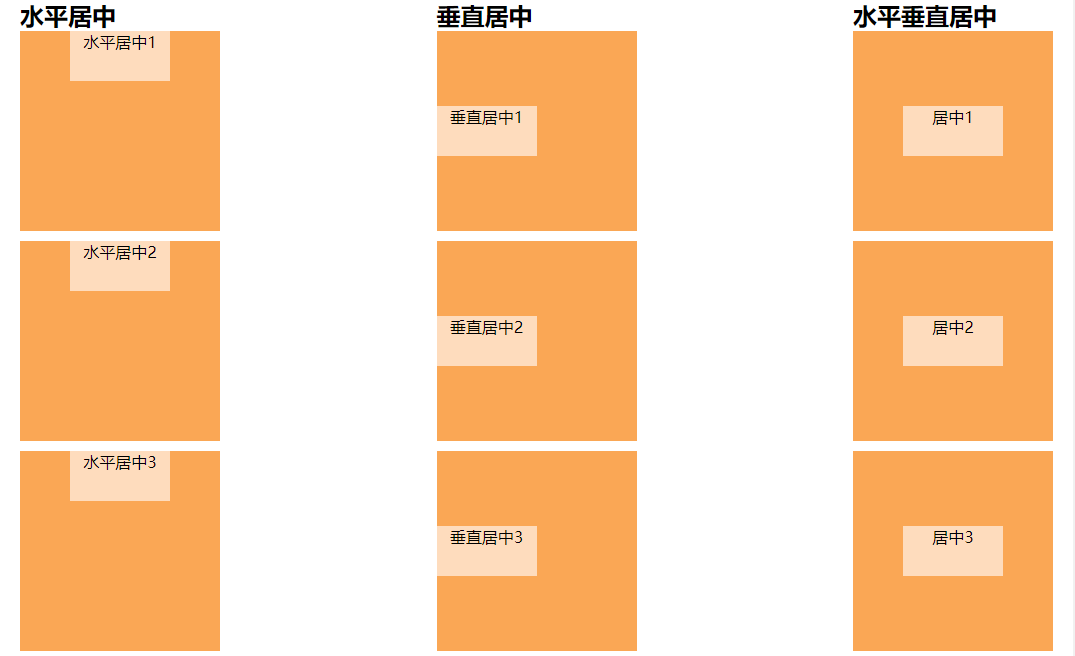
<ul>

    <li>

      <h2>水平居中</h2>

      <div>

          <p class="center-line-inline">水平居中1</p>  <!-- 块级元素:text-align:center -->

      </div>

      <div>

          <p class="center-line-inblock">水平居中2</p>  <!-- 块级元素:margin:0 auto -->

      </div>

      <div class="center-line-flex">

          <p>水平居中3</p> <!-- 弹性盒模型 justify-content: center;-->

      </div>

    </li>

    <li>

      <h2>垂直居中</h2>

      <div class="center-row">

          <p class="center-row-inline">垂直居中1</p> <!-- vertical-align:该属性定义行内元素的基线相对于该元素所在行的基线的垂直对齐(大白话就是相对于同一行元素来说),所以使用此属性布局垂直居中,需要设置父级元素属性为表格属性 -->

      </div>

      <div class="center-row-position">

          <p>垂直居中2</p>  <!-- 通过定位计算,需要知道子元素的高度 -->

      </div>

      <div class="center-row-flex">

          <p>垂直居中3</p>  <!-- 弹性盒模型 align-items: center; -->

      </div>

    </li>

    <li>

      <h2>水平垂直居中</h2>

      <div class="center-all">

          <p>居中1</p>    <!-- vertical-align结合align-center-->

      </div>

      <div class="center-all-position">

          <p>居中2</p>    <!-- 通过定位计算,需要知道子元素的宽高-->

      </div>

      <div class="center-all-flex">

          <p>居中3</p>    <!-- 通过弹性盒模型-->

      </div>

    </li>

  </ul>
二、多列布局(两列/三列布局、圣杯布局)
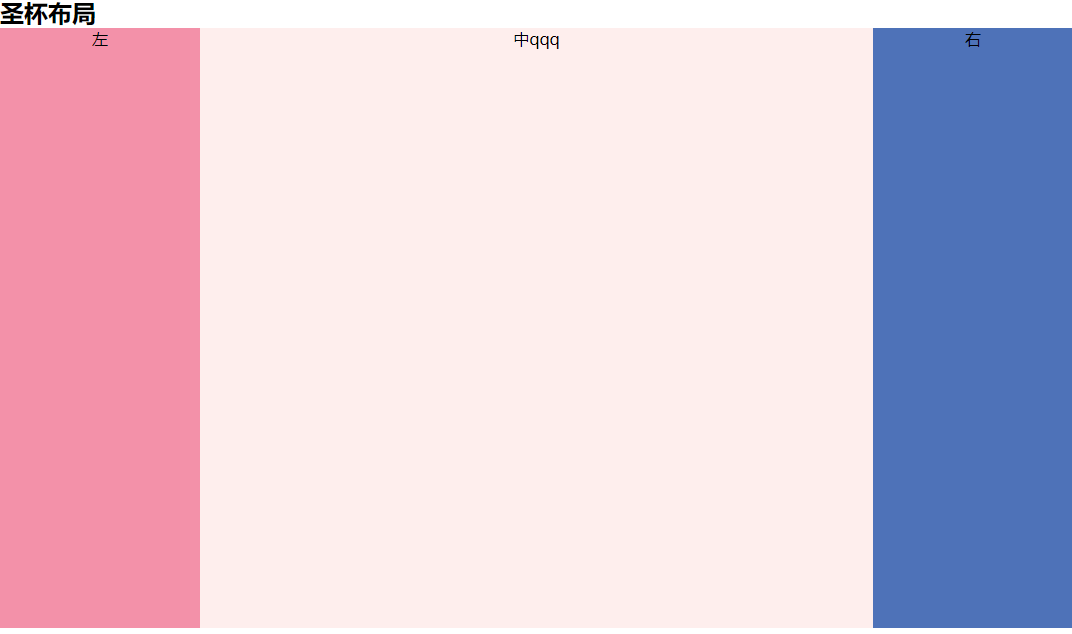
<h1>多列布局</h1>

  <h2>圣杯布局</h2> <!--  (左右固定中间自适应)(中间栏要在浏览器中优先渲染) -->

  <div class="grail-box"> <!--  通过绝对定位 -->

      <p class="center">中qqq</p>

      <p class="left">左</p>

      <p class="right">右</p>

  </div>

  <div class="grail-box-fl"> <!--  通过浮动 -->

      <p class="left">左</p>

      <p class="center">中</p>

      <p class="right">右</p>

  </div>
三、全屏布局(等分布局、等高布局、全屏布局)
css中的左右垂直居中的问题,可兼容各种版本浏览器的写法的更多相关文章
- CSS中设置DIV垂直居中的N种方法 兼容IE浏览器
在说到这个问题的时候,也许有人会问CSS中不是有vertical-align属性来设置垂直居中的吗?即使是某些浏览器不支持我只需做少许的CSS Hack技术就可以啊!所以在这里我还要啰嗦两句,CSS中 ...
- CSS中设置div垂直居中
在说到这个问题的时候,也许有人会问CSS中不是有vertical-align属性来设置垂直居中的吗?即使是某些浏览器不支持我只需做少许的CSS Hack技术就可以啊!所以在这里我还要啰嗦两句,CSS中 ...
- css中元素水平垂直居中4种方法介绍
table-cell轻松设置文本图片水平垂直居中 让一个元素垂直居中的思路:把这个元素的容器设置为table-cell,也就是具有表格单元格的特性,再使用vertical-align(这个属性对blo ...
- CSS中图片水平垂直居中方法小结
写页面时难免会遇到水平垂直居中的问题,总结一下最近使用的方法. 一.使用垂直居中和水平居中 <div id="div1"> <img src="img/ ...
- 在CSS中水平居中和垂直居中:完整的指南
这篇文章将会按照如下思路展开: 一.水平居中 1. 行内元素水平居中 2. block元素水平居中 3. 多个块级元素水平居中 二.垂直居中 1. 行内元素水平居中 2. block元素水平居中 3. ...
- CSS中元素水平居中和垂直居中的方法
#CSS中水平居中和垂直居中的方法 一. 水平居中 1.行内元素(文本,图片等) 如果被设置元素为文本.图片等行内元素时,可以通过给父元素设置` text-align:center;` 来实现 2.定 ...
- css中的1px并不总等于设备的1px(高分辨率不等 低分辨等)
在css中我们一般使用px作为单位,在桌面浏览器中css的1个像素往往都是对应着电脑屏幕的1个物理像素,这可能会造成我们的一个错觉,那就是css中的像素就是设备的物理像素.但实际情况却并非如此,css ...
- CSS中强大的EM
(转)作者:dearjohn ,发布于2012-7-31 http://www.uml.org.cn/html/201207311.asp 使用CSS也好久了,但一直都是在使用“px”来设置Web元素 ...
- css中的em 简单教程 -- 转
先附上原作的地址: https://www.w3cplus.com/css/px-to-em 习惯性的复制一遍~~~~ -------------------------------我是分界线---- ...
随机推荐
- 详解C++右值引用
C++0x标准出来很长时间了,引入了很多牛逼的特性[1].其中一个便是右值引用,Thomas Becker的文章[2]很全面的介绍了这个特性,读后有如醍醐灌顶,翻译在此以便深入理解. 目录 概述 mo ...
- 对于Android NDK编译器ARM和Thumb模式的理解
编译NDK项目时,编译器无法识别arm汇编,设置LOCAL_ARM_MODE := arm后问题解决, NDK文档上对LOCAL_ARM_MODE的说明如下: LOCAL_ARM_MODE By de ...
- ubuntu Qt5 librealsense opencv
08:11:47: 进程"/usr/bin/make"正常退出. 08:11:47: 配置没有改变, 跳过 qmake 步骤. 08:11:47: 正在启动 "/usr/ ...
- word 标题序号
设置标题的序号. 1>设置二级标题的序号 步骤一: 步骤二: 步骤三: 步骤四: 2>设置三级标题的序号 程序员的基础教程:菜鸟程序员
- 【小前端】float属性
要求 需要float的元素,必须指定一个width宽度 没了 然后就可以指定 float:right 什么的了
- [C++] the pointer array & the array's pointer
int *p[4]------p是一个指针数组,每一个指向一个int型的int (*q)[4]---------q是一个指针,指向int[4]的数组 --> type: int(*)[4] vo ...
- CF 1097D Makoto and a Blackboard
算是记一下昨天晚上都想了些什么 官方题解 点我 简单题意 给定两个正整数$n$和$k$,定义一步操作为把当前的数字$n$等概率地变成$n$的任何一个约数,求$k$步操作后的期望数字,模$1e9 + ...
- Python爬虫实战三之实现山东大学无线网络掉线自动重连
综述 最近山大软件园校区QLSC_STU无线网掉线掉的厉害,连上之后平均十分钟左右掉线一次,很是让人心烦,还能不能愉快地上自习了?能忍吗?反正我是不能忍了,嗯,自己动手,丰衣足食!写个程序解决掉它! ...
- [C#] IEnumerable vs IQueryable
这篇博客将介绍IEnumerable和IQueryable之间的区别. 1. IQueryable是继承自IEnumerable接口的.所以IEnumerable能做的,IQueryable都能做. ...
- Web测试实践-任务进度-Day03
小组成员 华同学.郭同学.覃同学.刘同学.穆同学.沈同学 任务进度 在经过任务分配阶段后,大家都投入到了各自的任务中,以下是大家今天任务的进度情况汇总. 华同学 & 刘同学(任务1) 1.再对 ...