
Setup FTP server on Ubuntu 14.04
Setup FTP server on Ubuntu 14.04
Step 1 » Update repositories .krizna@leela:~$ sudo apt-get update
Step 2 » Install VsFTPD package using the below command.krizna@leela:~$ sudo apt-get install vsftpd
Step 3 » After installation open /etc/vsftpd.conf file and make changes as follows.
Uncomment the below lines (line no:29 and 33).write_enable=YES» Uncomment the below line (line no: 120 ) to prevent access to the other folders outside the Home directory.
local_umask=022chroot_local_user=YESand add the following line at the end.allow_writeable_chroot=YES» Add the following lines to enable passive mode.pasv_enable=Yes
pasv_min_port=40000
pasv_max_port=40100
Step 4 » Restart vsftpd service using the below command.krizna@leela:~$ sudo service vsftpd restart
Step 5 » Now ftp server will listen on port 21. Create user with the below command.Use/usr/sbin/nologin shell to prevent access to the bash shell for the ftp users .krizna@leela:~$ sudo useradd -m john -s /usr/sbin/nologin
krizna@leela:~$ sudo passwd john
Step 6 » Allow login access for nologin shell . Open /etc/shells and add the following line at the end./usr/sbin/nologin
Now try to connect this ftp server with the username on port 21 using winscp or filezillaclient and make sure that user cannot access the other folders outside the home directory.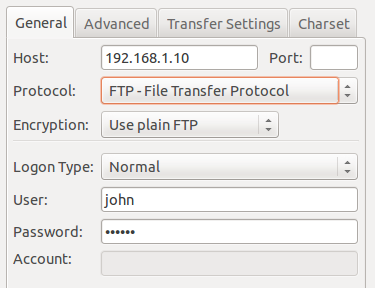
Please note using ftp on port 21 is a big security risk . it’s highly recommended to use SFTP. Please continue for SFTP configuration
Secure FTP ( SFTP )
SFTP is called as “Secure FTP” which generally use SSH File Transfer Protocol . so we need openssh-server package installed , Issue the below command if it’s not already installed.krizna@leela:~$ sudo apt-get install openssh-server
Step 7 » Create a new group ftpaccess for FTP users.krizna@leela:~$ sudo groupadd ftpaccess
Step 8 » Now make changes in this /etc/ssh/sshd_config file.
» Find and comment the below lineSubsystem sftp /usr/lib/openssh/sftp-serverand Add these lines at the end of the file.Subsystem sftp internal-sftp
Match group ftpaccess
ChrootDirectory %h
X11Forwarding no
AllowTcpForwarding no
ForceCommand internal-sftp
Step 9 » Restart sshd service.krizna@leela:~$ sudo service ssh restart
Step 10 » The below steps must be followed while creating Users for sftp access.
Create user john with ftpaccess group and /usr/bin/nologin shell.krizna@leela:~$ sudo useradd -m john -g ftpaccess -s /usr/sbin/nologinChange ownership for the home directory.
krizna@leela:~$ sudo passwd johnkrizna@leela:~$ sudo chown root /home/johnCreate a folder inside home directory for writing and change ownership of that folder.krizna@leela:~$ sudo mkdir /home/john/www
krizna@leela:~$ sudo chown john:ftpaccess /home/john/www
Now try to connect server using SFTP ( port : 22 ) and makesure Users can upload files to wwwdirectory and cannot access other folders outside home directory.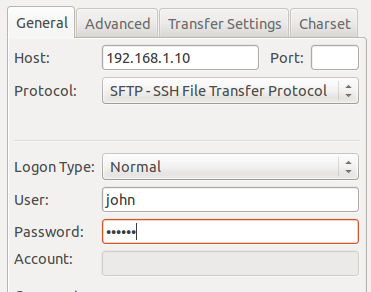
If you want use both FTP and SFTP together, please perform above steps ( Step 10 ) while creating users . For existing users, move them to ftpaccess group and create folder structure and ownership changes as below.krizna@leela:~$ sudo usermod john -g ftpaccess -s /usr/sbin/nologin
krizna@leela:~$ sudo chown root /home/john
krizna@leela:~$ sudo mkdir /home/john/www
krizna@leela:~$ sudo chown john:ftpaccess /home/john/www
Now john can able to upload files to www folder using FTP as well as SFTP.
Setup FTP server on Ubuntu 14.04的更多相关文章
- How to set up an FTP server on Ubuntu 14.04
How to set up an FTP server on Ubuntu 14.04 Setting up a fully-functional and highly secure FTP serv ...
- How To Set Up an OpenVPN Server on Ubuntu 14.04
Prerequisites The only prerequisite is having a Ubuntu 14.04 Droplet established and running. You wi ...
- Ubuntu Server(Ubuntu 14.04 LTS 64位)安装libgdiplus2.10.9出错问题记录
首先下载libgdiplus2.10.9安装包 wget http://download.mono-project.com/sources/libgdiplus/libgdiplus-2.10.9.t ...
- [原创]安全系列之端口敲门服务(Port Knocking for Ubuntu 14.04 Server)
Port Knocking for Ubuntu 14.04 Server OS:ubuntu 14.04 server 原理简单分析: 端口敲门服务,即:knockd服务.该服务通过动态的添加ipt ...
- ubuntu 14.04 安装git server
版本信息 ubuntu : 14.04.1 git version 1.9.1 perl v5.10.1 ssh OpenSSH_6.6.1p1 本次安装的git server使用gitolite实现 ...
- Ubuntu 14.04 server ssh 远程服务遇到的一点事儿
ubuntu server 14.04 root@ubuntu:/# lsb_release -aNo LSB modules are available.Distributor ID: Ubuntu ...
- 翻译:在Ubuntu 14.04上安装FTP服务器的方法
说明: 1.原文地址:http://www.krizna.com/ubuntu/setup-ftp-server-on-ubuntu-14-04-vsftpd/ 2.今天要做一个网络日志的迁移程序,搬 ...
- Ubuntu 14.04 配置vsftpd实现FTP服务器 - 通过FTP连接AWS
测试主机:亚马逊AWS EC2 系统:Ubuntu 14.04 想用AWS来做服务器玩,结果发现其不能像简单使用阿里云服务器那样用ftp连接,反正也不熟悉ftp服务器搭建,那就乘这个机会学习一下如何利 ...
- Ubuntu 14.04 配置FTP
配置Ubuntu 14.04的FTP服务,通过Windows远程访问Ubuntu 14.04的同时,可以实现windows和Ubuntu之间的文件交换传输.在多用户环境下,每一个用户都可以通过自己的帐 ...
随机推荐
- EasyPusher RTSP推流/EasyRTMP RTMP推流Android安卓摄像头视频偏暗的问题解决方案
本文转自EasyDarwin团队成员JOHN的博客:http://blog.csdn.net/jyt0551/article/details/75730226 在我们测试EasyPusher/Easy ...
- iOS开发之利用IJKPlayer+nginx+rtmp搭建直播的推流和拉流
最近项目中想实现直播的功能,所以研究了一段时间的直播功能,当然也是在别人的基础上不断的学习实现的,所以记录一下,希望对大家有所帮助. 直播拉流功能: 这里使用了开源的IJKPlayer第三框架,ijk ...
- iOS 11 Xcode 开发包SDK
一不小心,手机又升级了,哎
- 关于鼠标不敏感导致自以为ubuntu很怪的问题
你要相信自己拥有的确实是一个垃圾鼠标,而不要以为复制和粘贴有感觉控制不住.
- OK335xS 系统启动配置解析
OK335xS 系统启动配置解析 一.参考文档: AM335x ARM® Cortex™-A8 Microprocessors (MPUs) Technical Reference Manual 二. ...
- Python3 移动文件——合集
文件/文件夹操作头文件 import os import shutil 参考 Python3批量移动指定文件到指定文件夹
- Codeforces 15E Triangles 【组合计数】
Codeforces 15E Triangles Last summer Peter was at his granny's in the country, when a wolf attacked ...
- HDU2896 病毒侵袭 【AC自动机】
HDU2896 病毒侵袭 Problem Description 当太阳的光辉逐渐被月亮遮蔽,世界失去了光明,大地迎来最黑暗的时刻....在这样的时刻,人们却异常兴奋--我们能在有生之年看到500年一 ...
- Buy Tickets(线段树单点更新,逆向思维)
题目大意:有n个的排队,每一个人都有一个val来对应,每一个后来人都会插入当前队伍的某一个位置pos.要求把队伍最后的状态输出. 个人心得:哈哈,用链表写了下,果不其然超时了,后面转念一想要用静态数组 ...
- DispatcherServlet的初始化(二)
DispatcherServlet的初始化在springmvc的启动中有讲过,这一篇在上一篇的基础上接着讲.DispatcherServlet作为springmvc的前端控制器,还需要初始化其他的模块 ...