
Python的输入输出
一:Python2.x版本下的输入输出
Python2.x 下的输入
 1)raw_input
格式:result = raw_input("提示信息")
功能:1)会等待用户输入内容,直到用户按下Enter 2)会将用户输入的内容当做"字符串",传递给接收的变量

2)input   格式:result = input("提示信息")
功能: 1):会等待用户输入内容,直到用户按下Enter
    2):会将用户输入的内容当做"代码" 进行处理!

    可以理解为input = raw_input +  eval
 content = raw_input("Please input content:: ")

 print(type(content))

 print(content)
输出结果:
Please input content:: 1+1
<type 'str'>
1+1
当我们输出abcd时候
Please input content:: abcd
<type 'str'>
abcd
此时可以看出不论我们输入什么内容,raw_input都当做字符串来处理了。但是Python2.x版本下的input却不是如此
 result = input("Please input content:: ")

 print(type(result))

 print(result)
输出结果:
Please input content:: 1+1
<type 'int'>
2
而当我们输出内容为abc的时候会发生什么呢?
Please input content:: abc
Traceback (most recent call last):
File "G:/PythonProject/DemoTest01/css/001/PythonInput.py", line 23, in <module>
result = input("Please input content:: ")
File "<string>", line 1, in <module>
NameError: name 'abc' is not defined
此时报错了,说abc是未定义的。此时可以看出Python2.x版本下的input输入是把用户输入的内容当做"代码一样"来处理
 # content = "1+1"

 content = raw_input("Please input content:: ")

 result = eval(content)

 print type(result)

 print(result)
输出结果为:
Please input content:: 1+1
<type 'int'>
2
此时可以看出raw_input + eval()函数可以实现input的效果
Python2.x 下的输出
Python2.x print语句 print xxx
 # Python2.x版本

 # 输出一个值

 print 123

 # 输出一个变量

 num = 20

 print num

 # 输出多个变量

 num1 = 21

 print num, num1

 # 格式化输出

 name = "Lucy"

 age = 17

 # 例如我想输出 我的名字叫xxx,年龄xxx

 print "我的名字叫", name, ",年龄", age

 print "我的名字叫%s,年龄%d" % (name, age)

 print "我的名字叫{0},年龄{1}".format(name, age)

 # 输出到文件当中

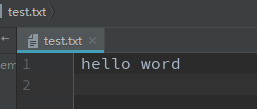
 f = open("test.txt", "w")

 print >> f, "hello word"

 # 输出不自动换行

 print ""

 print ""

 print ""

 # 以上会自动换行,下面的不会自动换行

 print "",

 print "",

 print ""

 # 输出的各个数据,使用分隔符进行分割

 print "a", "-", "b", "-", "c"

 print "-".join(["a", "b", "c"])
输出结果为:
123
20
20 21
我的名字叫 Lucy ,年龄 17
我的名字叫Lucy,年龄17
我的名字叫Lucy,年龄17
1
2
3
1 2 3
a - b - c
a-b-c
而且test.txt确实写入了数据
Python3.x版本下的输入
Python3.x版本的
input 相当于Python2.x版本中的raw_input

如果想要在Python3.x版本中实现类似于Python2.x中的input功能,可以使用eval()函数实现
 result = input("Please input content:: ")

 print(type(result))

 print(result)
输出结果为::
Please input content:: 1+1
<class 'str'>
1+1
当我们输入内容为abc的时候
Please input content:: abc
<class 'str'>
abc
 result = input("Please input content:: ")

 ret = eval(result)

 print(type(ret))

 print(ret)
输出结果为::
Please input content:: 1+1
<class 'int'>
2
Python3.x版本下的输出
Python3.x     print函数    print(values,sep,end,file,flush)
values:需要输出的值  多个值,使用","分割
sep:分割符,多个值被输出以后,值与值之间,会添加指定的分隔符
end: 1):输出完毕以后,以指定的字符结束    2):默认是换行'\n'
file:表示输出的目标。默认是标准的输出(控制台) 还可以是一个可以写入的文件句柄
flush:表示立即输出的意思  值为Bool类型
 # 导入文件

 import sys

 from time import sleep

 # Python3.x版本下

 # 输出一个值

 print(123)

 # 输出一个变量

 num = 6

 print(num)

 # 输出多个变量

 num1 = 8

 print(num, num1)

 # 格式化输出

 name = "cxq"

 age = 27

 # 输出:我的名字是xxx,年龄xxx

 print("我的名字是%s,年龄%d"%(name, age))

 print("我的名字是{0},年龄{1}".format(name, age))

 # 输出到文件当中

 f = open("test.txt", "w")

 print("what are you doing?", file=f)

 # 标准输出

 print("how are you", file=sys.stdout)

 # 输出不换行

 print("abc", end="")

 print("efg", end="\n")

 # 输出各个数据,使用分隔符分割

 print("", "", "", sep="-")
输出结果为::
123
6
6 8
我的名字是cxq,年龄27
我的名字是cxq,年龄27
how are you
abcefg
1-2-3
关于flush参数的说明::
 # flush 参数的说明

 print("hello world", end="")

 # 如果我在这里停留5秒钟,会发现hello world不会立即刷新出来到控制台上面,(其实是在缓冲区里面),而是5秒之后才打印出来

 sleep(5)
 # 但是如果我换一种方法以后,hello world就会立马刷新到控制台上面

 print("hello world", end="\n")

 print("hello world\n", end="")

 sleep(5)
或者使用
 # flush 就是刷新缓冲区数据,立即输出的作用

 print("hello world", end="", flush=True)

 sleep(5)
这三种方式都会是缓冲区里面的内容立马刷新出来
Python的输入输出的更多相关文章
- python之--输入输出
python之输出 用print加上字符串,就可以向屏幕上输出指定的文字.用代码实现如下: >>> print "i love baby!" i love bab ...
- numpy常用功能总结、python格式化输入输出
#coding:utf-8 #author:徐卜灵 ##################### #由于在各大公司笔试的时候总是会遇到一些格式化输入输出数据,今天就来总结一下. #结合numpy来处理数 ...
- Python的输入输出的应用
输入输出主要掌握print()和input()两个函数的应用. #print函数用于控制台输出 print('I love Python.','So I want to learn it.','I b ...
- python学习-输入输出
Python的输入和输出非常方便,下面详细记录一下 任何计算机程序都是为了执行一个特定的任务,有了输入,用户才能告诉计算机程序所需的信息,有了输出,程序运行后才能告诉用户任务的结果.输入是Input, ...
- Python字符串输入输出简述
字符串输入 Python用到的输入一般有两种方式,input() 和 raw_input() ,区别是,前者只能输入数字,后者输入的是字符串,使用如下: In [226]: help(input) H ...
- 我的Python学习之路 Python的输入输出与基本数据类型
*** python中的变量不需要事先声明再使用,而可以直接来一个变量名,后面一个赋值,接着一个数据值,如 hw = "hello python",相当于Python能智能的根据你 ...
- Python python的输入输出
#-*- coding:utf-8 -*- #屏蔽中文乱码方案一(官方推荐) #这个语句必须顶行写 #屏蔽中文乱码方案二(不建议使用) '''#coding=utf-8 ''' #input(),输入 ...
- Python 处理输入输出
sys.stdin.read() 用于接收标准输入,也就是让用户通过键盘进行输入sys.stdout.write() 用于打印标准输出,也就是把输入的数据输出到屏幕sys.stderr.write() ...
- Python学习-14.Python的输入输出(三)
在Python中写文件也是得先打开文件的. file=open(r'E:\temp\test.txt','a') file.write('append to file') file.close() 第 ...
- Python学习-13.Python的输入输出(二)
在Python中,读取文件使用open函数 file=open(r'E:\temp\test.txt','r') var = file.read() print(var) file.close() 第 ...
随机推荐
- C的文件操作函数
fgetc(FILE *)意为从文件指针stream指向的文件中读取一个字符,读取一个字节后,光标位置后移一个字节fputc(char,FILE*)将字符ch写到文件指针fp所指向的文件的当前写指针的 ...
- java中如何高效的判断数组中是否包含某个元素---
package zaLearnpackage; import org.apache.commons.lang3.ArrayUtils; import java.util.Arrays; import ...
- 【EF】EntityFramework 更新数据库字段的三种方法
实体类 public class TestDbContext : DbContext { public DbSet<Test> Tests { get; set; } public Tes ...
- altium常用快捷键记录
选中一个网络的点和线ctrl+h: 翻转器件的层 鼠标拖动+L: 镜像器件 鼠标拖动+x: 查看单一层shift+s: 隐藏/查看某些器件ctrl+d:
- mysql系列:加深对脏读、脏写、可重复读、幻读的理解
关于相关术语的专业解释,请自行百度了解,本文皆本人自己结合参考书和自己的理解所做的阐述,如有不严谨之处,还请多多指教. 事务有四种基本特性,叫ACID,它们分别是: Atomicity-原子性,Con ...
- 利用 netsh 给 mysql 开启多端口监听
利用 netsh 给 mysql 开启多端口监听 标题党,实际并不是真的多端口监听,只是端口转发而已. 由于某种特殊原因需要 mysql 服务器多个端口监听. mysql 服务器本身是不支持的,但可以 ...
- socket编程 —— 非阻塞socket (转)---例子已上传至文件中
在上一篇文章 <socket编程——一个简单的例子> http://blog.csdn.net/wind19/archive/2011/01/21/6156339.aspx 中写了一个简单 ...
- ECMALL模板解析机制.MVC架构分析及文件目录说明.二次开发指南手册(转)
ECMALL模板解析语法与机制 http://www.nowamagic.net/architecture/archt_TemplateSyntaxAndAnalysis.php ECMALL模块开发 ...
- ecmall挂件开发实例二(转)
下述例子讲述了快速增加挂件的方法,但对系统中的代码未做更改,基本参照image_ad挂件的方法. 第 一步: 了解首页模板结构 首页文 件结构 include hearder.html 包含的头文件, ...
- 相关TableLayoutPanel分页显示自定义控件
public partial class AcrossGrid : UserControl { /// <summary> /// 一页数量 /// </summary> ; ...