
CentOS压力测试工具Tsung安装和图形报表生成Tsung安装配置
Tsung 是一个压力测试工具,可以测试包括HTTP, WebDAV, PostgreSQL, MySQL, LDAP, and XMPP/Jabber等服务器。针对 HTTP 测试,Tsung 支持
HTTP 1.0/1.1 ,包含一个代理模式的会话记录、支持 GET、POST 和 PUT 以及 DELETE 方法,支持 Cookie 和基本的WWW 认证,同时还支持 SSL。
tsung的工作原理
(1) Tsung的每一个虚拟用户就是一个erlang的轻量进程。这点和loadrunner有很大的区别。
(2) 虚拟用户完成session后就消失。
(3) 大量的虚拟用户(erlang轻量进程)建立在erlangVM上。
(4) 一台测试机可以启多个erlangVM,目前按照1个cpu启动1个erlangVM。
一、安装环境:
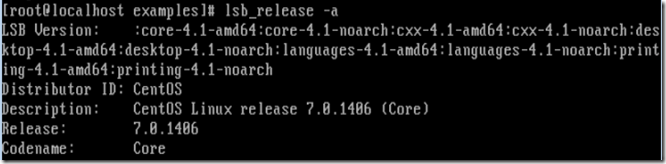
在安装之前确保安装了以下工具:
- yum install gcc -y
- yum install perl -y
- yum install unixODBC
- yum install unixODBC-devel
下载并安装erlang
 # wget http://www.erlang.org/download/otp_src_R14B04.tar.gz

 # tar -zxvf otp_src_R14B04.tar.gz

 # cd otp_src_R14B04

 # ./configure --prefix=/usr/local/erlang
 #检查erlang目录是否存在,不存在则mkdir.

 # make

 # make install
注意:如果出现 "configure: error: No curses library functions found "错误,尝试安装:
yum install -y ncurses-devel
下载并安装Tsung
# wget http://tsung.erlang-projects.org/dist/tsung-1.6.0.tar.gz

# tar -zxvf tsung-1.6..tar.gz

# cd tsung-1.6.

# ./configure --prefix=/usr/local/tsung --with-erlang=/usr/local/erlang

# make

# make install
下载并安装perl Template,用于生成报告模版
# wget http://cpan.org/modules/by-module/Template/Template-Toolkit-2.26.tar.gz

# tar -zxvf Template-Toolkit-2.26.tar.gz

# cd Template-Toolkit-2.26

# perl Makefile.PL

#perl出错不可用时先执行:

$ yum install perl-ExtUtils-MakeMaker  安装Perl.

# make

# make test

# make install
注意:如果出现 以下提示:
[root@localhost Template-Toolkit-2.24]# perl Makefile.PL

Can't locate ExtUtils/MakeMaker.pm in @INC (@INC contains: ./lib /usr/local/lib64/perl5 /usr/local/share/perl5 /usr/lib64/perl5/vendor_perl /usr/share/perl5/vendor_perl /usr/lib64/perl5 /usr/share/perl5 .) at Makefile.PL line 11.

BEGIN failed--compilation aborted at Makefile.PL line .
解决办法:
yum install perl-ExtUtils-CBuilder perl-ExtUtils-MakeMaker
下载并安装gnuplot,用于聊天生成
# yum install -y gnuplot gd libpng zlib
二、安装后设置环境变量
安装成后添加erlang、tsung环境变量
[root@localhost local]# vim /etc/profile

export PATH=$PATH:$JAVA_HOME/bin:/usr/local/erlang/bin:/usr/local/tsung/bin:/usr/local/nginx/sbin:$PATH(修改自己实际变量)

:wq保存,退出

[root@localhost local]# source /etc/profile

不报错则成功

[root@localhost local]# tsung -v

Tsung version 1.4.

[root@localhost local]# erl -v

Erlang R14B04 (erts-5.8.) [source] [-bit] [rq:] [async-threads:] [hipe] [kernel-poll:false]

Eshell V5.8.5 (abort with ^G)

>
三、检查是否安装成功
[root@localhost local]# perl -v      命令查看显示perl 当前版本信息。

[root@localhostlocal]# gnuplot       命令查看gnuplot 的安装版本

[root@localhost local]# erl          命令查看erlang的安装版本

Erlang R14B04 (erts-5.8.) [source] [-bit] [rq:] [async-threads:] [hipe] [kernel-poll:false]

Eshell V5.8.5 (abort with ^G)

[root@localhost local]# tsung -v 命令查看tsung 的安装版本

Tsung version 1.4.
四、使用并生成报表
1、在root文件夹下新建.tsung目录,用于存放log和xml配置,测试配置文件可参考/usr/local/tsung/share/doc/tsung/examples/目录下配置
[root@localhost local]#mkdir ~/.tsung

[root@localhost local]#cp /usr/local/tsung/share/doc/tsung/examples/http_simple.xml ~/.tsung/tsung.xml
2、运行,默认执行脚本~/.tsung/tsung.xml配置
[root@localhost local]# tsung start

Starting Tsung

"Log directory is: /root/.tsung/log/20150311-0536"
3、进入Log目录下可以看到生成的报表信息
[root@localhost -]# cd /root/.tsung/log/-

[root@localhost -]# ls -a

.  ..  match.log  tsung_controller@localhost.log  tsung.log  tsung.xml
4、进入需要生成图形报表的Log目录,如/root/.tsung/log/20150311-0536
[root@localhost -]# /usr/local/tsung/lib/tsung/bin/tsung_stats.pl

creating subdirectory data

creating subdirectory gnuplot_scripts

creating subdirectory images

No data for Session

No data for Perfs

No data for Transactions

No data for Match

No data for Event

No data for Async

No data for Size

size_rcv is equal to  !

size_sent is equal to  !

[root@localhost -]# ls

data  gnuplot.log  gnuplot_scripts  graph.html  images  match.log  report.html  tsung_controller@localhost.log  tsung.log  tsung.xml
5、将report.html拖到windows系统中,直接打开即可查看。
五、更多命令:
Usage: tsung <options> start|stop|debug|status

Options:

    -f <file>     set configuration file (default is ~/.tsung/tsung.xml)

                   (use - for standard input)

    -l <logdir>   set log directory (default is ~/.tsung/log/YYYYMMDD-HHMM/)

    -i <id>       set controller id (default is empty)

    -r <command>  set remote connector (default is ssh)

    -s            enable erlang smp on client nodes

    -p <max>      set maximum erlang processes per vm (default is )

    -m <file>     write monitoring output on this file (default is tsung.log)

                   (use - for standard output)

    -F            use long names (FQDN) for erlang nodes

    -w            warmup delay (default is  sec)

    -v            print version information and exit

    -            use IPv6 for Tsung internal communications

    -h            display this help and exit
CentOS压力测试工具Tsung安装和图形报表生成Tsung安装配置的更多相关文章
- apache压力测试工具的apache bench和JMeter的安装
Apache压力测试工具的安装 1,apache bench的安装 apache bench工具集成在http的软件包内,可以直接安装apache就可以. 当有些时候,我们不需要用到所有的软件包,我 ...
- Linux压力测试工具Tsung安装、使用和图形报表生成
简介 Tsung 是一个压力测试工具,可以测试包括HTTP, WebDAV, PostgreSQL, MySQL, LDAP, and XMPP/Jabber等服务器.针对 HTTP 测试,Tsung ...
- 压力测试工具ab及centos下单独安装方法 nginx和tomcat静态资源的性能测试
Apache安装包中自带的压力测试工具Apache Benchmark(简称ab)简单易用,这里采用ab作为压国测试工具. 独立安装: ab运行需要信赖apr-util包: # yum install ...
- [转] CentOS单独安装Apache Benchmark压力测试工具的办法
Apache安装包中自带的压力测试工具 Apache Benchmark(简称ab) 简单易用,这里就采用 ab作为压力测试工具了. 1.独立安装 ab运行需要依赖apr-util包,安装命令为: 1 ...
- 压力测试工具ab及centos下单独安装方法
压力测试工具Ab简介 Apache安装包中自带的压力测试工具 Apache Benchmark(简称ab) 简单易用,这里就采用 ab作为压力测试工具了. 1.独立安装 ab运行需要依赖apr-uti ...
- 转: Tsung:开源多协议分布式负载&压力测试工具
Main features High Performance: the load can be distributed on a cluster of client machines Multi-pr ...
- 一个好用的压力测试工具tsung
一个好用的压力测试工具tsung 前段时间一直在忙各种事情,快三周没弄过引擎了,今天有点时间,正好之前写的服务器引擎也到了收尾测试的阶段,于是就研究了下怎么测试服务器压力. ...
- 压力测试工具tsung
tsung是用erlang开发的一款简单易用的压力测试工具,可以生成成千上万的用户模拟对服务器进行访问.目前对tsung的理解也仅限于会简单的应用,其内部结构没有深入研究过. 1.安装 tsung是用 ...
- python的web压力测试工具-pylot安装使用
http://blog.csdn.net/chenggong2dm/article/details/10106517 pylot是python编写的一款web压力测试工具.使用比较简单.而且测试结果相 ...
随机推荐
- Ubuntu 14.04 配置安卓5.1编译环境
Ubuntu 14.04版本 电脑cpu必须是64位 硬盘分配大约100G的空间 1.ubuntu中更新源 $ sudo apt-get update 2.android5.1需要安装openjdk- ...
- Mysql中的GROUP_CONCAT使用
SELECT res.ITRId Id, res.ITRResourceName ResourceName, res.ITRSupplierName SupplierName, res.ITRDept ...
- Windows运行命令集锦
开始菜单中的“运行”(Win+R)是通向程序的快捷途径,输入特定的命令后,即可快速的打开Windows的大部分程序,熟练的运用它,将给我们的操作带来诸多便捷. winver 检查Windows版本 ...
- Fiddler过滤操作
Fidller,不做过多的简介,其中的过滤操作肯定是绕不过去的.直接上图.
- input标签存在的兼容问题?
当input标签在type为text时,在Firefox和Safari中的默认高度为22像素(包括上下边框)宽度为146像素(包括左右边框),而在IE中的默认高度为24像素,而宽度却和Firefox和 ...
- ODPS基础
遇到一个项目需求是统计128张分库分表的数据表记录的最大id,通过单表查询计算非常费时,也无法应对分表数更多的情况,因此考虑到通过odps进行任务发布和运算 在云端 http://d2.alibaba ...
- U盘启动安装WIN7(包含资源的地址)
这几天在装win7和linux双系统,整理一下 第一种是在正常的windows下,网上下了镜像之后,装虚拟光驱,然后双击安装,按步骤执行即可,这个没什么好讲的. 第二种是windows坏掉,或者木有系 ...
- DataSnap 连接池
二. DataSnap连接池 连接池 http://docwiki.embarcadero.com/Libraries/XE8/en/Datasnap.DSSession.TDSSessionMana ...
- 【306】通过ArcPy编写ArcToolbox
参考:使用 Python 创建工具 参考:在 Python 工具箱中定义参数数据类型 基本步骤如下: (1)创建一个 Python 脚本,并保存成 .py 文件. (2)创建一个自定义工具箱(.tbx ...
- Unmarshaller解析xml文件
参考地址:http://linbulu.iteye.com/blog/2295919 Girl.xml文件 <?xml version="1.0" encoding=&quo ...