
laravel 修改重置密码模板
Laravel里我们可以使用php artisan make:auth来生成一套默认的登陆注册重置邮箱的Authentication System,但是如何修改系统发送给用户的重置密码邮件的样式和内容呢?
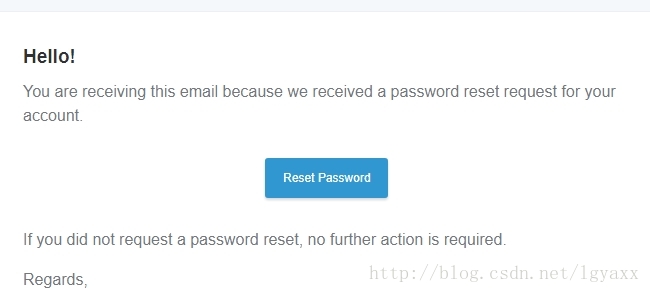
虽然默认的邮件样式很美观,但是不免全部是英文,我们至少可以添加进一些中文提示,方便用户查看。
首先我们需要明确的是:
- Laravel 默认的 Notification Class是ResetPassword,位于
Illumintate/Auth/Notifications中。- 我们不应该直接修改位于ResetPassword里的代码,因为如果更新package可能导致覆盖。
我们先来看一下ResetPassword:
<?php

namespace Illuminate\Auth\Notifications;

use Illuminate\Notifications\Notification;

use Illuminate\Notifications\Messages\MailMessage;

class ResetPassword extends Notification

{

    public $token;

    public function __construct($token)

    {

        $this->token = $token;

    }

    public function via($notifiable)

    {

        return ['mail'];

    }

    public function toMail($notifiable)

    {

        return (new MailMessage)

            ->line('You are receiving this email because we received a password reset request for your account')

            ->action('Reset Password', url(config('app.url').route('password.reset', $this->token, false)))

            ->line('If you did not request a password reset, no further action is required.');

    }

}- 1
- 2
- 3
- 4
- 5
- 6
- 7
- 8
- 9
- 10
- 11
- 12
- 13
- 14
- 15
- 16
- 17
- 18
- 19
- 20
- 21
- 22
- 23
- 24
- 25
- 26
- 27
- 28
可以看到,ResetPassword拓展了Notification这个类,所以我们需要做的就是新建一个Notification类,来完成我们自定义邮件内容的修改:
$ php artisan make:notification ResetPasswordNotification- 1
输入以上artisan命令,我们会发现在App\Notifications文件夹下多出了一个名为ResetPasswordNotification.php的文件,打开它,我们可以看到其内容跟ResetPassword很相似。我们只需要修改关键的代码即可:
<?php

namespace Illuminate\Auth\Notifications;

use Illuminate\Bus\Queueable;

use Illuminate\Notifications\Notification;

use Illuminate\Contracts\Queue\ShouldQueue;

use Illuminate\Notifications\Messages\MailMessage;

class ResetPasswordNotification extends Notification

{

    use Queueable;

    public $token;

    public function __construct($token)

    {

        $this->token = $token;

    }

    public function via($notifiable)

    {

        return ['mail'];

    }

    public function toMail($notifiable)

    {

        return (new MailMessage)

            ->line('这里可以放我们需要添加的内容')

            ->line('You are receiving this email because we received a password reset request for your account')

            ->action('Reset Password', url(config('app.url').route('password.reset', $this->token, false)))

            ->line('这里可以放我们需要添加的内容')

            ->line('If you did not request a password reset, no further action is required.');

    }

}- 1
- 2
- 3
- 4
- 5
- 6
- 7
- 8
- 9
- 10
- 11
- 12
- 13
- 14
- 15
- 16
- 17
- 18
- 19
- 20
- 21
- 22
- 23
- 24
- 25
- 26
- 27
- 28
- 29
- 30
- 31
- 32
- 33
- 34
可以看到,我们可以以line作为单位来添加我们需要的信息。
那么信息内容搞定了,怎么样修改邮件样式呢?首先我们需要能够修改信息的Blade模板:
$ php artisan vendor:publish --tag=laravel-notifications- 1
以上命令把包裹里的模板发布到resources/views/vendor/notifications文件夹中,这样我们只需要修改resources/views/vendor/notifications/email.blade.php就可以了。
最后一步,我们在User模型里添加:
/**

 * Send the password reset notification.

 *

 * @param  string  $token

 * @return void

 */

public function sendPasswordResetNotification($token)

{

    $this->notify(new ResetPasswordNotification($token));

}- 1
- 2
- 3
- 4
- 5
- 6
- 7
- 8
- 9
- 10
这样,我们就可以使用ResetPasswordNotification来进行邮件的发送了。
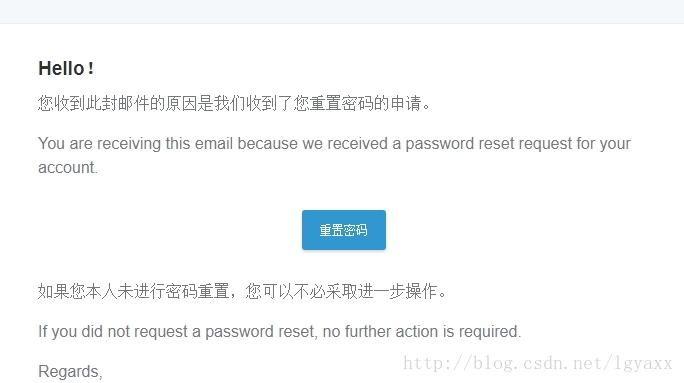
模板的修改很简单,这里就不赘述了,完成后,我们可以看到新的邮件内容:
laravel 修改重置密码模板的更多相关文章
- Laravel实现找回密码及密码重置的例子
https://mp.weixin.qq.com/s/PO5f5OJPt5FzUZr-7Xz8-g Laravel实现找回密码及密码重置功能在php实现与在这里实现会有什么区别呢,下面我们来看看Lar ...
- django用户认证系统——重置密码7
当用户不小心忘记了密码时,网站需要提供让用户找回账户密码的功能.在示例项目中,我们将发送一封含有重置用户密码链接的邮件到用户注册时的邮箱,用户点击收到的链接就可以重置他的密码,下面是具体做法. 发送邮 ...
- [ Laravel 5.6 文档 ] 安全系列 —— 重置密码
http://laravelacademy.org/post/8929.html 简介 想要快速实现该功能?只需要在新安装的 Laravel 应用下运行 php artisan make:auth(如 ...
- MVC5 网站开发之六 管理员 2、添加、删除、重置密码、修改密码、列表浏览
目录 奔跑吧,代码小哥! MVC5网站开发之一 总体概述 MVC5 网站开发之二 创建项目 MVC5 网站开发之三 数据存储层功能实现 MVC5 网站开发之四 业务逻辑层的架构和基本功能 MVC5 网 ...
- ubuntu系统下mysql重置密码和修改密码操作
一.忘记密码后想重置密码 在介绍修改密码之前,先介绍一个文件/etc/mysql/debian.cnf.其主要内容如下图: 里面有一个debian-sys-maint用户,这个用户只有Debian或U ...
- weblogic11g 修改密码和重置密码【原】
修改密码 知道密码的情况下,可参考该链接 http://www.cnblogs.com/may12138/p/6022946.html 或 http://www.cnblogs.com/lsdb/p/ ...
- ASP.NET Core MVC 打造一个简单的图书馆管理系统 (修正版)(三)密码修改以及密码重置
前言: 本系列文章主要为我之前所学知识的一次微小的实践,以我学校图书馆管理系统为雏形所作. 本系列文章主要参考资料: 微软文档:https://docs.microsoft.com/zh-cn/as ...
- laravel修改用户模块的密码验证
做项目的时候,用户认证几乎是必不可少的,如果我们的项目由于一些原因不得不使用 users 之外的用户表进行认证,那么就需要多做一点工作来完成这个功能. 现在假设我们只需要修改登录用户的表,表名和表结构 ...
- phpcms修改重置后台账号和密码
通过Phpmyadmin等工具,打开数据库中找到v9_admin表: 把password字段值改为: 0b817b72c5e28b61b32ab813fd1ebd7f再把encrypt字段值改为: 3 ...
随机推荐
- mybatis的一级缓存和二级缓存(1)
1.mybatis一级缓存,sqlSesion级别的缓存,一级缓存默认一直开启的,sqlSession级别的一个Map,把查询的数据放到一个Map中,以后需要相同的数据,直接从Map中去取 与数据库一 ...
- valgrind的memchk和callgrind
一.安装valgrind 安装valgrind,正常的三部曲configure/make/make install就行. 二.memchk使用 1.执行命令 [root@10g-host4 tools ...
- Linux Shell参数替换
Linux Shell参数替换 2013-06-03 10:01 by 轩脉刃, 1816 阅读, 0 评论, 收藏, 编辑 Bash中的符号的作用是参数替换,将参数名替换为参数所代表的值.对于 来说 ...
- HTML5 history API,创造更好的浏览体验
HTML5 history API有什么用呢? 从Ajax翻页的问题说起 请想象你正在看一个视频下面的评论,在翻到十几页的时候,你发现一个写得稍长,但非常有趣的评论.正当你想要停下滚轮细看的时候,手残 ...
- DataTemplate——数据模板的一个典型例子
下面是ListBox.ItemTemplate(数据模板)应用的“典型”例子,概述如下两点: 1:Grid部分,用来“规划” 数据 显示的 布局(即数据长成什么样子) 2:给DataTempl ...
- http协议code码
301 永久重定向 类似手机呼叫转移 302 临时重定向 类似手机呼叫转移 403 forbidden ngnix怎么解决? 含义:表示你在请求一个资源文件,但是nginx不允许你查看. 原因1:访问 ...
- day5-os、sys模块
一.概述 开发运维相关支撑系统现今已成为Devops下的一大热门领域,Python在这方面也有着自己独到的优势.这类场景以及其他一些场景下,需要调用一些操作系统的接口,这就涉及到今天要讲述的OS模块和 ...
- mysqldump 使用方法
1.仅导出数据: mysqldump -t -uroot -proot pgenius RES_COM_PFT_FCST>RES_COM_PFT_FCST.sql 2.有条的导出数据: mysq ...
- rsync的配置文件模板及简单介绍,命令及参数
必须知道推送有一个限速参数.--bwlimit=100 工作总必须要加.有三种模式,1.本地的模拟cp命令,在一个服务器2.远程的两个服务器之间,模拟scp3.以socket进程监听的方式启动rsyn ...
- 优化JDBC封装
可重用性较强的JDBC封装 以下为代码,注释中写了主要思想 主类 com.util.JDBCUtil.java package com.util; import java.lang.reflect.F ...