
Tags Used In OpenERP 7.0
In OpenERP 7.0. the form view of each object has been redesigned so that the object the user is working on resembles a real document. So, now when a user is creating an invoice, the document which appears on his screen actually looks like a hard copy invoice, a sales order will be similar to a sales order print out and so on. Likewise changes have been brought into the xml file. Html as well as css have been included for designing the forms . Some of the attributes and tags are mentioned below.
Header tag and status bar:
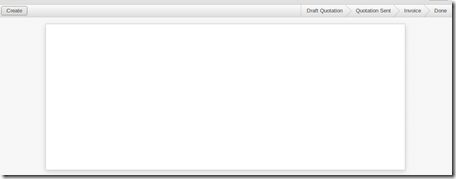
All the buttons appear on the left side of the form and the status bar should appear on the right side of the form. And this has to be in the header tag as shown below...
<header>

<button name="create_marklist" string="Create" type="object"/>

<field name="state" widget="statusbar"

  statusbar_visible="draft,sent,invoiced,done"

  statusbar_colors='{"draft":"red","done":"blue"}'/>

</header>

some new attributes have been added into the status bar . statusbar_visible shows which all states to be visible to the user . To show the current status of the order statusbar_colors have been used . Here when the status turns to invoice_except the colour changes to red.
Sheet tag:
sheet tag gives your form a real document like appearance.
<sheet><sheet/>
Heading tags:
The <h1> to <h6> tags are used to define HTML headings.
<h1> defines the most important heading. <h6> defines the least important heading.
So if you need to provide headings you can use the corresponding heading tag.
<h1>

  <label string="Heading " />

</h1>

Label tag:
Label tag is used to give labels to the corresponding fields. The for attribute tells which field should be provided with a label. An example is shown below
<label for="name"/>

<field name="name"/>

You can also use string attribute so that the label will change to what is given in the string.
<label String="Name"/>

<field name="name"/>

Placeholder attribute:
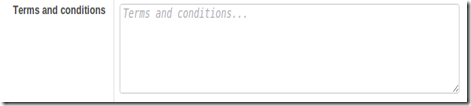
If you need a default string to appear in your text field you can provide an attribute placeholder as shown below.
<field name="note" placeholder="Terms and conditions..."/>
Editable attribute:
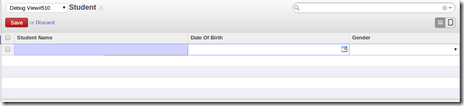
To edit from the tree view itself use the editable attribute in your tree view. This makes the edition simpler.
<tree string="Student Details" editable="bottom">
Help:
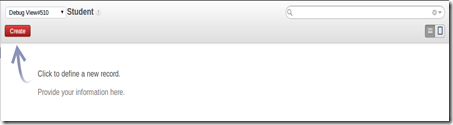
Initialy in the tree view there will not be any records . To direct the users to the next step a field called help is provided . You could provide the information using the paragraph tag <p></p> .
<field name="help" type="html">

    <p class="oe_view_nocontent_create">

             Click to define a new record.

    </p><p>

            provide your information here.

    </p>

</field>
Color and fonts attributes:
You can also provide attributes in the tree string.
<tree string=”Sales order” fonts=”bold:message_unread==True”

 colors="grey:state=='cancel';blue:state in (‘waiting_date’,'manual');red:state in ('invoice','shipping')">

    <field name="order_number"/>

    <field name="date_order"/>

    <field name="partner_id"/>

    <field name="user_id"/>

    <field name="amount"/>

    <field name="state"/>

</tree>
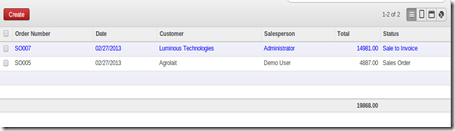
In the above example the font of the records appears bold and the colour of the records changes according to the states. If the state of the record is in manual state then the colour of the record in the tree view will be blue in colour as mentioned in the example.
html fields:
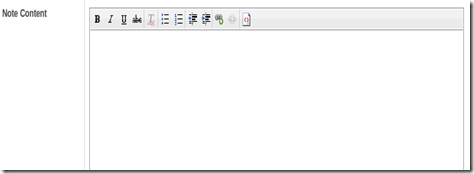
OpenERP 7.0 provides html fields too. An Example is shown below.
'memo': fields.html('Note Content'), (This is written in the python file)

<field name="memo" widget="html" class="oe_memo" editor_height="450px" />
By providing this u can bring the editor in to your form
Attachments:
To attach files from your computer you need to use the ‘ir.attachment’ model. The field should have a many2many relation to the ‘ir.attachment’ model. An example is shown below.
'attachment_ids': fields.many2many('ir.attachment', 'message','message_id', 'attachment_id', 'Attachments'),

<field name="attachment_ids"  widget="many2many_binary"/>

Widgets available in OpenERP 7.0

widget="one2many_list" : Same as one2many in Openerp 7.0

widget="many2many_tags" : same as many2many in Openerp 7.0

widget="monetary": You will be able to see  a dolar symbol after the value

widget="mail_followers" : To add Followers

widget="mail_thread" : Mail to groups

widget="statusbar" : shows the status bar

widget="progressbar" : Shows a progress bar

widget="html" : shows the html fields

widget="url" : Shows the url as a link

widget=”integer” : Only integer values will be saved  in the fields

widget="many2many_kanban" :An add button appears and  you will be able to see the tree view of the corresponding model.
Tags Used In OpenERP 7.0的更多相关文章
- JavaScript ,Css and Jquery In OpenERP 7.0
From: http://openerpbay.blogspot.jp/2013/02/javascript-css-and-jquery-in-openerp-70.html Hi fellows, ...
- 【转】CentOS 6.3 X64自动安装OpenERP 7.0脚本
原文地址:OpenERP 7.0安装与配置 #!/bin/bash -e # Modified script from Carlos E. Fonseca Zorrilla # . Add the t ...
- openerp 7.0邮件接收中文附件乱码问题解决办法
openerp 7.0邮件接收中文附件乱码问题解决办法: 修改文件\addons\mail\mail_thread.py #1064 line插入代码: h=email.Header.Header(n ...
- 在Ubuntu Server上源码安装OpenERP 8.0,并配置wsgi和nginx运行环境
原文: How to install OpenERP 8.0 Alpha on a fresh Debian / Ubuntu server. OpenERP的安装,可以有多种方式,通过添加源,到 h ...
- OpenERP 7.0 中文报表PDF乱码(WindowsXP)
OpenERP默认安装输出的PDF中文报表都是一些方块: 此问题可以通过oecn_base_fonts模块解决: 更多关于oecn_base_fonts的信息请参考: 1. OpenERPv7.0 中 ...
- Openerp 7.0 附件存储位置
我们知道对OpenERP中的每个内部对象(比如:业务伙伴,采购订单,销售订单,发货单,等等)我们都可以添加任意的附件,如图片,文档,视频等.那么这些附件在OpenERP内部是如何管理的呢? 默认情况下 ...
- 在Ubuntu 12 服务器上源码安装 OpenERP 8.0
原文:http://vivianyw.blog.163.com/blog/static/134547422201421112349489/ 1. 安装SSH: sudo apt-get install ...
- openerp 6.0.2库存业务
一.复式库存(Double-Entry Stock Management)和库存移动(Stock Move) OpenERP的库存管理采取了独特的复式库存(Double-Entry Stock Man ...
- openerp 7.0邮件多用户发送失败问题 解决方法
方法一(推荐): 修改代码/usr/lib/pymodules/python2.7/openerp/addons/base/ir/ir_mail_server.py #425 line: #mail_ ...
随机推荐
- 参加SAP VT项目有感
凡事预则立,不预则废. 没有接到录取电话还是有些悲伤的,虽然知道最终被录取的可能性不大,但是之前还是抱着一丝期望的,毕竟是自己的处女面,就这么以失败的结果结束了. 从最开始的投递简历,到后来的电话面试 ...
- mysql 存储过程案列一个。
-- 设置分隔符 DELIMITER // /*初始化*/ DROP PROCEDURE IF EXISTS useCursor // /*建立 存储过程 create */ CREATE PROCE ...
- Redis-环境搭建、创建服务、搭建主从复制-Windows版本
一.搭建Redis环境 1.链接:http://pan.baidu.com/s/1boKAzzL 密码:sh2r 2.不赘述:执行redis-server.再执行redis-cli即可.redis环境 ...
- MAC 版本 phpstorm 配置 theme
mac 版本的配置文件在:./Library/Preferences/WebIde70/colors/ 将文件复制到这个目录中,然后phpStorm设置中,IDE设置->editor->f ...
- Visual SVN 企业版代码管理平台的建设
通常需要完整的SVN的代码管理平台系统的搭建,需要安装三个文件,Visual SVN server , TortoiseSVN, Visual SVN. Visual SVN server 企业版 ...
- java序列化 SerializeUtil
import java.io.ByteArrayInputStream; import java.io.ByteArrayOutputStream; import java.io.Closeable; ...
- arcengine帮助http://help.arcgis.com/en/sdk/10.0/arcobjects_net/conceptualhelp/index.html#/what_s_new_for_developers_at_10_/0001000002zp000000/
http://help.arcgis.com/en/sdk/10.0/arcobjects_net/conceptualhelp/index.html#/what_s_new_for_develope ...
- 基于 Node.js 的轻量「持续集成」工具 CIZE
CIZE 是什么? CIZE 是一个「持续集成」工具,希望能让开发人员更快捷的搭建一个完整.可靠.便捷的 CI 服务. 甚至可以像 Gulp 或 Grunt 一样,仅仅通过一个 cizefile.js ...
- 2016年终总结--一个Python程序猿的跨界之旅
时间过得真快.感觉15年年终总结刚写完,16年就结束了.看了blog,16年就写了可怜的8篇,对我来说16年还算顺风顺水. 真正可能出乎意料的是年底我离开了呆了2年半的龙图游戏,临时放弃了用了3年半的 ...
- ActiveMQ使用示例之Topic
非持久的Topic消息示例 对于非持久的Topic消息的发送基本跟前面发送队列信息是一样的,只是把创建Destination的地方,由创建队列替换成创建Topic,例如: Destination d ...