
fastdfs-client-java操作fastdfs
一、在https://github.com/happyfish100/fastdfs-client-java 下载客户端,解压后并执行ant命令,在E:\tools\libs\fastdfs\fastdfs-client-Java-master\src\build下会生成fastdfs_client.jar如图示
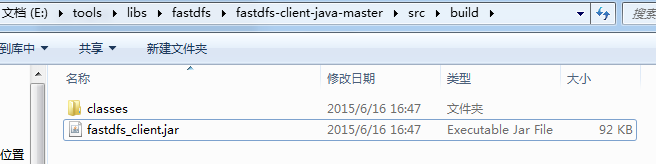
二、mvn安装fastdfs_client.jar,在cmd中执行命令
mvn install:install-file -DgroupId=org.csource -DartifactId=fastdfs-client-java -Dversion=5.0.4 -Dpackaging=jar -Dfile=D:\fastdfs_client.jar
三、在eclipse中新建maven项目fastdfs-demo,在pom.xml中加入依赖如下
|
1
2
3
4
5
6
7
8
9
10
11
12
13
14
15
16
17
18
19
20
21
22
23
24
25
26
27
28
29
30
31
32
33
34
35
36
37
38
|
<project xmlns="http://maven.apache.org/POM/4.0.0" xmlns:xsi="http://www.w3.org/2001/XMLSchema-instance" xsi:schemaLocation="http://maven.apache.org/POM/4.0.0 http://maven.apache.org/xsd/maven-4.0.0.xsd"> <modelVersion>4.0.0</modelVersion> <groupId>com.leech</groupId> <artifactId>fastdfs-demo</artifactId> <version>0.0.1-SNAPSHOT</version> <packaging>jar</packaging> <name>fastdfs-demo</name> <url>http://maven.apache.org</url> <properties> <project.build.sourceEncoding>UTF-8</project.build.sourceEncoding> </properties> <dependencies> <dependency> <groupId>junit</groupId> <artifactId>junit</artifactId> <version>4.11</version> <scope>test</scope> </dependency> <dependency> <groupId>org.csource</groupId> <artifactId>fastdfs-client-java</artifactId> <version>5.0.4</version> </dependency> <dependency> <groupId>commons-io</groupId> <artifactId>commons-io</artifactId> <version>2.4</version> </dependency> </dependencies></project> |
在src/main/resources中新建fdfs_client.conf文件,内容如下
connect_timeout = 2
network_timeout = 30
charset = UTF-8
http.tracker_http_port = 80
http.anti_steal_token = no
http.secret_key = FastDFS1234567890
tracker_server = 192.168.17.112:22122
#tracker_server = 192.168.0.119:22122
在src/main/java中创建TestFastDfs.java如下
|
1
2
3
4
5
6
7
8
9
10
11
12
13
14
15
16
17
18
19
20
21
22
23
24
25
26
27
28
29
30
31
32
33
34
35
36
37
38
39
40
41
42
43
44
45
46
47
48
49
50
51
52
53
54
55
56
57
58
59
60
61
62
63
64
65
66
67
68
69
70
71
72
73
74
75
76
77
78
79
80
81
82
83
84
85
86
87
88
89
90
91
92
93
94
95
96
97
98
99
100
101
102
103
104
105
106
107
108
109
110
111
112
113
114
115
116
117
118
119
120
121
122
123
124
125
126
127
128
129
130
131
132
133
134
135
136
137
138
139
140
141
142
143
|
package com.leech.fastdfs.demo;import java.io.FileNotFoundException;import java.io.FileOutputStream;import java.io.IOException;import java.util.UUID;import org.apache.commons.io.IOUtils;import org.csource.common.MyException;import org.csource.common.NameValuePair;import org.csource.fastdfs.ClientGlobal;import org.csource.fastdfs.FileInfo;import org.csource.fastdfs.StorageClient;import org.csource.fastdfs.StorageServer;import org.csource.fastdfs.TrackerClient;import org.csource.fastdfs.TrackerServer;import org.junit.After;import org.junit.Before;import org.junit.Test;public class TestFastDfs { public String conf_filename = "D:\\stsworkspace\\fastdfs-demo\\src\\main\\resources\\fdfs_client.conf"; //public String local_filename = "D:\\stsworkspace\\fastdfs-demo\\src\\main\\resources\\fdfs_client.conf"; public String local_filename = "D:\\stsworkspace\\fastdfs-demo\\src\\main\\resources\\sprites.png"; @Before public void setUp() throws Exception { } @After public void tearDown() throws Exception { } @Test public void testUpload() { try { ClientGlobal.init(conf_filename); TrackerClient tracker = new TrackerClient(); TrackerServer trackerServer = tracker.getConnection(); StorageServer storageServer = null; StorageClient storageClient = new StorageClient(trackerServer, storageServer); // NameValuePair nvp = new NameValuePair("age", "18"); NameValuePair nvp [] = new NameValuePair[]{ new NameValuePair("age", "18"), new NameValuePair("sex", "male") }; String fileIds[] = storageClient.upload_file(local_filename, "png", nvp); System.out.println(fileIds.length); System.out.println("组名:" + fileIds[0]); System.out.println("路径: " + fileIds[1]); } catch (FileNotFoundException e) { e.printStackTrace(); } catch (IOException e) { e.printStackTrace(); } catch (MyException e) { e.printStackTrace(); } } @Test public void testDownload() { try { ClientGlobal.init(conf_filename); TrackerClient tracker = new TrackerClient(); TrackerServer trackerServer = tracker.getConnection(); StorageServer storageServer = null; StorageClient storageClient = new StorageClient(trackerServer, storageServer); byte[] b = storageClient.download_file("group1", "M00/00/00/wKgRcFV_08OAK_KCAAAA5fm_sy874.conf"); System.out.println(b); IOUtils.write(b, new FileOutputStream("D:/"+UUID.randomUUID().toString()+".conf")); } catch (Exception e) { e.printStackTrace(); } } @Test public void testGetFileInfo(){ try { ClientGlobal.init(conf_filename); TrackerClient tracker = new TrackerClient(); TrackerServer trackerServer = tracker.getConnection(); StorageServer storageServer = null; StorageClient storageClient = new StorageClient(trackerServer, storageServer); FileInfo fi = storageClient.get_file_info("group1", "M00/00/00/wKgRcFV_08OAK_KCAAAA5fm_sy874.conf"); System.out.println(fi.getSourceIpAddr()); System.out.println(fi.getFileSize()); System.out.println(fi.getCreateTimestamp()); System.out.println(fi.getCrc32()); } catch (Exception e) { e.printStackTrace(); } } @Test public void testGetFileMate(){ try { ClientGlobal.init(conf_filename); TrackerClient tracker = new TrackerClient(); TrackerServer trackerServer = tracker.getConnection(); StorageServer storageServer = null; StorageClient storageClient = new StorageClient(trackerServer, storageServer); NameValuePair nvps [] = storageClient.get_metadata("group1", "M00/00/00/wKgRcFV_08OAK_KCAAAA5fm_sy874.conf"); for(NameValuePair nvp : nvps){ System.out.println(nvp.getName() + ":" + nvp.getValue()); } } catch (Exception e) { e.printStackTrace(); } } @Test public void testDelete(){ try { ClientGlobal.init(conf_filename); TrackerClient tracker = new TrackerClient(); TrackerServer trackerServer = tracker.getConnection(); StorageServer storageServer = null; StorageClient storageClient = new StorageClient(trackerServer, storageServer); int i = storageClient.delete_file("group1", "M00/00/00/wKgRcFV_08OAK_KCAAAA5fm_sy874.conf"); System.out.println( i==0 ? "删除成功" : "删除失败:"+i); } catch (Exception e) { e.printStackTrace(); } }} |
执行testUpload方法如下

注意:源码和maven仓库 下载地址:http://download.csdn.net/download/qingchunwuxian1993/9897535
fastdfs-client-java操作fastdfs的更多相关文章
- coding++:java操作 FastDFS(上传 | 下载 | 删除)
开发工具 IDEAL2017 Springboot 1.5.21.RELEASE --------------------------------------------------------- ...
- coding++: java 操作FastDFS(上传 | 下载 | 删除)
package cn.com.soundrecording.controller; import cn.com.soundrecording.utils.FastDFSClient;import co ...
- Java操作fastDFS
一.加入Maven依赖 <dependency> <groupId>org.csource</groupId> <artifactId>fastdfs- ...
- Java 客户端操作 FastDFS 实现文件上传下载替换删除
FastDFS 的作者余庆先生已经为我们开发好了 Java 对应的 SDK.这里需要解释一下:作者余庆并没有及时更新最新的 Java SDK 至 Maven 中央仓库,目前中央仓库最新版仍旧是 1.2 ...
- FastDFS.Client操作文件服务器
1.配置文件设置 <configSections> <section name="fastdfs" type="FastDFS.Client.Confi ...
- java连接Fastdfs图片服务器上传失败的解决方法
照着视频上做,但是却连接不了虚拟机linux上的图片服务器,估计是linux防火墙的问题(这个实在是神烦,前面有好几次连接不了都是因为linux防火墙),果不其然,关闭即可. Linux关闭防火墙的命 ...
- FastDFS之java客户端使用
为了方便应用程序的访问FastDFS,官网提供了fastdfs-client-java,以便更好的与应用程序结合使用. 下载fastdfs-client-java源码添加到项目工程里面,添加配置文件: ...
- 高可用高性能分布式文件系统FastDFS实践Java程序
在前篇 高可用高性能分布式文件系统FastDFS进阶keepalived+nginx对多tracker进行高可用热备 中已介绍搭建高可用的分布式文件系统架构. 那怎么在程序中调用,其实网上有很多栗子, ...
- FastDFS:Java客户都实现文件的上传、下载、修改、删除
客户端版本:fastdfs_client_v1.24.jar 配置文件 connect_timeout = 200 network_timeout = 3000 charset = UTF-8 htt ...
- 使用java调用fastDFS客户端进行静态资源文件上传
一.背景 上篇博客我介绍了FastDFS的概念.原理以及安装步骤,这篇文章我们来聊一聊如何在java中使用FastDFSClient进行静态资源的上传. 二.使用步骤 1.开发环境 spring+sp ...
随机推荐
- Python的内建比较函数cmp比较原理剖析-乾颐堂
cmp( x, y):比较2个对象,前者小于后者返回-1,相等则返回0,大于后者返回1. Python的cmp比较函数比较原理 Python的cmp函数可以比较同类型之间,或者不同数据类型之间.然后根 ...
- TCP、UDP、HTTP、SOCKET之间的区别与联系-乾颐堂CCIE
IP:网络层协议: TCP和UDP:传输层协议: HTTP:应用层协议: SOCKET:TCP/IP网络的API. TCP/IP代表传输控制协议/网际协议,指的是一系列协议. TCP和UDP使用IP协 ...
- 根据dateutil计算从前到现在过去多少时间
import datetime from dateutil import relativedelta while 1: birthday = input(">>>" ...
- Photo1
Story: 想象你是一个乡村的孩子,你有着健康的肤色,正在和家人一起坐在颠簸的马车上,赶着去城里买东西.正值夏日,黄昏的阳光晒在你的脸上,于是你的脸显得红扑扑的.路上满满的都是葱绿的草和参差不齐的树 ...
- [GO]并发实现聊天室服务器
package main import ( "net" "fmt" "strings" "time") type Cli ...
- UVa 12342 Tax Calculator (水题,纳税)
今天在uva看到一个水题,分享一下. 题意:制定纳税的总额,有几个要求,如果第一个180000,不纳,下一个300000,纳10%,再一个400000,纳15%,再一个300000,纳20%,以后的纳 ...
- 认证服务号Thinkphp微信支付
公众号配置 1.微信支付过程中需要获取用户的openid,所以,仍需填写 网页授权域名 2.微信支付授权目录 Thinkphp目录格式为www.xxx.cn/home/wxpay/ 这里目录不能填写 ...
- Java 理论与实践: 修复 Java 内存模型,第 2 部分(转载)
在 JSR 133 中 JMM 会有什么改变? 活跃了将近三年的 JSR 133,近期发布了关于如何修复 Java 内存模型(Java Memory Model, JMM)的公开建议.在本系列文章的 ...
- Delphi xe5 控件TIdhttp的用法post,get解决中文乱码问题
网络接口如下图: 浏览器演示如下:http://xxx.xxx.xxx.xxx/web/login!doLogin?data={"password":"yy123&quo ...
- [LeetCode 题解]: Remove Nth Node From End of List
Given a linked list, remove the nth node from the end of list and return its head. For example, Give ...