
k8s动态存储管理GlusterFS
1. 在node上安装Gluster客户端(Heketi要求GlusterFS集群至少有三个节点)

    删除master标签

    kubectl taint nodes --all node-role.kubernetes.io/master-

    kubectl describe node k8s查看taint是否为空

    查看kube-apiserver是否以特权模式运行:

    ps -ef | grep kube | grep allow

    给每个node打上标签:

    kubectl label node k8s storagenode=glusterfs

    kubectl label node k8s-node1 storagenode=glusterfs

    kubectl label node k8s-node2 storagenode=glusterfs

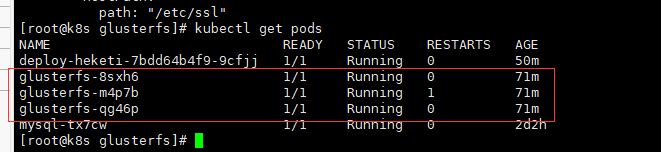
2. 确保每个node上运行一个GlusterFS管理服务

    cat glusterfs.yaml

kind: DaemonSet

apiVersion: extensions/v1beta1

metadata:

  name: glusterfs

  labels:

    glusterfs: daemonsett

  annotations:

    description: GlusterFS DaemonSet

    tags: glusterfs

spec:

  template:

    metadata:

      name: glusterfs

      labels:

        glusterfs-node: pod

    spec:

      nodeSelector:

        storagenode: glusterfs

      hostNetwork: true

      containers:

      - image: gluster/gluster-centos:latest

        name: glusterfs

        volumeMounts:

        - name: glusterfs-heketi

          mountPath: "/var/lib/heketi"

        - name: glusterfs-run

          mountPath: "/run"

        - name: glusterfs-lvm

          mountPath: "/run/lvm"

        - name: glusterfs-etc

          mountPath: "/etc/glusterfs"

        - name: glusterfs-logs

          mountPath: "/var/log/glusterfs"

        - name: glusterfs-config

          mountPath: "/var/lib/glusterd"

        - name: glusterfs-dev

          mountPath: "/dev"

        - name: glusterfs-misc

          mountPath: "/var/lib/misc/glusterfsd"

        - name: glusterfs-cgroup

          mountPath: "/sys/fs/cgroup"

          readOnly: true

        - name: glusterfs-ssl

          mountPath: "/etc/ssl"

          readOnly: true

        securityContext:

          capabilities: {}

          privileged: true

        readinessProbe:

          timeoutSeconds: 3

          initialDelaySeconds: 60

          exec:

            command:

            - "/bin/bash"

            - "-c"

            - systemctl status glusterd.service

        livenessProbe:

           timeoutSeconds: 3

           initialDelaySeconds: 60

           exec:

             command:

             - "/bin/bash"

             - "-c"

             - systemctl status glusterd.service

      volumes:

      - name: glusterfs-heketi

        hostPath:

          path: "/var/lib/heketi"

      - name: glusterfs-run

      - name: glusterfs-lvm

        hostPath:

          path: "/run/lvm"

      - name: glusterfs-etc

        hostPath:

          path: "/etc/glusterfs"

      - name: glusterfs-logs

        hostPath:

          path: "/var/log/glusterfs"

      - name: glusterfs-config

        hostPath:

          path: "/var/lib/glusterd"

      - name: glusterfs-dev

        hostPath:

          path: "/dev"

      - name: glusterfs-misc

        hostPath:

          path: "/var/lib/misc/glusterfsd"

      - name: glusterfs-cgroup

        hostPath:

          path: "/sys/fs/cgroup"

      - name: glusterfs-ssl

        hostPath:

          path: "/etc/ssl"

    kubectl create -f glusterfs.yaml && kubectl describe pods <pod_name>
2. 创建Heketi服务

    创建一个ServiceAccount对象

    cat heketi-service.yaml

apiVersion: v1

kind: ServiceAccount

metadata:

  name: heketi-service-account

    kubectl create -f heketi-service.yaml

    部署heketi服务:

    cat heketi-svc.yaml

---

kind: Deployment

apiVersion: extensions/v1beta1

metadata:

  name: deploy-heketi

  labels:

    glusterfs: heketi-deployment

    deploy-heketi: heket-deployment

  annotations:

    description: Defines how to deploy Heketi

spec:

  replicas: 1

  template:

    metadata:

      name: deploy-heketi

      labels:

        glusterfs: heketi-pod

        name: deploy-heketi

    spec:

      serviceAccountName: heketi-service-account

      containers:

      - image: heketi/heketi

        imagePullPolicy: IfNotPresent

        name: deploy-heketi

        env:

        - name: HEKETI_EXECUTOR

          value: kubernetes

        - name: HEKETI_FSTAB

          value: "/var/lib/heketi/fstab"

        - name: HEKETI_SNAPSHOT_LIMIT

          value: '14'

        - name: HEKETI_KUBE_GLUSTER_DAEMONSET

          value: "y"

        ports:

        - containerPort: 8080

        volumeMounts:

        - name: db

          mountPath: "/var/lib/heketi"

        readinessProbe:

          timeoutSeconds: 3

          initialDelaySeconds: 3

          httpGet:

            path: "/hello"

            port: 8080

        livenessProbe:

          timeoutSeconds: 3

          initialDelaySeconds: 30

          httpGet:

            path: "/hello"

            port: 8080

      volumes:

      - name: db

        hostPath:

            path: "/heketi-data"

---

kind: Service

apiVersion: v1

metadata:

  name: deploy-heketi

  labels:

    glusterfs: heketi-service

    deploy-heketi: support

  annotations:

    description: Exposes Heketi Service

spec:

  selector:

    name: deploy-heketi

  ports:

  - name: deploy-heketi

    port: 8080

    targetPort: 8080

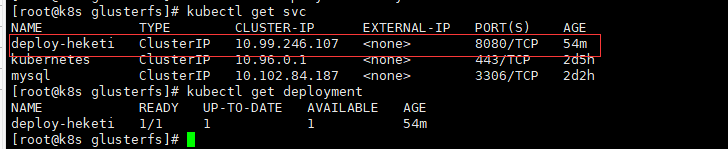
    kubectl create -f heketi-service.yaml && kubectl get svc && kubectl get deploument
   kubectl describe pod deploy-heketi查看运行在哪个node
3. Heketi安装

  yum install -y centos-release-gluster

  yum install -y heketi heketi-client

    cat topology.json

{

  "clusters": [

    {

      "nodes": [

        {

          "node": {

            "hostnames": {

              "manage": [

                "k8s"

              ],

              "storage": [

                "192.168.66.86"

              ]

            },

            "zone": 1

          },

          "devices": [

            "/dev/vdb"

          ]

        },

        {

          "node": {

            "hostnames": {

              "manage": [

                "k8s-node1"

              ],

              "storage": [

                "192.168.66.87"

              ]

            },

            "zone": 1

          },

          "devices": [

            "/dev/vdb"

          ]

        },

        {

          "node": {

            "hostnames": {

              "manage": [

                "k8s-node2"

              ],

              "storage": [

                "192.168.66.84"

              ]

            },

            "zone": 1

          },

          "devices": [

            "/dev/vdb"

          ]

        }

      ]

    }

  ]

}

    HEKETI_BOOTSTRAP_POD=$(kubectl get pods | grep deploy-heketi | awk '{print $1}')

    kubectl port-forward $HEKETI_BOOTSTRAP_POD 8080:8080 &后台启动

    export HEKETI_CLI_SERVER=http://localhost:8080

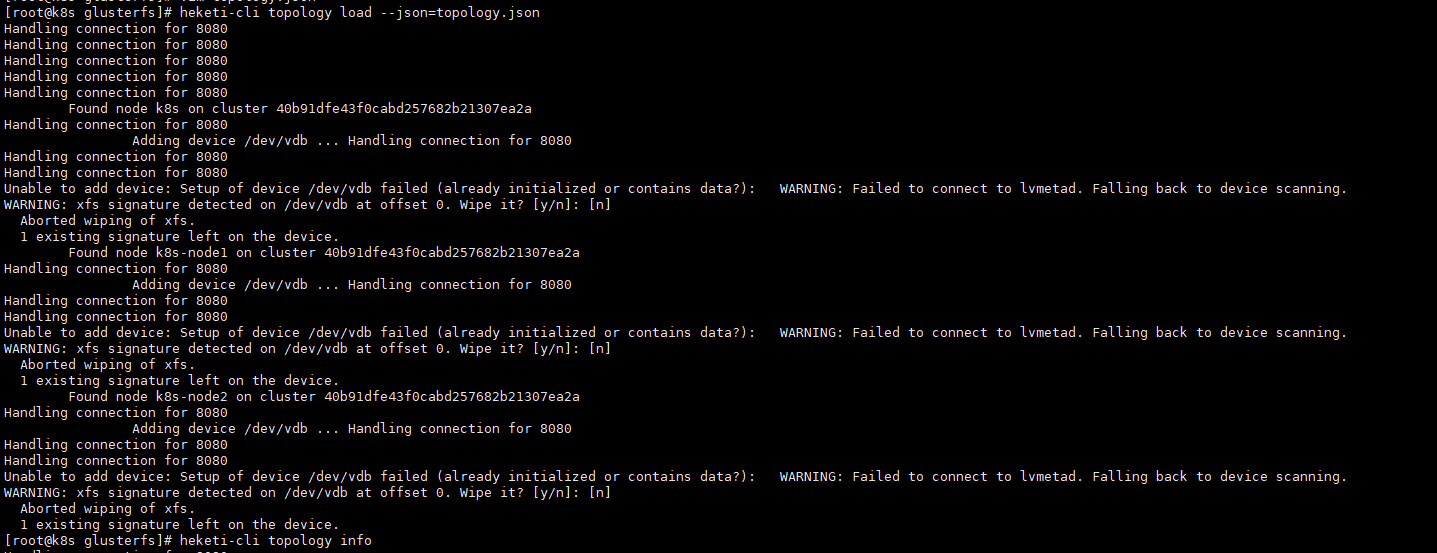
  heketi-cli topology load --json=topology.json

  heketi-cli topology info


4. 报错处理

    4.1:执行heketi-cli topology load --json=topology.json报错如下

    Creating cluster ... ID: 76576f2209ccd75a0ab1e44fc38fd393

	Allowing file volumes on cluster.

	Allowing block volumes on cluster.

	Creating node k8s ... Unable to create node: New Node doesn't have glusterd running

	Creating node k8s-node1 ... Unable to create node: New Node doesn't have glusterd running

	Creating node k8s-node2 ... Unable to create node: New Node doesn't have glusterd running

    解决:kubectl create clusterrole fao --verb=get,list,watch,create --resource=pods,pods/status,pods/exec如还报错

    kubectl create clusterrolebinding heketi-gluster-admin --clusterrole=edit --serviceaccount=default:heketi-service-account

    4.2:执行heketi-cli topology load --json=topology.json报错如下

    Found node k8s on cluster 88bed810717c204761b99c7ec1b71cd0

		Adding device /dev/vdb ... Unable to add device: Setup of device /dev/vdb failed (already initialized or contains data?):   Can't open /dev/vdb exclusively.  Mounted filesystem?

  Can't open /dev/vdb exclusively.  Mounted filesystem?

	Found node k8s-node1 on cluster 88bed810717c204761b99c7ec1b71cd0

		Adding device /dev/vdb ... Unable to add device: Setup of device /dev/vdb failed (already initialized or contains data?):   Can't open /dev/vdb exclusively.  Mounted filesystem?

  Can't open /dev/vdb exclusively.  Mounted filesystem?

	Found node k8s-node2 on cluster 88bed810717c204761b99c7ec1b71cd0

		Adding device /dev/vdb ... Unable to add device: Setup of device /dev/vdb failed (already initialized or contains data?):   Can't open /dev/vdb exclusively.  Mounted filesystem?

  Can't open /dev/vdb exclusively.  Mounted filesystem?

    解决:格式化节点磁盘:mkfs.xfs -f /dev/vdb(-f 强制)

    4.3:执行heketi-cli topology load --json=topology.json报错如下

    Found node k8s on cluster 88bed810717c204761b99c7ec1b71cd0

		Adding device /dev/vdb ... Unable to add device: Setup of device /dev/vdb failed (already initialized or contains data?): WARNING: xfs signature detected on /dev/vdb at offset 0. Wipe it? [y/n]: [n]

  Aborted wiping of xfs.

  1 existing signature left on the device.

	Found node k8s-node1 on cluster 88bed810717c204761b99c7ec1b71cd0

		Adding device /dev/vdb ... Unable to add device: Setup of device /dev/vdb failed (already initialized or contains data?): WARNING: xfs signature detected on /dev/vdb at offset 0. Wipe it? [y/n]: [n]

  Aborted wiping of xfs.

  1 existing signature left on the device.

	Found node k8s-node2 on cluster 88bed810717c204761b99c7ec1b71cd0

		Adding device /dev/vdb ... Unable to add device: Setup of device /dev/vdb failed (already initialized or contains data?): WARNING: xfs signature detected on /dev/vdb at offset 0. Wipe it? [y/n]: [n]

  Aborted wiping of xfs.

  1 existing signature left on the device

    解决:进入节点glusterfs容器执行pvcreate -ff --metadatasize=128M --dataalignment=256K /dev/vdb



5. 定义StorageClass

    netstat -anp | grep 8080查看resturl地址,resturl必须设置为API Server能访问Heketi服务的地址

    cat storageclass-gluster-heketi.yaml

apiVersion: storage.k8s.io/v1

kind: StorageClass

metadata:

  name: gluster-heketi

provisioner: kubernetes.io/glusterfs    #此参数必须设置kubernetes.io/glusterfs

parameters:

  resturl: "http://127.0.0.1:8080"

  restauthenabled: "false"

6. 定义PVC

    cat storageclass.yaml

kind: PersistentVolumeClaim

apiVersion: v1

metadata:

  name: pvc-gluster-heketi

spec:

  storageClassName: gluster-heketi

  accessModes:

    - ReadWriteOnce

  resources:

    requests:

      storage: 1Gi

    kubectl get pvc


7. Pod使用pvc存储

    cat pod-pvc.yaml

apiVersion: v1

kind: Pod

metadata:

  name: pod-use-pvc

spec:

  containers:

  - name: pod-pvc

    image: busybox

    command:

    - sleep

    - "3600"

    volumeMounts:

    - name: gluster-volume

      mountPath: "/mnt"

      readOnly: false

  volumes:

  - name: gluster-volume

    persistentVolumeClaim:

      claimName: pvc-gluster-heketi

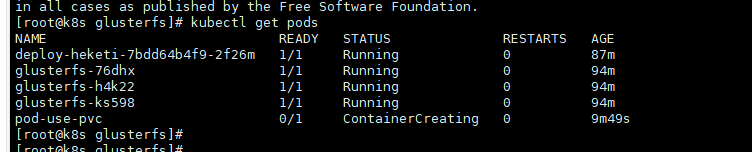
    报错如下:

    Warning  FailedMount  9m34s  kubelet, k8s-node2 ****: mount failed: mount failed: exit status 1

    在node2上查看日志:

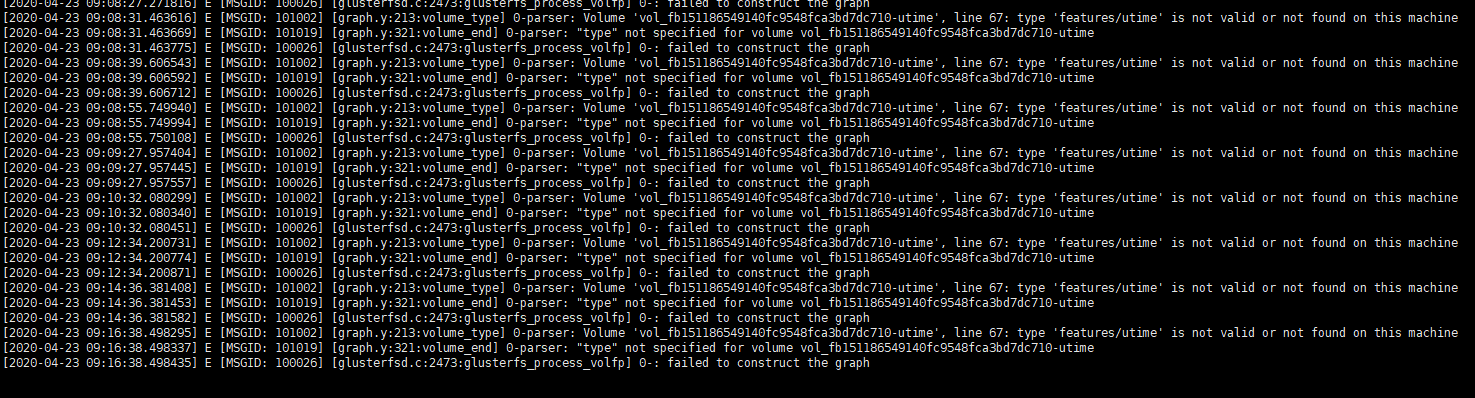
    tail -100f  /var/lib/kubelet/plugins/kubernetes.io/glusterfs/pvc-5ea820ba-8538-11ea-8750-5254000e327c/pod-use-pvc-glusterfs.log

    line 67: type 'features/utime' is not valid or not found on this machine

    解决:查看node时间,glusterfs和k8s_glusterfs容器的时间和glusterfs版本不对

    安装ntp,使用ntp ntp1.aliyun.com发现glusterfs容器时间一直同步了

    升级node glusterfs版本,升级前node版本为3.12.x,容器内版本为7.1

    yum install centos-release-gluster -y

    yum install glusterfs-client -y升级后版本为7.5


8. 创建文件验证是否成功

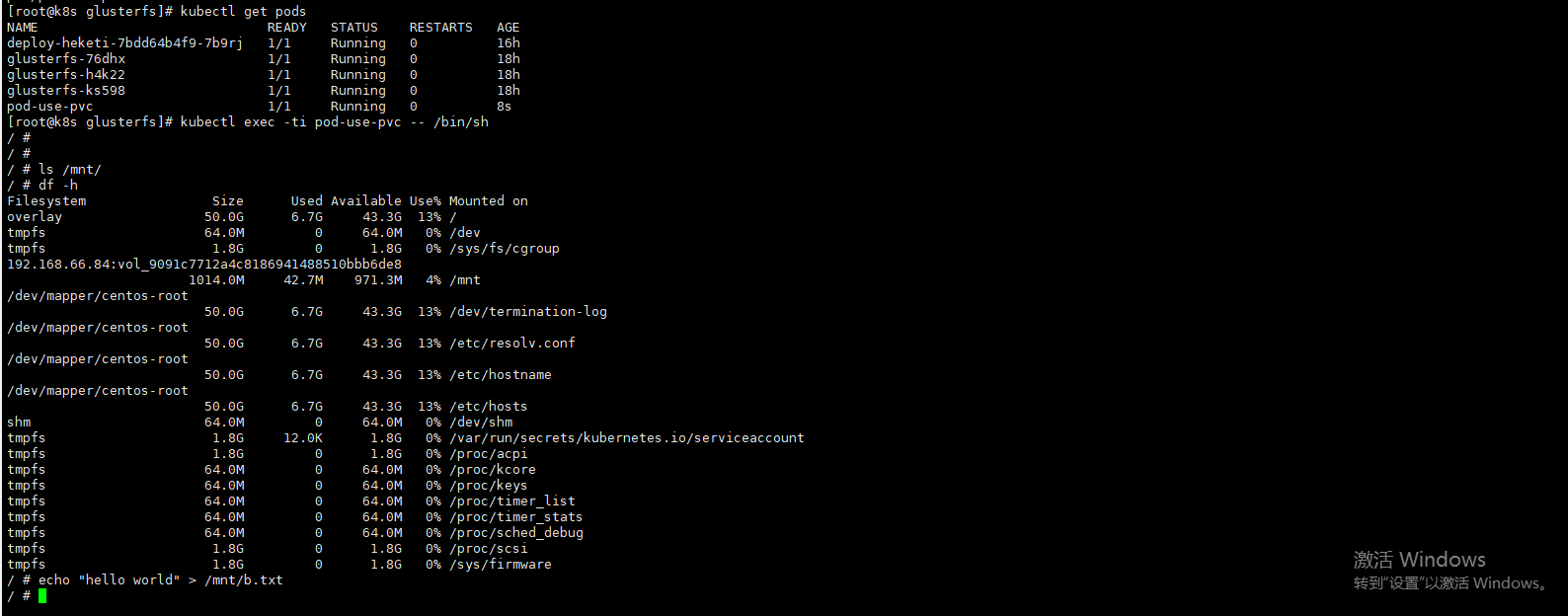
    在k8s集群master上执行:kubectl exec -ti pod-use-pvc -- /bin/sh

    echo "hello world" > /mnt/b.txt

    df -h:  查看挂载那台的glusterfs

    在node节点进入glusterfs节点查看文件

    docker exec -ti 89f927aa2110 /bin/bash

    find / -name b.txt

    cat /var/lib/heketi/mounts/vg_22e127efbdefc1bbb315ab0fcf90e779/brick_97de1365f98b19ee3b93ce8ecb588366/brick/b.txt

    或者在k8s集群master上查看

    进入相应的glusterfs集群几点

    kubectl exec -ti glusterfs-h4k22 -- /bin/sh

    find / -name b.txt

    cat /var/lib/heketi/mounts/vg_22e127efbdefc1bbb315ab0fcf90e779/brick_97de1365f98b19ee3b93ce8ecb588366/brick/b.txt


k8s动态存储管理GlusterFS的更多相关文章
- kubernetes实战(九):k8s集群动态存储管理GlusterFS及使用Heketi扩容GlusterFS集群
1.准备工作 所有节点安装GFS客户端 yum install glusterfs glusterfs-fuse -y 如果不是所有节点要部署GFS管理服务,就在需要部署的节点上打上标签 [root@ ...
- 动态存储管理实战:GlusterFS
文件转载自:https://www.orchome.com/1284 本节以GlusterFS为例,从定义StorageClass.创建GlusterFS和Heketi服务.用户申请PVC到创建Pod ...
- k8s中应用GlusterFS类型StorageClass
GlusterFS在Kubernetes中的应用 GlusterFS服务简介 GlusterFS是一个可扩展,分布式文件系统,集成来自多台服务器上的磁盘存储资源到单一全局命名空间,以提供共享文件存储. ...
- kubespy 用bash实现的k8s动态调试工具
原文位于 https://github.com/huazhihao/kubespy/blob/master/implement-a-k8s-debug-plugin-in-bash.md 背景 Kub ...
- glusterfs+heketi为k8s提供共享存储
背景 近来在研究k8s,学习到pv.pvc .storageclass的时候,自己捣腾的时候使用nfs手工提供pv的方式,看到官方文档大量文档都是使用storageclass来定义一个后端存储服务, ...
- 通过Heketi管理GlusterFS为K8S集群提供持久化存储
参考文档: Github project:https://github.com/heketi/heketi MANAGING VOLUMES USING HEKETI:https://access.r ...
- 部署GlusterFS及Heketi
一.前言及环境 在实践kubernetes的StateFulSet及各种需要持久存储的组件和功能时,通常会用到pv的动态供给,这就需要用到支持此类功能的存储系统了.在各类支持pv动态供给的存储系统中, ...
- 独立部署GlusterFS+Heketi实现Kubernetes共享存储
目录 环境 glusterfs配置 安装 测试 heketi配置 部署 简介 修改heketi配置文件 配置ssh密钥 启动heketi 生产案例 heketi添加glusterfs 添加cluste ...
- 附009.Kubernetes永久存储之GlusterFS独立部署
一 前期准备 1.1 基础知识 Heketi提供了一个RESTful管理界面,可以用来管理GlusterFS卷的生命周期.Heketi会动态在集群内选择bricks构建所需的volumes,从而确保数 ...
随机推荐
- 基于kubernetes的分布式限流
做为一个数据上报系统,随着接入量越来越大,由于 API 接口无法控制调用方的行为,因此当遇到瞬时请求量激增时,会导致接口占用过多服务器资源,使得其他请求响应速度降低或是超时,更有甚者可能导致服务器宕机 ...
- 硬核 | Redis 布隆(Bloom Filter)过滤器原理与实战
在Redis 缓存击穿(失效).缓存穿透.缓存雪崩怎么解决?中我们说到可以使用布隆过滤器避免「缓存穿透」. 码哥,布隆过滤器还能在哪些场景使用呀? 比如我们使用「码哥跳动」开发的「明日头条」APP 看 ...
- ArcGIS使用技巧(一)——数据存储
新手,若有错误还请指正! 日常接触ArcGIS较多,发现好多人虽然也在用ArcGIS,但一些基础的小技巧并不知道,写下来希望对大家有所帮助. ArcGIS默认的存储数据库是在C盘(图1),不修改存储数 ...
- Sentinel基础应用
Sentinel 是什么? 随着微服务的流行,服务和服务之间的稳定性变得越来越重要.Sentinel 以流量为切入点,从流量控制.熔断降级.系统负载保护等多个维度保护服务的稳定性. Sentinel ...
- 五分钟配置 MinGW-W64 编译工具
编译器是一个诸如 C 语言撰写的源程序一步一步走向机器世界彼岸的桥梁. Gnu 项目的 GCC 编译器是常用的编译器之一.儿在Windows 上也有 MinGW 这样可用的套件,可以让我们使用 GCC ...
- 进阶版css点击按钮动画
1. html <div class="menu-wrap"> <input type="checkbox" class="togg ...
- Homomorphic Evaluation of the AES Circuit:解读
之前看过一次,根本看不懂,现在隔这么久,再次阅读,希望有所收获! 论文版本:Homomorphic Evaluation of the AES Circuit(Updated Implementati ...
- 【kubernetes 问题排查】使用 kubeadm 部署时遇到的问题
引言 再使用kubeadm部署集群时会多少遇到一些问题,这里做下记录,方便后面查找问题时有方向,同时也为刚要入坑的你指明下方向,让你少走点弯路 问题汇总 The connection to the s ...
- Microsoft Graph 的 .NET 6 之旅
这是一篇发布在dotnet 团队博客上由微软Graph首席软件工程师 Joao Paiva写的文章,原文地址: https://devblogs.microsoft.com/dotnet/micros ...
- 想学会SOLID原则,看这一篇文章就够了!
背景 在我们日常工作中,代码写着写着就出现下列的一些臭味.但是还好我们有SOLID这把'尺子', 可以拿着它不断去衡量我们写的代码,除去代码臭味.这就是我们要学习SOLID原则的原因所在. 设计的臭味 ...