
2022:checking for Python executable "python2" in the PATH
一、node报错
gyp verb check python checking for Python executable "python2" in the PATH

gyp verb `which` failed Error: not found: python2

gyp verb `which` failed     at getNotFoundError (E:\workspace\mall\mall-admin-web\node_modules\which\which.js:13:12)

gyp verb `which` failed     at F (E:\workspace\mall\mall-admin-web\node_modules\which\which.js:68:19)

gyp verb `which` failed     at E (E:\workspace\mall\mall-admin-web\node_modules\which\which.js:80:29)

gyp verb `which` failed     at E:\workspace\mall\mall-admin-web\node_modules\which\which.js:89:16

gyp verb `which` failed     at E:\workspace\mall\mall-admin-web\node_modules\isexe\index.js:42:5

gyp verb `which` failed     at E:\workspace\mall\mall-admin-web\node_modules\isexe\windows.js:36:5

gyp verb `which` failed     at FSReqCallback.oncomplete (fs.js:192:21)

gyp verb `which` failed  python2 Error: not found: python2

gyp verb `which` failed     at getNotFoundError (E:\workspace\mall\mall-admin-web\node_modules\which\which.js:13:12)

gyp verb `which` failed     at F (E:\workspace\mall\mall-admin-web\node_modules\which\which.js:68:19)

gyp verb `which` failed     at E (E:\workspace\mall\mall-admin-web\node_modules\which\which.js:80:29)

gyp verb `which` failed     at E:\workspace\mall\mall-admin-web\node_modules\which\which.js:89:16

gyp verb `which` failed     at E:\workspace\mall\mall-admin-web\node_modules\isexe\index.js:42:5

gyp verb `which` failed     at E:\workspace\mall\mall-admin-web\node_modules\isexe\windows.js:36:5

gyp verb `which` failed     at FSReqCallback.oncomplete (fs.js:192:21) {

gyp verb `which` failed   code: 'ENOENT'

gyp verb `which` failed }
说明
1、网上常用方法一(本博主环境无效)
npm install --global --production windows-build-tools
- 这个的含义是在下载一个新的python,存放在本地目录下:C:\Users\A.windows-build-tools

- 如果你的机器没有装过python,那么这个命令有可能好使,但是,安装到这里的时候,它不会给你安装环境变量,你需要自己选择一下.


- 如果你本地装了python,有时候是无效的.
2、网上常用方法二(本博主环境无效)
修改本地环境变量
此电脑右键->属性->高级系统设置->环境变量->系统变量->path(添加本地的python路径)


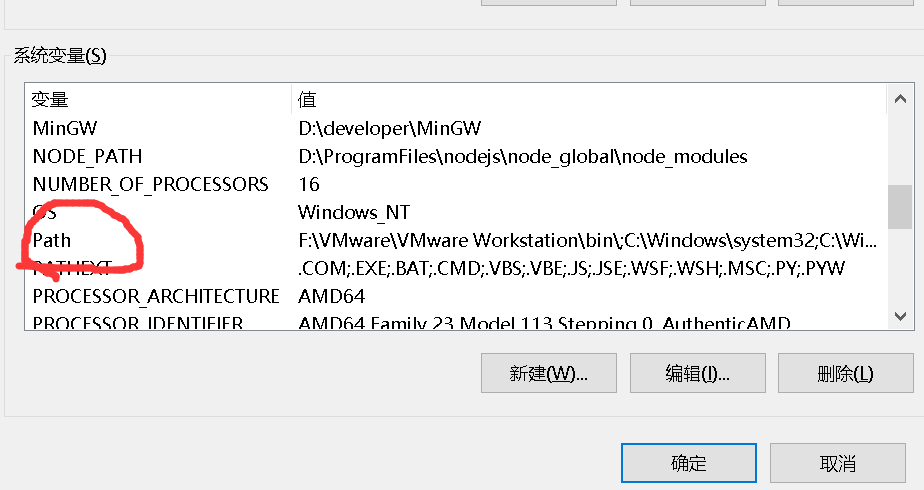

*本博主这个环境的python,之前就是好使的,命令窗口输入python,是可以返回版本号的,但是使用Node时候,它还是不识别路径.
3、本博主使用方法(当前有效)
1、确保NodeJS环境安装没有问题,如果不会安装,请参考
构建工具(参考工具部署方式)
| 软件名称 | 版本 | 相关文章推荐 |
|---|---|---|
| NodeJS | 16.. | https://www.cnblogs.com/liuyangfirst/p/15998172.html |
2、方法一,修改配置文件,添加python环境到Node中
- 输入命令找到node的配置文件.
npm config get userconfig

- 根据输出路径,找到本地文件位置,右键以文本格式打开.
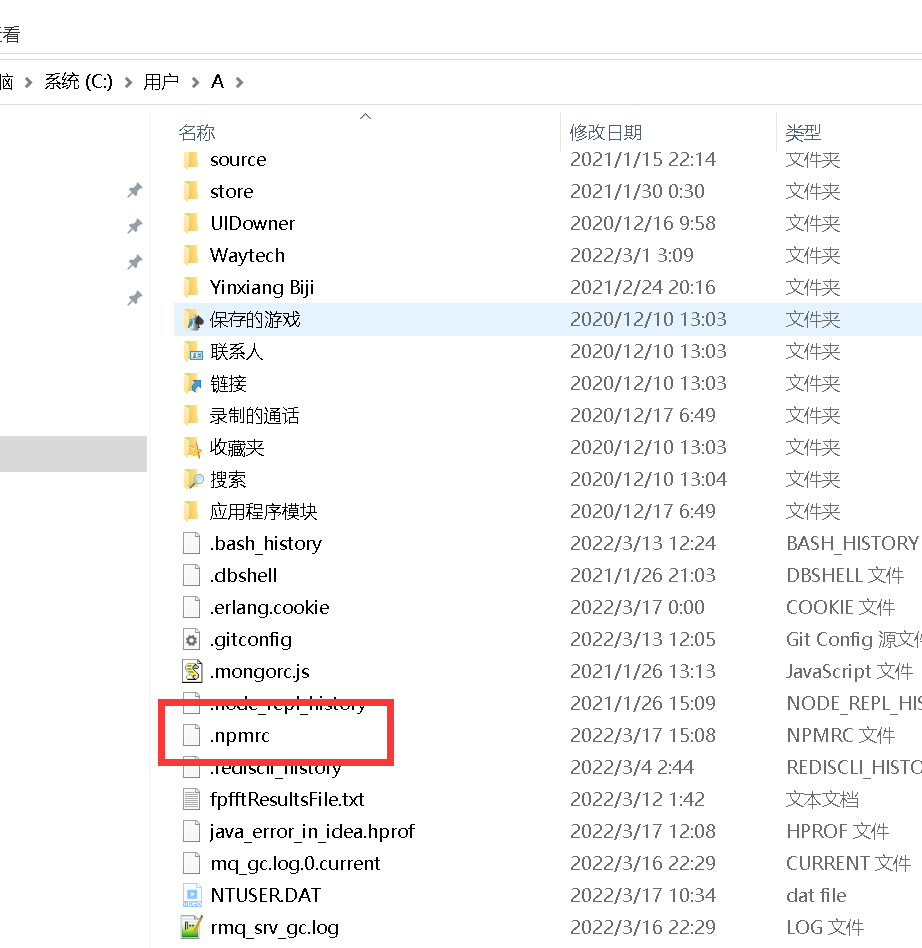

- 添加如下的路径配置.

3、方法二,命令行添加方式,添加python环境到Node中
- 输入如下命令,在命令窗口中。
npm config set python C:\Python27\python.exe

- 输入完这个命令,本质上它会将这个替你加入到配置文件中,所以,手动还是命令方式,随你喜欢。
二、node重新加载
- 执行完上述方法,如果是项目,删除项目的node_modules文件夹,重新执行。
npm install

结语
希望点赞,收藏,评论,转发,您的支持就是最快解救其他小伙伴的最好方法.
2022:checking for Python executable "python2" in the PATH的更多相关文章
- gyp verb check python checking for Python executable "python2" in the PATH
缺少python2.7支持 可快速使用以下语句完成安装 npm install --global --production windows-build-tools 到时候会自动下载python的 如果 ...
- 成功解决:Can‘t find Python executable “python“, you can set the PYTHON env variable.
今天跑公司新项目的时候.运行前端vue.报了一个关于python的错误.就离谱 1.问题报错全部代码 actual version of core-js. npm ERR! code 1 npm ER ...
- Error: Can't find Python executable, you can set the PYTHON env variable.
该错误解决方案. NodeJS安装Npm包时出现错误: npm WARN prefer global node-gyp@3.4.0 should be installed with -g > s ...
- 56.ERR! configure error gyp ERR! stack Error: Can't find Python executable "python", you can set the PYTHON env variable.
Node.js 在安装模块的时候报错,缺少python环境. ERR! configure error gyp ERR! stack Error: Can't find Python executab ...
- Spark-shell错误:Missing Python executable 'python', defaulting to ...
最近博主因为学习<云计算导论>一课,需要在Windows上搭建Saprk,故在网上找了相关教程搭建,步骤如下: 1. Scala 2.Spark 3.Handoop 但是不管博主怎么修正, ...
- 解决Error: Can't find Python executable "python", you can set the PYTHON env variable
在执行 yarn start时遇到问题, 最后一行提示 Run `npm rebuild node-sass` to download the binding for your current env ...
- python内置模块[sys,os,os.path,stat]
python内置模块[sys,os,os.path,stat] 内置模块是python自带功能,在使用内置模块时,需要遵循 先导入在 使用 一.sys 对象 描述 sys.argv 命令行参数获取,返 ...
- Bison executable not found in PATH by mysql install
[root@luozhonghua mysql-5.5.21]# cmake . -DCMAKE_INSTALL_PREFIX=/usr/local/mysql -DMYSQL_DATADIR=/d ...
- Python join() 方法与os.path.join()的区别
Python join() 方法与os.path.join()的区别 pythonJoinos.path.join 今天工作中用到python的join方法,有点分不太清楚join() 方法与os.p ...
随机推荐
- JVM学习三:JVM之垃圾收集器及GC参数
一.堆的回顾 新生代中的98%对象都是"朝生夕死"的,所以并不需要按照1:1的比例来划分内存空间,而是将内存分为一块比较大的Eden空间和两块较小的Survivor空间,每次使用E ...
- SlidingMenu addIgnoreView() 无效的bug解决方法
## 感谢大佬:https://blog.csdn.net/fuchaosz/article/details/51513288 1 简介 最近在做侧滑的时候用到了SlidingMenu,在MainAc ...
- Innodb之索引与算法
目录 一.概述 二.数据结构与算法 1.二分查找 2.二叉查找树和平衡二叉树 1)二叉查找树 2)平衡二叉树 三.B+树 1.B+树完整定义 2.关于 M 和 L的选定案例 四.B+树索引 1.聚集索 ...
- 通过安装HomeBrew来安装Python3
首先说什么是HomeBrew? 下面引用简书上一个博客的解释:(博客链接:http://www.jianshu.com/p/d229ac7fe77d) 为什么要使用Homebrew Mac OS X是 ...
- Solution -「Gym 102956F」Border Similarity Undertaking
\(\mathcal{Description}\) Link. 给定一张 \(n\times m\) 的表格,每个格子上写有一个小写字母.求其中长宽至少为 \(2\),且边界格子上字母相同的矩 ...
- Solution -「CF 1392H」ZS Shuffles Cards
\(\mathcal{Description}\) Link. 打乱的 \(n\) 张编号 \(1\sim n\) 的数字排和 \(m\) 张鬼牌.随机抽牌,若抽到数字,将数字加入集合 \(S ...
- Sunlogin RCE漏洞分析和使用
介绍 前两天网上曝出了关于向日葵远控工具(Sunlogin)Windows个人版的RCE漏洞POC.因为利用简单并且网上出现了公开的自动化扫描脚本,所以测试的人很多,也出现了一些真实攻击.漏洞的问 ...
- Dubbo SPI机制之三Adaptive自适应功能
JDK标准中SPI机制的一个问题就是其一次性实例化扩展点所有实现,如果有扩展实现初始化很耗时,但如果没用上也加载,会很浪费资源:扩展点加载失败,其他扩展点都用不了了.Dubbo是如何解决该问题动态的选 ...
- 日行一算(Vowel-大小写转换)
题目 题目描述 solo从小就对英文字母非常感兴趣,尤其是元音字母(a,e,i,o,u,A,E,I,O,U),他在写日记的时候都会把元音字母写成大写的,辅音字母则都写成小写,虽然别人看起来很别扭,但是 ...
- 解决UIWebView内存不释放问题
走访很多朋友,查阅了很多资料发现UIWebView这尼玛就是个坑,有人说是sdk自带的bug....... 所以一个新的方法诞生了#import <WebKit/WebKit.h> WKW ...