
2022:checking for Python executable "python2" in the PATH
一、node报错
gyp verb check python checking for Python executable "python2" in the PATH

gyp verb `which` failed Error: not found: python2

gyp verb `which` failed     at getNotFoundError (E:\workspace\mall\mall-admin-web\node_modules\which\which.js:13:12)

gyp verb `which` failed     at F (E:\workspace\mall\mall-admin-web\node_modules\which\which.js:68:19)

gyp verb `which` failed     at E (E:\workspace\mall\mall-admin-web\node_modules\which\which.js:80:29)

gyp verb `which` failed     at E:\workspace\mall\mall-admin-web\node_modules\which\which.js:89:16

gyp verb `which` failed     at E:\workspace\mall\mall-admin-web\node_modules\isexe\index.js:42:5

gyp verb `which` failed     at E:\workspace\mall\mall-admin-web\node_modules\isexe\windows.js:36:5

gyp verb `which` failed     at FSReqCallback.oncomplete (fs.js:192:21)

gyp verb `which` failed  python2 Error: not found: python2

gyp verb `which` failed     at getNotFoundError (E:\workspace\mall\mall-admin-web\node_modules\which\which.js:13:12)

gyp verb `which` failed     at F (E:\workspace\mall\mall-admin-web\node_modules\which\which.js:68:19)

gyp verb `which` failed     at E (E:\workspace\mall\mall-admin-web\node_modules\which\which.js:80:29)

gyp verb `which` failed     at E:\workspace\mall\mall-admin-web\node_modules\which\which.js:89:16

gyp verb `which` failed     at E:\workspace\mall\mall-admin-web\node_modules\isexe\index.js:42:5

gyp verb `which` failed     at E:\workspace\mall\mall-admin-web\node_modules\isexe\windows.js:36:5

gyp verb `which` failed     at FSReqCallback.oncomplete (fs.js:192:21) {

gyp verb `which` failed   code: 'ENOENT'

gyp verb `which` failed }
说明
1、网上常用方法一(本博主环境无效)
npm install --global --production windows-build-tools
- 这个的含义是在下载一个新的python,存放在本地目录下:C:\Users\A.windows-build-tools

- 如果你的机器没有装过python,那么这个命令有可能好使,但是,安装到这里的时候,它不会给你安装环境变量,你需要自己选择一下.


- 如果你本地装了python,有时候是无效的.
2、网上常用方法二(本博主环境无效)
修改本地环境变量
此电脑右键->属性->高级系统设置->环境变量->系统变量->path(添加本地的python路径)


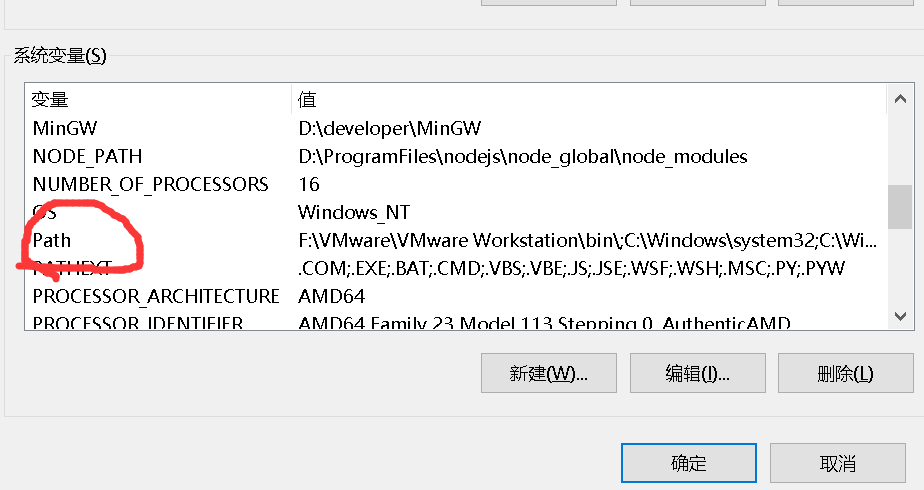

*本博主这个环境的python,之前就是好使的,命令窗口输入python,是可以返回版本号的,但是使用Node时候,它还是不识别路径.
3、本博主使用方法(当前有效)
1、确保NodeJS环境安装没有问题,如果不会安装,请参考
构建工具(参考工具部署方式)
| 软件名称 | 版本 | 相关文章推荐 |
|---|---|---|
| NodeJS | 16.. | https://www.cnblogs.com/liuyangfirst/p/15998172.html |
2、方法一,修改配置文件,添加python环境到Node中
- 输入命令找到node的配置文件.
npm config get userconfig

- 根据输出路径,找到本地文件位置,右键以文本格式打开.
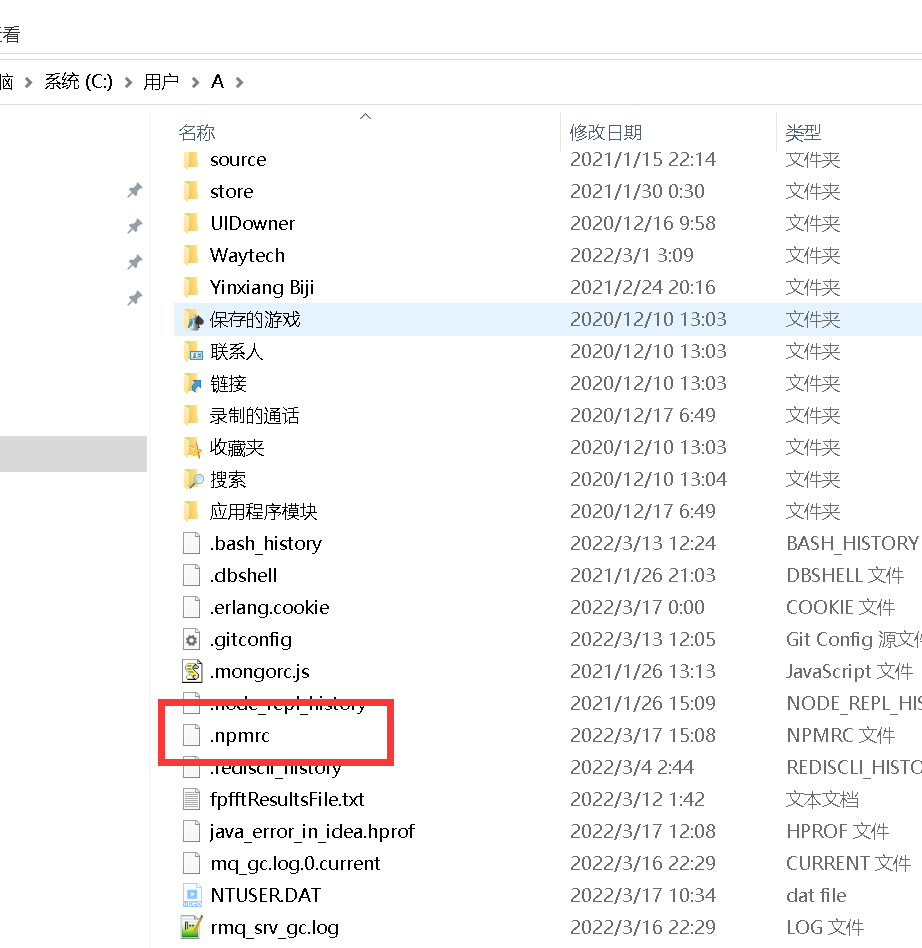

- 添加如下的路径配置.

3、方法二,命令行添加方式,添加python环境到Node中
- 输入如下命令,在命令窗口中。
npm config set python C:\Python27\python.exe

- 输入完这个命令,本质上它会将这个替你加入到配置文件中,所以,手动还是命令方式,随你喜欢。
二、node重新加载
- 执行完上述方法,如果是项目,删除项目的node_modules文件夹,重新执行。
npm install

结语
希望点赞,收藏,评论,转发,您的支持就是最快解救其他小伙伴的最好方法.
2022:checking for Python executable "python2" in the PATH的更多相关文章
- gyp verb check python checking for Python executable "python2" in the PATH
缺少python2.7支持 可快速使用以下语句完成安装 npm install --global --production windows-build-tools 到时候会自动下载python的 如果 ...
- 成功解决:Can‘t find Python executable “python“, you can set the PYTHON env variable.
今天跑公司新项目的时候.运行前端vue.报了一个关于python的错误.就离谱 1.问题报错全部代码 actual version of core-js. npm ERR! code 1 npm ER ...
- Error: Can't find Python executable, you can set the PYTHON env variable.
该错误解决方案. NodeJS安装Npm包时出现错误: npm WARN prefer global node-gyp@3.4.0 should be installed with -g > s ...
- 56.ERR! configure error gyp ERR! stack Error: Can't find Python executable "python", you can set the PYTHON env variable.
Node.js 在安装模块的时候报错,缺少python环境. ERR! configure error gyp ERR! stack Error: Can't find Python executab ...
- Spark-shell错误:Missing Python executable 'python', defaulting to ...
最近博主因为学习<云计算导论>一课,需要在Windows上搭建Saprk,故在网上找了相关教程搭建,步骤如下: 1. Scala 2.Spark 3.Handoop 但是不管博主怎么修正, ...
- 解决Error: Can't find Python executable "python", you can set the PYTHON env variable
在执行 yarn start时遇到问题, 最后一行提示 Run `npm rebuild node-sass` to download the binding for your current env ...
- python内置模块[sys,os,os.path,stat]
python内置模块[sys,os,os.path,stat] 内置模块是python自带功能,在使用内置模块时,需要遵循 先导入在 使用 一.sys 对象 描述 sys.argv 命令行参数获取,返 ...
- Bison executable not found in PATH by mysql install
[root@luozhonghua mysql-5.5.21]# cmake . -DCMAKE_INSTALL_PREFIX=/usr/local/mysql -DMYSQL_DATADIR=/d ...
- Python join() 方法与os.path.join()的区别
Python join() 方法与os.path.join()的区别 pythonJoinos.path.join 今天工作中用到python的join方法,有点分不太清楚join() 方法与os.p ...
随机推荐
- Android SDK:Android standard develop kits 安卓开发的工具集
目前主流的安卓开发工具: 1.Adnroid-Adt-bundle SDK Manager.exe: Tools(安卓的开发小工具) 各种安卓版本 Extras 额外的开发包 在线更新/安装的安卓版本 ...
- Java基础复习(五)
1. 接口是否可继承接口? 抽象类是否可实现(implements)接口? 抽象类是否可继承具体类(concrete class)? 抽象类中是否可以有静态的main方法? 接口可以继承接口.抽象类可 ...
- 自定义UITableview自带侧滑删除按钮样式 by 徐
效果如下: 实现原理: 1.打开tableview自带的侧滑删除功能 核心代码: 1 -(void)tableView:(UITableView *)tableView commitEditingSt ...
- 今天带大家了解一下ICMP协议及基本使用
ICMP协议的介绍及基本使用 1.IP数据包头的格式 2.ICMP协议的功能介绍 3.ICMP的基本使用方法 1.在讲解ICMP协议之前,我们先来简单了解一下IP数据包格式如图所示: 2.好现在切入正 ...
- Apache——配置与应用
Apache配置与应用 1.概述 2.httpd服务支持的虚拟主机类型 3.构建虚拟Web主机 4.构建Web虚拟目录与用户授权限制 5.日志分割 6.AWStats分析系统 1.概述: 虚拟web主 ...
- webfunny前端系统:如何解决警报设置触发常见问题
大家好,经常会有小伙伴在使用webfunny监控系统中,遇到无法触发警报的问题,其实都是一些配置上的疏漏,在这里给大家总结一下: PS:只要消息中心里有警报,则说明触发机制没有问题.其他方式没有触发, ...
- traceback.print_exc()的用法
Python使用traceback.print_exc()来代替print e 来输出详细的异常信息 [python] view plain copy try: 1/0 except Except ...
- 《PHP程序员面试笔试宝典》——如何克服面试中紧张的情绪?
本文摘自<PHP程序员面试笔试宝典>. PHP面试技巧分享,PHP面试题,PHP宝典尽在"琉忆编程库". 面试的成功与否,往小的方面讲,直接关系到求职者的工作问题,往大 ...
- [LeetCode]35.搜索插入位置(Java)
原题地址: search-insert-position 题目描述: 给定一个排序数组和一个目标值,在数组中找到目标值,并返回其索引.如果目标值不存在于数组中,返回它将会被按顺序插入的位置. 请必须使 ...
- MXNet源码分析 | KVStore进程间通信
本文主要基于MXNet1.6.0版本进行分析. 在上一篇文章中,我们分析了MXNet中KVStore的进程内通信机制.在这篇文章中,我们主要分析KVStore如何进行多节点分布式通信. 在KVStor ...