
sFlow-RT
sFlow-RT™ incorporates InMon's asynchronous analytics technology (patent pending), delivering real-time visibility to Software Defined Networking (SDN), DevOps and Orchestration stacks and enabling new classes of performance aware application such as load balancing, DDoS protection, and workload placement.
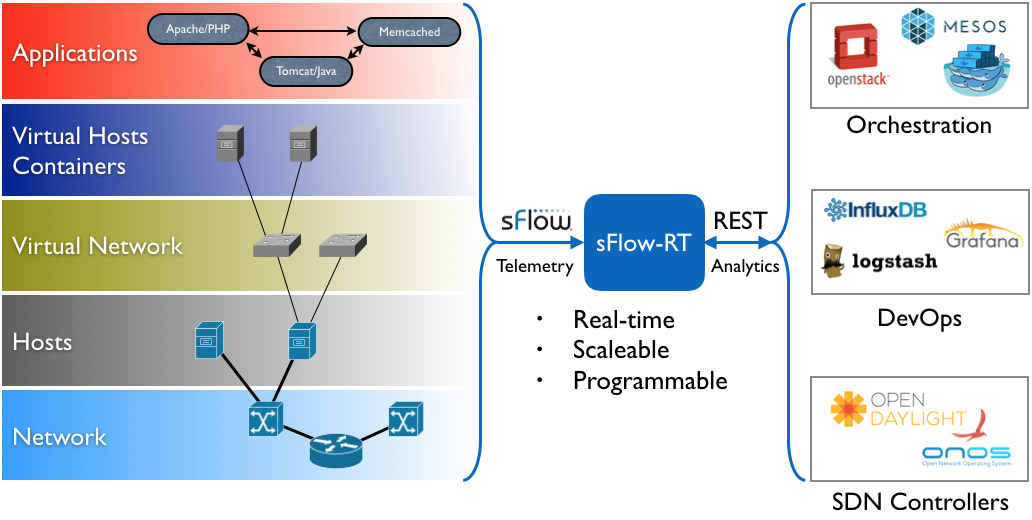
The sFlow-RT analytics engine receives a continuous telemetry stream from sFlow Agents embedded in network devices, hosts and applications and converts them into actionable metrics, accessible through the RESTflow™ API. The RESTflow API makes it easy for to configure customized measurements, retrieve metrics, set thresholds, and receive notifications. Applications can be external, written in any language that supports HTTP/REST calls, or internal, using sFlow-RT's embedded JavaScript/ECMAScript.
Network visibility is essential to understanding the interaction between scale-out services running on cloud infrastructure. By combining network, host and application monitoring within an integrated analytics pipeline, sFlow-RT provides visibility into applications and the server and network resources needed to sustain performance.
Download
Visit sFlow-RT.com to download sFlow-RT software and applications.
Support
Please post questions, suggestions and applications to the sFlow-RT group.
Commercial use
Contact sales@inmon.com to discuss commercial licensing options for sFlow-RT.
===================================================
http://sflow-rt.com/download.php
Download and install
sFlow-RT requires Java 1.7+. The following commands download, install and run the software:
wget http://www.inmon.com/products/sFlow-RT/sflow-rt.tar.gz

tar -xvzf sflow-rt.tar.gz

cd sflow-rt

./start.sh
Alternatively, the following command runs sFlow-RT in a Docker container (see sflow/sflow-rt):
docker run -p 8008:8008 -p 6343:6343/udp -d sflow/sflow-rtUse a web browser to connect to http://localhost:8008 to interact with the REST API.
The software is also available as RPM and DEB packages:
Software is installed under the path /usr/local/sflow-rt/ and log files are directed to /usr/local/sflow-rt/log/sflow-rt-<N>.log
Note There are no access controls built into sFlow-RT. However, HTTP access can be restricted to the local host by settings the http.hostname property to 127.0.0.1 and a reverse proxy can then be used to secure remote access to the API. For example, the following Apache configuration settings make the interface accessible on port 80 under the path /sflow-rt/
<IfModule mod_proxy.c>

  ProxyRequests off

  ProxyVia off

  ProxyPass        /sflow-rt/ http://127.0.0.1:8008/ retry=0 timeout=5

  ProxyPassReverse /sflow-rt/ http://127.0.0.1:8008/

</IfModule>

<Location /sflow-rt/>

# insert access policy

</Location>
Please read and accept the License Agreement before downloading this software.
Applications
The following command (run in the sFlow-RT home directory) downloads and installs an application:
./get-app.sh sflow-rt dashboard-exampleThe following applications are currently available on GitHub:
| User | Application | Description |
|---|---|---|
| sflow-rt | dashboard-example | Real-time dashboard example |
| sflow-rt | flow-graph | Real-time graph of network associations |
| sflow-rt | top-flows | Real-time top network flows table |
| sflow-rt | svg-weather | Real-time network weathermap example |
| sflow-rt | fabric-view | Real-time visibility for leaf / spine ECMP fabrics |
| sflow-rt | ddos-blackhole | Real-time DDoS flood mitigation using null route |
| sflow-rt | active-routes | Real-time active BGP route cache |
| sflow-rt | sflow-test | Test data center switch sFlow implementation |
| sflow-rt | ix-metrics | Real-time monitoring of Internet Exchange (IX) traffic |
| sflow-rt | mininet-dashboard | Real-time dashboard for Mininet |
| sflow-rt | world-map | Real-time traffic displayed on world map |
| pphaal | ovs-2015 | Overlay/underlay network virtualization visibility demo |
| pphaal | sc15-weather | SC15 SCinet real-time weathermap |
Writing Applications provides an introduction describing the structure of an sFlow-RT application. Post information on new applications to the sFlow-RT group to have them listed.
Support
Please post questions, suggestions and applications to the sFlow-RT group.
Production use
Contact sales@inmon.com to discuss production licensing options for sFlow-RT.
sFlow-RT的更多相关文章
- 华为交换机sflow配置
华为交换机sflow功能配置 1.配置交换机的sflow流发送 [系统视图]sflow agen ip x.x.x.x 设置sflow输出源 [系统视图]sflow ...
- sFlow
http://www.sflow.org/developers/specifications.php http://www.inmon.com/technology/index.php sFlow s ...
- curl 查看一个web站点的响应时间(rt)
1. curl 查看web站点rt curl -o /dev/null -s -w %{time_namelookup}::%{time_connect}::%{time_starttransfer} ...
- Workspace defines a VM that does not contain a valid jre/lib/rt.jar: C:\Program Files\Java\jre7
Maven编译时两则信息 (Workspace以及default classpath container) 博客分类: Java 使用Maven一年有余,却总是被两则不起眼的编译信息困扰,终想查明 ...
- 自己写方法处理WP(RT)后退键事件处理
不用微软的NavigationHelper,自己写方法处理WP后退键事件 在WP8.1(RT)程序中,你会发现按下后退键时,应用会直接退出,变为后台运行,这是因为RT与Silverlight对后退键的 ...
- 高并发应用中客户端等待、响应时间的推算,及RT/QPS概念辨析
高并发应用中客户端等待.响应时间的推算,及RT/QPS概念辨析 对于一个网站,已知服务端的服务线程数和处理单个请求所需的时间时,该如何算出高并发时用户从点击链接到收到响应的时间?注意这个时间并不等于服 ...
- cpu进程调度---RT Throttling【转】
转自:http://book.2cto.com/201302/16291.html RT Throttling是对分配给实时进程的CPU时间进行限制的功能.使用实时调度策略的进程由于bug等出现不可控 ...
- RT/Metro商店应用如何如何获取图片的宽高
RT/Metro商店应用如何如何获取图片的宽高 var file = await StorageFile.GetFileFromApplicationUriAsync(new Uri("ms ...
- JRE下的rt.jar、tools.jar
JRE下的rt.jar: 这个文件是极为重要的一个文件,rt是runtime的缩写,即运行时的意思.是java程序在运行时必不可少的文件. 里面包含了java程序员常用的包,如java.lang,ja ...
- Installing your app on your Windows RT device
Alright… so my app is almost finished and I want to install it for real on my Surface tablet. How do ...
随机推荐
- npm 初学者教程
Node.js 让 JavaScript 编写服务器端应用程序成为可能.它建立在 JavaScript V8(C++ 编写的) 运行时之上,所以它很快.最初,它旨在为应用程序提供服务器环境,但是开发人 ...
- 那些过目不忘的H5页面
原文链接:http://isux.tencent.com/great-mobile-h5-pages.html 从引爆朋友圈的H5小游戏<围住神经猫>,到颠覆传统广告的大众点评H5专题页& ...
- Atitit.去除水印的方案
Atitit.去除水印的方案 1.1. 查找水印的位置 Kegwa imgd posit zo ok le .. Auto find d zo troub ...manu easy 1.2. 还原去除 ...
- 理解java虚拟机内存分配堆,栈和方法区
栈:存放局部变量 堆:存放new出来的对象 方法区:存放类的信息,static变量,常量池(字符串常量) 在堆中,可以说是堆的一部分 创建了一个student类,定义了name属性, id静态变量 ...
- IOS 页面间跳转
常用的就两种 一种通过导航,一种直接跳 第一种 直接跳转 思路大致就是new一个目的页面,然后设置下页面跳转动画 中间还可以做点目的页面的数据初始化: ValueInputView *valueVie ...
- IOS开发基础知识--碎片40
1:Masonry快速查看报错小技巧 self.statusLabel = [UILabel new]; [self.contentView addSubview:self.statusLabel]; ...
- Storm基础
Storm基本概念 Storm是一个开源的实时计算系统,它提供了一系列的基本元素用于进行计算:Topology.Stream.Spout.Bolt等等. 在Storm中,一个实时应用的计算任务被打包作 ...
- parawork平台介绍
ParaWork软件项目估算平台---科学估算项目,让管理更简单 ParaWork软件项目估算平台是由北京软件造价评估技术创新联盟与北京科信深度科技有限公司联合开发.维护的软件项目估算工具,为会员免 ...
- FindBugs 入门——帮你减少代码中的bug数
FindBugs 入门 FindBugs 作用 开发人员在开发了一部分代码后,可以使用FindBugs进行代码缺陷的检查.提高代码的质量,同时也可以减少测试人员给你报的bug数. 代码缺陷分类 根据缺 ...
- 从零自学Hadoop(03):Linux准备上
阅读目录 序 检查列表 常用Linux命令 搭建环境 系列索引 本文版权归mephisto和博客园共有,欢迎转载,但须保留此段声明,并给出原文链接,谢谢合作. 文章是哥(mephisto)写的,Sou ...