
FATAL Exited too quickly (process log may have details)的解决方案
作为一个混混的开发,不会啥容器操作。所以一般都是用supervisor来管理一些运行的进程
用了一段时间还是比较好用的,这个软件也是用的Python开发。
但在使用的过程中,status时会出现
FATAL Exited too quickly (process log may have details)
BACKOFF Exited too quickly (process log may have details)
这样的提示,表示该进程已经退出,明明设置了autorestart=true了,为什么还是退出了。
以下内容参考supervisor的官方网站信息:http://supervisord.org/configuration.html
autorestart
Specifies if supervisord should automatically restart a process if it exits when it is in the RUNNING state. May be one of false, unexpected, or true. If false, the process will not be autorestarted. If unexpected, the process will be restarted when the program exits with an exit code that is not one of the exit codes associated with this process’ configuration (see exitcodes). If true, the process will be unconditionally restarted when it exits, without regard to its exit code.
Note
autorestart controls whether supervisord will autorestart a program if it exits after it has successfully started up (the process is in the RUNNING state).
supervisord has a different restart mechanism for when the process is starting up (the process is in the STARTING state). Retries during process startup are controlled by startsecs and startretries.
Default: unexpected
Required: No.
Introduced: 3.0
上面标红的是比较重要的一句话,自动重启只能在监控的进程在RUNNING的状态下才有效
那说了,被supervisor托管的检查在supervisor定义的状态中除了RUNNING还有另外的状态
官网找了一下,找不到相关的信息,那手动在supervisorctl中查看,一般的状态还有FATAL,BACKOFF,STARTING,STOPED。
中断插入一些信息,刚刚仔细看了一下官方文档,还是上面这段话,红字下面这段话也非常重要
在每个任务的配置文档里面有startsecs与startretries
再次中断插入一张官方来的好图
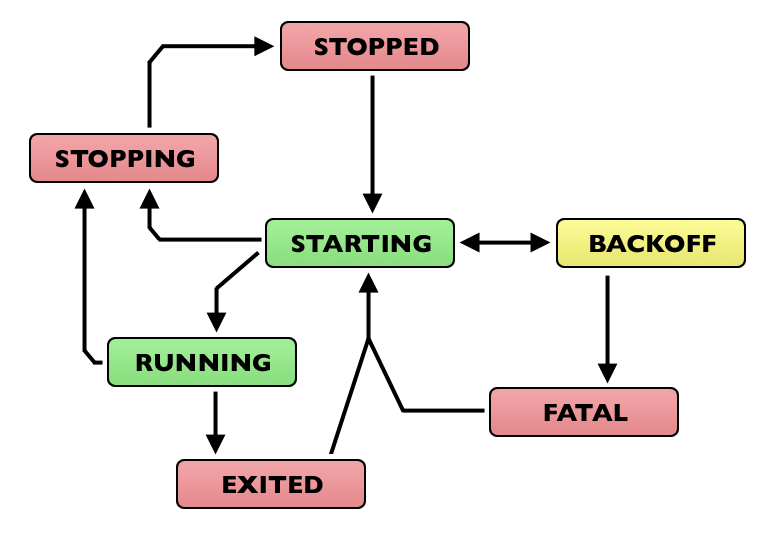
自信看看官方的文档,结合这个图,就可以很好的理解supervisor的管理逻辑
一个重点是autorestart,与startretries和startsecs的关系非常有意思
首先是autorestart,当你的进行超过startretries设置的时间后,进程的状态将由STRATING切换到RUNNING状态
autorestart的作用只能在RUNNING状态下才会起作用,如果你将autorestart设置为true,假如你设置的startretries少于你程序的运行时间,
也就是说你的程序可以进入RUNNING状态,那恭喜你,你这个程序将永远不会终止,他将一直由supervisor托管,Foreve,当然手动命令拆散不算。
所以从autorestart的角度,就有了解决方案
首先从图中就可以看到出现FATAL的情况,是因为出现了多次BACKOFF之后,才会进入FATAL状态。
那为什么会进入BACKOFF状态,那就需要聊一下startretries与startsecs了[如果没有设置的情况,参数默认为3和1]。
在启动进程的命令之后,在小于startsecs的时间,进程的状态为STARTING状态,当这个时候,进程出现问题, 退出
那就进入到了BACKOFF状态,也就用到了startretries参数了。只要连续的在STARTING状态下重启次数小于startretries
supervisor就会再次重新拉起该任务,
Retries will take increasingly more time depending on the number of subsequent attempts made, adding one second each time.
So if you set startretries=3, supervisord will wait one, two and then three seconds between each restart attempt, for a total of 5 seconds.
上面的文字表示了,在STARTING状态,出现重新拉起任务会自动添加休眠间隔时间,在休眠间隔时间的状态就是BACKOFF了
在BACKOFF的状态下,要么继续拉起来,要么就FATAL了。
啰嗦的讲的这么多,现在知道了BACKOFF的原因,也知道了为什么会FATAL了。
解决方案
因为你的进程未进入RUNNING,重启次数多了,然后就FATAL,那如何让进程能够进入RUNNING呢
第一个方法就是调整startsecs的参数,默认为1,一对于计算机来说,那可以做的事情太多了,那设置为0,岂不是一启动就进入RUNNING了,只要进入了该状态
autorestart的参数就用上了效果,这个对于时间要求比较高的进程还是比较好用的
2022-10-13 03:51:13,584 INFO spawned: 'test_supervisor' with pid 6963

2022-10-13 03:51:13,601 INFO success: test_supervisor entered RUNNING state, process has stayed up for > than 0 seconds (startsecs)

2022-10-13 03:51:13,603 INFO exited: test_supervisor (exit status 0; expected)

2022-10-13 03:51:13,846 INFO spawned: 'test_supervisor' with pid 6964

2022-10-13 03:51:13,865 INFO success: test_supervisor entered RUNNING state, process has stayed up for > than 0 seconds (startsecs)

2022-10-13 03:51:13,867 INFO exited: test_supervisor (exit status 0; expected)

2022-10-13 03:51:13,886 INFO spawned: 'test_supervisor' with pid 6965

2022-10-13 03:51:13,911 INFO success: test_supervisor entered RUNNING state, process has stayed up for > than 0 seconds (startsecs)

2022-10-13 03:51:13,914 INFO exited: test_supervisor (exit status 0; expected)
这是一秒钟的重启进程状况,我那云主机一秒启动了3次
第二种方案就是将自己的项目启动的时候加入阻塞时间,假如默认为1的状况下,主函数进入的时候,先sleep大于1的时间,这段时间肯定不会报错
所以肯定能够进入RUNNING状态,那就又能够愉快的使用autorestart了。
上面两种方案都是定频率的重启
第三种
下次就进入通过startretries来重启进程吧,这个时候autorestart的设置是无效的.
这个用在只执行一次,也就是跑通一遍的情况比较好.
首先将autorestart设置为false,或者unexpected,将startretries略小于完整执行跑完整个进程的大概时间.
将startretries设置为合适的参数,这样在STARTING阶段会通过startretries来重启
注意,这个重启的时间会自增
差不多就写到这里,花了大半天时间写下来,实际的使用中,大家应该结合实际的情况,调整到合适自己的参数
FATAL Exited too quickly (process log may have details)的解决方案的更多相关文章
- Exited too quickly (process log may have details)-配置问题
在配置supervisor的时候,提示Exited too quickly (process log may have details),这个时候一脸懵逼,啥回事,执行太快了???
- 解决MyEclipe出现An error has occurred,See error log for more details的错误
今晚在卸载MyEclipse时出现An error has occurred,See error log for more details的错误,打开相应路径下的文件查看得如下: !SESSION 2 ...
- eclipse报An error has occurred,See error log for more details. java.lang.NullPointerException错误
eclipse报An error has occurred,See error log for more details. java.lang.NullPointerException错误,解决办法: ...
- An unexpected exception occurred while creating a change object. see the error log for more details
今天再给Android项目工程中的包重命名时出现了这个错误(之前重命名的时候就没有出现,郁闷): An unexpected exception occurred while creating a c ...
- An error has occurred,See error log for more details
解决Eclipse3.2配合MyEclipse5.0M2使用时打开JSP发生“An error has occurred,See error log for more details”错误的解决方法 ...
- 安装RabbitMQ编译erlang时,checking for c compiler default output file name... configure:error:C compiler cannot create executables See 'config.log' for more details.
checking for c compiler default output file name... configure:error:C compiler cannot create executa ...
- Eclipse:An error has occurred. See error log for more details. java.lang.NullPointerException
问题描述 在使用 Eclipse Clean 项目时报错:An error has occurred. See error log for more details. java.lang.Null ...
- eclipse使用异常An error has occurred.see error log for more details eclipse
eclipse使用异常An error has occurred.see error log for more details eclipse 解决Eclipse,MyEclipse出现An erro ...
- Android An unexpected exception occurred while creating a change object. see the error log for more details
今天再给Android项目工程中的包重命名时出现了这个错误(之前重命名的时候就没有出现,郁闷):An unexpected exception occurred while creating a ch ...
- Gradle sync failed: Cause: org.gradle.logging.StyledTextOutput$Style Consult IDE log for more details
环境 Android studio 3.0 导入开源中国: ... dependencies { //noinspection GradleDependency classpath 'com.andr ...
随机推荐
- ClickHouse 使用
最近mysql报表数据太多,要转移数据到 clickHouse ,顺便学学该数据仓库的使用 中文文档:https://clickhouse.com/docs/zh/ B站学习视频 : https:// ...
- M1 安装apache tomcat
一.下载以及安装 1.Tomcat(官网:http://tomcat.apache.org/) 2.找到需要的版本:我用的9版本 二.将下载的文件放在自己一个目录下去 三.设置Apache环境路径 e ...
- 动手学强化学习 第二章 多臂tiger机问题 阅读笔记
第二章 多臂tiger机问题 第一节 简介 强化学习是一种试错型学习范式. 第二节 问题介绍 多臂tiger机(multi-armed bandit,MAB)不存在状态信息,只有动作和奖励.有一个拥有 ...
- 使用虚拟环境-Python虚拟环境的安装和配置-virtualenv
打开windows命令终端(cmd)安装虚拟环境 virtualenv(如果你执行了上面查看python版本的语句,那么要先使用exit()方法先退出) pip3 install virtualenv ...
- 在集群上运行Spark应用
初识Spark真的存在很多疑问:Spark需要部署在集群里的每个节点上吗?Spark怎么有这么多依赖,这些依赖分别又有什么用?官网里边demo是用sbt构建的,难道还有再学一下sbt吗? --就是这么 ...
- ubuntu iptables 做为路由转发
实现功能,本地服务器的号段的192.168.8.0/24,而做为路由器的机器有2个ip,192.168.8.x和另一个ip,而另一个ip可以访问 192.168.2.0/24号段, 为了让其它192. ...
- SCI论文写作技巧-introduction和related works
introduction怎么写 a)背景介绍,现状(介绍别人研究),存在问题,怎样解决,我的做法,有何亮点 b)研究背景和重要性.引出该领域科研空白.点题-指出本文的研究课题.概述文章的核心方法论和主 ...
- iOS证书签名
苹果官方有一对密钥,即私钥和公钥,私钥在苹果后台,公钥在iOS系统中(如iPhone手机在出厂后,其中就保存有苹果官方的公钥):在Mac系统打包app时也会生成一对密钥(私钥.公钥),并保存在钥匙串中 ...
- app对接微信支付(app支付)
(先补充一下,app唤醒微信支付失败的话,在确保没错的情况下,建议换一个手机或者重新下载微信,不知道是微信缓存还是什么原因) 1.先申请好开发环境 app支付不需要公众号,所以申请好开发商号和开发平台 ...
- springboot配置文件中的基本配置
#应用启动端口设置server.port=9088#=================================微信相关====================================# ...