
springboot+mybatis实现数据分页(三种方式)
项目准备
1.创建用户表
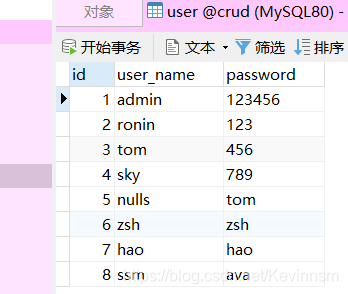
2.使用spring初始化向导快速创建项目,勾选mybatis,web,jdbc,driver
添加lombok插件
<?xml version="1.0" encoding="UTF-8"?>

<project xmlns="http://maven.apache.org/POM/4.0.0" xmlns:xsi="http://www.w3.org/2001/XMLSchema-instance"

         xsi:schemaLocation="http://maven.apache.org/POM/4.0.0 https://maven.apache.org/xsd/maven-4.0.0.xsd">

    <modelVersion>4.0.0</modelVersion>

    <parent>

        <groupId>org.springframework.boot</groupId>

        <artifactId>spring-boot-starter-parent</artifactId>

        <version>2.4.1</version>

        <relativePath/> <!-- lookup parent from repository -->

    </parent>

    <groupId>com.hao</groupId>

    <artifactId>spring-boot-crud-end</artifactId>

    <version>0.0.1-SNAPSHOT</version>

    <name>spring-boot-crud-end</name>

    <description>Demo project for Spring Boot</description>

    <properties>

        <java.version>1.8</java.version>

    </properties>

    <dependencies>

        <dependency>

            <groupId>org.springframework.boot</groupId>

            <artifactId>spring-boot-starter-jdbc</artifactId>

        </dependency>

        <dependency>

            <groupId>org.springframework.boot</groupId>

            <artifactId>spring-boot-starter-web</artifactId>

        </dependency>

        <dependency>

            <groupId>org.mybatis.spring.boot</groupId>

            <artifactId>mybatis-spring-boot-starter</artifactId>

            <version>2.1.4</version>

        </dependency>

        <dependency>

            <groupId>org.springframework.boot</groupId>

            <artifactId>spring-boot-starter-test</artifactId>

            <scope>test</scope>

        </dependency>

        <dependency>

            <groupId>org.projectlombok</groupId>

            <artifactId>lombok</artifactId>

        </dependency>

        <dependency>

            <groupId>mysql</groupId>

            <artifactId>mysql-connector-java</artifactId>

        </dependency>

    </dependencies>

    <build>

        <plugins>

            <plugin>

                <groupId>org.springframework.boot</groupId>

                <artifactId>spring-boot-maven-plugin</artifactId>

            </plugin>

        </plugins>

    </build>

</project>
一、使用原生Java实现分页
1.UserMapper接口
@Mapper

@Repository

public interface UserMapper {

    int selectCount();

    List<User> selectUserFindAll();

}
2.整合mybatis(application.yaml)
spring:

  datasource:

    driver-class-name: com.mysql.cj.jdbc.Driver

    url: jdbc:mysql://localhost:3306/crud?serverTimezone=UTC

    username: root

    password: hao20001010

mybatis:

  mapper-locations: classpath:mapper/*.xml

  type-aliases-package: com.hao.springboot.entity
3.测试dao层(成功)
@SpringBootTest

class SpringBootCrudEndApplicationTests {

    @Autowired

    UserMapper userMapper;

    @Test

    void contextLoads() {

        List<User> users = userMapper.selectUserFindAll();

        for(User user:users){

            System.out.println(user);

        }

    }

    @Test

    void contextLoads2(){

    }

}
4.编写service层
public interface UserService {

    int selectCount();

    List<User> selectUserByArray(int currentPage,int pageSize);

}
/**

 * @author:抱着鱼睡觉的喵喵

 * @date:2020/12/26

 * @description:

 */

@Service

public class UserServiceImpl implements UserService {

    @Autowired

    UserMapper userMapper;

    @Override

    public int selectCount() {

        int count = userMapper.selectCount();

        return count;

    }

    /**

     * 原始分页逻辑实现

     * @param currentPage	当前页

     * @param pageSize		每页的数量

     * @return

     */

    @Override

    public List<User> selectUserByArray(int currentPage, int pageSize) {

        List<User> users = userMapper.selectUserFindAll();

        int count=selectCount();

        int startCurrentPage=(currentPage-1)*pageSize;        //开启的数据

        int endCurrentPage=currentPage*pageSize;        //结束的数据

        int totalPage=count/pageSize;                   //总页数

        if (currentPage>totalPage || currentPage<=0){

            return null;

        }else{

            return users.subList(startCurrentPage,endCurrentPage);

        }

    }

}
5.controller层
@RestController

public class UserController {

    @Autowired

    UserService userService;

    @GetMapping("/user/{currentPage}/{pageSize}")

    public List<User> selectFindPart(@PathVariable("currentPage") int currentPage, @PathVariable("pageSize") int pageSize){

        List<User> list = userService.selectUserByArray(currentPage, pageSize);

        if (list==null){

            throw new UserNotExistException("访问出错!QWQ");

        }else{

            return list;

        }

    }

}
6.异常处理
public class UserNotExistException extends RuntimeException{

    private static final long serialVersionUID = 1L;

    private String msg;

    public UserNotExistException(String msg) {

        super("user not exist");

        this.msg=msg;

    }

    public String getMsg() {

        return msg;

    }

    public void setMsg(String msg) {

        this.msg = msg;

    }

}
7.controller异常处理类
/**

 * @author:抱着鱼睡觉的喵喵

 * @date:2020/12/26

 * @description:

 */

@ControllerAdvice			//处理controller层出现的异常

public class ControllerExceptionHandler {

    @ExceptionHandler(UserNotExistException.class)

    @ResponseBody

    @ResponseStatus(value = HttpStatus.INTERNAL_SERVER_ERROR) //状态码

    public Map<String,Object> handlerUserNotExistException(UserNotExistException ex){

        Map<String,Object> result=new HashMap<>();

        result.put("msg", ex.getMsg());

        result.put("message", ex.getMessage());

        return result;

    }

}
8.访问http://localhost:8080/user/5/10出现如下
{“msg”:“访问出错!QWQ”,“message”:“user not exist”}
9.访问http://localhost:8080/user/2/3 出现如下
[{“id”:4,“userName”:“sky”,“password”:“789”},{“id”:5,“userName”:“nulls”,“password”:“tom”},{“id”:6,“userName”:“zsh”,“password”:“zsh”}]
总结:
缺点:数据库查询并返回所有的数据,而我们需要的只是极少数符合要求的数据。当数据量少时,还可以接受。当数据库数据量过大时,每次查询对数据库和程序的性能都会产生极大的影响。
二、通过sql语句进行分页操作
1.在UserMapper接口中新增一个方法
@Mapper

@Repository

public interface UserMapper {

//原生分页

    int selectCount();

    List<User> selectUserFindAll();

//通过sql语句进行分页

    List<User> selectBySql(Map<String,Object> map);

}
2.UserService接口中新增方法,以及UserServiceImpl类中进行重写
public interface UserService {

    int selectCount();

    /**

     * 原生分页

     * @param currentPage

     * @param pageSize

     * @return

     */

    List<User> selectUserByArray(int currentPage,int pageSize);

    /**

     * 通过sql分页

     * @param currentPage

     * @param pageSize

     * @return

     */

    List<User> selectUserBySql(int currentPage,int pageSize);

}
@Service

public class UserServiceImpl implements UserService {

    @Autowired

    UserMapper userMapper;

    @Override

    public int selectCount() {

        int count = userMapper.selectCount();

        return count;

    }

    /**

     * 原始分页逻辑实现

     * @param currentPage

     * @param pageSize

     * @return

     */

    @Override

    public List<User> selectUserByArray(int currentPage, int pageSize) {

        List<User> users = userMapper.selectUserFindAll();

        int count=selectCount();

        int startCurrentPage=(currentPage-1)*pageSize;        //从第几个数据开始

        int endCurrentPage=currentPage*pageSize;        //结束的数据

        int totalPage=count/pageSize;                   //总页数

        if (currentPage>totalPage || currentPage<=0){

            return null;

        }else{

            return users.subList(startCurrentPage,endCurrentPage);

        }

    }

/**

*通过sql语句进行分页

*/

    @Override

    public List<User> selectUserBySql(int currentPage, int pageSize) {

        Map<String,Object> map=new HashMap<>();

        int startCurrentPage=(currentPage-1)*pageSize;        //从第几个数据开始

        int count=selectCount();

        int totalPage=count/pageSize;                   //总页数

        if (currentPage>totalPage || currentPage<=0){

            return null;

        }else{

            map.put("currentPage",startCurrentPage);

            map.put("pageSize",pageSize);

            List<User> list = userMapper.selectBySql(map);

            return list;

        }

    }

}
3.controller层编写
@RestController

public class UserController {

    @Autowired

    UserService userService;

//Java原生实现分页模块

    @GetMapping("/user/{currentPage}/{pageSize}")

    public List<User> selectFindByJava(@PathVariable("currentPage") int currentPage, @PathVariable("pageSize") int pageSize){

        List<User> list = userService.selectUserByArray(currentPage, pageSize);

        if (list==null){

            throw new UserNotExistException("访问出错!QWQ");

        }else{

            return list;

        }

    }

//sql分页方法模块

    @GetMapping("/user2/{currentPage}/{pageSize}")

    public List<User> selectFindBySql(@PathVariable("currentPage") int currentPage, @PathVariable("pageSize") int pageSize){

        List<User> list = userService.selectUserBySql(currentPage,pageSize);

        if (list==null){

            throw new UserNotExistException("访问出错!QWQ");

        }else{

            return list;

        }

    }

}
4.UserMapper.xml添加查询条件,使用limit进行分页
<?xml version="1.0" encoding="UTF-8"?>

<!DOCTYPE mapper

        PUBLIC "-//mybatis.org//DTD Mapper 3.0//EN"

        "http://mybatis.org/dtd/mybatis-3-mapper.dtd">

<mapper namespace="com.hao.springboot.mapper.UserMapper">

    <resultMap id="user" type="com.hao.springboot.entity.User">

        <result column="user_name" property="userName"/>

        <result column="password" property="password"/>

    </resultMap>

    <select id="selectUserFindAll" resultMap="user">

        select * from user

    </select>

    <select id="selectCount" resultType="integer">

        select count(*) from user

    </select>

    <select id="selectBySql" parameterType="map" resultType="com.hao.springboot.entity.User">

        select * from user limit #{currentPage} , #{pageSize}

    </select>

</mapper>
5.启动访问http://localhost:8080/user2/5/10 出现如下
{“msg”:“访问出错!QWQ”,“message”:“user not exist”}
接着正确访问http://localhost:8080/user2/2/2
[{“id”:3,“userName”:“tom”,“password”:“456”},{“id”:4,“userName”:“sky”,“password”:“789”}]
总结:
缺点:虽然这里实现了按需查找,每次检索得到的是指定的数据。但是每次在分页的时候都需要去编写limit语句,很冗余。而且不方便统一管理,维护性较差。所以我们希望能够有一种更方便的分页实现。
三、拦截器实现分页
springboot+mybatis实现数据分页(三种方式)的更多相关文章
- Linux就这个范儿 第15章 七种武器 linux 同步IO: sync、fsync与fdatasync Linux中的内存大页面huge page/large page David Cutler Linux读写内存数据的三种方式
Linux就这个范儿 第15章 七种武器 linux 同步IO: sync.fsync与fdatasync Linux中的内存大页面huge page/large page David Cut ...
- ios网络学习------4 UIWebView的加载本地数据的三种方式
ios网络学习------4 UIWebView的加载本地数据的三种方式 分类: IOS2014-06-27 12:56 959人阅读 评论(0) 收藏 举报 UIWebView是IOS内置的浏览器, ...
- Linux就这个范儿 第18章 这里也是鼓乐笙箫 Linux读写内存数据的三种方式
Linux就这个范儿 第18章 这里也是鼓乐笙箫 Linux读写内存数据的三种方式 P703 Linux读写内存数据的三种方式 1.read ,write方式会在用户空间和内核空间不断拷贝数据, ...
- MATLAB 显示输出数据的三种方式
MATLAB 显示输出数据的三种方式 ,转载 https://blog.csdn.net/qq_35318838/article/details/78780412 1.改变数据格式 当数据重复再命令行 ...
- ajax数据提交数据的三种方式和jquery的事件委托
ajax数据提交数据的三种方式 1.只是字符串或数字 $.ajax({ url: 'http//www.baidu.com', type: 'GET/POST', data: {'k1':'v1'}, ...
- Struts2(四.注册时检查用户名是否存在及Action获取数据的三种方式)
一.功能 1.用户注册页面 <%@ page language="java" contentType="text/html; charset=UTF-8" ...
- iOS --- UIWebView的加载本地数据的三种方式
UIWebView是IOS内置的浏览器,可以浏览网页,打开文档 html/htm pdf docx txt等格式的文件. safari浏览器就是通过UIWebView做的. 服务器将MIM ...
- android sqlite使用之模糊查询数据库数据的三种方式
android应用开发中常常需要记录一下数据,而在查询的时候如何实现模糊查询呢?很少有文章来做这样的介绍,所以这里简单的介绍下三种sqlite的模糊查询方式,直接上代码把: package com.e ...
- jQuery中通过JSONP来跨域获取数据的三种方式
第一种方法是在ajax函数中设置dataType为'jsonp' $.ajax({ dataType: 'jsonp', url: 'http://www.a.com/user?id=123', su ...
随机推荐
- 路径查找算法应用之A*算法
环境:Visual Studio 2017 + .Net Framework 4.5 应用场景:在画板上查找起始点和目标点之间的最短最直路径,最后画出连接两个点之间的折线. 算法简介:A*算法是一种性 ...
- mysql5.7开启二进制日制中间遇害到的坑
centos7下经过多次试验最终开启进这制日志成功. 最终用以下这个方法在mysql5.7下开启日志成功 下面这两个参数注意是下划线不是"-" log_bin=mysql-bin ...
- 8、msyql性能分析工具
性能分析工具 1服务器优化的步骤 2查询系统参数 在MySQL中,可以使用 SHOW STATUS 语句查询一些MySQL数据库服务器的性能参数.执行频率 . SHOW STATUS语句语法如下: S ...
- 【数据结构与算法】Trie(前缀树)模板和例题
Trie 树的模板 Trie 树的简介 Trie树,又称字典树,单词查找树或者前缀树,是一种用于快速检索的多叉树结构,如英文字母的字典树是一个26叉树,数字的字典树是一个10叉树.他的核心思想是空间换 ...
- 【图片+代码】:GCC 链接过程中的【重定位】过程分析
作 者:道哥,10+年嵌入式开发老兵,专注于:C/C++.嵌入式.Linux. 关注下方公众号,回复[书籍],获取 Linux.嵌入式领域经典书籍:回复[PDF],获取所有原创文章( PDF 格式). ...
- LGP3726题解
确实牛逼......这个转化我反正肯定想不到... 考虑 \(a=b\) 的情况.发现出了平局之外都是一半赢一半输.可以得到此时的答案为: \[\frac{2^{a+b}-\sum_{i=0}^{a} ...
- LGP3708题解
题面很直白,就不说了罢qaq 首先很明显,\(\sum_{i=1}^n x \bmod i = nx - \sum_{i=1}^n i\lfloor \frac x i \rfloor\) 这道题要是 ...
- 写给开发人员的实用密码学(七)—— 非对称密钥加密算法 RSA/ECC
本文部分内容翻译自 Practical-Cryptography-for-Developers-Book,笔者补充了密码学历史以及 openssl 命令示例,并重写了 RSA/ECC 算法原理.代码示 ...
- Springboot项目 配置数据库连接属性后,启动项目报错
Springboot项目 配置数据库连接属性后,启动项目报错,错误如下: 错误原因分析: 1.连接信息配置错误 当使用properties为配置文件时,如图所示,上面的 spring.datasour ...
- 高级IO模型之kqueue和epoll
目录 简介 block IO和nonblocking IO IO多路复用和select poll epoll kqueue epoll和kqueue的优势 简介 任何一个程序都离不开IO,有些是很明显 ...