
Display HTML in WPF and CefSharp
https://www.codeproject.com/articles/881315/display-html-in-wpf-and-cefsharp-tutorial-part
Introduction
There are not too many choices when it comes to displaying HTML inside of a WPF application without mixing code with COM or other plugin technologies. And there are even less projects when it comes to open source and freedom of usage.
The CefSharp Version 3 project is a very interesting and stable project. Be sure to read the Wiki and FAQ section before getting started or reporting a problem [3].
What I am missing though, is a good tutorial that guides me from simple scenario into the complex world of WPF and MVVM. This series of articles is an attempt at contributing documentation to change this for good.
Prerequisites
This article series requires not much more than Visual Studio Express and in an Internet connection. So, lets start it up and lets create our first WPF solution name Sample1. Please be sure to set the minimum .Net version for the project to be at least .Net 4.5.2.
Lets go to: Visual Studio > File > New Project ... and enter the required parameters

to create the project.
Creating a WPF Solution with CefSharp Version 3
We are going to use the release version of CefSharp 3. This version can be found on NuGet:
https://github.com/cefsharp/CefSharp#nuget-packages
But it supports only x64 and x86 apllications. That means CefSharp 3 does not support the Any CPU setting or any other processor architecture. It is therefore, a good idea to copy the default solution settings from Any CPU into the x86 and x64 configurations and remove the Any CPU configuration (before referencing CefSharp 3):
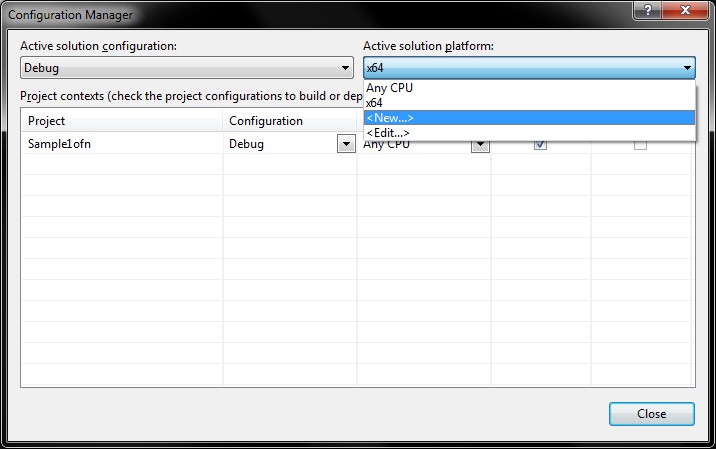
- Solution (Context Menu) > Configuration Manager
- Click Active solution platform > New... to create the x86 and x64 settings:


Click Active solution platform > Edit... to remove the Any CPU configuration (its not supported in CefSharp 3):
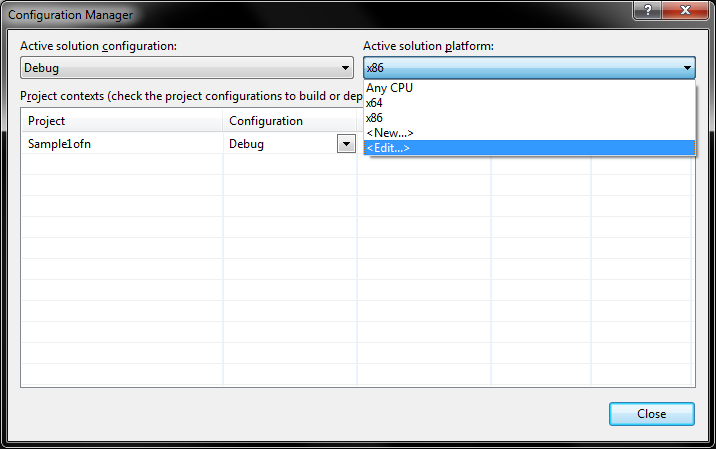

- Be sure to also align the Project Settings with the Solution

- Now lets add a reference to the solution via NuGet
Click Solution (Context Menu) > Enable NuGet Package Restore
Click Solution (Context Menu) > Manage NuGet Packages for Solution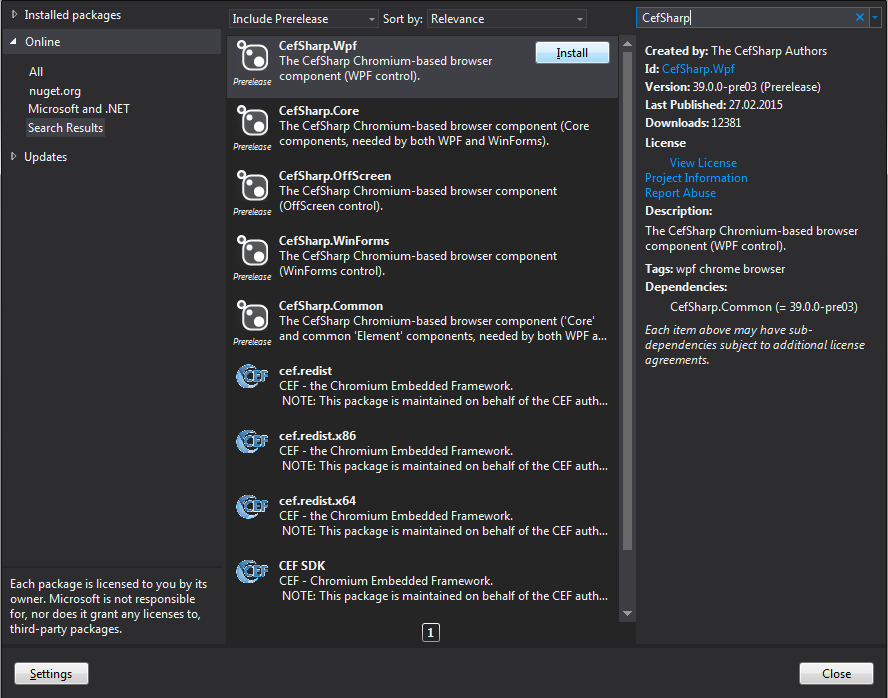
Add the CefSharp.WPF library into the solution - Save All edits and close Visual Studio. You really have to close it completely because the CefSharp reference will otherwise not show up correctly.
- Re-open the CefSharp 3 solution and click build.
Expectation: The project should build without an error and the References section in the sample project should show the CefSharp.WPF reference. - Lets open the MainWindow.xaml and lets add a CefSharp browser control into it:
<Window x:Class="Sample1.MainWindow"

        xmlns="http://schemas.microsoft.com/winfx/2006/xaml/presentation"

        xmlns:x="http://schemas.microsoft.com/winfx/2006/xaml"

        xmlns:cefSharp="clr-namespace:CefSharp.Wpf;assembly=CefSharp.Wpf"

        Title="MainWindow" Height="550" Width="625">

    <Grid>

        <cefSharp:ChromiumWebBrowser Grid.Row="0"

        Address="https://github.com/cefsharp/CefSharp/wiki/Frequently-asked-questions" />

  </Grid>

</Window>
- That is, we have to add the CefSharp name space reference:
xmlns:cefSharp="clr-namespace:CefSharp.Wpf;assembly=CefSharp.Wpf" - ...and the control itself:
<cefSharp:ChromiumWebBrowser Grid.Row="0"<br> Address="https://github.com/cefsharp/CefSharp/wiki/Frequently-asked-questions" /> - This code instantiates the ChromiomBrowser and points it at the Internet address indicated by the bindable
Addressproperty. - Now build and execute and enjoy. You should see the following window and be able to browse around in it. Be patience on starting it up though - this depends on you Internet speed and whether you use the debug version:

Congratulation :-) You just completed the first steps in series of articles towards building complex browsers into a MVVM compliant WPF architecture.
Using a Preview Version of CefSharp 3
There is also a preview version at MyGet.org for those who are running into problems using the current release version. You can use this preview version to check whether your problem has been reported before and may have already been fixed in the meantime. To do this, open:
- Tools > NuGet Package Manager > Package Manager Settings
to setup a new NuGet source:https://www.myget.org/F/cefsharp/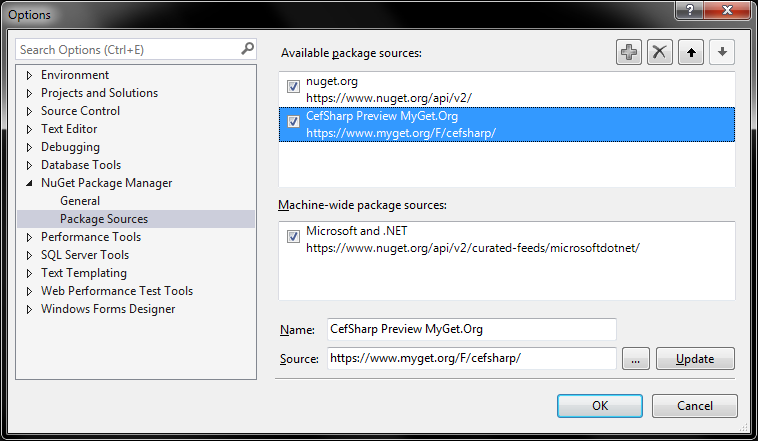
- Go into the NuGet Package Manager and install the package from MyGet.org
Now go back into the solution and add a reference to the MyGet package:
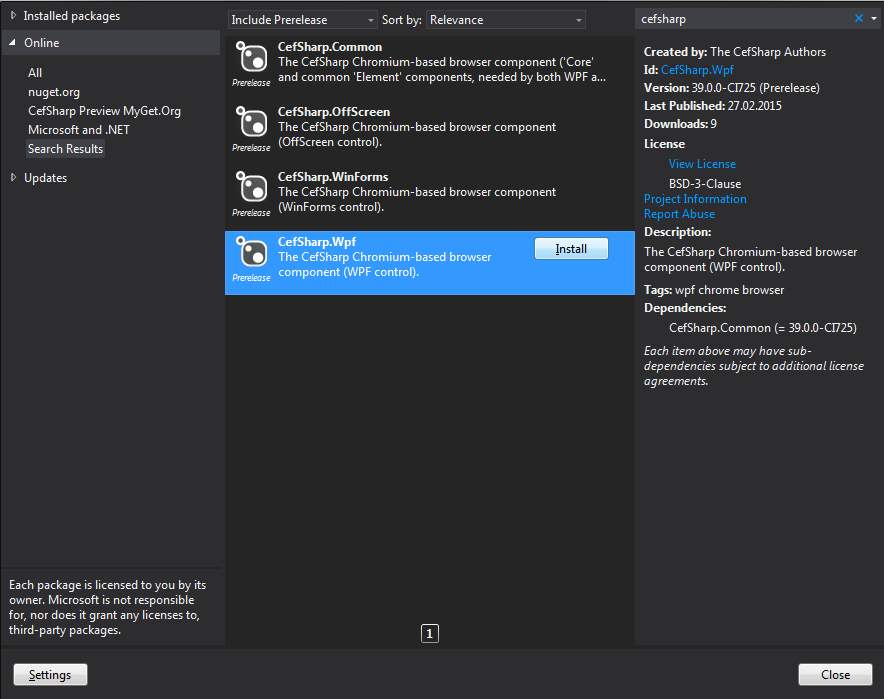
- Whether your problem still exists or whether its been solved, your feedback here or at the Google Groups forum is probably always welcome: https://groups.google.com/forum/#!forum/cefsharp
A Web-browser control can naturally be used to display content retrieved from a web server. But the strength of this control is not limited to displaying content from a web server. It is actually designed to retrieve and display content from virtually any local or remote source. One way of implementing this is shown in the next article of this series: http://www.codeproject.com/Articles/887148/Display-HTML-in-WPF-and-CefSharp-Tutorial-Part.
References
[1] Embedding Chrome in a WPF VB.NET Application using CEFSharp
http://www.codeproject.com/Tips/648678/Embedding-Chrome-in-a-WPF-VB-NET-Application-using
[2] CefSharp repository on GitHub
https://github.com/cefsharp/CefSharp
[3] CefSharp FAQ
https://github.com/cefsharp/CefSharp/wiki/Frequently-asked-questions
CefSharp Wiki
https://github.com/cefsharp/CefSharp/wiki
License
This article, along with any associated source code and files, is licensed under The Code Project Open License (CPOL)
Display HTML in WPF and CefSharp的更多相关文章
- WPF使用CefSharp嵌入网页
1.点击项目应用下的管理NuGet程序包 2.在浏览中输入cefsharp-->查找 CefSharp.Wpf-->点击安装,等待安装完成 3.如果遇到一下问题将解决方案和项目都改成64位 ...
- WPF使用cefsharp
最近在公司项目上会用到cefsharp.wpf,不知道为什么按照网上的配置一直无法运行成功,怎么配置可以参考以下这篇博文: http://www.cnblogs.com/TianFang/p/4573 ...
- WPF使用cefsharp 下载地址
源码下载: https://github.com/cefsharp/CefSharp dll类库包下载nuget: https://www.nuget.org/packages/CefSharp.Wp ...
- WPF 开发 WebBrowser
WebBrowser WebBrowser 报错如何屏蔽 CEF(Chromium Embedded Framework) 参考 WPF, Chrome Embedded and WebA ...
- 【WPF】使用CefSharp嵌入HTML网页
需求:WPF项目中要做用户的商铺主页,由于考虑到每个商家的主页布局各不相同,不能用XAML写死布局.最好的办法是WPF这边XAML写好一个容器,用户使用HTML可视化编辑器(比如这个)来准备好网页,输 ...
- wpf中使用cefsharp加载本地html网页并实现cs和js的交互,并且cefsharp支持any cpu
废话少说,直接上代码: 第一步: 第二步: 第三步: 第四步: App.xaml.cs对应的代码: using CefSharp; using CefSharp.Wpf; using System; ...
- wpf CefSharp 与 js交互
原文:wpf CefSharp 与 js交互 通过 NuGet 获取 CefSharp.WpF 组件. xmlns:cefSharp="clr-namespace:CefSharp.Wpf ...
- WPF中使用cefsharp
原文:WPF中使用cefsharp 新入职一家公司,由写服务端接口变成了软硬件通信.服务器.客户端.C/S.B/S乱七八糟各种打杂.首先接收一个WPF项目,因为不熟WPF,再加上前端我也不熟,我打算使 ...
- CefSharp For WPF基本使用
原文:CefSharp For WPF基本使用 Nuget引用 CefSharp.Wpf CefSharp.Common cef.redist.x64 cef.redist.x86 直接搜索安装Cef ...
随机推荐
- iOS开发之UISearchBar初探
iOS开发之UISearchBar初探 UISearchBar也是iOS开发常用控件之一,点进去看看里面的属性barStyle.text.placeholder等等.但是这些属性显然不足矣满足我们的开 ...
- Photo Shop 设置
1. 编辑 > 首选项 > 单位与标尺 2. 面板 在『窗口』 菜单下开启: 工具 选项 信息(F8) 图层(F7) 历史记录 可以将设置好的面板保存下来,这样下次别人弄乱了你的面板后,你 ...
- java 中的volatile
本博客摘录自 http://www.infoq.com/cn/articles/java-memory-model-4/ 当我们声明共享变量为volatile后,对这个变量的读/写将会很特别.理解 ...
- Parameter 'id' not found. Available parameters are [1, 0, param1, param2]异常
出现此类异常可能的原因:Mapper.xml文件中的parameterType的类型与传入的参数类型不匹配
- RabbitMQ入门教程——.NET客户端使用
众所周知RabbitMQ使用的是AMQP协议.我们知道AMQP是一种网络协议,能够支持符合要求的客户端应用和消息中间件代理之间进行通信. 其中消息代理扮演的角色就是从生产者那儿接受消息,并根据既定的路 ...
- cocosstdio之字体之文本和FNT字体
FNT字体和文本字体的作用是:导入字体资源可以使用字体资源便可以使用其资源内的字体来在程序中使用 不同的是FNT字体资源内容比较少,所以个人猜想可以在特定情况下使用: 两种字体资源对比: 赋值过程对比 ...
- c++双字符常量
ascii表中 A是65,B是66,16706是A乘256+B 一些双字符的汉字也可以通过此方法转为int数字
- linux批量删除进程
在虚拟机用脚本跑了几十个client程序用来测试服务器,然后发现参数设置错误,得重来,就傻眼了,不知道怎么关这么多client进程,总不能一个一个关.还好,学习一下,想出了以下的命令. ps -e ...
- spring注入静态成员变量提示invalid setter method
果然还是不够细心啊,被坑一晚上.. 一个极其简单的小程序,但是需要通过xml文件配置注入一个值,唯一的特别是要注入的属性是类中的静态成员变量.. 如下,然后自动生成get和set方法..坑就从此开始了 ...
- @Value取不到值引出的spring的2种配置文件applicationContext.xml和xxx-servlet.xml
项目中经常会用到配置文件,定义成properties的形式比较常见,为了方便使用一般在spring配置文件中做如下配置: <context:property-placeholder ignore ...