
Spring3+Mybatis3+Mysql+ivy+liquibase
Spring3+Mybatis3+Mysql+ivy+liquibase 集成
近一周时间所学技术:整合
Spring+MyBatis+MySql+ivy+liquibase
Mybatis:是一个基于Java的持久层框架。提供的持久层框架包括SQL Maps和Data Access Objects(DAO)
Liquibase是一个用于跟踪、管理和应用数据库变化的开源的数据库重构工具。它将所有数据库的变化(包括结构和数据)都保存在XML文件中,便于版本控制。
Apache Ivy™ 是Apache Ant 下的一个子项目。Apache Ivy是一个优秀的管理(记录、跟踪、解析和报告)项目依赖的工具,提供了强大的依赖管理功能,可与Apache Ant紧密集成.
工具:Eclipse 已安装ivyDe插件
1、新建Web工程,添加ivy.xml文件支持,主要添加所需jar包,类似maven的配置文件
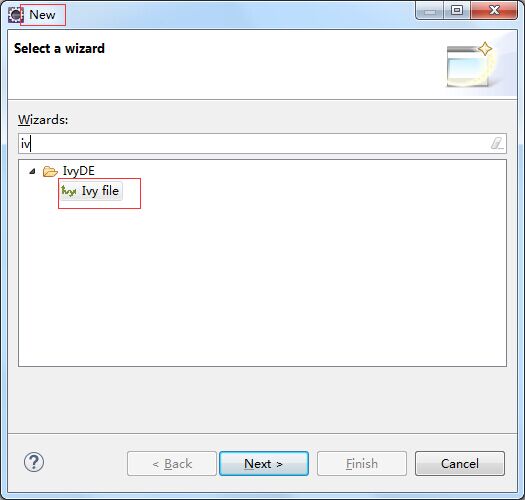
ivy.xml:
<?xml version="1.0" encoding="UTF-8"?>

<!--

Licensed to the Apache Software Foundation (ASF) under one

or more contributor license agreements. See the NOTICE file

distributed with this work for additional information

regarding copyright ownership. The ASF licenses this file

to you under the Apache License, Version 2.0 (the

"License"); you may not use this file except in compliance

with the License. You may obtain a copy of the License at

http://www.apache.org/licenses/LICENSE-2.0

Unless required by applicable law or agreed to in writing,

software distributed under the License is distributed on an

"AS IS" BASIS, WITHOUT WARRANTIES OR CONDITIONS OF ANY

KIND, either express or implied. See the License for the

specific language governing permissions and limitations

under the License.

-->

<ivy-module version="2.0" xmlns:xsi="http://www.w3.org/2001/XMLSchema-instance"

xsi:noNamespaceSchemaLocation="http://ant.apache.org/ivy/schemas/ivy.xsd">

<info

organisation="com.cdv"

module="Smmil"

status="integration">

</info>

<configurations>

<conf name="default" visibility="public" description="runtime dependencies and master artifact can be used with this conf" extends="runtime,master"/>

<conf name="master" visibility="public" description="contains only the artifact published by this module itself, with no transitive dependencies"/>

<conf name="compile" visibility="public" description="this is the default scope, used if none is specified. Compile dependencies are available in all classpaths."/>

<conf name="provided" visibility="public" description="this is much like compile, but indicates you expect the JDK or a container to provide it. It is only available on the compilation classpath, and is not transitive."/>

<conf name="runtime" visibility="public" description="this scope indicates that the dependency is not required for compilation, but is for execution. It is in the runtime and test classpaths, but not the compile classpath." extends="compile"/>

<conf name="test" visibility="private" description="this scope indicates that the dependency is not required for normal use of the application, and is only available for the test compilation and execution phases." extends="runtime"/>

<conf name="system" visibility="public" description="this scope is similar to provided except that you have to provide the JAR which contains it explicitly. The artifact is always available and is not looked up in a repository."/>

<conf name="sources" visibility="public" description="this configuration contains the source artifact of this module, if any."/>

<conf name="javadoc" visibility="public" description="this configuration contains the javadoc artifact of this module, if any."/>

<conf name="optional" visibility="public" description="contains all optional dependencies"/>

</configurations>

<dependencies>

<!-- Spring 相关内容 -->

<dependency org="org.springframework" name="spring-core" rev="3.2.5.RELEASE" conf="compile->compile(*),master(*);runtime->runtime(*)" transitive="false"/>

<dependency org="org.springframework" name="spring-beans" rev="3.2.5.RELEASE" conf="compile->compile(*),master(*);runtime->runtime(*)" transitive="false"/>

<dependency org="org.springframework" name="spring-web" rev="3.2.5.RELEASE" conf="compile->compile(*),master(*);runtime->runtime(*)" transitive="false"/>

<dependency org="org.springframework" name="spring-context" rev="3.2.5.RELEASE" conf="compile->compile(*),master(*);runtime->runtime(*)" transitive="false"/>

<dependency org="org.springframework" name="spring-aop" rev="3.2.5.RELEASE" conf="compile->compile(*),master(*);runtime->runtime(*)" transitive="false"/>

<dependency org="org.springframework" name="spring-expression" rev="3.2.5.RELEASE" conf="compile->compile(*),master(*);runtime->runtime(*)" transitive="false"/>

<dependency org="org.springframework" name="spring-tx" rev="3.2.5.RELEASE" conf="compile->compile(*),master(*);runtime->runtime(*)" transitive="false"/>

<dependency org="org.springframework" name="spring-jms" rev="3.2.5.RELEASE" conf="compile->compile(*),master(*);runtime->runtime(*)" transitive="false"/>

<dependency org="org.springframework" name="spring-jdbc" rev="3.2.5.RELEASE" conf="compile->compile(*),master(*);runtime->runtime(*)" transitive="false"/>

<dependency org="aopalliance" name="aopalliance" rev="1.0" conf="compile->compile(*),master(*);runtime->runtime(*)" transitive="false"/>

<dependency org="com.sun.xml.fastinfoset" name="FastInfoset" rev="1.2.12" conf="compile->compile(*),master(*);runtime->runtime(*)" transitive="false"/>

<dependency org="cglib" name="cglib-nodep" rev="2.2.2" conf="compile->compile(*),master(*);runtime->runtime(*)" />

<dependency org="org.aspectj" name="aspectjrt" rev="1.6.11" conf="compile->compile(*),master(*);runtime->runtime(*)" transitive="false"/>

<dependency org="org.aspectj" name="aspectjweaver" rev="1.6.11" conf="compile->compile(*),master(*);runtime->runtime(*)" transitive="false"/>

<!--添加日志包 -->

<dependency org="commons-logging" name="commons-logging" rev="1.2" conf="compile->compile(*),master(*);runtime->runtime(*)" transitive="false"></dependency>

<!-- 数据库相关内容 -->

<dependency org="com.h2database" name="h2" rev="1.3.174" conf="compile->compile(*),master(*);runtime->runtime(*)" transitive="false"/>

<dependency org="mysql" name="mysql-connector-java" rev="5.1.18" conf="compile->compile(*),master(*);runtime->runtime(*)" transitive="false"/>

<dependency org="commons-dbcp" name="commons-dbcp" rev="1.4" conf="compile->compile(*),master(*);runtime->runtime(*)" transitive="false"/>

<dependency org="commons-pool" name="commons-pool" rev="1.5.6" conf="compile->compile(*),master(*);runtime->runtime(*)" transitive="false"/>

<dependency org="org.liquibase" name="liquibase-core" rev="2.0.4" conf="compile->compile(*),master(*);runtime->runtime(*)" transitive="false"/>

<dependency org="org.mybatis" name="mybatis" rev="3.1.1" conf="compile->compile(*),master(*);runtime->runtime(*)" transitive="false"/>

<dependency org="org.mybatis" name="mybatis-spring" rev="1.1.1" conf="compile->compile(*),master(*);runtime->runtime(*)" transitive="false"/>

</dependencies>

</ivy-module>
引入jar包。
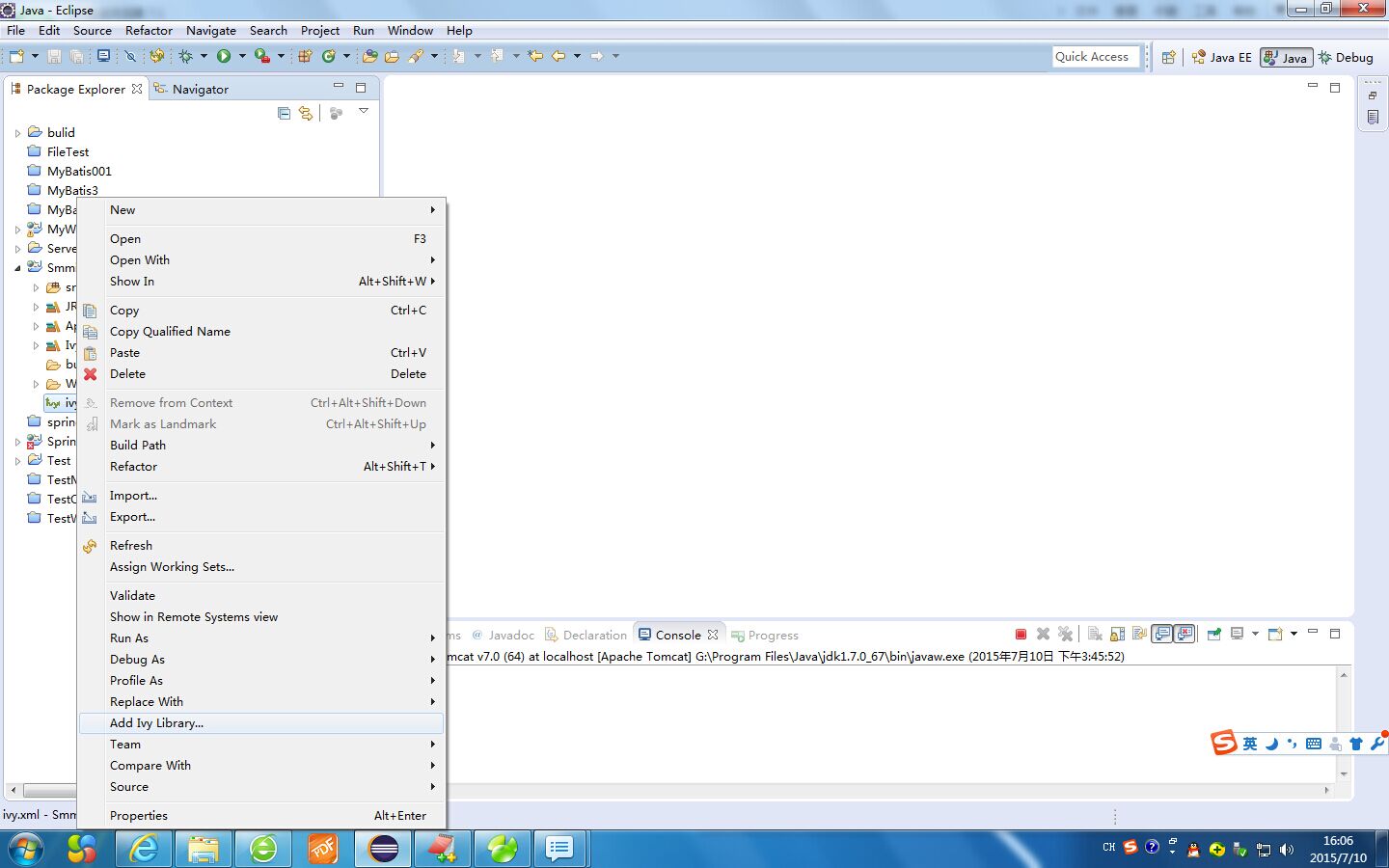
2、添加liquibase配置文件
新建包com.lgp.test_changelog并添加数据库重构配置文件xml
master.xml table.xml view.xml data.xml
master.xml:
<?xml version="1.0" encoding="UTF-8" standalone="no"?>

<databaseChangeLog xmlns="http://www.liquibase.org/xml/ns/dbchangelog"

xmlns:xsi="http://www.w3.org/2001/XMLSchema-instance"

xsi:schemaLocation="http://www.liquibase.org/xml/ns/dbchangelog http://www.liquibase.org/xml/ns/dbchangelog/dbchangelog-2.0.xsd">

<include file="table.xml" relativeToChangelogFile="true" />

<include file="view.xml" relativeToChangelogFile="true" />

<include file="data.xml" relativeToChangelogFile="true" />

</databaseChangeLog>
table.xml
<?xml version="1.0" encoding="UTF-8" standalone="no"?>

<databaseChangeLog xmlns="http://www.liquibase.org/xml/ns/dbchangelog"

xmlns:xsi="http://www.w3.org/2001/XMLSchema-instance"

xsi:schemaLocation="http://www.liquibase.org/xml/ns/dbchangelog http://www.liquibase.org/xml/ns/dbchangelog/dbchangelog-2.0.xsd">

<!-- OOOOOO注意: 本文件不要格式化OOOOOO -->

<changeSet author="lgp" id="20150710-test" context="production">

<createTable tableName="user_info">

<column name="userid" type="NVARCHAR(100)"><constraints nullable="false" primaryKey="true" primaryKeyName="PK_USER_INFO" /></column>

<column name="userhome" type="NVARCHAR(100)"></column>

<column name="useraddress" type="NVARCHAR(100)"><constraints nullable="false" /></column>

</createTable>

</changeSet>

</databaseChangeLog>
view.xml:
<?xml version="1.0" encoding="UTF-8" standalone="no"?>

<databaseChangeLog xmlns="http://www.liquibase.org/xml/ns/dbchangelog"

xmlns:xsi="http://www.w3.org/2001/XMLSchema-instance"

xsi:schemaLocation="http://www.liquibase.org/xml/ns/dbchangelog http://www.liquibase.org/xml/ns/dbchangelog/dbchangelog-2.0.xsd">

</databaseChangeLog>
data.xml:
<?xml version="1.0" encoding="UTF-8" standalone="no"?>

<databaseChangeLog xmlns="http://www.liquibase.org/xml/ns/dbchangelog"

xmlns:xsi="http://www.w3.org/2001/XMLSchema-instance"

xsi:schemaLocation="http://www.liquibase.org/xml/ns/dbchangelog http://www.liquibase.org/xml/ns/dbchangelog/dbchangelog-2.0.xsd">

<changeSet author="lgp" id="20150710-test-initdata">

<insert tableName="user_info">

<column name="userid" value="lisi" />

<column name="userhome" value="111111ls" />

<column name="useraddress" value="123456ls" />

</insert>

<insert tableName="user_info">

<column name="userid" value="zhaoliu" />

<column name="userhome" value="111111zl" />

<column name="useraddress" value="123456" />

</insert>

</changeSet>

</databaseChangeLog>
在spring配置文件中添加配置集成liquibase
3、添加mybatis支持文件
添加com.lgp.test.pojo.UserInfo.java
package com.lgp.test.pojo;

public class UserInfo {

private String userId;

private String userHome;

private String userAddress;

public String getUserId() {

return userId;

}

public void setUserId(String userId) {

this.userId = userId;

}

public String getUserHome() {

return userHome;

}

public void setUserHome(String userHome) {

this.userHome = userHome;

}

public String getUserAddress() {

return userAddress;

}

public void setUserAddress(String userAddress) {

this.userAddress = userAddress;

}

}
添加数据库Mapper文件com/lgp/test/mapper/mybatis-config.xml
<?xml version="1.0" encoding="UTF-8"?>

<!DOCTYPE configuration PUBLIC "-//mybatis.org//DTD Config 3.0//EN" "http://mybatis.org/dtd/mybatis-3-config.dtd">

<configuration>

<!--设置别名 -->

<typeAliases>

<typeAlias type="com.lgp.test.pojo.UserInfo" alias="UserInfo"/>

</typeAliases>

<mappers>

<mapper resource="com/lgp/test/dao/UserMapper.xml"/>

</mappers>

</configuration>
添加接口文件 com.lgp.test.dao.UserInfoDao.java
package com.lgp.test.dao;

import java.util.List;

import com.lgp.test.pojo.UserInfo;

public interface UserInfoDao {

public int insert(UserInfo user);

public int update(UserInfo user);

public int delete(String userId);

public List<UserInfo> selectAll();

public int countAll();

public UserInfo find(String userId);

}

(实现接口)com/lgp/test/dao/UserMapper.xml

<?xml version="1.0" encoding="UTF-8" ?>

<!DOCTYPE mapper PUBLIC "-//mybatis.org//DTD Mapper 3.0//EN" "http://mybatis.org/dtd/mybatis-3-mapper.dtd">

<mapper namespace="com.lgp.test.dao.UserInfoDao">

<select id="countAll" resultType="int"> <!-- 查询表中记录总数 -->

select count(*) c from user_info

</select>

<select id="selectAll" resultType="UserInfo"> <!-- 查询表中的所有用户 -->

select * from user_info order by userid asc

</select>

<insert id="insert" parameterType="UserInfo"> <!-- 向数据库中插入用户 -->

insert into user_info(userid,userHome,useraddress) values(#{userId},#{userHome},#{userAddress})

</insert>

<update id="update" parameterType="UserInfo"> <!-- 更新库中的用户 -->

update user_info set userhome=#{userHome},useraddress=#{userAddress} where userid=#{userId}

</update>

<delete id="delete" parameterType="String"> <!-- 删除用户 -->

delete from user_info where userid=#{userId}

</delete>

<select id="find" parameterType="String" resultType="UserInfo"> <!-- 根据用户名查找用户 -->

select * from user_info where userid=#{userId}

</select>

</mapper>
4、添加Spring支持配置文件:
添加web.xml文件
<?xml version="1.0" encoding="UTF-8"?>

<web-app xmlns:xsi="http://www.w3.org/2001/XMLSchema-instance" xmlns="http://java.sun.com/xml/ns/javaee" xsi:schemaLocation="http://java.sun.com/xml/ns/javaee http://java.sun.com/xml/ns/javaee/web-app_3_0.xsd" id="test" version="3.0">

<context-param>

<param-name>contextConfigLocation</param-name>

<param-value>classpath:beans.xml</param-value>

</context-param>

<listener>

<listener-class>org.springframework.web.context.ContextLoaderListener</listener-class>

</listener>

<welcome-file-list>

<welcome-file>index.html</welcome-file>

<welcome-file>index.htm</welcome-file>

<welcome-file>index.jsp</welcome-file>

<welcome-file>default.html</welcome-file>

<welcome-file>default.htm</welcome-file>

<welcome-file>default.jsp</welcome-file>

</welcome-file-list>

</web-app>
添加beans.xml和数据库配置文件db_config.pro..s 到src目录下
dbconfig.pro...
# Database connection

database.driver=com.mysql.jdbc.Driver

database.url=jdbc:mysql://127.0.0.1:3306/test

database.user=root

database.password=123456

# Database

#database.driver=org.h2.Driver

#database.url=jdbc:h2:${database.h2.basedir}\\test

#database.user=sa

#database.password=
beans.xml
<?xml version="1.0" encoding="UTF-8"?>

<beans xmlns="http://www.springframework.org/schema/beans"

xmlns:xsi="http://www.w3.org/2001/XMLSchema-instance" xmlns:tx="http://www.springframework.org/schema/tx"

xmlns:aop="http://www.springframework.org/schema/aop" xmlns:context="http://www.springframework.org/schema/context"

xmlns:jdbc="http://www.springframework.org/schema/jdbc" xmlns:util="http://www.springframework.org/schema/util"

xsi:schemaLocation="http://www.springframework.org/schema/beans http://www.springframework.org/schema/beans/spring-beans.xsd

http://www.springframework.org/schema/tx http://www.springframework.org/schema/tx/spring-tx.xsd

http://www.springframework.org/schema/context http://www.springframework.org/schema/context/spring-context.xsd

http://www.springframework.org/schema/aop http://www.springframework.org/schema/aop/spring-aop.xsd

http://www.springframework.org/schema/jdbc http://www.springframework.org/schema/jdbc/spring-jdbc.xsd

http://www.springframework.org/schema/util http://www.springframework.org/schema/util/spring-util.xsd

http://cxf.apache.org/jaxws http://cxf.apache.org/schemas/jaxws.xsd"

xmlns:jaxws="http://cxf.apache.org/jaxws">

<!-- enable transaction demarcation with annotations -->

<tx:annotation-driven />

<!-- enable autowire -->

<context:annotation-config />

<bean

class="org.springframework.beans.factory.config.PropertyPlaceholderConfigurer">

<property name="locations">

<list>

<value>classpath:dbconfig.properties</value>

</list>

</property>

</bean>

<!-- 数据库、数据源等相关配置-->

<bean id="ds" class="org.apache.commons.dbcp.BasicDataSource"

destroy-method="close">

<property name="driverClassName" value="${database.driver}" />

<property name="url" value="${database.url}" />

<property name="username" value="${database.user}" />

<property name="password" value="${database.password}" />

</bean>

<!-- 指明mybatis工厂类的配置 -->

<bean id="sqlSessionFactory" class="org.mybatis.spring.SqlSessionFactoryBean">

<property name="dataSource" ref="ds" />

<property name="configLocation" value="classpath:com/lgp/test/mapper/mybatis-config.xml" />

</bean>

<bean class="org.mybatis.spring.mapper.MapperScannerConfigurer">

<property name="basePackage" value="com.lgp.test.dao" />

</bean>

<!-- 数据库事务管理-->

<bean id="transactionManager"

class="org.springframework.jdbc.datasource.DataSourceTransactionManager">

<property name="dataSource" ref="ds" />

</bean>

<!-- 初始化数据库 -->

<bean id="liquibase" class="liquibase.integration.spring.SpringLiquibase">

<property name="dataSource" ref="ds" />

<property name="changeLog" value="classpath:com/lgp/test/db_changelog/master.xml" />

<property name="contexts" value="production" />

</bean>

</beans>
添加测试类 Servlet
package com.lgp.test.controller;

import java.io.IOException;

import javax.servlet.ServletException;

import javax.servlet.annotation.WebServlet;

import javax.servlet.http.HttpServlet;

import javax.servlet.http.HttpServletRequest;

import javax.servlet.http.HttpServletResponse;

import org.springframework.context.ApplicationContext;

import org.springframework.context.support.ClassPathXmlApplicationContext;

import com.lgp.test.dao.UserInfoDao;

import com.lgp.test.pojo.UserInfo;

@WebServlet("/testUser")

public class UserInfoServlet extends HttpServlet {

private static final long serialVersionUID = 1L;

static ApplicationContext ctx=null;

public UserInfoServlet() {

super();

ctx=new ClassPathXmlApplicationContext("beans.xml");

}

protected void doGet(HttpServletRequest request, HttpServletResponse response) throws ServletException, IOException {

String action = request.getParameter("action");

UserInfoDao userInfoDao = (UserInfoDao)ctx.getBean("userInfoDao");

if ("find".equals(action)) {

System.out.println("信息记录数:"+userInfoDao.countAll());

UserInfo user = userInfoDao.find(request.getParameter("userId"));

System.out.println("用户信息:"+user.getUserId()+"=="+user.getUserHome()+"=="+user.getUserAddress());

}

if ("insert".equals(action)) {

System.out.println("信息记录数:"+userInfoDao.countAll());

UserInfo user = new UserInfo();

user.setUserId(request.getParameter("userId"));

user.setUserHome(request.getParameter("userHome"));

user.setUserAddress(request.getParameter("userAddress"));

userInfoDao.insert(user);

System.out.println("添加一条数据成功==信息记录数:"+userInfoDao.countAll());

System.out.println("修改后用户信息:"+user.getUserId()+"=="+user.getUserHome()+"=="+user.getUserAddress());

}

if ("update".equals(action)) {

System.out.println("信息记录数:"+userInfoDao.countAll());

UserInfo user = new UserInfo();

user.setUserId(request.getParameter("userId"));

user.setUserHome(request.getParameter("userHome"));

user.setUserAddress(request.getParameter("userAddress"));

userInfoDao.update(user);

System.out.println("修改一条数据成功==信息记录数:"+userInfoDao.countAll()+"====");

}

if ("delete".equals(action)) {

System.out.println("信息记录数:"+userInfoDao.countAll());

userInfoDao.delete(request.getParameter("userId"));

System.out.println("删除一条数据成功==信息记录数:"+userInfoDao.countAll()+"====");

}

}

protected void doPost(HttpServletRequest request, HttpServletResponse response) throws ServletException, IOException {

doGet(request, response);

}

}
=======配置完成=====
添加测试页面测试:
index.jsp
<%@ page language="java" contentType="text/html; charset=ISO-8859-1"

pageEncoding="ISO-8859-1"%>

<!DOCTYPE html PUBLIC "-//W3C//DTD HTML 4.01 Transitional//EN" "http://www.w3.org/TR/html4/loose.dtd">

<html>

<head>

<meta http-equiv="Content-Type" content="text/html; charset=ISO-8859-1">

<title>Insert title here</title>

</head>

<body>

<a href="find.jsp">find</a>

<br/>

<a href="save.jsp">insert</a>

<br/>

<a href="delete.jsp">delete</a>

<br/>

<a href="update.jsp">update</a>

</body>

</html>
find.jsp
<%@ page language="java" contentType="text/html; charset=ISO-8859-1"

pageEncoding="ISO-8859-1"%>

<!DOCTYPE html PUBLIC "-//W3C//DTD HTML 4.01 Transitional//EN" "http://www.w3.org/TR/html4/loose.dtd">

<html>

<head>

<meta http-equiv="Content-Type" content="text/html; charset=ISO-8859-1">

<title>Insert title here</title>

</head>

<body>

<form action="testUser">

<input type="hidden" name="action" value="find">

<input type="text" name="userId">

<input type="submit">

</form>

</body>

</html>
save.jsp
<%@ page language="java" contentType="text/html; charset=ISO-8859-1"

pageEncoding="ISO-8859-1"%>

<!DOCTYPE html PUBLIC "-//W3C//DTD HTML 4.01 Transitional//EN" "http://www.w3.org/TR/html4/loose.dtd">

<html>

<head>

<meta http-equiv="Content-Type" content="text/html; charset=ISO-8859-1">

<title>Insert title here</title>

</head>

<body>

<form action="testUser">

<input type="hidden" name="action" value="insert">

<input type="text" name="userId">

<input type="text" name="userHome">

<input type="text" name="userAddress">

<input type="submit">

</form>

</body>

</html>
update.jsp
<%@ page language="java" contentType="text/html; charset=ISO-8859-1"

pageEncoding="ISO-8859-1"%>

<!DOCTYPE html PUBLIC "-//W3C//DTD HTML 4.01 Transitional//EN" "http://www.w3.org/TR/html4/loose.dtd">

<html>

<head>

<meta http-equiv="Content-Type" content="text/html; charset=ISO-8859-1">

<title>Insert title here</title>

</head>

<body>

<form action="testUser">

<input type="hidden" name="action" value="update">

<input type="text" name="userId">

<input type="text" name="userHome">

<input type="text" name="userAddress">

<input type="submit">

</form>

</body>

</html>
delete.jsp
<%@ page language="java" contentType="text/html; charset=ISO-8859-1"

pageEncoding="ISO-8859-1"%>

<!DOCTYPE html PUBLIC "-//W3C//DTD HTML 4.01 Transitional//EN" "http://www.w3.org/TR/html4/loose.dtd">

<html>

<head>

<meta http-equiv="Content-Type" content="text/html; charset=ISO-8859-1">

<title>Insert title here</title>

</head>

<body>

<form action="testUser">

<input type="hidden" name="action" value="delete">

<input type="text" name="userId">

<input type="submit">

</form>

</body>

</html>
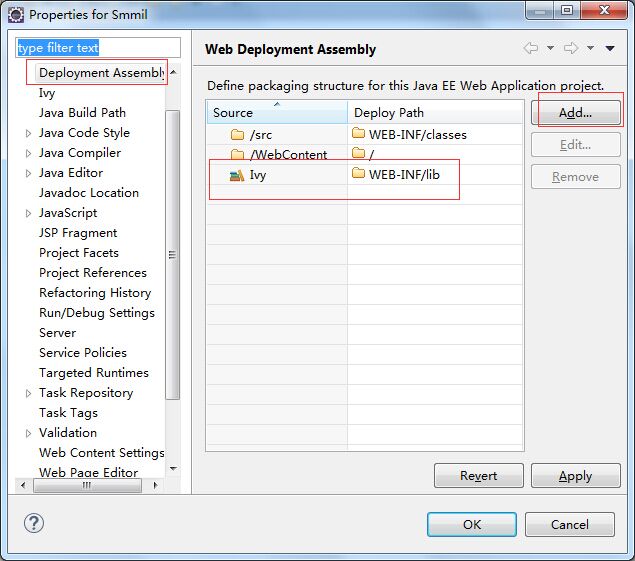
===============================部署测试(添加资源库部署)======

Spring3+Mybatis3+Mysql+ivy+liquibase的更多相关文章
- Struts2+Spring3+Mybatis3开发环境搭建
本文主要介绍Struts2+Spring3+Mybatis3开发环境搭建 Struts和Spring不过多介绍. MyBatis 是支持普通 SQL 查询,存储过程和高级映射的优秀持久层框架.MyBa ...
- struts2 + spring3 + mybatis3 环境搭建
struts2 + spring3 + mybatis3 1. 框架下载 struts2: http://struts.apache.org/ 下载 struts-2.3.14-all.zip spr ...
- Spring3+MyBatis3整合log4j无法输出SQL语句问题的解决
今天遇到了跟下面文章一模一样的问题,下面文章的解决方案很好,在这里记录保存一下. Spring3+MyBatis3整合无法输出SQL语句问题的解决
- Spring3+mybatis3在多数据源情况下找不到数据库驱动的问题
解决问题的过程如下: 1.遇到问题和一般的解决方法和下面这个帖子的一样: http://www.oschina.net/question/188964_32305 2.我在按照1的做法配置了以后,依然 ...
- Struts2+Spring3+MyBatis3整合以及Spring注解开发
分类: Web(2) 版权声明:本文为博主原创文章,未经博主允许不得转载. 最近在做一个SpringMVC+spring+MyBatis的项目,突然想起以前自己要搭建一个Struts2+Sprin ...
- SpringBoot Jpa 双数据源mysql + oracle + liquibase+参考源码
一.yml文件配置 spring: # 数据库配置 datasource: primary: jdbc-url: jdbc:mysql://localhost:3306/mes-dev?useUnic ...
- struts2+spring3+hibernate3+mysql简单登录实现
1.导入相关的jar包 2.建立数据库 1 create table account( 2 id int(10), 3 user varchar(50), 4 paw varchar(50) 5 ); ...
- Spring3 +mybatis3 之 MapperScannerConfigurer
之前一直使用"org.mybatis.spring.mapper.MapperFactoryBean"这个类在spring中配置mybatis的dao接口,后来发现如果dao太多话 ...
- MyBatis3: There is no getter for property named 'code' in 'class java.lang.String'
mybatis3 : mysql文如下,传入参数为string类型时‘preCode’,运行报错为:There is no getter for property named 'preCode' i ...
随机推荐
- Hadoop环境常用命令
用户可以通过dfsadmin -safemode value 来操作安全模式,参数value的说明如下: enter - 进入安全模式 leave - 强制NameNode离开安全模式 get - ...
- android The public type classname must be defined in its own file 报错
The public type classname must be defined in its own file classname 为类名 错误提示,公用的类必髯有自己拥有独立.java文件 解 ...
- Learning Spark: Lightning-Fast Big Data Analysis 中文翻译
Learning Spark: Lightning-Fast Big Data Analysis 中文翻译行为纯属个人对于Spark的兴趣,仅供学习. 如果我的翻译行为侵犯您的版权,请您告知,我将停止 ...
- AC日记——向量点积计算 openjudge 1.6 09
09:向量点积计算 总时间限制: 1000ms 内存限制: 65536kB 描述 在线性代数.计算几何中,向量点积是一种十分重要的运算. 给定两个n维向量a=(a1,a2,...,an)和b=(b ...
- Unity热门插件推荐
前言 Unite2015的笔记 ,本文所提到的扩展主要针对 mobile上使用. 文中资源在Asset Store描述的截图日期:2016-04-28 Mesh Baker https://www.a ...
- Java面向对象之多态
多态:具有表现多种形态的能力的特征(同一个实现接口,使用不同的实例而执行不同的操作) 实现多态的优点:为了方便统一调用! 实现多态的三种方式! 1:子类到父类的转换: 例: Dog dog=new D ...
- IO调度器
由于对blktrace的好奇,来到了block层.通过阅读block层的代码,自己的几个错误认知被纠正,比如 一) 同步操作时,进程是在驱动中睡觉真实情况是:进程在文件系统睡觉 二) 对同一个数据块的 ...
- sqlserver 通用分页存储过程
来源:http://www.jb51.net/article/19936.htm CREATE PROCEDURE commonPagination ), --要显示的列名,用逗号隔开 ), --要查 ...
- PHPExcel
1.PHPExcel类中读取Excel文件相关函数和使用方法 插件官网:http://phpexcel.codeplex.com/ <?php require_once 'Classes/PHP ...
- Construct Binary Tree from Inorder and Postorder Traversal
Construct Binary Tree from Inorder and Postorder Traversal Given inorder and postorder traversal of ...