
Kubernetes Rook
Rook
Rook 是一个开源的cloud-native storage编排, 提供平台和框架;为各种存储解决方案提供平台、框架和支持,以便与云原生环境本地集成。
Rook 将存储软件转变为自我管理、自我扩展和自我修复的存储服务,它通过自动化部署、引导、配置、置备、扩展、升级、迁移、灾难恢复、监控和资源管理来实现此目的。
Rook 使用底层云本机容器管理、调度和编排平台提供的工具来实现它自身的功能。
Rook 目前支持Ceph、NFS、Minio Object Store和CockroachDB。
搭建Rook for Ceph环境
第一步:创建Rook Operator
kubectl apply -f operator.yaml
apiVersion: v1

kind: Namespace

metadata:

  name: rook-ceph-system

---

apiVersion: apiextensions.k8s.io/v1beta1

kind: CustomResourceDefinition

metadata:

  name: clusters.ceph.rook.io

spec:

  group: ceph.rook.io

  names:

    kind: Cluster

    listKind: ClusterList

    plural: clusters

    singular: cluster

    shortNames:

    - rcc

  scope: Namespaced

  version: v1beta1

---

apiVersion: apiextensions.k8s.io/v1beta1

kind: CustomResourceDefinition

metadata:

  name: filesystems.ceph.rook.io

spec:

  group: ceph.rook.io

  names:

    kind: Filesystem

    listKind: FilesystemList

    plural: filesystems

    singular: filesystem

    shortNames:

    - rcfs

  scope: Namespaced

  version: v1beta1

---

apiVersion: apiextensions.k8s.io/v1beta1

kind: CustomResourceDefinition

metadata:

  name: objectstores.ceph.rook.io

spec:

  group: ceph.rook.io

  names:

    kind: ObjectStore

    listKind: ObjectStoreList

    plural: objectstores

    singular: objectstore

    shortNames:

    - rco

  scope: Namespaced

  version: v1beta1

---

apiVersion: apiextensions.k8s.io/v1beta1

kind: CustomResourceDefinition

metadata:

  name: pools.ceph.rook.io

spec:

  group: ceph.rook.io

  names:

    kind: Pool

    listKind: PoolList

    plural: pools

    singular: pool

    shortNames:

    - rcp

  scope: Namespaced

  version: v1beta1

---

apiVersion: apiextensions.k8s.io/v1beta1

kind: CustomResourceDefinition

metadata:

  name: volumes.rook.io

spec:

  group: rook.io

  names:

    kind: Volume

    listKind: VolumeList

    plural: volumes

    singular: volume

    shortNames:

    - rv

  scope: Namespaced

  version: v1alpha2

---

# The cluster role for managing all the cluster-specific resources in a namespace

apiVersion: rbac.authorization.k8s.io/v1beta1

kind: ClusterRole

metadata:

  name: rook-ceph-cluster-mgmt

  labels:

    operator: rook

    storage-backend: ceph

rules:

- apiGroups:

  - ""

  resources:

  - secrets

  - pods

  - services

  - configmaps

  verbs:

  - get

  - list

  - watch

  - patch

  - create

  - update

  - delete

- apiGroups:

  - extensions

  resources:

  - deployments

  - daemonsets

  - replicasets

  verbs:

  - get

  - list

  - watch

  - create

  - update

  - delete

---

# The role for the operator to manage resources in the system namespace

apiVersion: rbac.authorization.k8s.io/v1beta1

kind: Role

metadata:

  name: rook-ceph-system

  namespace: rook-ceph-system

  labels:

    operator: rook

    storage-backend: ceph

rules:

- apiGroups:

  - ""

  resources:

  - pods

  - configmaps

  verbs:

  - get

  - list

  - watch

  - patch

  - create

  - update

  - delete

- apiGroups:

  - extensions

  resources:

  - daemonsets

  verbs:

  - get

  - list

  - watch

  - create

  - update

  - delete

---

# The cluster role for managing the Rook CRDs

apiVersion: rbac.authorization.k8s.io/v1beta1

kind: ClusterRole

metadata:

  name: rook-ceph-global

  labels:

    operator: rook

    storage-backend: ceph

rules:

- apiGroups:

  - ""

  resources:

  # Pod access is needed for fencing

  - pods

  # Node access is needed for determining nodes where mons should run

  - nodes

  - nodes/proxy

  verbs:

  - get

  - list

  - watch

- apiGroups:

  - ""

  resources:

  - events

    # PVs and PVCs are managed by the Rook provisioner

  - persistentvolumes

  - persistentvolumeclaims

  verbs:

  - get

  - list

  - watch

  - patch

  - create

  - update

  - delete

- apiGroups:

  - storage.k8s.io

  resources:

  - storageclasses

  verbs:

  - get

  - list

  - watch

- apiGroups:

  - batch

  resources:

  - jobs

  verbs:

  - get

  - list

  - watch

  - create

  - update

  - delete

- apiGroups:

  - ceph.rook.io

  resources:

  - "*"

  verbs:

  - "*"

- apiGroups:

  - rook.io

  resources:

  - "*"

  verbs:

  - "*"

---

# The rook system service account used by the operator, agent, and discovery pods

apiVersion: v1

kind: ServiceAccount

metadata:

  name: rook-ceph-system

  namespace: rook-ceph-system

  labels:

    operator: rook

    storage-backend: ceph

---

# Grant the operator, agent, and discovery agents access to resources in the rook-ceph-system namespace

kind: RoleBinding

apiVersion: rbac.authorization.k8s.io/v1beta1

metadata:

  name: rook-ceph-system

  namespace: rook-ceph-system

  labels:

    operator: rook

    storage-backend: ceph

roleRef:

  apiGroup: rbac.authorization.k8s.io

  kind: Role

  name: rook-ceph-system

subjects:

- kind: ServiceAccount

  name: rook-ceph-system

  namespace: rook-ceph-system

---

# Grant the rook system daemons cluster-wide access to manage the Rook CRDs, PVCs, and storage classes

kind: ClusterRoleBinding

apiVersion: rbac.authorization.k8s.io/v1beta1

metadata:

  name: rook-ceph-global

  namespace: rook-ceph-system

  labels:

    operator: rook

    storage-backend: ceph

roleRef:

  apiGroup: rbac.authorization.k8s.io

  kind: ClusterRole

  name: rook-ceph-global

subjects:

- kind: ServiceAccount

  name: rook-ceph-system

  namespace: rook-ceph-system

---

# The deployment for the rook operator

apiVersion: apps/v1beta1

kind: Deployment

metadata:

  name: rook-ceph-operator

  namespace: rook-ceph-system

  labels:

    operator: rook

    storage-backend: ceph

spec:

  replicas: 1

  template:

    metadata:

      labels:

        app: rook-ceph-operator

    spec:

      serviceAccountName: rook-ceph-system

      containers:

      - name: rook-ceph-operator

        image: rook/ceph:master

        args: ["ceph", "operator"]

        volumeMounts:

        - mountPath: /var/lib/rook

          name: rook-config

        - mountPath: /etc/ceph

          name: default-config-dir

        env:

        # To disable RBAC, uncomment the following:

        # - name: RBAC_ENABLED

        #  value: "false"

        # Rook Agent toleration. Will tolerate all taints with all keys.

        # Choose between NoSchedule, PreferNoSchedule and NoExecute:

        # - name: AGENT_TOLERATION

        #  value: "NoSchedule"

        # (Optional) Rook Agent toleration key. Set this to the key of the taint you want to tolerate

        # - name: AGENT_TOLERATION_KEY

        #  value: "<KeyOfTheTaintToTolerate>"

        # Set the path where the Rook agent can find the flex volumes

        # - name: FLEXVOLUME_DIR_PATH

        #  value: "<PathToFlexVolumes>"

        # Rook Discover toleration. Will tolerate all taints with all keys.

        # Choose between NoSchedule, PreferNoSchedule and NoExecute:

        # - name: DISCOVER_TOLERATION

        #  value: "NoSchedule"

        # (Optional) Rook Discover toleration key. Set this to the key of the taint you want to tolerate

        # - name: DISCOVER_TOLERATION_KEY

        #  value: "<KeyOfTheTaintToTolerate>"

        # Allow rook to create multiple file systems. Note: This is considered

        # an experimental feature in Ceph as described at

        # http://docs.ceph.com/docs/master/cephfs/experimental-features/#multiple-filesystems-within-a-ceph-cluster

        # which might cause mons to crash as seen in https://github.com/rook/rook/issues/1027

        - name: ROOK_ALLOW_MULTIPLE_FILESYSTEMS

          value: "false"

        # The logging level for the operator: INFO | DEBUG

        - name: ROOK_LOG_LEVEL

          value: "INFO"

        # The interval to check if every mon is in the quorum.

        - name: ROOK_MON_HEALTHCHECK_INTERVAL

          value: "45s"

        # The duration to wait before trying to failover or remove/replace the

        # current mon with a new mon (useful for compensating flapping network).

        - name: ROOK_MON_OUT_TIMEOUT

          value: "300s"

        # Whether to start pods as privileged that mount a host path, which includes the Ceph mon and osd pods.

        # This is necessary to workaround the anyuid issues when running on OpenShift.

        # For more details see https://github.com/rook/rook/issues/1314#issuecomment-355799641

        - name: ROOK_HOSTPATH_REQUIRES_PRIVILEGED

          value: "false"

        # The name of the node to pass with the downward API

        - name: NODE_NAME

          valueFrom:

            fieldRef:

              fieldPath: spec.nodeName

        # The pod name to pass with the downward API

        - name: POD_NAME

          valueFrom:

            fieldRef:

              fieldPath: metadata.name

        # The pod namespace to pass with the downward API

        - name: POD_NAMESPACE

          valueFrom:

            fieldRef:

              fieldPath: metadata.namespace

      volumes:

      - name: rook-config

        emptyDir: {}

      - name: default-config-dir

        emptyDir: {}
operator.yaml
第二步:创建Rook Cluster
kubectl apply -f cluster.yaml
#################################################################################

# This example first defines some necessary namespace and RBAC security objects.

# The actual Ceph Cluster CRD example can be found at the bottom of this example.

#################################################################################

apiVersion: v1

kind: Namespace

metadata:

  name: rook-ceph

---

apiVersion: v1

kind: ServiceAccount

metadata:

  name: rook-ceph-cluster

  namespace: rook-ceph

---

kind: Role

apiVersion: rbac.authorization.k8s.io/v1beta1

metadata:

  name: rook-ceph-cluster

  namespace: rook-ceph

rules:

- apiGroups: [""]

  resources: ["configmaps"]

  verbs: [ "get", "list", "watch", "create", "update", "delete" ]

---

# Allow the operator to create resources in this cluster's namespace

kind: RoleBinding

apiVersion: rbac.authorization.k8s.io/v1beta1

metadata:

  name: rook-ceph-cluster-mgmt

  namespace: rook-ceph

roleRef:

  apiGroup: rbac.authorization.k8s.io

  kind: ClusterRole

  name: rook-ceph-cluster-mgmt

subjects:

- kind: ServiceAccount

  name: rook-ceph-system

  namespace: rook-ceph-system

---

# Allow the pods in this namespace to work with configmaps

kind: RoleBinding

apiVersion: rbac.authorization.k8s.io/v1beta1

metadata:

  name: rook-ceph-cluster

  namespace: rook-ceph

roleRef:

  apiGroup: rbac.authorization.k8s.io

  kind: Role

  name: rook-ceph-cluster

subjects:

- kind: ServiceAccount

  name: rook-ceph-cluster

  namespace: rook-ceph

---

#################################################################################

# The Ceph Cluster CRD example

#################################################################################

apiVersion: ceph.rook.io/v1beta1

kind: Cluster

metadata:

  name: rook-ceph

  namespace: rook-ceph

spec:

  dataDirHostPath: /var/lib/rook

  dashboard:

    enabled: true

  storage:

    useAllNodes: true

    useAllDevices: false

    config:

      databaseSizeMB: ""

      journalSizeMB: ""
cluster.yaml
第三步:启用Ceph Dashboard
1、在Cluster.yaml中开启
  spec:

    dashboard:

      enabled: true
2、修改dashboard svc type为NodePort
kubectl edit svc --namespace=rook-ceph rook-ceph-mgr-dashboard
3、访问Ceph Dashboard
[root@node01 rook]# kubectl get svc --namespace=rook-ceph

NAME                      TYPE        CLUSTER-IP       EXTERNAL-IP   PORT(S)          AGE

rook-ceph-mgr             ClusterIP   10.108.75.252    <none>        9283/TCP         12d

rook-ceph-mgr-dashboard   NodePort    10.102.61.3      <none>        7000:32400/TCP   12d

rook-ceph-mon-a           ClusterIP   10.111.7.51      <none>        6790/TCP         12d

rook-ceph-mon-b           ClusterIP   10.102.239.101   <none>        6790/TCP         12d

rook-ceph-mon-c           ClusterIP   10.105.212.119   <none>        6790/TCP         12d
找到rook-ceph-mgr-dashborad的暴露端口

第四步:创建StorageClass
kubectl apply -f storageclass.yaml
apiVersion: ceph.rook.io/v1beta1

kind: Pool

metadata:

  name: replicapool

  namespace: rook-ceph

spec:

  replicated:

    size: 3

---

apiVersion: storage.k8s.io/v1

kind: StorageClass

metadata:

   name: rook-ceph-block

provisioner: ceph.rook.io/block

parameters:

  pool: replicapool

  # The value of "clusterNamespace" MUST be the same as the one in which your rook cluster exist

  clusterNamespace: rook-ceph

  # Specify the filesystem type of the volume. If not specified, it will use `ext4`.

  fstype: xfs

# Optional, default reclaimPolicy is "Delete". Other options are: "Retain", "Recycle" as documented in https://kubernetes.io/docs/concepts/storage/storage-classes/

reclaimPolicy: Retain
StorageClass
第五步:在应用中创建PVC
kubectl apply -f wordpress_mysql.yaml
apiVersion: v1

kind: Service

metadata:

  name: wordpress

  labels:

    app: wordpress

spec:

  ports:

  - port: 80

  selector:

    app: wordpress

    tier: frontend

  type: LoadBalancer

---

apiVersion: v1

kind: PersistentVolumeClaim

metadata:

  name: wp-pv-claim

  labels:

    app: wordpress

spec:

  storageClassName: rook-ceph-block

  accessModes:

  - ReadWriteOnce

  resources:

    requests:

      storage: 2Gi

---

apiVersion: extensions/v1beta1

kind: Deployment

metadata:

  name: wordpress

  labels:

    app: wordpress

spec:

  strategy:

    type: Recreate

  template:

    metadata:

      labels:

        app: wordpress

        tier: frontend

    spec:

      containers:

      - image: wordpress:4.6.1-apache

        name: wordpress

        env:

        - name: WORDPRESS_DB_HOST

          value: wordpress-mysql

        - name: WORDPRESS_DB_PASSWORD

          value: changeme

        ports:

        - containerPort: 80

          name: wordpress

        volumeMounts:

        - name: wordpress-persistent-storage

          mountPath: /var/www/html

      volumes:

      - name: wordpress-persistent-storage

        persistentVolumeClaim:

claimName: wp-pv-claim

---

apiVersion: v1

kind: Service

metadata:

  name: wordpress-mysql

  labels:

    app: wordpress

spec:

  ports:

    - port: 3306

  selector:

    app: wordpress

    tier: mysql

  clusterIP: None

---

apiVersion: v1

kind: PersistentVolumeClaim

metadata:

  name: mysql-pv-claim

  labels:

    app: wordpress

spec:

  storageClassName: rook-ceph-block

  accessModes:

  - ReadWriteOnce

  resources:

    requests:

      storage: 2Gi

---

apiVersion: apps/v1beta1

kind: Deployment

metadata:

  name: wordpress-mysql

  labels:

    app: wordpress

spec:

  strategy:

    type: Recreate

  template:

    metadata:

      labels:

        app: wordpress

        tier: mysql

    spec:

      containers:

      - image: mysql:5.6

        name: mysql

        env:

        - name: MYSQL_ROOT_PASSWORD

          value: changeme

        ports:

        - containerPort: 3306

          name: mysql

        volumeMounts:

        - name: mysql-persistent-storage

          mountPath: /var/lib/mysql

      volumes:

      - name: mysql-persistent-storage

        persistentVolumeClaim:

claimName: mysql-pv-claim
WordPress_Mysql.yaml
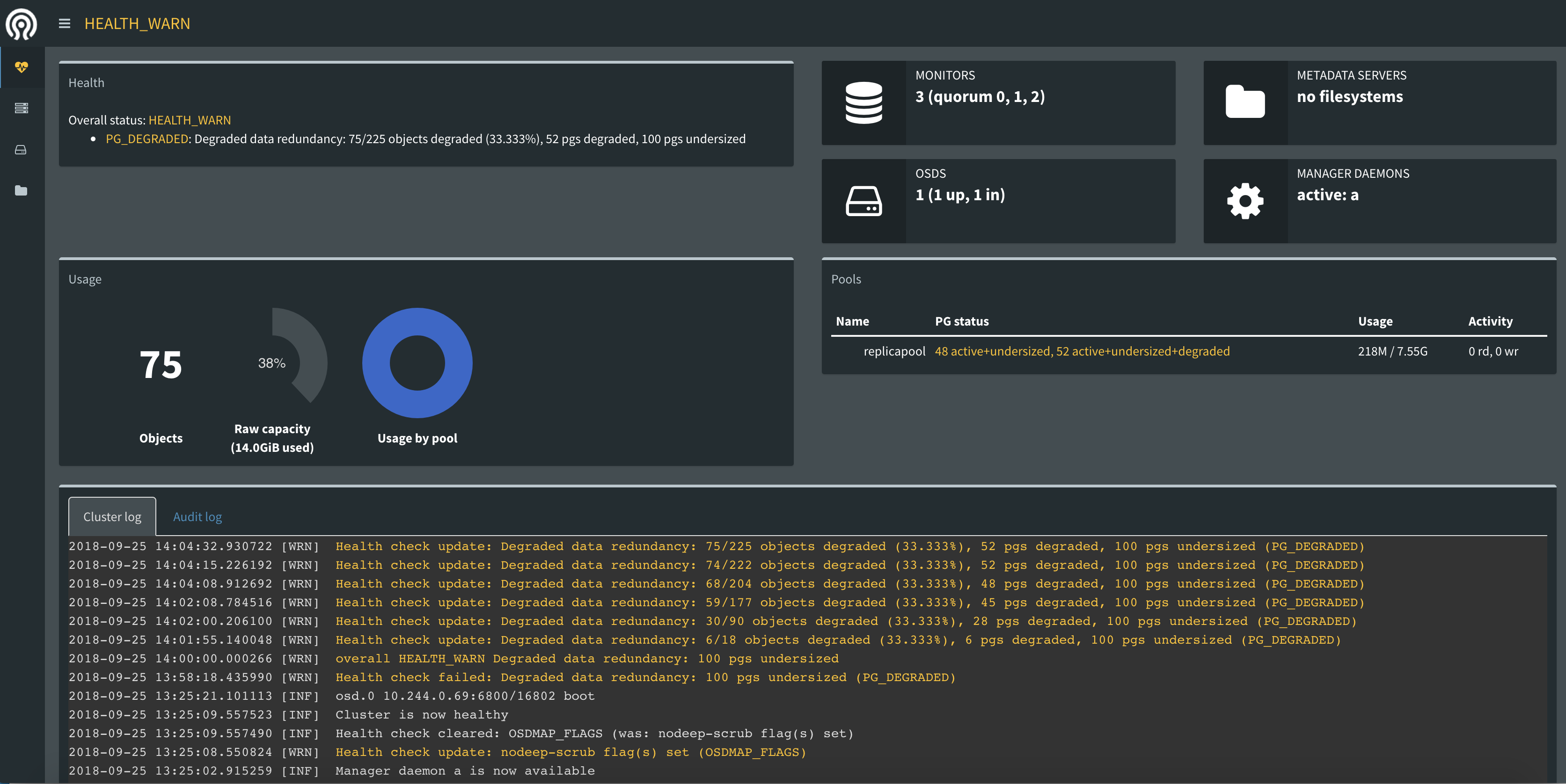
第六步:验证
[root@node01 rook]# kubectl get pv

NAME                                       CAPACITY   ACCESS MODES   RECLAIM POLICY   STATUS    CLAIM                    STORAGECLASS      REASON    AGE

pvc-8bc2a268-c0cb-11e8-a65a-000c29b52823   2Gi        RWO            Retain           Bound     default/wp-pv-claim      rook-ceph-block             25m

pvc-8bcc6847-c0cb-11e8-a65a-000c29b52823   2Gi        RWO            Retain           Bound     default/mysql-pv-claim   rook-ceph-block             25m

[root@node01 rook]# kubectl get pvc

NAME             STATUS    VOLUME                                     CAPACITY   ACCESS MODES   STORAGECLASS      AGE

mysql-pv-claim   Bound     pvc-8bcc6847-c0cb-11e8-a65a-000c29b52823   2Gi        RWO            rook-ceph-block   25m

wp-pv-claim      Bound     pvc-8bc2a268-c0cb-11e8-a65a-000c29b52823   2Gi        RWO            rook-ceph-block   25m
其他:
在StatefulSet中使用 volumeClaimTemplate
apiVersion: apps/v1

kind: StatefulSet

metadata:

  name: web

spec:

  serviceName: "nginx"

  replicas: 2

  selector:

    matchLabels:

      app: nginx

  template:

    metadata:

      labels:

        app: nginx

    spec:

      containers:

      - name: nginx

        image: nginx

        ports:

        - containerPort: 80

          name: web

        volumeMounts:

        - name: www

          mountPath: /usr/share/nginx/html

  volumeClaimTemplates:

  - metadata:

      name: www

    spec:

      accessModes:

      - ReadWriteOnce

      resources:

        requests:

          storage: 1Gi

      storageClassName: rook-ceph-block
参考文档:
https://rook.github.io/docs/rook/master/ceph-quickstart.html
https://github.com/rook/rook
Kubernetes Rook的更多相关文章
- 附013.Kubernetes永久存储Rook部署
一 Rook概述 1.1 Ceph简介 Ceph是一种高度可扩展的分布式存储解决方案,提供对象.文件和块存储.在每个存储节点上,将找到Ceph存储对象的文件系统和Ceph OSD(对象存储守护程序)进 ...
- 【转载】Docker+Kubernetes 干货文章精选
主要涉及到以下关键字: K8S.Docker.微服务.安装.教程.网络.日志.存储.安全.工具.CI/CD.分布式.实践.架构等: 以下盘点2018年一些精选优质文章! 漫画形式: 漫画:小黄人学 S ...
- kubernetes之监控Operator部署Prometheus(三)
第一章和第二章中我们配置Prometheus的成本非常高,而且也非常麻烦.但是我们要考虑Prometheus.AlertManager 这些组件服务本身的高可用的话,成本就更高了,当然我们也完全可以用 ...
- Kubernetes — 从0到1:搭建一个完整的Kubernetes集群
准备工作 首先,准备机器.最直接的办法,自然是到公有云上申请几个虚拟机.当然,如果条件允许的话,拿几台本地的物理服务器来组集群是最好不过了.这些机器只要满足如下几个条件即可: 满足安装 Docker ...
- Kubernetes之StatefulSet
什么是StatefulSet StatefulSet 是Kubernetes中的一种控制器,他解决的什么问题呢?我们知道Deployment是对应用做了一个简化设置,Deployment认为一个应用的 ...
- 容器、容器集群管理平台与 Kubernetes 技术漫谈
原文:https://www.kubernetes.org.cn/4786.html 我们为什么使用容器? 我们为什么使用虚拟机(云主机)? 为什么使用物理机? 这一系列的问题并没有一个统一的标准答案 ...
- 关于 Kubernetes 中的 Volume 与 GlusterFS 分布式存储
容器中持久化的文件生命周期是短暂的,如果容器中程序崩溃宕机,kubelet 就会重新启动,容器中的文件将会丢失,所以对于有状态的应用容器中持久化存储是至关重要的一个环节:另外很多时候一个 Pod 中可 ...
- rook 排错记录 + Orphaned pod found kube-controller-manager的日志输出
1.查看rook-agent(重要)和mysql-wordpress 的日志,如下: MountVolume.SetUp failed for volume "pvc-f002e1fe-46 ...
- kubespray 容器存储设备 -- rook ceph
1./root/kubespray/roles/docker/docker-storage/defaults/main.yml #在用kubespray部署集群是制定docker用什么设备 dock ...
随机推荐
- Permutation Descent Counts(递推)
1968: Permutation Descent Counts Submit Page Summary Time Limit: 1 Sec Memory Limit: 128 Mb ...
- 母版页改变被嵌套的页面中的控件ID的解决方法
使用过模板页的朋友都会很纳闷,怎么页面的用js通过getElementById(“id”):找不到对象.查看了页面源代码才发现,原来控件的ID变了,这是母版页导致的.因为母版页怕母版页本身页面中的控件 ...
- Redis持久化之rdb&aof
Redis有两种持久化的方式:快照(RDB文件)和追加式文件(AOF文件) RDB持久化方式是在一个特定的间隔保存某个时间点的一个数据快照. AOF(Append only file)持久化方式则会记 ...
- 巨蟒python全栈开发django5:组件&&CBV&FBV&&装饰器&&ORM增删改查
内容回顾: 补充反向解析 Html:{% url ‘别名’ 参数 %} Views:reverse(‘别名’,args=(参数,)) 模板渲染 变量 {{ 变量名 }} 逻辑相关 {% %} 过滤器: ...
- python系列十三:Python3 输入输出
#!/usr/bin/python #Python3 输入输出 import math'''输出格式美化Python两种输出值的方式: 表达式语句和 print() 函数.第三种方式是使用文件对象的 ...
- 解决IE,z-index失效
在影响显示顺序的模块加上: style="position:relative;z-index:-1;" 解决IE,z-index失效
- 整理前端css/js/jq常见问题及解决方法(2)
移动端 手机 1.点击图片或按钮,选中状态影响到其他范围解决:html{-webkit-user-select:none}<meta name="msapplication-tap-h ...
- mysql练手
1.根据图创建下列表格 没有外键的表先创建,创建顺序为teacher,class,course,student CREATE TABLE class ( cid INT NOT NULL auto_i ...
- Delphi里的Windows消息(可查MSDN指定位置)
各种控件的通知消码和控制消息可由MSDN-> Platform SDK-> User Interface Services->Windows User Interface->C ...
- scrapy+mongodb报错 TypeError: name must be an instance of str
经过各种排查,最后找到原因,在settings文件中配置文件大小写写错了,在pipelines中 mongo_db=crawler.settings.get('MONGODB_DB'),get 获取的 ...