
Enjoy coding
Enjoy coding
iTerm配置
主题选择
- Solarized Dark
- LiquidCarbon
字体选择
- Cousine for Powerline(需要安装Powerline字体库), 18pt, Regular
Powerline 字体安装
- 官方: Powershell github: https://github.com/powerline/fonts
- 这里也已经给出了安装步骤
git clone https://github.com/powerline/fonts.git --depth=1cd fonts./install.shcd ..rm -rf fonts
oh-my-zsh安装与配置
前提条件
- oh-my-zsh依赖zsh, 如果计算机中没有则使用
brew install zsh安装zsh
安装oh-my-zsh
- 官方: oh-my-zsh: https://github.com/robbyrussell/oh-my-zsh
- 这里也已经给出了安装步骤
sh -c "$(wget https://raw.githubusercontent.com/robbyrussell/oh-my-zsh/master/tools/install.sh -O -)"
配置oh-my-zsh
- 安装bunnyruni主题(oh-my-zsh自带了很多主题但是没有这个主题)
- 官方: bunnyruni: https://github.com/jopcode/oh-my-zsh-bunnyruni-theme
- 这里也已经给出了安装步骤
mkdir -p $ZSH_CUSTOM/themes && curl https://raw.githubusercontent.com/jopcode/oh-my-zsh-bunnyruni-theme/master/bunnyruni.zsh-theme -L -o $ZSH_CUSTOM/themes/bunnyruni.zsh-theme- 修改.zshrc配置文件
- 打开配置文件.zshrc
- 修改ZSH_THEME为ZSH_THEME="bunnyruni", 大约是在第10行
- 执行
exec $SHELL使配置生效
终端命令行高亮
- 安装zsh-syntax-highlighting
- 官网: zsh-syntax-highlighting: https://github.com/zsh-users/zsh-syntax-highlighting/blob/master/INSTALL.md
- 这里也给出了安装步骤
git clone https://github.com/zsh-users/zsh-syntax-highlighting.gitecho "source ${(q-)PWD}/zsh-syntax-highlighting/zsh-syntax-highlighting.zsh" >> ${ZDOTDIR:-$HOME}/.zshrcsource ./zsh-syntax-highlighting/zsh-syntax-highlighting.zsh
终端命令提示
- 安装zsh-autosuggestions
- 官网: zsh-autosuggestions
: https://github.com/zsh-users/zsh-autosuggestions/blob/master/INSTALL.md - 这里也给出了安装步骤
git clone https://github.com/zsh-users/zsh-autosuggestions ${ZSH_CUSTOM:-~/.oh-my-zsh/custom}/plugins/zsh-autosuggestions- 在.zshrc配置文件中找到plugins所在的那一行, 该为
plugins=(git zsh-autosuggestions)
在终端打开github
- 安装git-open
- 官网: git-open: https://github.com/paulirish/git-open
- 这里也给出了安装步骤
git clone https://github.com/paulirish/git-open.git $ZSH_CUSTOM/plugins/git-open- 在.zshrc配置文件中找到plugins所在的那一行, 该为
plugins=(git zsh-autosuggestions git-open)
VIM 配置
安装VIM
- macOS 自带的vim版本太低, 要下载最新版本的VIM
brew install macvim --with-override-system, 关于brew源的配置请看homebrew配置: https://www.cnblogs.com/megachen/p/9156811.html- 执行
vim --version是否为8.*的, 如果是则表示安装成功
配置文件(在这之前先安装并配置Vundle)
- 已经给出了配置文件, 在配置文件中也给出了说明, 直接拷贝即可, 但是建议不要删除配置文件中的内容而是不断地在对应的位置(在配置文件中已经注释了哪种配置要写到哪里)追加
" ************************** Basic Settings *************************

set nocompatible              " required, so don't remove it.

filetype off                  " required, so don't remove it.

syntax on

set hlsearch

set ts=4                      " set tab space

set expandtab

set sw=4

set ic                        " ignore case

set ai

set ci

set nu                        " show line number

set ruler

set wildmenu

set showcmd

hi Pmenu ctermbg=lightblue

set nofoldenable

set encoding=utf8

" set foldmethod=indent

set clipboard=unnamed       " let vim share the clipboard with system -> really useful.

set completeopt-=preview

set completeopt=longest,menu

set relativenumber

au BufWinLeave * silent mkview  "

au BufRead * silent loadview    "

" ******************* Customized Keyboard Mapping ***********************

nnoremap <space> za             " open/close code folding.

let mapleader = "@"

" ******************* Keyboard Mapping For CompleteParameter.vim Plugin ***************

" ************* Github: https://github.com/tenfyzhong/CompleteParameter.vim **********

inoremap <silent><expr> ( complete_parameter#pre_complete("()")

smap <c-j> <Plug>(complete_parameter#goto_next_parameter)

imap <c-j> <Plug>(complete_parameter#goto_next_parameter)

smap <c-k> <Plug>(complete_parameter#goto_previous_parameter)

imap <c-k> <Plug>(complete_parameter#goto_previous_parameter)

" *** Warning area(You'd better don't modify anything here) **

" It's necessary to set ycm_global_ycm_extra_conf variable here so that the YCM can work.

let g:ycm_global_ycm_extra_conf='~/.vim/bundle/YouCompleteMe/third_party/ycmd/.ycm_extra_conf.py'

let g:ycm_key_invoke_completion = '<c-k>' " code hint

" auto complete when you input 2 characters

let g:ycm_semantic_triggers =  {

            \ 'c,cpp,python,java,go,erlang,perl': ['re!\w{2}'],

            \ 'cs,lua,javascript': ['re!\w{2}'],

            \ }

" close code syntax checking

let g:ycm_show_diagnostics_ui = 0

let g:ycm_min_num_of_chars_for_completion=1

let g:indentLine_char = "┆"

let g:indentLine_enabled = 1

let g:autopep8_disable_show_diff=1

" ================ Setting for vim status line ===============

set rtp+=~/.vim/bundle/powerline/powerline/bindings/vim

set guifont=Sauce\ Code\ Powerline:h14.5

set laststatus=2

set encoding=utf-8

set t_Co=256

set number

set fillchars+=stl:\ ,stlnc:\

set term=xterm-256color

set termencoding=utf-8

set background=light

" ============================================================

set rtp+=~/.vim/bundle/Vundle.vim

set rtp+=~/.vim/bundle/CompleteParameter.vim

call vundle#begin()

" different from other Plugins, this `Plugin 'gmarik/Vundle.vim'` statement should

" be written here.

Plugin 'gmarik/Vundle.vim'

call vundle#end()            " required, so don't remove it.

filetype plugin indent on    " required, so don't remove it.

" ********************** Plugin Area ************************

" Install Plugin

" autocmd vimenter * NERDTree

Plugin 'tmhedberg/SimpylFold'

Plugin 'Valloric/YouCompleteMe'

Plugin 'scrooloose/nerdtree'

Plugin 'kien/ctrlp.vim'         " use ctrl + p to search files

Plugin 'scrooloose/nerdcommenter'   " commenter: \cc \cu -> use `\cc` to comment code, use `\cu` to uncomment code

Plugin 'Yggdroot/indentLine'

Plugin 'powerline/powerline'
如果已经将上面的配置文件拷贝到了.vimrc中
- 执行
vim - 在normal模式下执行
PluginInstall安装插件, 注意在安装YCM的时候非常地慢, 请耐心等待
- 文件中的
hi Pmenu ctermbg=lightblue语句是这是VIM弹出菜单的背景颜色, 通过normal模式下:hi查看, 颜色的值为0-255, 每一个字符表示的颜色都可以添加前缀light和dark - 使用ctrl + p键可以在当前目录下进行全局搜索
- \cc注释一行, \cu取消注释
- 在normal模式下, 使用:NERDTree打开目录
- 在normal模式下, 使用za可以折叠和打开代码
- 执行
关于YCM的配置
- 官网: YCM: https://github.com/Valloric/YouCompleteMe/blob/master/README.md#mac-os-x
- 执行的命令
cd ~/.vim/bundle/YouCompleteMe ./install.py --clang-completer
效果图
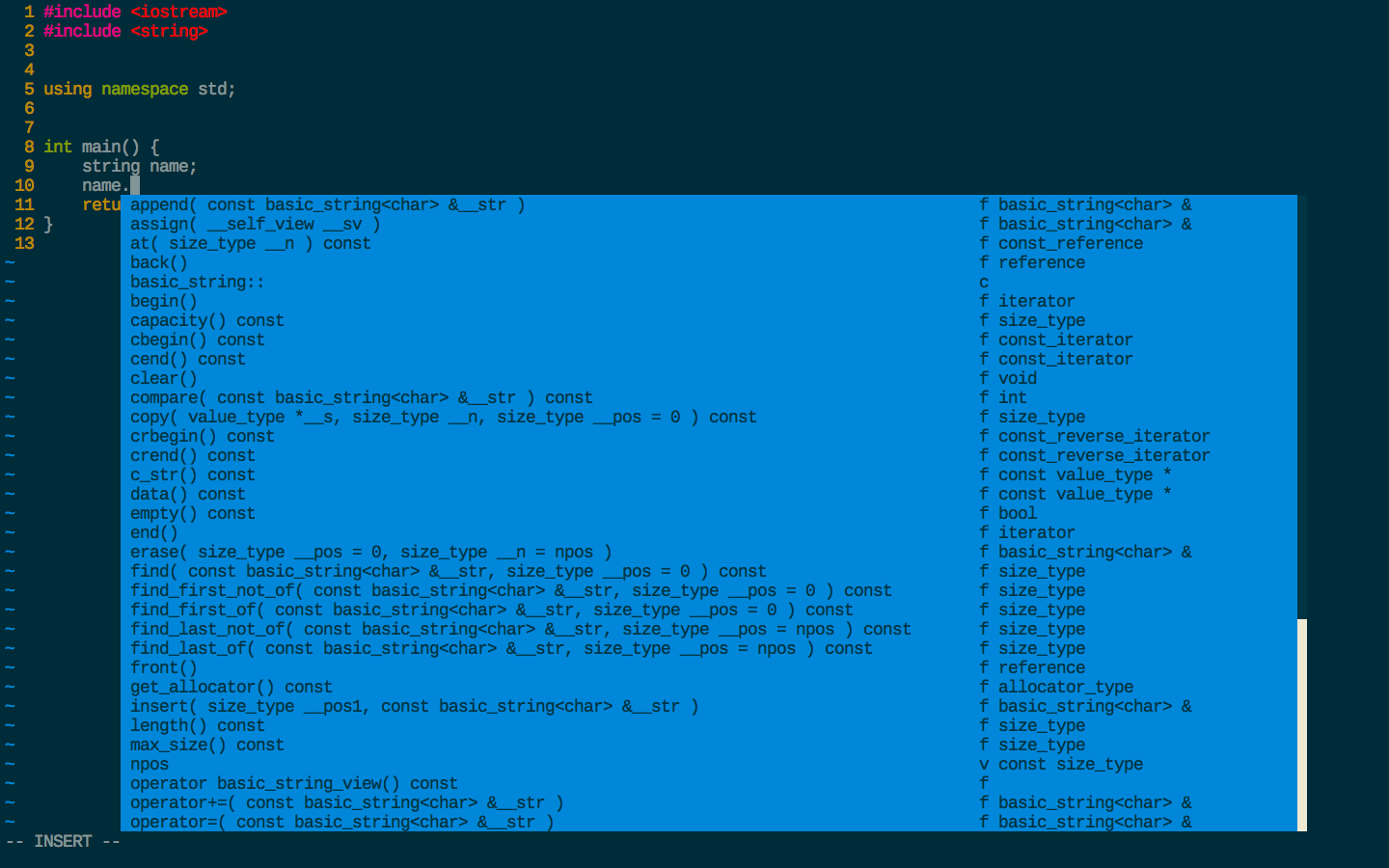
- 如果要更美观的VIM配置, 请看VIM配置篇
Enjoy coding的更多相关文章
- async & await 的前世今生(Updated)
async 和 await 出现在C# 5.0之后,给并行编程带来了不少的方便,特别是当在MVC中的Action也变成async之后,有点开始什么都是async的味道了.但是这也给我们编程埋下了一些隐 ...
- async & await 的前世今生
async 和 await 出现在C# 5.0之后,给并行编程带来了不少的方便,特别是当在MVC中的Action也变成async之后,有点开始什么都是async的味道了.但是这也给我们编程埋下了一些隐 ...
- 我的github代码库
我的github代码库地址:https://github.com/gooree.Enjoy coding,enjoy sharing.
- 【转载】async & await 的前世今生(Updated)
async 和 await 出现在C# 5.0之后,给并行编程带来了不少的方便,特别是当在MVC中的Action也变成async之后,有点开始什么都是async的味道了.但是这也给我们编程埋下了一些隐 ...
- JS模块化库seajs体验
seajs http://seajs.org/docs/en.html#intro https://github.com/seajs/seajs/releases Extremely simple e ...
- A little tutorial on CodeFluent Entities with ASP.NET MVC4
/* Author: Jiangong SUN */ CodeFluent Entities is a model-first development tool which creates non-s ...
- 译:在C#中使用LINQ To SQL
译文出处:http://www.codeproject.com/Tips/871938/LINQ-To-SQL-Using-Csharp 今天在这个话题中,我给大家分享一个在c#编程中非常有趣和十分有 ...
- Sublime text2如何设置快捷键让编写的HTML文件在浏览器预览?
著作权归作者所有.商业转载请联系作者获得授权,非商业转载请注明出处.作者:浪人链接:http://www.zhihu.com/question/27219231/answer/43608776来源:知 ...
- JAVASCRIPT的一些知识点梳理
春节闲点,可以安心的梳理一下以前不是很清楚的东东.. 看的是以下几个URL: http://web.jobbole.com/82520/ http://blog.csdn.net/luoweifu/a ...
随机推荐
- 【SQL】- 基础知识梳理(五) - 触发器
触发器的概念 触发器对表进行插入.更新.删除的时候会自动执行的特殊存储过程 触发器的语法 create trigger tgr_name on table_name with encrypion –加 ...
- ecliplse集成反编译插件
言语不清晰,上图最直接 搜索框输入:Decompiler 等待安装: 重启之后进入下面的界面: 8.对反编译器( Decompiler )进行配置 二.配置说明 1.缺省类反编译器(Default C ...
- [Algorithm]查找
一.查找的算法 1.顺序查找 1 int Search_Seq( SeqList L, ElemType elem ) 2 { 3 L.elem[0] = elem; 4 for ( int i = ...
- 【大数据系统架构师】0.1 Java编程基础
1. 初识Java 2. Java语法 快速入门点我 2.1 数据类型和运算符 2.2 流程控制语句 2.3 数组 2.4 类和对象 2.5 OOP三大特性 2.6 集合框架与泛型 2.7 反射机制 ...
- 【转】C# String 与 Char[] 数组 相互转换
源地址:http://blog.csdn.net/razilfelix/article/details/52289663 string 转换成 Char[] string ss = "abc ...
- 通过html()的方法获取文本内容, form表单组件显示的值与获取到的值不一致的问题
我在通过 html()获取对应节点的内容,发现一个问题,获取到的 form表单组件的内容值是初始加载的值,而不是经过用户修改后的值.例如页面加载时组件<input type="text ...
- dsp之BF531笔记
获得更多资料欢迎进入我的网站或者 csdn或者博客园 很久以前的BF531的笔记,觉得有用分享出来.摘自于open dsp 通用Gpio ADSP-BF53x 处理器上有16 个PF 接口,这些接口就 ...
- [CQOI2006]凸多边形(半平面交)
很明显是一道半平面交的题. 先说一下半平面交的步骤: 1.用点向法(点+向量)表示直线 2.极角排序,若极角相同,按相对位置排序. 3.去重,极角相同的保留更优的 4.枚举边维护双端队列 5.求答案 ...
- O(n^2) 级别的排序算法
o(n^2) 的排序算法.性能那么差,为什么还要学习? 首先,它是基础,千里之行,始于足下.它编码简单,容易实现,是一些简单情景的首选,它能给我们的问题一个暴力的解法,这样的解法也许不是最优的,但是它 ...
- 自旋锁Spin lock与互斥锁Mutex的区别
POSIX threads(简称Pthreads)是在多核平台上进行并行编程的一套常用的API.线程同步(Thread Synchronization)是并行编程中非常重要的通讯手段,其中最典型的应用 ...