
SpringBoot | 第三十章:Spring-data-jpa的集成和使用
前言
在前面的第九章:Mybatis-plus的集成和使用章节中,介绍了使用
ORM框架mybatis-plus进行数据库的访问。今天,我们来简单学习下如何使用spring-data-jpa进行数据库的访问。由于本人未使用过jpa,也是趁着写博文的机会查阅了相关资料下,有错误的地方还望指出!
一点知识
何为JPA
JPA是Java Persistence API的简写,是Sun官方提出的一种ORM规范!
对于Sun官网而言,
一是想简化现有Java EE和Java SE应用开发工作。
二是想整合ORM技术,实现天下归一。
对于JPA规范,都在包路径:javax.persistence.*下,像一些常用的如:@Entity、@Id及@Transient都在此路径下。这些也是一些现在市面上常用的ORM一些约定俗成的注解了。
简单来说,JPA是一套规范。所以使用Jpa的一个好处是,可以更换实现而不必改动太多代码。
何为Sping-data-jpa
Spring Data JPA是Spring基于Hibernate开发的一个JPA框架。可以极大的简化JPA的写法,可以在几乎不用写具体代码的情况下,实现对数据的访问和操作。除了CRUD外,还包括如分页、排序等一些常用的功能。
Spring Data JPA提供的接口,也是Spring Data JPA的核心概念:
Repository:最顶层的接口,是一个空的接口,目的是为了统一所有Repository的类型,且能让组件扫描的时候自动识别。CrudRepository:是Repository的子接口,提供CRUD的功能PagingAndSortingRepository:是CrudRepository的子接口,添加分页和排序的功能JpaRepository:是PagingAndSortingRepository的子接口,增加了一些实用的功能,比如:批量操3作等。JpaSpecificationExecutor:用来做负责查询的接口Specification:是Spring Data JPA提供的一个查询规范,要做复杂的查询,只需围绕这个规范来设置查询条件即可。
题外话:刚开始,其实我看mybatis提供的都差不多,最让我觉得神奇的是:可以通过方法命名规则进行相关数据库操作,这个确实可以减少很多代码的编写。原本使用Mybatis-plus新增一个自定义方法,需要使用通用查询模版EntityWrapper进行相应的操作的
其中,相关命名规范如下:
| 关键字 | 方法命名 | sql where字句 |
|---|---|---|
| And | findByNameAndPwd | where name= ? and pwd =? |
| Or | findByNameOrSex | where name= ? or sex=? |
| Is,Equals | findById,findByIdEquals | where id= ? |
| Between | findByIdBetween | where id between ? and ? |
| LessThan | findByIdLessThan | where id < ? |
| LessThanEquals | findByIdLessThanEquals | where id <= ? |
| GreaterThan | findByIdGreaterThan | where id > ? |
| GreaterThanEquals | findByIdGreaterThanEquals | where id > = ? |
| After | findByIdAfter | where id > ? |
| Before | findByIdBefore | where id < ? |
| IsNull | findByNameIsNull | where name is null |
| isNotNull,NotNull | findByNameNotNull | where name is not null |
| Like | findByNameLike | where name like ? |
| NotLike | findByNameNotLike | where name not like ? |
| StartingWith | findByNameStartingWith | where name like '?%' |
| EndingWith | findByNameEndingWith | where name like '%?' |
| Containing | findByNameContaining | where name like '%?%' |
| OrderBy | findByIdOrderByXDesc | where id=? order by x desc |
| Not | findByNameNot | where name <> ? |
| In | findByIdIn(Collection<?> c) | where id in (?) |
| NotIn | findByIdNotIn(Collection<?> c) | where id not in (?) |
| True | findByAaaTue | where aaa = true |
| False | findByAaaFalse | where aaa = false |
| IgnoreCase | findByNameIgnoreCase | where UPPER(name)=UPPER(?) |
这个确实,够强大!但查询添加一多,是不是这个方法名就也很长了,(┬_┬)
SpringBoot集成Spring-data-jpa
本示例,使用druid(连接池)+mysql进行演示。同时以User表举例:
CREATE TABLE `user` (

  `id` bigint(20) unsigned NOT NULL AUTO_INCREMENT COMMENT '唯一标示',

  `code` varchar(20) DEFAULT NULL COMMENT '编码',

  `name` varchar(64) DEFAULT NULL COMMENT '名称',

  `status` char(1) DEFAULT '1' COMMENT '状态 1启用 0 停用',

  `gmt_create` datetime DEFAULT CURRENT_TIMESTAMP COMMENT '创建时间',

  `gmt_modified` datetime DEFAULT CURRENT_TIMESTAMP ON UPDATE CURRENT_TIMESTAMP COMMENT '修改时间'

) ENGINE=InnoDB DEFAULT CHARSET=utf8;
题外话:虽然也提供了自动根据实体创建表的功能,但一般上开发应该不会这么创建吧。因为表结构一般都需要经过评审的,评审后就创建好了。。
0.引入pom依赖
 <!-- 引入jpa依赖 -->

        <dependency>

            <groupId>org.springframework.boot</groupId>

            <artifactId>spring-boot-starter-data-jpa</artifactId>

        </dependency>

        <!--druid -->

        <dependency>

           <groupId>com.alibaba</groupId>

           <artifactId>druid-spring-boot-starter</artifactId>

           <version>1.1.10</version>

        </dependency>

       <!-- mysql驱动 -->

        <dependency>

            <groupId>mysql</groupId>

            <artifactId>mysql-connector-java</artifactId>

        </dependency>

        <dependency>

            <groupId>org.springframework.boot</groupId>

            <artifactId>spring-boot-starter-web</artifactId>

        </dependency>
1.编写User的实体类。
/**

 * 用户实体

 * @author oKong

 *

 */

@Entity

@Data

@Builder

@NoArgsConstructor

@AllArgsConstructor

@EntityListeners(AuditingEntityListener.class)

//@Table(name="CUSTOM_USER")//自定义表名

public class User implements Serializable{

     /**

     *

     */

    private static final long serialVersionUID = -3752294262021766827L;

    /**

     * 唯一标示

     */

    @Id

    @GeneratedValue(strategy = GenerationType.IDENTITY)

    private Long id;

    /**

     * 编码

     */

    private String code;

    /**

     * 名称

     */

    private String name;

    /**

     * 创建时间

     */

    @CreatedDate //自动创建

    private Date gmtCreate;

    /**

     * 修改时间

     */

    @LastModifiedDate //有修改时 会自动时间

    private Date gmtModified;

}
这里需要注意,在使用mybatis-plus时,在《Mybatis-Plus使用全解》时,介绍过可如何设置公共字段自动填充功能,比如创建时间和修改时间,创建人和修改人等等,都是可以统一进行赋值的。而在spring-data-jap中,是使用@CreatedDate和@LastModifiedDate标记的,同时,需要在实体类上,加入@EntityListeners(AuditingEntityListener.class),然后在启动类上加入注解@EnableJpaAuditing,这样就实现了类似公共字段自动填充功能了。
2.创建资源类,这里习惯了命名为dao了,所以还是以Dao进行结尾。
/**

 * 资源类

 * @author oKong

 *

 */

public interface UserDao extends PagingAndSortingRepository<User,Long>{

	List<User> findById(Long id);

	//使用自动命名规则进行查询服务

	List<User> findByCodeAndName(String code,String name);

	//使用@Query进行 自定义sql编写

	//nativeQuery=true,正常的sql语法

	//负责是hsql语法

	@Query(value="select * from user where code = ?1",nativeQuery=true)

	List<User> queryByCode(String code);

	//分页

	Page<User> findByCode(String code,Pageable pageable);

}
注意:这里直接继承了PagingAndSortingRepository,其本身实现了分页功能,还可以按需要继承CrudRepository或者JpaRepository等。而且,占位符为:?+具体的参数索引值
3.创建控制层,引入资源类。示例了一些常用的操作,包括分页,查询、删除、新增等等。
/**

 * 测试类

 * @author oKong

 *

 */

@RestController

@Slf4j

public class DemoController {

    @Autowired

    UserDao userDao;

    @PostMapping("/add")

    public String addUser(User user) {

        log.info("新增用户:{}", user);

        user = userDao.save(user);

        return "新增成功,返回用户id为:" + user.getId();

    }

    @GetMapping("/find/{id}")

    public User findUser(@PathVariable Long id) {

        log.info("查找用户ID:{}", id);

        return userDao.findOne(id);

    }

    @PostMapping("/del/{id}")

    public String delUser(Long id) {

        log.info("删除用户ID:{}", id);

        userDao.delete(id);

        return "用户id为:" + id + ",已被删除!";

    }

    @GetMapping("/find/{code}/{name}")

    public List<User> findUserByCodeAndName(@PathVariable("code") String code, @PathVariable("name")String name) {

        log.info("命名规则方式,查找用户:编码:{},名称:{}", code, name);

        return userDao.findByCodeAndName(code, name);

    }

    @GetMapping("/find/paging/{code}")

    public Page<User> findUserByCodePagin(@PathVariable("code") String code){

        log.info("分页模式,查找用户:编码:{}", code);

        //这里注意 page是从0开始的

        return userDao.findByCode(code, new PageRequest(0,10));

    }

    @GetMapping("/find/sql/{code}")

    public List<User> findUserByQuerySql(@PathVariable("code") String code){

        log.info("自定义sql方式,查找用户:编码:{}", code);

        return userDao.queryByCode(code);

    }

}
4.配置文件添加相关数据源及jpa相关信息。这里使用druid作为数据连接池。
#数据源设置

spring.datasource.url=jdbc:mysql://127.0.0.1:3306/learning?useUnicode=true&characterEncoding=UTF-8

spring.datasource.username=root

spring.datasource.password=123456

#以上为必须的

#选填

spring.datasource.druid.initial-size=5

# maxPoolSize

spring.datasource.druid.max-active=20

# minPoolSize

spring.datasource.druid.min-idle=5

#配置获取连接等待超时的时间

spring.datasource.druid.max-wait=60000

# 校验

spring.datasource.druid.validation-query=SELECT 'x'

spring.datasource.druid.test-on-borrow=false

spring.datasource.druid.test-on-return=false

spring.datasource.druid.test-while-idle=true

#配置间隔多久才进行一次检测,检测需要关闭的空闲连接,单位是毫秒

spring.datasource.druid.time-between-eviction-runs-millis=60000

#配置一个连接在池中最小生存的时间,单位是毫秒

spring.datasource.druid.min-evictable-idle-time-millis=300000

#jpa相关配置

# 显示sql 但不会显示具体的操作值 可以替换成log4jdbc

spring.jpa.show-sql=true
5.编写启动类。
/**

 * jpa集成

 *

 * @author oKong

 *

 */

@SpringBootApplication

@EnableJpaAuditing

@Slf4j

public class JpaApplication {

    public static void main(String[] args) throws Exception {

        SpringApplication.run(JpaApplication.class, args);

        log.info("spring-boot-jpa-chapter30启动!");

    }

}
6.启动服务。然后使用postman进行访问(关于postman相关用法,可以查看:第十五章:基于Postman的RESTful接口测试)。
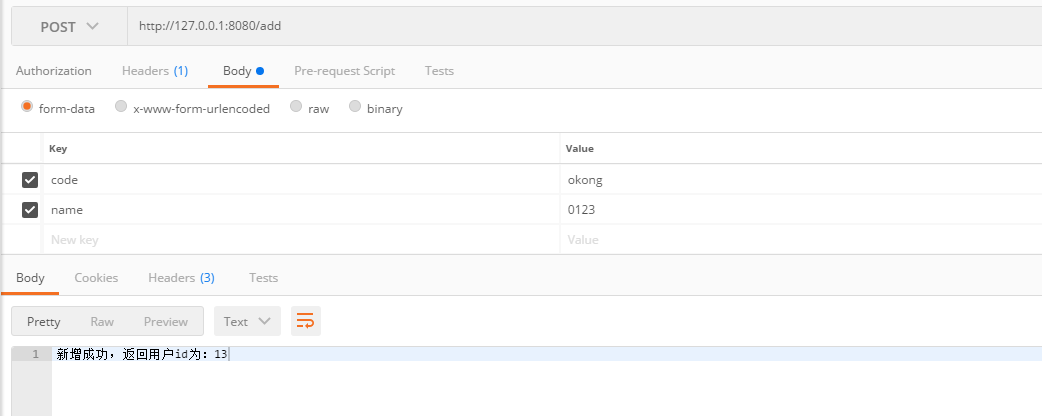
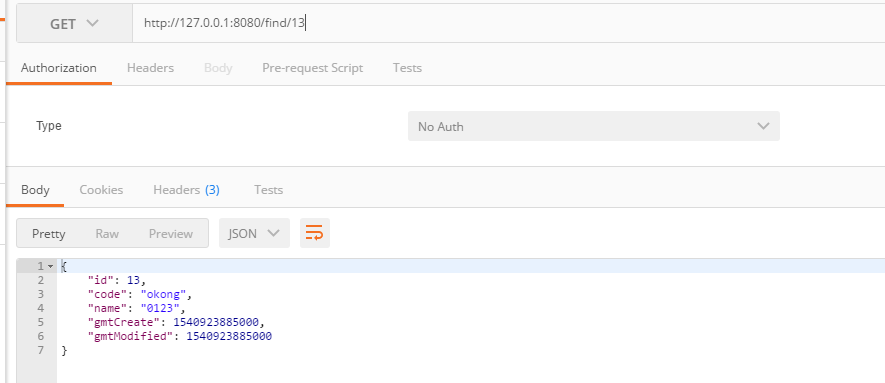
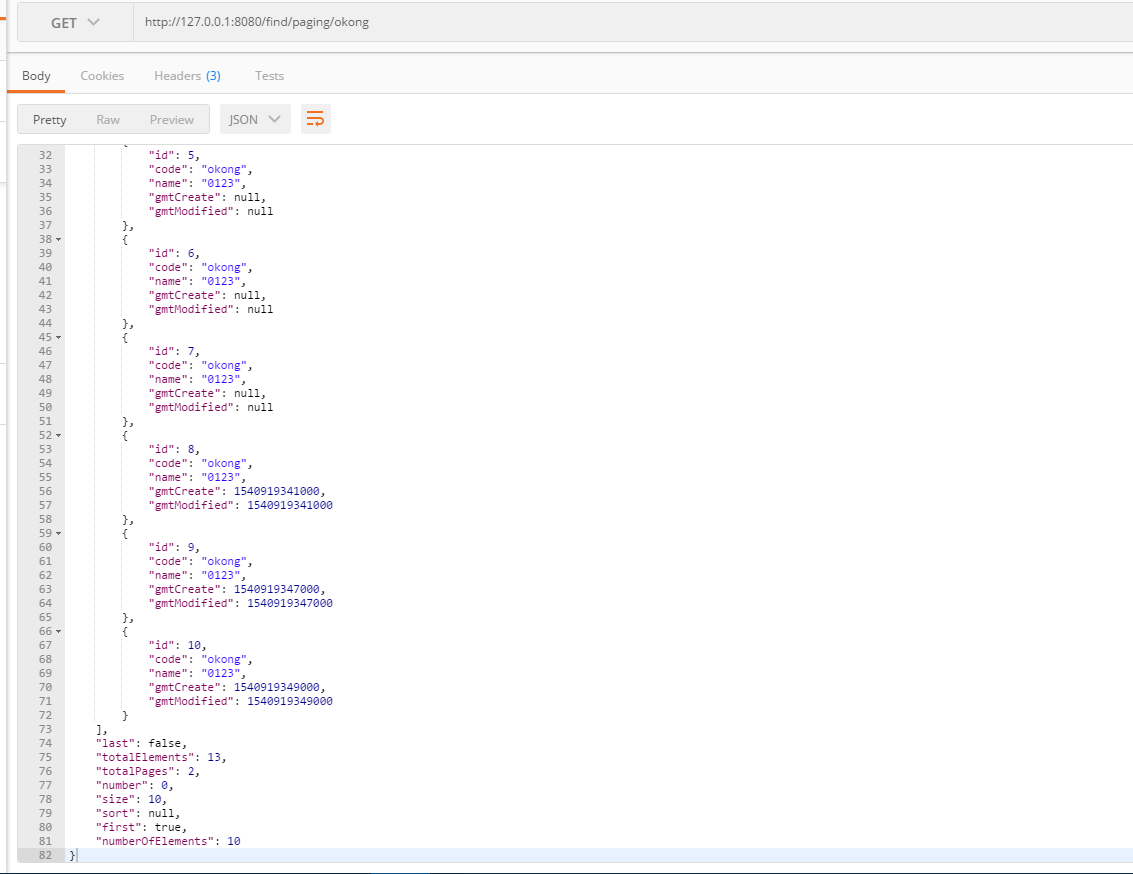
会返回相关信息,如总记录数,总页码数等等。
控制台输出:
Hibernate: select user0_.id as id1_0_, user0_.code as code2_0_, user0_.gmt_create as gmt_crea3_0_, user0_.gmt_modified as gmt_modi4_0_, user0_.name as name5_0_ from user user0_ where user0_.code=? limit ?

Hibernate: select count(user0_.id) as col_0_0_ from user user0_ where user0_.code=?
- 自定义sql查找:http://127.0.0.1:8080/find/sql/okong
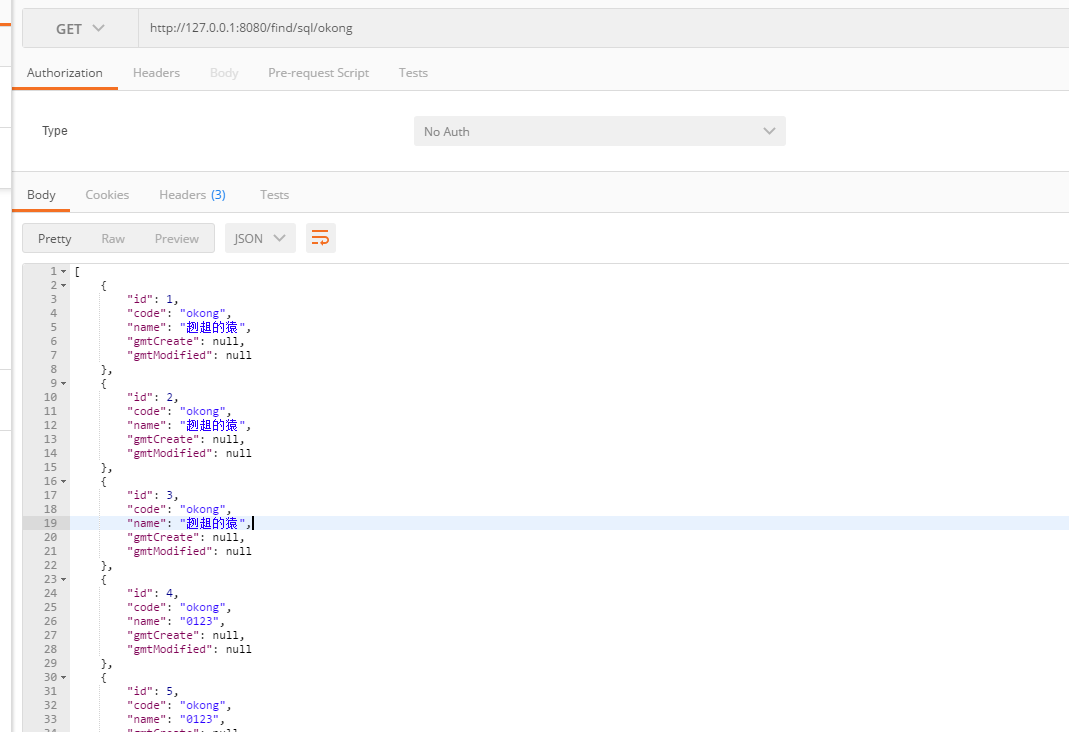
控制台输出:
Hibernate: select * from user where code = ?
参考资料
总结
本章节主要介绍了
Spring-data-jpa的集成和简单的使用。并未深入了解,想了解更多细节,比如排序、@Param使用等等,可去官网查阅下。待有机会深入学习后,再写一篇关于JPA的提高篇吧使用起来其实也蛮简单的,就是可能更开始接触,不是很习惯到时真的,有机会一些小的项目或者demo项目,到时可以使用下,切身体验下
最后
目前互联网上很多大佬都有
SpringBoot系列教程,如有雷同,请多多包涵了。原创不易,码字不易,还希望大家多多支持。若文中有所错误之处,还望提出,谢谢。
老生常谈
- 个人QQ:
499452441 - 微信公众号:
lqdevOps

个人博客:http://blog.lqdev.cn
完整示例:https://github.com/xie19900123/spring-boot-learning/tree/master/chapter-30
SpringBoot | 第三十章:Spring-data-jpa的集成和使用的更多相关文章
- SpringBoot整合持久层技术--(三)Spring Data JPA
简介: JPA(java Persistence API)和SpringData是两个范畴的概念.spring data jpa是spring公司下的spring data项目的一个模块. sprin ...
- SpringBoot 自动配置:Spring Data JPA
前言 不知道从啥时候开始项目上就一直用MyBatis,其实我个人更新JPA些,因为JPA看起来OO的思想更强烈些,所以这才最近把JPA拿出来再看一看,使用起来也很简单,除了定义Entity实体外,声明 ...
- SpringBoot学习笔记:Spring Data Jpa的使用
更多请关注公众号 Spring Data Jpa 简介 JPA JPA(Java Persistence API)意即Java持久化API,是Sun官方在JDK5.0后提出的Java持久化规范(JSR ...
- spring boot(三):spring data jpa的使用
@RequestMapping("/queryUserListByPageNativeQuery") public String queryUserListByPageNative ...
- 【ORM框架】Spring Data JPA(一)-- 入门
本文参考:spring Data JPA入门 [原创]纯干货,Spring-data-jpa详解,全方位介绍 Spring Data JPA系列教程--入门 一.Spring Data JPA介 ...
- spring data jpa 操作pipelinedb 的continuous view 与stream
一. 由于pipelinedb是postgreSQL的扩展,因此相关依赖于配置都合集成postgreSQL是一样的. springboot + spring data jpa + postgreSQL ...
- spring data jpa使用详解
https://blog.csdn.net/liuchuanhong1/article/details/52042477 使用Spring data JPA开发已经有一段时间了,这期间学习了一些东西, ...
- Spring Data Jpa 初探
Spring Data 项目的目的是为了简化构建基于 Spring 框架应用的数据访问计数,包括非关系数据库.Map-Reduce 框架.云数据服务等等;另外也包含对关系数据库的访问支持. 下载网址: ...
- spring-boot (三) spring data jpa
学习文章来自:http://www.ityouknow.com/spring-boot.html spring data jpa介绍 首先了解JPA是什么? JPA(Java Persistence ...
- SpringBoot入门:Spring Data JPA 和 JPA(理论)
参考链接: Spring Data JPA - Reference Documentation Spring Data JPA--参考文档 中文版 纯洁的微笑:http://www.ityouknow ...
随机推荐
- C#英文面试常见问题[转]
I was reading a post about some common C# interview questions, and thought I'd share some of mine. T ...
- 一个基于 .NET Core 2.0 开发的简单易用的快速开发框架 - LinFx
LinFx 一个基于 .NET Core 2.0 开发的简单易用的快速开发框架,遵循领域驱动设计(DDD)规范约束,提供实现事件驱动.事件回溯.响应式等特性的基础设施.让开发者享受到正真意义的面向对象 ...
- .Net Core 项目部署IIS简单步骤
1.新建一个解决方案: 我习惯会把运行文件移至一级目录 然后清除CoreTest 文件夹里面的文件 2.在解决方案中新建一个项目 点击确认有,这里有几种选择类型,我一般选择空类型(这里需要注意一下,空 ...
- [Algorithm]图
一.图的算法 邻接矩阵表示的数据结构 1 #define INFINITY INT_MAX // 无穷大 2 #define MAX_VERTEX_NUM 20 // 限制顶点最大数值为20个 3 # ...
- day02.1-字符串内置方法
字符串——str的定义:test = "zizaijiapu" 特点:1. 字符串是可迭代对象: 2. 字符串中各元素是有序的: 3. 字符串一经创建,其内容值不可修改. 1. 查 ...
- 2018数学建模国赛总结(A题/编程选手视角)
2018数学建模已经告一段落了,先说说基本情况吧,我们队伍专业分别为:金融(A),会计(B),计算机(我),配置还算可以,他们俩会数据分析软件也会写论文,我可以写代码,画图.他们俩打过美赛(M奖),我 ...
- django 重写User表增加字段设置
models中: from django.contrib.auth.models import AbstractUser lass User(AbstractUser): mobile = model ...
- ansible基本模块-cron
ansible XXX -m cron -a "name=‘XXX ’ job=‘执行的命令’ minute=XXX " ...
- Java过滤器详细文档,简介,实例,应用
简介 Filter也称之为过滤器,它是Servlet技术中最激动人心的技术,WEB开发人员通过Filter技术,对web服务器管理的所有web资源:例如Jsp, Servlet, 静态图片文件或静态 ...
- svn学习笔记(二)
一.TortoiseSVN日常使用 1.1 浏览仓库 Repo-browser : 浏览仓库中资源信息 1.2 导入导出 Export :导出项目 ,和checkout区别 (checkout检出后文 ...