
python构造wireshark可以解析的LTE空口数据
Wireshark是可以解析LTE的空口数据。但是在wireshark的实现中,这些数据都是被封装到UDP报文中。然后根据wireshark的格式文件对LTE的数据加上头信息。头信息的定义参考附件packet-mac-lte.h文件
大致结构如下:
typedef struct mac_lte_info
{
/* Needed for decode */
guint8 radioType;
guint8 direction;
guint8 rntiType;
/* Extra info to display */
guint16 rnti;
guint16 ueid;
/* Timing info */
guint16 sysframeNumber;
guint16 subframeNumber;
gboolean sfnSfInfoPresent;
/* Optional field. More interesting for TDD (FDD is always -4 subframeNumber) */
gboolean subframeNumberOfGrantPresent;
guint16 subframeNumberOfGrant;
/* Flag set only if doing PHY-level data test - i.e. there may not be a
well-formed MAC PDU so just show as raw data */
gboolean isPredefinedData;
/* Length of DL PDU or UL grant size in bytes */
guint16 length;
/* 0=newTx, 1=first-retx, etc */
guint8 reTxCount;
guint8 isPHICHNACK; /* FALSE=PDCCH retx grant, TRUE=PHICH NACK */
/* UL only. Indicates if the R10 extendedBSR-Sizes parameter is set */
gboolean isExtendedBSRSizes;
/* UL only. Indicates if the R10 simultaneousPUCCH-PUSCH parameter is set for PCell */
gboolean isSimultPUCCHPUSCHPCell;
/* UL only. Indicates if the R10 extendedBSR-Sizes parameter is set for PSCell */
gboolean isSimultPUCCHPUSCHPSCell;
/* Status of CRC check. For UE it is DL only. For eNodeB it is UL
only. For an analyzer, it is present for both DL and UL. */
gboolean crcStatusValid;
mac_lte_crc_status crcStatus;
/* Carrier ID */
mac_lte_carrier_id carrierId;
/* DL only. Is this known to be a retransmission? */
mac_lte_dl_retx dl_retx;
/* DL only. CE mode to be used for RAR decoding */
mac_lte_ce_mode ceMode;
/* DL and UL. NB-IoT mode of the UE */
mac_lte_nb_mode nbMode;
/* UL only, for now used for CE mode A RAR decoding */
guint8 nUlRb;
/* More Physical layer info (see direction above for which side of union to use) */
union {
struct mac_lte_ul_phy_info
{
guint8 present; /* Remaining UL fields are present and should be displayed */
guint8 modulation_type;
guint8 tbs_index;
guint8 resource_block_length;
guint8 resource_block_start;
guint8 harq_id;
gboolean ndi;
} ul_info;
struct mac_lte_dl_phy_info
{
guint8 present; /* Remaining DL fields are present and should be displayed */
guint8 dci_format;
guint8 resource_allocation_type;
guint8 aggregation_level;
guint8 mcs_index;
guint8 redundancy_version_index;
guint8 resource_block_length;
guint8 harq_id;
gboolean ndi;
guint8 transport_block; /* 0..1 */
} dl_info;
} detailed_phy_info;
/* Relating to out-of-band events */
/* N.B. dissector will only look to these fields if length is 0... */
mac_lte_oob_event oob_event;
guint8 rapid;
guint8 rach_attempt_number;
#define MAX_SRs 20
guint16 number_of_srs;
guint16 oob_ueid[MAX_SRs];
guint16 oob_rnti[MAX_SRs];
} mac_lte_info;
在进行头信息编码的时候,每个值都有一个TAG对应。TAG的定义如下
#define MAC_LTE_RNTI_TAG 0x02
/* 2 bytes, network order */
#define MAC_LTE_UEID_TAG 0x03
/* 2 bytes, network order */
#define MAC_LTE_FRAME_SUBFRAME_TAG 0x04
/* 2 bytes, network order, SFN is stored in 12 MSB and SF in 4 LSB */
#define MAC_LTE_PREDEFINED_DATA_TAG 0x05
/* 1 byte */
#define MAC_LTE_RETX_TAG 0x06
/* 1 byte */
#define MAC_LTE_CRC_STATUS_TAG 0x07
/* 1 byte */
#define MAC_LTE_EXT_BSR_SIZES_TAG 0x08
/* 0 byte */
#define MAC_LTE_SEND_PREAMBLE_TAG 0x09
/* 2 bytes, RAPID value (1 byte) followed by RACH attempt number (1 byte) */
#define MAC_LTE_CARRIER_ID_TAG 0x0A
/* 1 byte */
#define MAC_LTE_PHY_TAG 0x0B
/* variable length, length (1 byte) then depending on direction
in UL: modulation type (1 byte), TBS index (1 byte), RB length (1 byte),
RB start (1 byte), HARQ id (1 byte), NDI (1 byte)
in DL: DCI format (1 byte), resource allocation type (1 byte), aggregation level (1 byte),
MCS index (1 byte), redundancy version (1 byte), resource block length (1 byte),
HARQ id (1 byte), NDI (1 byte), TB (1 byte), DL reTx (1 byte) */
#define MAC_LTE_SIMULT_PUCCH_PUSCH_PCELL_TAG 0x0C
/* 0 byte */
#define MAC_LTE_SIMULT_PUCCH_PUSCH_PSCELL_TAG 0x0D
/* 0 byte */
#define MAC_LTE_CE_MODE_TAG 0x0E
/* 1 byte containing mac_lte_ce_mode enum value */
#define MAC_LTE_NB_MODE_TAG 0x0F
/* 1 byte containing mac_lte_nb_mode enum value */
#define MAC_LTE_N_UL_RB_TAG 0x10
/* 1 byte containing the number of UL resource blocks: 6, 15, 25, 50, 75 or 100 */
#define MAC_LTE_SR_TAG 0x11
/* 2 bytes for the number of items, followed by that number of ueid, rnti (2 bytes each) */
/* MAC PDU. Following this tag comes the actual MAC PDU (there is no length, the PDU
continues until the end of the frame) */
#define MAC_LTE_PAYLOAD_TAG 0x01
在编码前需要再加上一个头MAC_LTE_START_STRING=” mac-lte”。这个是用来指示封装的什么数据。Wireshark可以解析的有MAC-LTE, RLC-LTE, PDCP-LTE。其中MAC-LTE已经包含了RLC以及PDCP的数据。如果只是想解析RLC-LTE的数据。那么就指定RLC_LTE_START_STRING=” rlc-lte”。同理PDCP-LTE的数据,PDCP_LTE_START_STRING=” pdcp-lte”.
下面来看对应的代码:
参数的定义:
packet:LTE空口数据(RRC+PDCP+RLC+MAC)
direction:上行消息还是下行消息
rntiType:rnti的类型。
from scapy import *

def Write_info_to_pcap(direction,rntiType,packet):

    try:

        src_addr='192.168.0.1'

        dst_addr='192.168.0.1
        CRNTI_dict={b'\x00':b'\x00\x00',b'\x01':b'\xFF\xFE',b'\x02':b'\x05\x00',b'\x03':b'\x05\x00',b'\x04':b'\xFF\xFF'}

        MAC_LTE_START_STRING = b"mac-lte"

        radioType = b'\x01'

        DIRECTION = direction

        C_RNTI = rntiType

        MAC_LTE_RNTI_TAG = b'\x02'

        rnti = CRNTI_dict[rntiType]

        MAC_LTE_UEID_TAG = b'\x03'

        UEID = b'\x65\x00'

        MAC_LTE_SUBFRAME_TAG = b'\x04'

        subframe = b'\x01\x00'

        MAC_LTE_CRC_STATUS_TAG = b'\x07'

        crcStatus = b'\x01'

        MAC_LTE_NB_MODE_TAG = b'\x0F'

        nb_mode_value = b'\x01'

        MAC_LTE_PREDFINED_DATA_TAG=b'\x05'

        isPredefinedData=b'\x00'

        MAC_LTE_PAYLOAD_TAG = b'\x01'

        payload = MAC_LTE_START_STRING  + radioType + DIRECTION + C_RNTI + MAC_LTE_RNTI_TAG \

                  + rnti + MAC_LTE_UEID_TAG + UEID + MAC_LTE_SUBFRAME_TAG + \

                  subframe + MAC_LTE_CRC_STATUS_TAG + crcStatus + \

                  MAC_LTE_NB_MODE_TAG + nb_mode_value + MAC_LTE_PREDFINED_DATA_TAG + \

                  isPredefinedData + MAC_LTE_PAYLOAD_TAG + packet

        pcap_packet = IP(tos=169, src=src_addr, dst=dst_addr, proto=17) / UDP(sport=61300, dport=10000) / payload

        wrpcap(“lte-mac.pcap”, pcap_packet, append=True)

    except BaseException as e:

        write_info_in_log(log_handle,"Write_info_to_pcap_error:"+str(e))
最后在wireshark对应的设置:
1编辑->首选项->Protocols->UDP-> Try heuristic sub-dissectors first
2分析->启用的协议->全部启用->搜索skype相关的配置去除->ok;设置“全部启用"主要是为了启用LTE的消息解析库,也可以只增加LTE消息解析的启用。
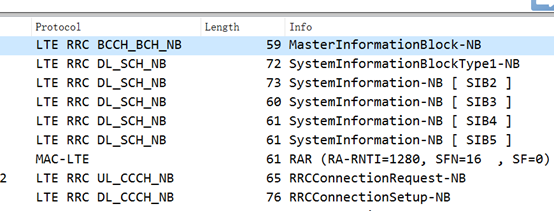
这样,wireshark上就可以解析到对应的空口数据了
python构造wireshark可以解析的LTE空口数据的更多相关文章
- LTE空口协议——是空口3GPP协议 不是网络IP协议
[LTE基础知识]LTE空口协议分析 from:https://www.mscbsc.com/viewnews-102038.html控制面协议 控制面协议结构如下图所示. PDCP在网络侧终止于eN ...
- python爬虫之html解析Beautifulsoup和Xpath
Beautiifulsoup Beautiful Soup 是一个HTML/XML的解析器,主要的功能也是如何解析和提取 HTML/XML 数据.BeautifulSoup 用来解析 HTML 比较简 ...
- Python命令行参数解析模块getopt使用实例
Python命令行参数解析模块getopt使用实例 这篇文章主要介绍了Python命令行参数解析模块getopt使用实例,本文讲解了使用语法格式.短选项参数实例.长选项参数实例等内容,需要的朋友可以参 ...
- 第14.11节 Python中使用BeautifulSoup解析http报文:使用查找方法快速定位内容
一. 引言 在<第14.10节 Python中使用BeautifulSoup解析http报文:html标签相关属性的访问>介绍了BeautifulSoup对象的主要属性,通过这些属性可以访 ...
- julia与python中的列表解析.jl
julia与python中的列表解析.jl #=julia与python中的列表解析.jl 2016年3月16日 07:30:47 codegay julia是一门很年轻的科学计算语言 julia文档 ...
- python 解析XML python模块xml.dom解析xml实例代码
分享下python中使用模块xml.dom解析xml文件的实例代码,学习下python解析xml文件的方法. 原文转自:http://www.jbxue.com/article/16587.html ...
- Python 迭代器和列表解析
Python 迭代器和列表解析 1)迭代器 一种特殊的数据结构,以对象形式存在 >>> i1 = l1.__iter__() >>> i1 = iter(l1) 可 ...
- 使用Python解析豆瓣上Json格式数据
现在的API接口多为xml或json,json解析更简洁相对xml来说 以豆瓣的API接口为例,解析返回的json数据: https://api.douban.com/v2/book/1220562 ...
- python常见排序算法解析
python——常见排序算法解析 算法是程序员的灵魂. 下面的博文是我整理的感觉还不错的算法实现 原理的理解是最重要的,我会常回来看看,并坚持每天刷leetcode 本篇主要实现九(八)大排序算法 ...
随机推荐
- logstash5 单实例多配置文件实现
有些服务器上有多个服务,要使用单个logstash收集日志,因为有多个配置文件,刚开始使用 /opt/app/logstash/bin/logstash "--path.settings&q ...
- iOS 提示更新 业务逻辑
1, 当程序启动,先去APPstore 检查有没有新版本.没有新版本就不提示,有新版本才提示. 2,只有当有提示了,再去判断是强制更新还是普通提示. 3,当后台给返回要强制更新时,就给出提示,并且没有 ...
- 知也atitit.解决struts2 SpringObjectFactory.getClassInstance NullPointerException v2 q31无涯 - I
atitit.解决struts2 SpringObjectFactory.getClassInstance NullPointerExceptionv2 q31 1. #--现象 java.lang. ...
- Atitit.单向sso 单点登录的设计与实现
Atitit.单向sso 单点登录的设计与实现 1. 单点登录sso 的三大解决方案1 2. 新方案:密码管理器方案1 3. 调用方1 4. 自动登录登录2 5. 主页跳转2 1. 单点登录sso ...
- Log4j学习(使用流程,Log4j.properties配置文件,配置到多个不同目标)
参考网址: [http://blog.csdn.net/drift_away/article/details/7403658] [http://blog.csdn.net/lxzo123/articl ...
- cf #363 a
A. Launch of C time limit per test 2 seconds memory limit per test 256 megabytes input standard inpu ...
- iOS开发-常用第三方开源框架介绍
iOS开发-常用第三方开源框架介绍 图像: 1.图片浏览控件MWPhotoBrowser 实现了一个照片浏览器类似 iOS 自带的相册应用,可显示来自手机的图片或者是网络图片,可自动从网 ...
- Java Stream 官方文档翻译
先立个flag https://docs.oracle.com/javase/8/docs/api/java/util/stream/Stream.html
- libpcap丢包原理分析及Fedora 9 内核2.6.25.14下安装PF-RING的详细过程
看到网上有人讲解fedora 9下安装PF-RING的过程,都是几年前的了,比较老了,我安装PF-RING就是为了使用libpcap库,libpcap的原理是通过socket 将数据包从网卡 捕获数据 ...
- python 开发技巧(3)-- 连接mysql 出现错误 ModuleNotFoundError: No module named 'MySQLdb'
python3中使用mysql报错ModuleNotFoundError: No module named 'MySQLdb' 原因是:在python2.x中用mysqldb,但是在python3.x ...