
Navicat for Mysql中错误提示索引过长1071-max key length is 767 byte
1.建用户信息表 tb_person_info
create table tb_person_info(

    user_id int(10) auto_increment,

    `name` varchar(32) default null,

    gender varchar(2) default null,

    profile_img varchar(1024) default null,

    email varchar(1024) default null,

    enable_status int(2) not null default 0 comment '0:禁止访问商城,1:允许访问商城',

    user_type int(2) not null default 1 comment '1:顾客,2:商家,3:超级管理员',

    create_time datetime default null,

    last_edit_time datetime default null,

    primary key(user_id)

);
2.建微信账号表 tb_wechat_auth
 create table tb_wechat_auth(

 2     wechat_auth_id int(10) auto_increment,

     user_id int(10) not null,

 4     open_id varchar(1024) not null,

     create_time datetime default null,

 6     primary key(wechat_auth_id),

 7     constraint fk_wechatauth_profile foreign key(user_id)

 8     references tb_person_info(user_id),

 9     unique key(open_id)

 );
出现错误提示:[Err] 1071 - Specified key was too long; max key length is 767 bytes
错误地方:
open_id varchar(1024) not null
 create table tb_wechat_auth(

     wechat_auth_id int(10) auto_increment,

     user_id int(10) not null,

 4     open_id varchar(256) not null,

     create_time datetime default null,

     primary key(wechat_auth_id),

     constraint fk_wechatauth_profile foreign key(user_id)

     references tb_person_info(user_id),

 9     unique key(open_id)

 );
仍然报错:[Err] 1071 - Specified key was too long; max key length is 767 bytes
 create table tb_wechat_auth(

     wechat_auth_id int(10) auto_increment,

     user_id int(10) not null,

 4     open_id varchar(255) not null,

     create_time datetime default null,

     primary key(wechat_auth_id),

     constraint fk_wechatauth_profile foreign key(user_id)

     references tb_person_info(user_id),

 9     unique key(open_id)

 );
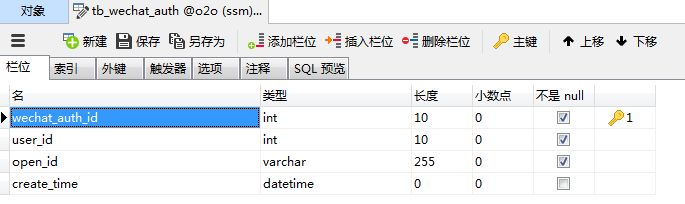
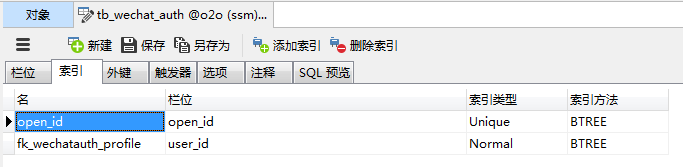
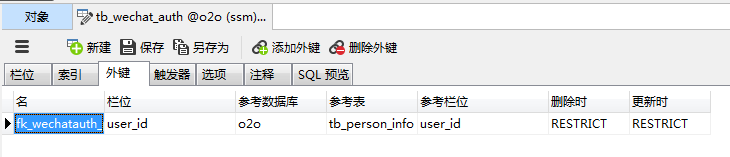
原因分析正确,建表成功!展示如下
1.栏位
2.索引
3.外键
总结:varchar(n),n≤255
Navicat for Mysql中错误提示索引过长1071-max key length is 767 byte的更多相关文章
- EF MySQL 提示 Specified key was too long; max key length is 767 bytes错误
在用EF的CodeFirst操作MySql时,提示 Specified key was too long; max key length is 767 bytes错误,但数据库和表也建成功了.有高人知 ...
- Hive集成Mysql作为元数据时,提示错误:Specified key was too long; max key length is 767 bytes
在进行Hive集成Mysql作为元数据过程中.做全然部安装配置工作后.进入到hive模式,运行show databases.运行正常,接着运行show tables:时却报错. 关键错误信息例如以下: ...
- mysql 索引过长1071-max key length is 767 byte
问题 create table: Specified key was too long; max key length is 767 bytes 原因 数据库表采用utf8编码,其中varchar ...
- 【转】mysql 索引过长1071-max key length is 767 byte
问题 create table: Specified key was too long; max key length is 767 bytes 原因 数据库表采用utf8编码,其中varchar(2 ...
- 数据库操作提示:Specified key was too long; max key length is 767 bytes
操作重现: 法1:新建连接——>新建数据库——>右键数据库导入脚本——>提示:Specified key was too long; max key length is 767 by ...
- 索引长度过长 ERROR 1071 (42000): Specified key was too long; max key length is 767 bytes
1.发现问题 今天在修改innodb表的某个列的长度时,报如下错误: alter table test2 modify column id varchar(500); ERROR 1071 (4200 ...
- Specified key was too long; max key length is 767 bytes mysql
Specified key was too long; max key length is 767 bytes 说明: 执行当前 Web 请求期间,出现未经处理的异常.请检查堆栈跟踪信息,以了解有关该 ...
- hive mysql元数据,报错 Specified key was too long; max key length is 767 bytes
Specified key was too long; max key length is 767 bytes 此错误为hive 元数据mysql 字符集编码问题 如 show create tabl ...
- 关于MySQL字符集问题:Specified key was too long; max key length is 767 bytes
[文章来源]http://blog.csdn.net/cindy9902/article/details/6215769 MySQL: ERROR 1071 (42000): Specified ke ...
随机推荐
- js使用占位符替换字符串
js使用占位符替换字符串是一个ES6中的模版字符串语法. 在``中使用 ${} var a = 5; var b = 10; console.log(`Fifteen is ${a + b} and ...
- .net使用redis入门笔记
1.学习blog:http://www.cnblogs.com/yangecnu/p/Introduct-Redis-in-DotNET.html 2.redis官网:http://redis.io/ ...
- Android4.4源码学习笔记
1.StatusBar和Recents是如何建立联系的 在BaseStatusBar的start()函数通过getComponent(RecentsComponent.class)得到了Recents ...
- Linux ARP代理 与 NAT
有时候我们会在一个已有网络(10.10.10.0/24)内组建一个实验网络(192.168.1.0/24),网络结构如上图所示. 假设我们不能控制(修改)A网络内除D主机以外的系统配置,但可以完全控制 ...
- 从零开始的全栈工程师——html篇1.4
背景与边框 一.背景(backgound) 1.背景颜色:background-color:red;(简写:background:color;) 备注:ie9以下给body设置background-c ...
- 00字体图标iconfont的制作与使用--阿里矢量图库
一.iconfont的使用范围 在工作当中,经常会用到嵌在元素里的小图标 在这种情况下,如果使用<img>标签或者用作背景图片,也能实现这种效果.但是如果这么做的话,就必须把图片一个个切下 ...
- css rgba/hsla知识点讲解及半透明边框
一.RGBA(R,G,B,A) 参数: R:红色值.正整数 | |百分数 G:绿色值.正整数 | |百分数 B:蓝色值.正整数 | |百分数 A:Alpha透明度.取值0~1之间. 说明:此色彩模式与 ...
- 获取css样式,style、getComputedStyle及currentStyle的区别
样式表有三种: 内嵌样式:<div id="box" style="color:red">box</div>,style写在html中的 ...
- 在Windows 7 上安装 Mapnik
环境: 1.Windows 7_64位 2.Python 2.7_32位 步骤: 1.下载 Mapnik SDK http://mapnik.org/download/ 我下载的是 Windo ...
- GridCellChoiceEditor
choice_editor = wx.grid.GridCellChoiceEditor(choices_list, True) grid.SetCellEditor(row, col, choice ...