
LNMP的基本配置
LNMP的基本配置
cd /usr/local/nginx_php/etc/
> php-fpm.conf //清空php-fpm.conf
vim php-fpm.conf
[global]
pid= /usr/local/nginx_php/var/run/php-fpm.pid
error_log= /usr/local/nginx_php/var/log/php-fpm.log
[www]
listen= /tmp/php-fcgi.sock
user= php-fpm
group= php-fpm
listen.owner=nobody //已nobody的身份运行sock
listen.group=nobody //同上
pm= dynamic
pm.max_children= 50
pm.start_servers= 20
pm.min_spare_servers= 5
pm.max_spare_servers= 35
pm.max_requests= 500
rlimit_files= 1024
>nginx.conf
vim nginx.conf(写入以下内容)
user nobody nobody;
worker_processes 2;
error_log /usr/local/nginx/logs/nginx_error.log crit;
pid /usr/local/nginx/logs/nginx.pid;
worker_rlimit_nofile 51200;
events
{
use epoll;
worker_connections 6000;
}
http
{
include mime.types;
default_type application/octet-stream;
server_names_hash_bucket_size 3526;
server_names_hash_max_size 4096;
log_format combined_realip '$remote_addr $http_x_forwarded_for [$time_local]'
'$host "$request_uri" $status'
'"$http_referer" "$http_user_agent"';
sendfile on;
tcp_nopush on;
keepalive_timeout 30;
client_header_timeout 3m;
client_body_timeout 3m;
send_timeout 3m;
connection_pool_size 256;
client_header_buffer_size 1k;
large_client_header_buffers 8 4k;
request_pool_size 4k;
output_buffers 4 32k;
postpone_output 1460;
client_max_body_size 10m;
client_body_buffer_size 256k;
client_body_temp_path /usr/local/nginx/client_body_temp;
proxy_temp_path /usr/local/nginx/proxy_temp;
fastcgi_temp_path /usr/local/nginx/fastcgi_temp;
fastcgi_intercept_errors on;
tcp_nodelay on;
gzip on;
gzip_min_length 1k;
gzip_buffers 4 8k;
gzip_comp_level 5;
gzip_http_version 1.1;
gzip_types text/plain application/x-javascript text/css text/htm application/xml;
server
{
listen 80;
server_name localhost;
index index.html index.htm index.php;
root /data/123;
location ~ \.php$ {
include fastcgi_params;
fastcgi_pass unix:/tmp/php-fcgi.sock;
fastcgi_index index.php;
fastcgi_param /data/123$fastcgi_script_name;
}
}
}
/usr/local/nginx/sbin/nginx –t
/usr/local/nginx/sbin/nginx -s reload
编辑启动脚本:
vim /etc/init.d/nginx ( 写入以下内容)
#!/bin/bash
# chkconfig: - 30 21
# description: http service.
# Source Function Library
. /etc/init.d/functions
# Nginx Settings
NGINX_SBIN="/usr/local/nginx/sbin/nginx"
NGINX_CONF="/usr/local/nginx/conf/nginx.conf"
NGINX_PID="/usr/local/nginx/logs/nginx.pid"
RETVAL=0
prog="Nginx"
start() {
echo -n $"Starting $prog: "
mkdir -p /dev/shm/nginx_temp
daemon $NGINX_SBIN -c $NGINX_CONF
RETVAL=$?
echo
return $RETVAL
}
stop() {
echo -n $"Stopping $prog: "
killproc -p $NGINX_PID $NGINX_SBIN -TERM
rm -rf /dev/shm/nginx_temp
RETVAL=$?
echo
return $RETVAL
}
reload(){
echo -n $"Reloading $prog: "
killproc -p $NGINX_PID $NGINX_SBIN -HUP
RETVAL=$?
echo
return $RETVAL
}
restart(){
stop
start
}
configtest(){
$NGINX_SBIN -c $NGINX_CONF -t
return 0
}
case "$1" in
start)
start
;;
stop)
stop
;;
reload)
reload
;;
restart)
restart
;;
configtest)
configtest
;;
*)
echo $"Usage: $0 {start|stop|reload|restart|configtest}"
RETVAL=1
esac
exit $RETVAL
虚拟主机配置
vim nginx.conf
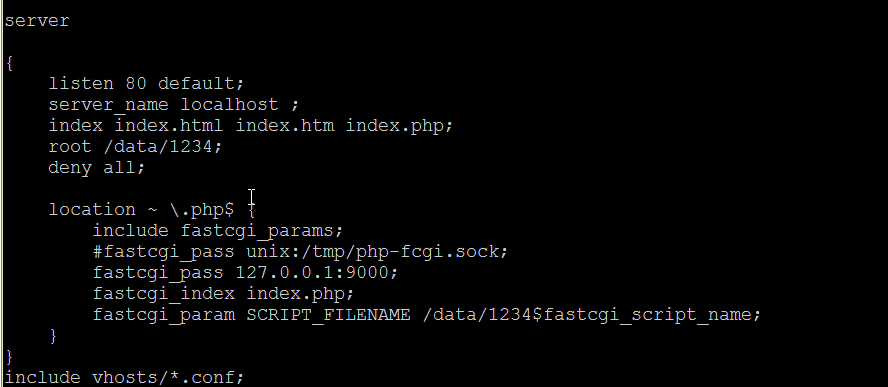
//最后一行插入include vhosts/*.conf -》加载这个文件
//80后加上default,设置第一个为默认主机
//加入deny all 限制默认
mkdir vhosts
cd vhosts
vim 1.conf(写入下列配置)
server
{
listen 80;
server_name 123.com;
index index.html index.htm index.php;
root /data/123;
location ~ \.php$ {
include fastcgi_params;
fastcgi_pass unix:/tmp/php-fcgi.sock;
#fastcgi_pass 127.0.0.1:9000;
fastcgi_index index.php;
fastcgi_param SCRIPT_FILENAME /data/123$fastcgi_script_name;
}
}
Apache的缓存、认证、限制、安全配置,nginx也可以配置。
LNMP的基本配置的更多相关文章
- 8.LNMP环境的配置
LNMP环境的配置 参照文档:https://oneinstack.com/install/ 安装文件位置:/data/soft: ```yum -y install wget screen pyth ...
- LNMP + Apache 架构配置
从事前端开发已3年有余,越来越发现前端开发要学习的知识已不仅仅是html+css+js那么简单了,2017年市场上就有了大前端的概念,可以说对前端工程师的要求也越来越高了,从招聘的要求中可以看到熟悉一 ...
- LNMP安装与配置之CentOS7的安装。
LNMP与LAMP是我们常见的两种网站服务器架构.LNMP代表的就是Linux系统下Nginx+MySQL+PHP/Python,LAMP代表的则是Linux系统下Apache+MySQL+PHP/P ...
- 轻松获取LAMP,LNMP环境编译参数配置
轻松获取LAMP,LNMP环境编译参数配置 作者:Mr.Xiong /分类:系统管理 字号:L M S 大家是否遇到过去了新公司,公司内的LAMP,LNMP等所有的环境都是配置好的(已经在提 ...
- lnmp 安装 访问 配置 laravel
环境要求 Lnmp 一键安装包安装 php7.2+ Mysql 5.7 Innodb 开启 第一步 上传项目到 /home/wwwroot/default/ 或者composer命令行安装larave ...
- 源码编译安装LNMP环境及配置基于域名访问的多虚拟主机
实验环境及软件版本: CentOS版本: 6.6(2.6.32.-504.el6.x86_64) nginx版本: nginx-1.6.2 mysql版本: Mysql-5.6.23 php版本: ...
- lnmp 虚拟主机配置及重写
lnmp安装与调试,请看 http://www.cnblogs.com/lin3615/p/4376224.html 虚拟主机的配置编辑nginx配置文件 nginx.conf此为主配置文件 vim ...
- LNMP安装与配置
Nginx与apache.lighttp性能综合对比,如下图: 注意:关闭rpm默认安装的apache和mysql 1.准备php函数的rpm包 y ...
- Vagrant安装完lnmp后,配置linux和windows共享文件并配置虚拟主机访问项目
虚拟机目录下的Vagrantfile文件是vagrant的配置文件,如果想把虚拟机当作一台服务器,可以通过ip访问,需要修改配置文件进行配置. (1)第一步:打开虚拟机目录下的Vagrantfile文 ...
随机推荐
- ubuntu 和 centOS 的apache设置
更改ubuntu的网站访问根目录: 在sudo gedit /etc/apache2/sites-enabled/000-default,把 DocumentRoot /var/www #这 ...
- P2P(WFD)之RegClass *****************************TBD
三个Action Frame的IE会有带上RegClass的信息 Listen Channel element, Channel List element, Operation Channel ele ...
- ThreadLocal 验明正身
一.前言 之前ThreadLocal使用不多,有个细节也就注意不到了:ThreadLocal在多线程中到底起什么作用?用它保存的变量在每个线程中,是每个线程都保存一份变量的拷贝吗?带着这些问题,我查了 ...
- java生成唯一的id编号
GUID是一个128位长的数字,一般用16进制表示.算法的核心思想是结合机器的网卡.当地时间.一个随即数来生成GUID.从理论上讲,如果一台机器每秒产生10000000个GUID,则可以保证(概率意义 ...
- 【bzoj3626】[LNOI2014]LCA 树链剖分+线段树
题目描述 给出一个n个节点的有根树(编号为0到n-1,根节点为0).一个点的深度定义为这个节点到根的距离+1.设dep[i]表示点i的深度,LCA(i,j)表示i与j的最近公共祖先.有q次询问,每次询 ...
- 【题解】CQOI2007余数求和
大家都说这题水然而我好像还是调了有一会儿……不过暴力真的很良心,裸的暴力竟然还有60分. 打一张表出来,就会发现数据好像哪里有规律的样子,再仔细看一看,就会发现k/3~k/2为公差为2的等差数列,k/ ...
- OpenJudge百炼-2747-数字方格-C语言-枚举
描述:如上图,有3个方格,每个方格里面都有一个整数a1,a2,a3.已知0 <= a1, a2, a3 <= n,而且a1 + a2是2的倍数,a2 + a3是3的倍数, a1 + a2 ...
- 解决IIS设置多个工作进程中Session失效的问题
利用StateServer实现Session共享 session保存在专门的StateServer中,该种方式,性能损失比sql略好.比inproc据说有10%-15%的性能损失.怎么使用StateS ...
- [POJ2777] Count Color
\[Count Color\] Time Limit: 1000MS Memory Limit: 65536K Total Submissions: 50865 Accepted: 15346 Des ...
- Python3 urlparse
>>> from urllib.parse import urlparse >>> o = urlparse('http://www.cwi.nl:80/%7Egu ...