
USB High Speed Inter-Chip (HSIC) IP: What is it? And why should I use it?
来源: https://www.synopsys.com/dw/dwtb.php?a=hsic_usb2_device
What is HSIC?
HSIC (High-Speed Inter-Chip) is an industry standard for USB chip-to-chip interconnect with a 2-signal (strobe, data) source synchronous serial interface using 240 MHz DDR signaling to provide only high-speed (480 Mbps data rate). No external cables or connectors and hot plug-n-play are supported. There is also no analog transceivers, and hence reduces the complexity, cost, power consumption, and manufacturing risk. Low power can be achieved with 1.2 V LVCMOS signaling levels instead of the 3.3 V signaling requirement. Both data and strobe are bi-directional utilizing NRZI encoding. In addition, HSIC interface is always operated at high speed, 480 Mbps. Hence, no high-speed chirp protocol is needed during enumeration. Finally, HSIC USB is fully compatible with existing USB software stacks and provides all data transfer needs through a single unified USB software stack. For more technical information regarding the requirements to implement a HSIC USB solution, please refer to the High-Speed Inter-Chip USB Electrical Specification, Version 1.0 (a supplement to the USB 2.0 specification.) which is now available online at http://www.usb.org/developers/docs/docs
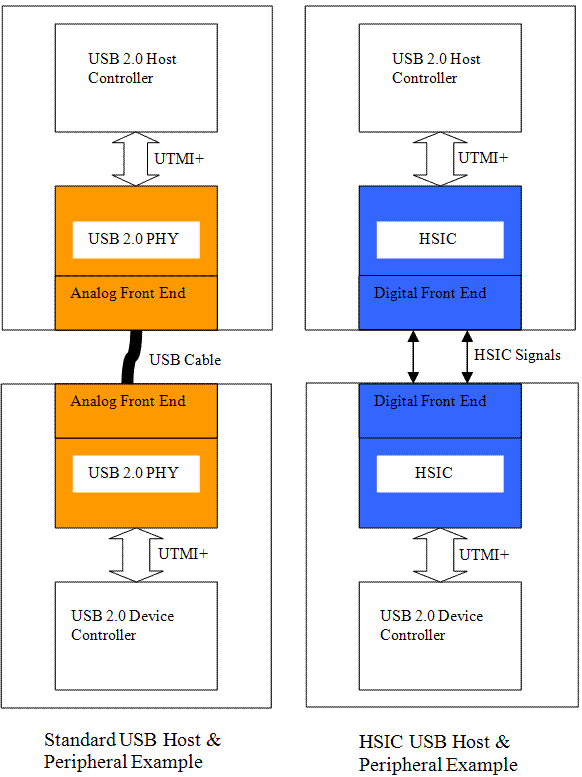
Why HSIC?
- HSIC replaces I2C
- I2C isn’t fast enough and requires special drivers
- HSIC allows USB Software reuse
- PHY reuse/adaptation of existing PHY technologies
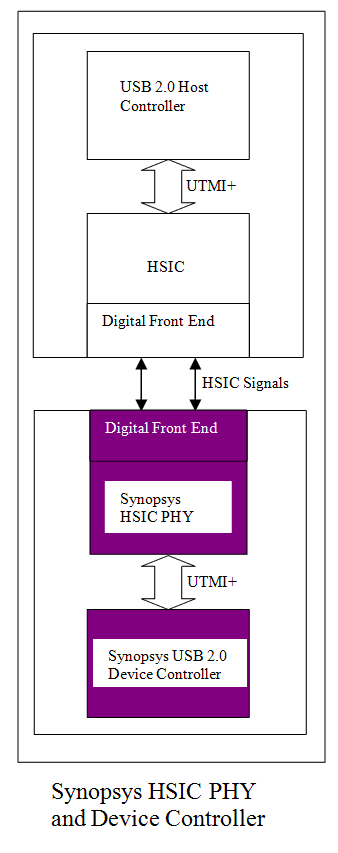
HSIC Device Using Synopsys USB 2.0 Device Controller and HSIC PHY
USB chip-to-chip interconnect can be achieved with the use of both Synopsys device controller and HSIC PHY. It eliminates USB cables and connector connection down to two wires for high speed chip-to-chip communication. It also allows low power high-speed data transfers (480 Mbps) using a source-synchronous serial interface. By eliminating the need of 3.3 V signaling and 5 V short protection logic, Synopsys HSIC PHY can offer approximately up to 50 percent lower power and 75 percent smaller area compared to traditional USB 2.0 PHYs.
USB 2.0 HSIC PHY
- HSIC USB version 1.0 compliance
- HSIC USB Features
- Supports 8/16-bit unidirectional parallel interfaces for HS mode of operation in accordance with the UTMI+ specification
- Implements data recovery from serial data on the HSIC connector
- Implements SYNC/End-of-Packet (EOP) generation and checking
- Implements bit stuffing and unstuffing, and bit-stuffing error detection
- Implements Non Return to Zero Invert (NRZI) encoding and decoding
- Implements bit serialization and deserialization
- Implements holding registers for staging transmit and receive data
- Implements logic to support suspend, sleep, resume, and remote wakeup operations
- General Features
- Occupies small area
- Implements low power dissipation while active, idle, or on standby
- Implements one parallel data interface and clock for high-speed HSIC data transfers
- Provides parameter override bits for optimal yield and interoperability
- Provides on-chip PLL to reduce clock noise and eliminate the need for an external clock generator
- Provides Built-in Self-Test (BIST) circuitry to confirm high-speed operation
- Provides extensive test interface
- Technical Specification
- Small area with approx. 0.18 sq. mm (macro + pads)
- Low power
- HS transmit ~27 mW (typical)
- HS receive ~18 mW (typical)
- Suspend and sleep modes ~4uA
- Supports 12/24/48 MHz clock
- Initial process - TSMC 65LP
- Compatability
- The HSIC PHY uses the same UTMI interface to communicate with Synopsys device controller. Since there is no well defined standard on the UTMI interface for HSIC and we have not tested the HSIC PHY with non-Synopsys device controllers yet, we do not guarantee that the UTMI interface of HSIC PHY would work well with that of non-Synopsys device controllers.
- Availability
- Please contact Synopsys if you are interested in this feature for your USB product.
USB 2.0 Device Controller with HSIC feature
- Configuration
- New device controller configuration option is available to enable HSIC support.
- HSIC logic is implemented through an `ifdef statement. The logic will additionally be controlled by a strap pin.
- Device controller needs to be configured to support unidirectional UTMI PHY interface.
- New device controller configuration option is available to enable HSIC support.
- PHY interface specific
- No new pin is required to interface to Synopsys HSIC PHY for HSIC purposes. Unidirectional UTMI PHY interface is used.
- When the device controller is interfacing to Synopsys HSIC PHY, both the device controller and the PHY are of the understanding not to go through the chirp enumeration steps, but rather go to high-speed idle directly.
- Application Interface/logic
- New strap input pin from Application to enable/disable HSIC support (if the core is already configured to support HSIC through coreConsultant/RapidScript)
- This new strap input pin will not be existed if the device controller is configured not to support HSIC.
- Hardware impact
- Device controller will bypass the Chirp enumeration stage in the chirp_gen_state state machine of udc20_speed_enum module if HSIC feature is supported.
- The bypassing of the chirp enumeration stage will only happen if the associated strap signal is also enabled. If the strap signal is not yet enabled, the core will go through the normal chirp handshake mechanism to support non-HSIC PHY.
- Firmware impact
- No significant change is needed. Supporting high speed falling back to full speed mode is no longer needed when attaching to a HSIC USB host during enumeration because HSIC chip-to-chip interconnect supports high-speed operation only. Hence, a high-speed only device driver is needed.
- Compatability
- The device controller uses the same UTMI interface to communicate with Synopsys HSIC PHY. Since there is no well defined standard on the UTMI interface for HSIC and we have not tested the device controller with non-Synopsys HSIC PHYs yet, we do not guarantee that the UTMI interface of device controller would work well with that of non-Synopsys HSIC PHYs.
- Availability
- Please contact Synopsys if you are interested in this feature for your USB product.
USB High Speed Inter-Chip (HSIC) IP: What is it? And why should I use it?的更多相关文章
- Linux usb 1. 总线简介
文章目录 1. USB 发展历史 1.1 USB 1.0/2.0 1.2 USB 3.0 1.3 速度识别 1.4 OTG 1.5 phy 总线 1.6 传输编码方式 2. 总线拓扑 2.1 Devi ...
- Android 不通过USB数据线调试的方法
在开发Android应用时,通常情况下是通过USB数据线连接设备和计算机,但对于一些需要使用USB设备的应用,这种方法就碰到了麻烦,手机的USB接口已经和外接的USB设备连接,无法再连数据线,此时可以 ...
- USB眼图
/********************************************************************** * USB眼图 * 说明: * 对于USB眼图,并不是很 ...
- USB的挂起和唤醒(Suspend and Resume)【转】
转自:http://m.blog.csdn.net/blog/luckywang1103/25244091 USB协议的第9章讲到USB可见设备状态[Universal Serial Bus Spec ...
- PHP简单爬虫 爬取免费代理ip 一万条
目标站:http://www.xicidaili.com/ 代码: <?php require 'lib/phpQuery.php'; require 'lib/QueryList.php'; ...
- USB各种模式 解释
1.MTP: 通过MTP这种技术,可以把音乐传到手机里.有了U盘功能为什么还要多此一举呢?因为版权问题,MTP可以把权限文件从电脑上导过去:如果只使用手机的U盘功能,把歌的文件拷过去之后,没有权限文件 ...
- USB详解
USB作为一种串行接口,应用日益广泛.如同每个工程设计人员必须掌握I2C,RS232这些接口一样,我们也必须掌握USB.但是USB的接口协议实在有点费解,Linux UCHI驱动作者之一Alan St ...
- 技巧.【转】在虚拟机Vmware中使用HID设备(如USB免驱键盘)
ZC:我的环境:Win7x64.VMware10 ZC:我的处理: ZC: (1).usb.generic.allowHID = "TRUE" (本来就有,将它的位置提前) ZC: ...
- STM32 USB复合设备编写
目的 完成一个CDC + MSC的复合USB设备 可以方便在CDC,MSC,复合设备三者间切换 可移植性强 预备知识 cube中USB只有两个入口. main函数中的MX_USB_DEVICE_Ini ...
随机推荐
- linux基础(2)
Linux基础题 作业一:1) 新建用户natasha,uid为1000,gid为555,备注信息为“master”useradd natashagroupmod -g 555 natashauser ...
- 使用FindBugs-IDEA插件找到代码中潜在的问题
另一篇使用文档,参照:https://www.cnblogs.com/huaxingtianxia/p/6703315.html 我们通常都会在APP上线之后,发现各种错误,尤其是空指针异常,这些错误 ...
- Codeforces Round #301 解题报告
感觉这次的题目顺序很不合理啊... A. Combination Lock Scrooge McDuck keeps his most treasured savings in a home sa ...
- 全局axios默认值 和 自定义实例默认值
首先说了一下情况, 登录后成功返回token 然后在带着token去继续下面的请求, 奇怪的是都是当前页面起作用,刷新和跳转之后就token 就消失了. 查了 axios文档发现 被自己坑了 我设置了 ...
- 基于x64的处理器意思
基于x64的处理器意思是CPU的架构是X64的,也是64位的CPU. 基本简介: "x86-64",有时会简称为"x64",是64位微处理器架构及其相应指令集的 ...
- Python 本地线程
1. 本地线程,保证即使是多个线程,自己的值也是互相隔离. 2.普通对象演示 import threading import time class A(): pass a=A() def func(n ...
- 使用libssh2库实现支持密码参数的ssh2客户端
使用libssh2库实现支持密码参数的ssh2客户端 http://blog.chinaunix.net/uid-24382173-id-229823.html libssh2的简单应用 http:/ ...
- springboot 全局异常处理
springboot 全局异常处理 研究了半天springboot的全局异常处理,虽然还是需要再多整理一下,但是对于常见的404和500足以可以区分开,能够根据这两个异常分别处理 首先配置视图解析路径 ...
- [ 脚本 ] RHEL6.x 及Centos6.x 初始化脚本
#!/bin/bash # check network echo "-------------check Network-------------" ping -c -t mirr ...
- IE6 下的HTML5兼容问题
下面列举IE6中10个不得不注意的问题: 1. 使用 DOCTYPE你需要在HTML页面的最顶部加上DOCTYPE类型,当然, strict版是值得推荐的,例如: <!DOCTYPE HTML ...