
【ExtJS】自定义组件datetimefield(一)
目的:
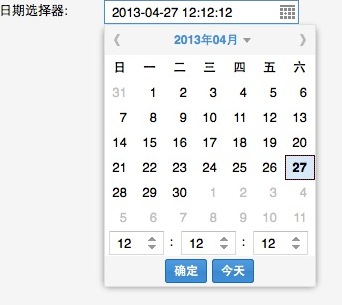
ExtJS中提供了下拉日期选择控件Ext.form.field.Date与下拉时间选择控件Ext.form.field.Time。不过没有一个在选择日期时选择时间的控件datetimefield。目的就是运用自定义组件的方法,来扩展下拉日期选择控件Ext.form.field.Date,在下拉框中添加时间选择的组件。目标效果:
第一步:继承Ext.picker.Date,创建My.picker.DateTime类
 Ext.define('My.picker.DateTime', {

     extend: 'Ext.picker.Date',

     alias: 'widget.datetimepicker',

     okText:'确定',

     okTip:'确定',

     renderTpl: [

         '<div id="{id}-innerEl" data-ref="innerEl" role="grid">',

             '<div role="presentation" class="{baseCls}-header">',

                 '<a id="{id}-prevEl" data-ref="prevEl" class="{baseCls}-prev {baseCls}-arrow" role="button" title="{prevText}" hidefocus="on" ></a>',

                 '<div id="{id}-middleBtnEl" data-ref="middleBtnEl" class="{baseCls}-month">{%this.renderMonthBtn(values, out)%}</div>',

                 '<a id="{id}-nextEl" data-ref="nextEl" class="{baseCls}-next {baseCls}-arrow" role="button" title="{nextText}" hidefocus="on" ></a>',

             '</div>',

             '<table id="{id}-eventEl" data-ref="eventEl" class="{baseCls}-inner" cellspacing="0" role="grid">',

                 '<thead role="presentation"><tr role="row">',

                     '<tpl for="dayNames">',

                         '<th role="columnheader" class="{parent.baseCls}-column-header" title="{.}">',

                             '<div class="{parent.baseCls}-column-header-inner">{.:this.firstInitial}</div>',

                         '</th>',

                     '</tpl>',

                 '</tr></thead>',

                 '<tbody role="presentation"><tr role="row">',

                     '<tpl for="days">',

                         '{#:this.isEndOfWeek}',

                         '<td role="gridcell" id="{[Ext.id()]}">',

                             // The '#' is needed for keyboard navigation

                             '<a href="#" role="button" hidefocus="on" class="{parent.baseCls}-date"></a>',

                         '</td>',

                     '</tpl>',

                 '</tr></tbody>',

             '</table>',

             '<tpl if="showToday">',

                 '<div id="{id}-footerEl" data-ref="footerEl" role="presentation" class="{baseCls}-footer">{%this.renderTodayBtn(values, out)%}</div>',

             '</tpl>',

         '</div>',

         {

             firstInitial: function(value) {

                 return Ext.picker.Date.prototype.getDayInitial(value);

             },

             isEndOfWeek: function(value) {

                 // convert from 1 based index to 0 based

                 // by decrementing value once.

                 value--;

                 var end = value % 7 === 0 && value !== 0;

                 return end ? '</tr><tr role="row">' : '';

             },

             renderTodayBtn: function(values, out) {

                 Ext.DomHelper.generateMarkup(values.$comp.todayBtn.getRenderTree(), out);

             },

             renderMonthBtn: function(values, out) {

                 Ext.DomHelper.generateMarkup(values.$comp.monthBtn.getRenderTree(), out);

             }

         }

     ]

  });
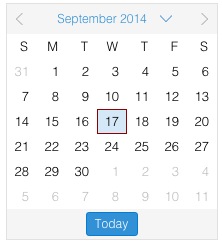
其中renderTpl部分与后面按钮渲染部分出自源码。
效果:
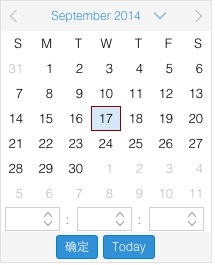
第二步:在原布局中添加3个组件用来选取时、分、秒,添加一个确认按钮,并在组件渲染之前,将自定义添加的时、分、秒和确认按钮进行初始化
Ext.define('My.picker.DateTime', {
extend: 'Ext.picker.Date',
alias: 'widget.datetimepicker',
okText:'确定',
okTip:'确定',
renderTpl: [
'<div id="{id}-innerEl" data-ref="innerEl" role="grid">',
'<div role="presentation" class="{baseCls}-header">',
'<a id="{id}-prevEl" data-ref="prevEl" class="{baseCls}-prev {baseCls}-arrow" role="button" title="{prevText}" hidefocus="on" ></a>',
'<div id="{id}-middleBtnEl" data-ref="middleBtnEl" class="{baseCls}-month">{%this.renderMonthBtn(values, out)%}</div>',
'<a id="{id}-nextEl" data-ref="nextEl" class="{baseCls}-next {baseCls}-arrow" role="button" title="{nextText}" hidefocus="on" ></a>',
'</div>',
'<table id="{id}-eventEl" data-ref="eventEl" class="{baseCls}-inner" cellspacing="0" role="grid">',
'<thead role="presentation"><tr role="row">',
'<tpl for="dayNames">',
'<th role="columnheader" class="{parent.baseCls}-column-header" title="{.}">',
'<div class="{parent.baseCls}-column-header-inner">{.:this.firstInitial}</div>',
'</th>',
'</tpl>',
'</tr></thead>',
'<tbody role="presentation"><tr role="row">',
'<tpl for="days">',
'{#:this.isEndOfWeek}',
'<td role="gridcell" id="{[Ext.id()]}">',
// The '#' is needed for keyboard navigation
'<a href="#" role="button" hidefocus="on" class="{parent.baseCls}-date"></a>',
'</td>',
'</tpl>',
'</tr></tbody>',
'<table id="{id}-timeEl" style="table-layout:auto;width:auto;margin:0 3px;" class="x-datepicker-inner" cellspacing="0">',
'<tbody><tr>',
'<td>{%this.renderHourBtn(values,out)%}</td>',
'<td>{%this.renderMinuteBtn(values,out)%}</td>',
'<td>{%this.renderSecondBtn(values,out)%}</td>',
'</tr></tbody>',
'</table>',
'<tpl if="showToday">',
'<div id="{id}-footerEl" role="presentation" class="{baseCls}-footer">{%this.renderOkBtn(values, out)%}{%this.renderTodayBtn(values, out)%}</div>',
'</tpl>',
'</div>',
{
firstInitial: function(value) {
return Ext.picker.Date.prototype.getDayInitial(value);
},
isEndOfWeek: function(value) {
// convert from 1 based index to 0 based
// by decrementing value once.
value--;
var end = value % 7 === 0 && value !== 0;
return end ? '</tr><tr role="row">' : '';
},
renderTodayBtn: function(values, out) {
Ext.DomHelper.generateMarkup(values.$comp.todayBtn.getRenderTree(), out);
},
renderMonthBtn: function(values, out) {
Ext.DomHelper.generateMarkup(values.$comp.monthBtn.getRenderTree(), out);
},
renderHourBtn: function(values, out) {
Ext.DomHelper.generateMarkup(values.$comp.hourBtn.getRenderTree(), out);
},
renderMinuteBtn: function(values, out) {
Ext.DomHelper.generateMarkup(values.$comp.minuteBtn.getRenderTree(), out);
},
renderSecondBtn: function(values, out) {
Ext.DomHelper.generateMarkup(values.$comp.secondBtn.getRenderTree(), out);
},
renderOkBtn: function(values, out) {
Ext.DomHelper.generateMarkup(values.$comp.okBtn.getRenderTree(), out);
}
}
],
beforeRender: function () {
var me = this;
me.hourBtn=new Ext.form.field.Number({
minValue:0,
maxValue:23,
step:1,
width:55
});
me.minuteBtn=new Ext.form.field.Number({
minValue:0,
maxValue:59,
step:1,
width:70,
labelWidth:10,
fieldLabel:' '
});
me.secondBtn=new Ext.form.field.Number({
minValue:0,
maxValue:59,
step:1,
width:70,
labelWidth:10,
fieldLabel:' '
});
me.okBtn = new Ext.button.Button({
ownerCt: me,
ownerLayout: me.getComponentLayout(),
text: me.okText,
tooltip: me.okTip,
tooltipType:'title',
handler:me.okHandler,
scope: me
});
me.callParent();
}
});
效果:
第三步:添加按钮事件绑定,各种内部逻辑的处理,获取选定的时间等等
【ExtJS】自定义组件datetimefield(一)的更多相关文章
- 【ExtJS】自定义组件datetimefield(二)
接上[ExtJS]自定义组件datetimefield(一) 第三步:添加按钮事件绑定,获取选定的时间 privates:{ finishRenderChildren: function () { v ...
- ExtJS 自定义组件
主要参考的是官方文档 <!DOCTYPE html> <html lang="en"> <head> <meta charset=&quo ...
- 【ExtJS】关于自定义组件(一)
一.目的: ExtJS中提供了下拉日期选择控件Ext.form.field.Date与下拉时间选择控件Ext.form.field.Time.不过没有一个在选择日期时选择时间的控件datetimefi ...
- ExtJS关于组件Component生命周期
extjs组件生命周期大体分为3个阶段:初始化.渲染.销毁. 第一阶段:初始化 初始化工作开始于组件的诞生,所有必须的配置设定.事件注册.预渲染处理等都在此时进行. 1.应用组件的配置: 当初始化一个 ...
- ExtJs 自定义Vtype验证
最近公司开发项目在用ExtJs,碰到验证的就大概的总结了一些常用的验证.自定义的验证主要有两种方式:一种是单字段的自定义验证,另一种是多字段间的验证.对于单字段的验证主要通过regex配置项指定自定义 ...
- ExtJS 4 组件详解
ExtJS 4 的应用界面是由很多小部件组合而成的,这些小部件被称作"组件(Component)",所有组件都是Ext.Component的子类,Ext.Component提供了生 ...
- ExtJS4.2 - 从 Hello World 到 自定义组件 -01 (为爱女伊兰奋斗)
ExtJS4.2 - 从 Hello World 到 自定义组件 - 01 经验.概述.项目搭建.国际化.HelloWorld.布局 —— 为爱女伊兰而奋斗 ——少走弯路,简单才是王道 1. 写在前面 ...
- Javascript - ExtJs - GridPanel组件
GridPanel组件(Ext.grid.GridPanel)logogram:Ext.grid.Panel | xtype:gridpanel 此类派生自Ext.Panel,创建表格需要两个必须的对 ...
- ExtJS自定义事件
1.开发ExtJS组件UI的时候,基本上对于一些操作,就是与后台交互之类的多数都是用户进行点击触发一个事件,在事件的处理器handler里面调具体的业务方法,完成业务数据的处理以及业务流程的流转机制, ...
随机推荐
- CSVHelper 导出CSV 格式
public class CSVHelper { System.Windows.Forms.SaveFileDialog saveFileDialog1;//保存 private string hea ...
- java 支付宝即时到帐提交订单dome
package com.tian.batis; import java.io.UnsupportedEncodingException; import java.net.URLEncoder; imp ...
- PHP 去掉emoji字符
function isMatchEmoji($str) { $pattern='/./u'; $rs=preg_match_all($pattern,$str,$match); if($rs>0 ...
- python的requests库怎么发送带cookies的请求
背景: 在用robot做接口自动化时,有一个查询接口需要用到登录后返回的token等信息作为cookies作为参数一起请求(token是在返回体中,并不在cookies中), 刚好create se ...
- C#构造函数详解和析构函数详解
首先来了解下构造函数的定义: C#构造函数是一种特殊的成员函数,它的作用主要用于为对象分配存储空间,对数据成员进行初始化. 接下来看一下他的语法定义形式: |访问修饰符| 标识符 (|参数列表|) | ...
- 关于C#中Timer定时器的重入问题解决方法(也适用于多线程)
项目中用到了定时器随着服务启动作定时任务,按指定的准点时间定时执行相关操作,但是在指定准点时间内我只想让它执行一次,要避免重入问题的发生. 首先简单介绍一下timer,这里所说的timer是指的Sys ...
- 新建项目下的web文件夹下的dynamic web project和static web project和web fragment project的区别
dynamic web project是Eclipse的项目,与其对应的有static web project,前者指动态web项目,包含一些动态代码,如java:而static web projec ...
- Socket 简易静态服务器 WPF MVVM模式(四)
最重要的一个类Socket类 using System; using System.Collections.Generic; using System.IO; using System.Linq; u ...
- 洛谷 P2286 [HNOI2004]宠物收养场
题目描述 凡凡开了一间宠物收养场.收养场提供两种服务:收养被主人遗弃的宠物和让新的主人领养这些宠物. 每个领养者都希望领养到自己满意的宠物,凡凡根据领养者的要求通过他自己发明的一个特殊的公式,得出该领 ...
- 远程诊断DoIP
目录 远程诊断DoIP Part 1: General information and use case definition DoIP诊断网络架构 诊断连接场景 DoIP之通信建立 DoIP中的一些 ...