
bootstrap的使用2
表单控件:
<!DOCTYPE html>

<html lang="en">

<head>

    <meta charset="UTF-8">

    <title>Title</title>

    <script src="https://cdn.bootcss.com/jquery/1.12.2/jquery.js"></script>

    <!-- 最新版本的 Bootstrap 核心 CSS 文件 -->

    <link rel="stylesheet" href="https://cdn.jsdelivr.net/npm/bootstrap@3.3.7/dist/css/bootstrap.min.css" integrity="sha384-BVYiiSIFeK1dGmJRAkycuHAHRg32OmUcww7on3RYdg4Va+PmSTsz/K68vbdEjh4u" crossorigin="anonymous">

    <!-- 最新的 Bootstrap 核心 JavaScript 文件 -->

    <script src="https://cdn.jsdelivr.net/npm/bootstrap@3.3.7/dist/js/bootstrap.min.js" integrity="sha384-Tc5IQib027qvyjSMfHjOMaLkfuWVxZxUPnCJA7l2mCWNIpG9mGCD8wGNIcPD7Txa" crossorigin="anonymous"></script>

<style>

  form{

      margin-top: 100px;

  }

</style>

</head>

<body>

<div>

    <div class="col-sm-6">

    </div>

    <div class="col-sm-4">

        <form>

            <div class="form-group">

                <label for="exampleInputEmail1">Email address</label>

                <input type="email" class="form-control" id="exampleInputEmail1" placeholder="Email">

            </div>

            <div class="form-group">

                <label for="exampleInputPassword1">Password</label>

                <input type="password" class="form-control" id="exampleInputPassword1" placeholder="Password">

            </div>

            <div class="form-group">

                <label for="exampleInputFile">File input</label>

                <input type="file" id="exampleInputFile">

                <p class="help-block">Example block-level help text here.</p>

            </div>

            <div class="checkbox">

                <label>

                    <input type="checkbox"> Check me out

                </label>

            </div>

            <button type="submit" class="btn btn-default">Submit</button>

        </form>

    </div>

</div>

</body>

</html>
在上面中引入了栅格系统,展示效果:
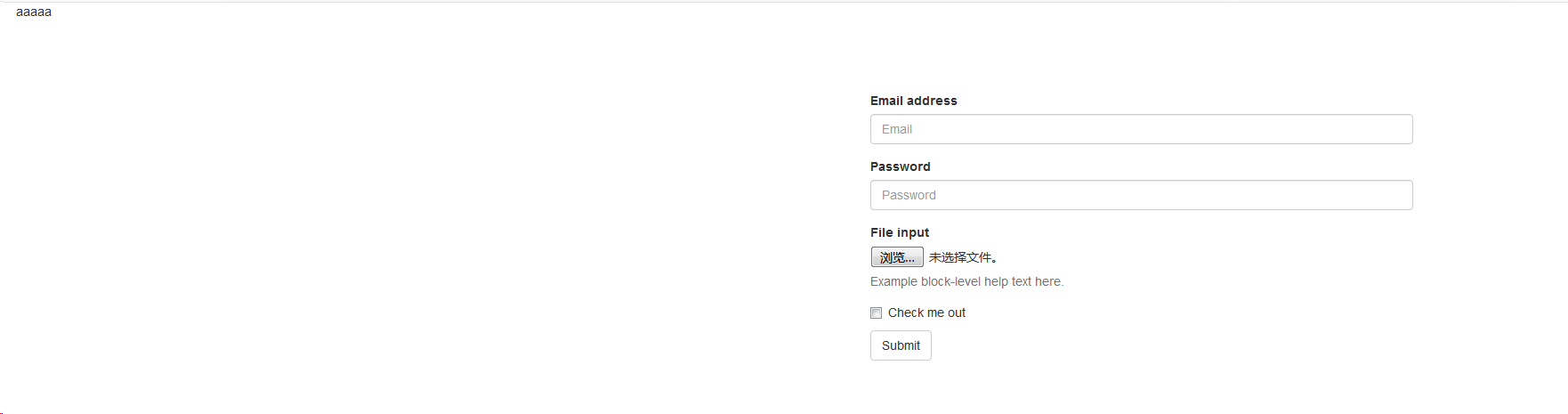
如果页面加上了背景图就更好看了
<!DOCTYPE html>

<html lang="en">

<head>

    <meta charset="UTF-8">

    <title>Title</title>

    <script src="https://cdn.bootcss.com/jquery/1.12.2/jquery.js"></script>

    <!-- 最新版本的 Bootstrap 核心 CSS 文件 -->

    <link rel="stylesheet" href="https://cdn.jsdelivr.net/npm/bootstrap@3.3.7/dist/css/bootstrap.min.css" integrity="sha384-BVYiiSIFeK1dGmJRAkycuHAHRg32OmUcww7on3RYdg4Va+PmSTsz/K68vbdEjh4u" crossorigin="anonymous">

    <!-- 最新的 Bootstrap 核心 JavaScript 文件 -->

    <script src="https://cdn.jsdelivr.net/npm/bootstrap@3.3.7/dist/js/bootstrap.min.js" integrity="sha384-Tc5IQib027qvyjSMfHjOMaLkfuWVxZxUPnCJA7l2mCWNIpG9mGCD8wGNIcPD7Txa" crossorigin="anonymous"></script>

<style>

  body{

       /* background-image: url("2.jpg");*/

    }

    .background1{

       margin-top: 100px;

        margin-left: 20px;

        height:330px;

        background-image: url("2.jpg");

    }

    .background2{

        margin-top: 100px;

        margin-left: 20px;

        height:330px;

        background-color: beige;

    }

</style>

</head>

<body>

<div> aaaaaaaaaaaaaaaaaaaaaaa</div>

<div class="background">

    <div class="col-sm-6 background1">

    </div>

    <div class="col-sm-4 background2" >

        <form>

            <div class="form-group">

                <label for="exampleInputEmail1">Email address</label>

                <input type="email" class="form-control" id="exampleInputEmail1" placeholder="Email">

            </div>

            <div class="form-group">

                <label for="exampleInputPassword1">Password</label>

                <input type="password" class="form-control" id="exampleInputPassword1" placeholder="Password">

            </div>

            <div class="form-group">

                <label for="exampleInputFile">File input</label>

                <input type="file" id="exampleInputFile">

                <p class="help-block">Example block-level help text here.</p>

            </div>

            <div class="checkbox">

                <label>

                    <input type="checkbox"> Check me out

                </label>

            </div>

            <button type="submit" class="btn btn-default">Submit</button>

        </form>

    </div>

</div>

</body>

</html>
效果如下

这个是竖排的,还可以进行横排
再加上样式:
.background1{

       margin-top: 100px;

        margin-left: 20px;

        height:330px;

        background-image: url("2.jpg");

        background-size: %,%;
又变了
bootstrap的使用2的更多相关文章
- 旺财速啃H5框架之Bootstrap(五)
在上一篇<<旺财速啃H5框架之Bootstrap(四)>>做了基本的框架,<<旺财速啃H5框架之Bootstrap(二)>>篇里也大体认识了bootst ...
- 旺财速啃H5框架之Bootstrap(四)
上一篇<<旺财速啃H5框架之Bootstrap(三)>>已经把导航做了,接下来搭建内容框架.... 对于不规整的网页,要做成自适应就有点玩大了.... 例如下面这种版式的页面. ...
- bootstrap + requireJS+ director+ knockout + web API = 一个时髦的单页程序
也许单页程序(Single Page Application)并不是什么时髦的玩意,像Gmail在很早之前就已经在使用这种模式.通常的说法是它通过避免页面刷新大大提高了网站的响应性,像操作桌面应用程序 ...
- 参考bootstrap中的popover.js的css画消息弹框
前段时间小颖的大学同学给小颖发了一张截图,图片类似下面这张图: 小颖当时大概的给她说了下,其实小颖也不知道上面那个三角形怎么画嘻嘻,给她说了DOM结构,具体的css让她自己百度,今天小颖自己参考boo ...
- Bootstrap 模态框(Modal)插件
页面效果: html+js: <!DOCTYPE html> <html> <head> <meta charset="utf-8"> ...
- 利用bootstrap的carousel.js实现轮播图动画
前期准备: 1.jquery.js. 2.bootstrap的carousel.js. 3.bootstrap.css. 如果大家不知道在哪下载,可以联系小颖,小颖把这些js和css可以发送给你. 一 ...
- 旺财速啃H5框架之Bootstrap(三)
好多天没有写了,继续走起 在上一篇<<旺财速啃H5框架之Bootstrap(二)>>中已经把CSS引入到页面中,接下来开始写页面. 首先有些问题要先处理了,问什么你要学boot ...
- 旺财速啃H5框架之Bootstrap(二)
突然感觉不知道写啥子,脑子里面没水了,可能是因为今晚要出去浪,哈哈~~~提前提醒大家平安夜要回家哦,圣诞节生00000000000这么多蛋....继续 上一篇的已经把bootstrap了解个大概了,接 ...
- 旺财速啃H5框架之Bootstrap(一)
接下来的时间里,我将和大家一起对当前非常流行的前端框架Bootstrap进行速度的学习,以案例的形式.对刚开始想学习Bootstrap的同学而找不着边的就很有帮助了.如果你想详细的学习Bootstra ...
- [BootStrap] 富编辑器,基于wysihtml5
在我的周围,已经有很多人在使用BootStrap,但对于任何一个带留言.评论.提问.文章编辑功的网站,编辑器永远是重中之重,显然,早期的编辑器完全没考虑过BootStrap的出现,或皮肤跟网站不匹配, ...
随机推荐
- resolve或reject之后还需要return吗
答案: 需要 今日碰到一个问题, 是我的同事发现的,如果不说的话可能一直没有注意到 这个代码 在reject 后还会执行, 但是谁也没有注意到, 但是不会报错, 因为当一个promise是resolv ...
- PHP数组的详细解读
数组的定义 数组的本质是管理和操作一组变量,数组中可以存储任意长度的数据,也可以存储任意类型的数据.数组中的单元称为元素,每个元素包括下标(键)和值,访问元素的时候,是通过下标来访问,包括一维数组,二 ...
- _GNU_SOURCE宏
打开_GNU_SOURCE这个宏可以打开一些功能,比如为了在Linux系统上编译使用带有检测文件type的宏(S_ISxxxx): S_ISREG() //传入stat结构的st_mode,下同.是否 ...
- c语言实践:RS信号报告
题目: 无线电台的RS制信号报告是由三两个部分组成的: R(Readability) 信号可辨度即清晰度. S(Strength) 信号强度即大小. 其中R位于报告第一位,共分5级,用1—5数字 ...
- Django--form验证及错误处理
需求 from表单验证和ajax验证时返回的错误信息处理 速查 1.form表单提交时错误信息显示 views 1 2 error = form表单实例化对象.errors return render ...
- 23.NULL 函数
SQL ISNULL().NVL().IFNULL() 和 COALESCE() 函数 请看下面的 "Products" 表: P_Id ProductName UnitPrice ...
- tensorflow 中 feed的用法
Feed 上述示例在计算图中引入了 tensor, 以常量或变量的形式存储. TensorFlow 还提供了 feed 机制, 该机制 可以临时替代图中的任意操作中的 tensor 可以对图中任何操作 ...
- libtool: syntax error near unexpected token `]*
../libtool: line 543: syntax error near unexpected token `]*' ../libtool: line 543: ` *[\[\~\#\ ...
- [Lua快速了解一下]Lua的语法
-注释 -- 两个减号是行注释 -块注释 --[[ 这是块注释 这是块注释 --]] -变量 Lua的数字只有double型,64bits, Lua的字符串string支持双引号或者单引号 以下例子会 ...
- LibreOJ 6004 圆桌聚餐 (最大流)
题解:天啊,这道最大流真是水的一批……只需要每张桌子向每个单位建一条容量为1的边,源点向桌子建边,容量为桌子能坐的人数;单位向汇点建边,容量为单位人数即可,然后根据单位与桌子的连边值是否为一来了解每个 ...