
C# 通过 AppDomain 应用程序域实现程序集动态卸载或加载
AppDomain 表示应用程序域,它是一个应用程序在其中执行的独立环境。每个应用程序只有一个主应用程序域,但是一个应用程序可以创建多个子应用程序域。
因此可以通过 AppDomain 创建新的应用程序域,在新创建的子应用程序域中加载执行程序集并且在执行完毕后释放程序集资源,来实现系统在运行状态下,程序集的动态加载或卸载,从而达到系统运行中程序集热更新的目的。
所谓应用程序域,.Net引入的一个概念,指的是一种边界,它标识了代码的运行范围,在其中产生的任何行为,包括异常都不会影响到其他应用程序域,起到安全隔离的效果。也可以看成是一个轻量级的进程。
一个进程可以包含多个应用程序域,各个域之间相互独立。如下是一个.net进程的组成(图片来自网络)
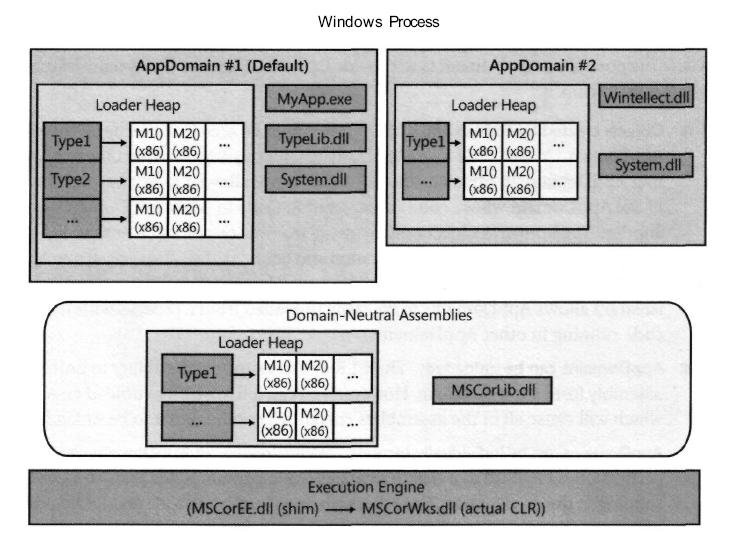
以下为整个原理的实现代码
主应用程序入口:
using Kernel.ServiceAgent;

using System;

using System.Collections.Generic;

using System.IO;

using System.Linq;

using System.Reflection;

using System.Runtime.Remoting;

using System.Text;

using System.Threading;

using System.Threading.Tasks;

namespace Kernel.App

{

    class Program

    {

        static void Main(string[] args)

        {

            Console.WriteLine("");

            using (ServiceManager<IObjcet> manager = new ServiceManager<IObjcet>())

            {

                string result = manager.Proxy.Put("apprun one");

                Console.WriteLine(result);

                Console.WriteLine("");

                Console.WriteLine("                         Thread AppDomain info                             ");

                Console.WriteLine(manager.CotrProxy.FriendlyName);

                Console.WriteLine(Thread.GetDomain().FriendlyName);

                Console.WriteLine(manager.CotrProxy.BaseDirectory);

                Console.WriteLine(manager.CotrProxy.ShadowCopyFiles);

                Console.WriteLine("");

            }

            Console.ReadLine();

        }

    }

}
创建新的应用程序域并且在新的应用程序域中调用透明代理类:
using Kernel.Interface;

using System;

using System.Collections.Generic;

using System.IO;

using System.Linq;

using System.Reflection;

using System.Security.Policy;

using System.Text;

using System.Threading;

using System.Threading.Tasks;

namespace Kernel.ServiceAgent

{

    public class ServiceManager<T> : IDisposable where T : class

    {

        private AppDomain ctorProxy = null;

        /// <summary>

        /// 应用程序运行域容器

        /// </summary>

        public AppDomain CotrProxy

        {

            get { return ctorProxy; }

        }

        private T proxy = default(T);

        public T Proxy

        {

            get

            {

                if (proxy == null)

                {

                    proxy = (T)InitProxy(AssemblyPlugs);

                }

                return proxy;

            }

        }

        private string assemblyPlugs;

        /// <summary>

        /// 外挂插件程序集目录路径

        /// </summary>

        public string AssemblyPlugs

        {

            get {

                assemblyPlugs = ConfigHelper.GetVaule("PrivatePath");

                if (assemblyPlugs.Equals("")){

                    assemblyPlugs = Path.Combine(AppDomain.CurrentDomain.BaseDirectory, "Plugins");

                }

                if (!Directory.Exists(assemblyPlugs))

                {

                    Directory.CreateDirectory(assemblyPlugs);

                }

                return assemblyPlugs;

            }

            set { assemblyPlugs = value; }

        }

        public ServiceManager()

        {

            if (proxy == null)

            {

                proxy = (T)InitProxy(AssemblyPlugs);

            }

        }

        private T InitProxy(string assemblyPlugs)

        {

            try

            {

                //AppDomain.CurrentDomain.SetShadowCopyFiles();

                //Get and display the friendly name of the default AppDomain.

                //string callingDomainName = Thread.GetDomain().FriendlyName;

                //Get and display the full name of the EXE assembly.

                //string exeAssembly = Assembly.GetEntryAssembly().FullName;

                //Console.WriteLine(exeAssembly);

                AppDomainSetup ads = new AppDomainSetup();

                ads.ApplicationName = "Shadow";

                //应用程序根目录

                ads.ApplicationBase = AppDomain.CurrentDomain.BaseDirectory;

                //子目录(相对形式)在AppDomainSetup中加入外部程序集的所在目录,多个目录用分号间隔

                ads.PrivateBinPath = assemblyPlugs;

                //设置缓存目录

                ads.CachePath = ads.ApplicationBase;
                //获取或设置指示影像复制是打开还是关闭

                ads.ShadowCopyFiles = "true";
                //获取或设置目录的名称,这些目录包含要影像复制的程序集

                ads.ShadowCopyDirectories = ads.ApplicationBase;

                ads.DisallowBindingRedirects = false;

                ads.DisallowCodeDownload = true;

                ads.ConfigurationFile = AppDomain.CurrentDomain.SetupInformation.ConfigurationFile;

                //Create evidence for the new application domain from evidence of

                Evidence adevidence = AppDomain.CurrentDomain.Evidence;

                // Create the second AppDomain.

                ctorProxy = AppDomain.CreateDomain("AD #2", adevidence, ads);

                //Type.GetType("Kernel.TypeLibrary.MarshalByRefType").Assembly.FullName

                string assemblyName = Assembly.GetExecutingAssembly().GetName().FullName;

                //string assemblyName = typeof(MarshalByRefType).Assembly.FullName

                // Create an instance of MarshalByRefObject in the second AppDomain.

                // A proxy to the object is returned.

                Console.WriteLine("CtorProxy:" + Thread.GetDomain().FriendlyName);

                //TransparentFactory factory = (IObjcet)ctorProxy.CreateInstance("Kernel.TypeLibrary",
               "Kernel.TypeLibrary.TransparentFactory").Unwrap();

                TransparentAgent factory = (TransparentAgent)ctorProxy.CreateInstanceAndUnwrap(assemblyName,
                              typeof(TransparentAgent).FullName);

                Type meetType = typeof(T);

                string typeName = AssemblyHelper.CategoryInfo(meetType);

                object[] args = new object[];

                string assemblyPath = ctorProxy.SetupInformation.PrivateBinPath;

                //IObjcet ilive = factory.Create(@"E:\Plug\Kernel.SimpleLibrary.dll", "Kernel.SimpleLibrary.PlugPut", args);

                T obj = factory.Create<T>(assemblyPath, typeName, args);

                return obj;

            }

            catch (System.Exception)

            {

                throw;

            }

        }

        /// <summary>

        /// 卸载应用程序域

        /// </summary>

        public void Unload()

        {

            try

            {

                if (ctorProxy != null)

                {

                    AppDomain.Unload(ctorProxy);

                    ctorProxy = null;

                }

            }

            catch(Exception)

            {

                throw;

            }

        }

        public void Dispose()

        {

            this.Unload();

        }

    }

}
创建应用程序代理类:
using Kernel.Interface;

using System;

using System.Collections.Generic;

using System.IO;

using System.Linq;

using System.Reflection;

using System.Text;

using System.Threading.Tasks;

namespace Kernel.ServiceAgent

{

    public class TransparentAgent : MarshalByRefObject

    {

        private const BindingFlags bfi = BindingFlags.Instance | BindingFlags.Public | BindingFlags.CreateInstance;

        public TransparentAgent() { }

        /// <summary> Factory method to create an instance of the type whose name is specified,

        /// using the named assembly file and the constructor that best matches the specified parameters. </summary>

        /// <param name="assemblyFile"> The name of a file that contains an assembly where the type named typeName is sought. </param>

        /// <param name="typeName"> The name of the preferred type. </param>

        /// <param name="constructArgs"> An array of arguments that match in number, order,
     /// and type the parameters of the constructor to invoke, or null for default constructor. </param>

        /// <returns> The return value is the created object represented as IObjcet. </returns>

        public IObjcet Create(string assemblyFile, string typeName, object[] args)

        {

            return (IObjcet)Activator.CreateInstanceFrom(assemblyFile, typeName, false, bfi, null, args, null, null).Unwrap();

        }

        public T Create<T>(string assemblyPath, string typeName, object[] args)

        {

            string assemblyFile = AssemblyHelper.LoadAssemblyFile(assemblyPath, typeName);

            return (T)Activator.CreateInstanceFrom(assemblyFile, typeName, false, bfi, null, args, null, null).Unwrap();

        }

    }

}
所有涉及到需要动态加载或释放的资源,都需要放在代理类中进行操作,只有在此代理类中进行托管的代码才是属于新建的应用程序域的操作。
using Kernel.Interface;

using System;

using System.Collections.Generic;

using System.IO;

using System.Linq;

using System.Reflection;

using System.Text;

using System.Threading;

using System.Threading.Tasks;

namespace Kernel.ServiceAgent

{

    public class AssemblyHelper

    {

        /// <summary>

        /// 获取泛型类中指定属性值

        /// </summary>

        /// <typeparam name="T"></typeparam>

        /// <returns></returns>

        public static string CategoryInfo(Type meetType)

        {

            object[] attrList = meetType.GetCustomAttributes(typeof(CategoryInfoAttribute), false);

            if (attrList != null)

            {

                CategoryInfoAttribute categoryInfo = (CategoryInfoAttribute)attrList[];

                return categoryInfo.Category;

            }

            return "";

        }

        public static string LoadAssemblyFile(string assemblyPlugs, string typeName)

        {

            string path = string.Empty;

            DirectoryInfo d = new DirectoryInfo(assemblyPlugs);

            foreach (FileInfo file in d.GetFiles("*.dll"))

            {

                Assembly assembly = Assembly.LoadFile(file.FullName);

                Type type = assembly.GetType(typeName, false);

                if (type != null)

                {

                    path = file.FullName;

                }

            }

            return path;

        }

    }

}
读取配置文件信息:
using System;

using System.Collections.Generic;

using System.Linq;

using System.Text;

using System.Threading.Tasks;

using System.Configuration;

namespace Kernel.ServiceAgent

{

    public class ConfigHelper

    {

        public static string GetVaule(string configName)

        {

            string configVaule = ConfigurationManager.AppSettings[configName];

            if (configVaule != null && configVaule != "")

            {

                return configVaule.ToString();

            }

            return "";

        }

    }

}
配置文件相关配置信息:
<?xml version="1.0" encoding="utf-8" ?>

<configuration>

    <startup>

        <supportedRuntime version="v4.0" sku=".NETFramework,Version=v4.5" />

    </startup>

    <appSettings>

      <add key="PrivatePath" value="E:\Plugins"/>

    </appSettings>

</configuration>
创建接口信息:
using System;

using System.Collections.Generic;

using System.Linq;

using System.Text;

using System.Threading.Tasks;

namespace Kernel.Interface

{

    [CategoryInfo("Kernel.SimpleLibrary.PlugPut", "")]

    public interface IObjcet

    {

        void Put();

        string Put(string plus);

    }

}
创建接口自定义属性:
using System;

using System.Collections.Generic;

using System.Linq;

using System.Text;

using System.Threading.Tasks;

namespace Kernel.Interface

{

    /// <summary>

    /// 设置接口实现类自定义标注属性

    /// </summary>

    ///

   [AttributeUsage(AttributeTargets.Class | AttributeTargets.Interface, Inherited = false, AllowMultiple = false)]

    public class CategoryInfoAttribute : Attribute

    {

        public string Category { get; set; }

        public string Describtion { get; set; }

        /// <summary>

        /// 设置实现类自定义标注属性

        /// </summary>

        /// <param name="category"></param>

        /// <param name="describtion"></param>

        public CategoryInfoAttribute(string category, string describtion)

        {

            this.Category = category;

            this.Describtion = describtion;

        }

    }

}
创建继承至IObjcet接口带有具体操作的实现类:
using System;

using System.Collections.Generic;

using System.Linq;

using System.Text;

using System.Threading.Tasks;

using Kernel.Interface;

namespace Kernel.SimpleLibrary

{

    [Serializable]

    public class PlugPut : MarshalByRefObject, IObjcet

    {

        private string plugName = "my plugName value is default!";

        public string PlugName

        {

            get { return plugName; }

            set { plugName = value; }

        }

        public PlugPut() { }

        public PlugPut(string plusName)

        {

            this.PlugName = plusName;

        }

        public void Put()

        {

            Console.WriteLine("Default plug value is:" + plugName);

        }

        public string Put(string plus)

        {

            Console.WriteLine("Put plus value is:" + plus);

            return ("-------------------- PlugPut result info is welcome -------------------------");

        }

    }

}
继承至IObjcet接口带有具体操作的实现类,就是属于需要动态替换更新的程序集,所以最好将其编译在一个单独的程序集中,插件目录在配置文件中可配置,示例中放置在E:\Plugins 目录下,示例中代码最后将生成 Kernel.SimpleLibrary.DLL ,最后将编译好的程序集放置在 E:\Plugins\Kernel.SimpleLibrary.DLL 路径下,程序运行后将加载此程序集,加载完毕运行完毕后并释放此程序集。
以下两句较为重要,最好设置一下,不设置的后果暂时没有尝试
//获取或设置指示影像复制是打开还是关闭
ads.ShadowCopyFiles = "true";
//获取或设置目录的名称,这些目录包含要影像复制的程序集
ads.ShadowCopyDirectories = ads.ApplicationBase;
当程序运行起来后,程序集加载之后会在设置的应用程序域缓存目录中复制一份程序集的副本,然后运行副本中的程序集,释放掉本身加载的程序集。以上示例中会在主程序目录下生成一个Shadow 目录,此目录下包含了程序集的副本文件。
小节:
如果在另一个AppDomain 中加载程序集,然后获取Type,最后在主AppDomain中使用CreateInstance中的Type重载创建对象,结果会是Type所属的程序集会被加入到当前AppDomain中,然后Type的实例会在当前AppDomain中创建。
只有继承至 MarshalByRefObject 的透明代理类才能够进行跨域操作。
所以需要在继承至 MarshalByRefObject 的透明代理类中进行相关操作然后返回给主应用程序域,只有在代理类中进行的代码操作才是属于新建的应用程序域。否则任何运行代理类以外的代码都是属于主应用程序域。
此章节只是讲解了程序集动态加载或卸载热插拔的实现方式,有关AppDomain 和 AppDomainSetup 具体信息可以参考MSDN上面的文档。
C# 通过 AppDomain 应用程序域实现程序集动态卸载或加载的更多相关文章
- netload 加载程序集抛异常----无法加载程序集解决办法
netload 加载程序集抛异常----无法加载程序集 错误信息如下: 无法加载程序集.错误详细信息: System.BadImageFormatException: 未能加载文件或程序集“file: ...
- .Net Core 程序集管理说明(加载)
.NET CORE 的程序集加载管理和以前的 .NET 发生了很大的变化, 在 .NET CORE 里, 程序集的加载, 依赖了 xx.deps.json 文件, deps.json 文件里,定义了程 ...
- c++ 动态库的加载
转载:https://blog.csdn.net/ztq_12345/article/details/99677769 使用ide是vs, 使用Windows.h下的3个函数对动态库进行加载第一个:H ...
- PHP+Mysql+easyui点击左侧tree菜单对应表名右侧动态生成datagrid加载表单数据(二)
关于tree菜单生成,参考我的另一篇博文地址tree 菜单 实现功能:点击左侧tree菜单中的table,右侧通过datagrid加载出该表对用的所有数据 难点:获取该表的所有列名,动态生成datag ...
- [f]动态判断js加载完成
在正常的加载过程中,js文件的加载是同步的,也就是说在js加载的过程中,浏览器会阻塞接下来的内容的解析.这时候,动态加载便显得尤为重要了,由于它是异步加载,因此,它可以在后台自动下载,并不会妨碍其它内 ...
- 动态库DLL加载方式-静态加载和动态加载
静态加载: 如果你有a.dll和a.lib,两个文件都有的话可以用静态加载的方式: message函数的声明你应该知道吧,把它的声明和下面的语句写到一个头文件中 #pragma comment(lib ...
- Extjs4.1.x使用Application动态按需加载MVC各模块
我们知道Extjs4之后提出了MVC模块开发,将以前肥厚的js文件拆分成小的js模块[model\view\controller\store\form\data等],通过controller拼接黏合, ...
- [ExtJS5学习笔记]第二十节 Extjs5配合数组的push方法,动态创建并加载组件
本文地址:http://blog.csdn.net/sushengmiyan/article/details/39226773 官方例子:http://docs.sencha.com/extjs/5. ...
- linux驱动动态与静态加载
在Linux中驱动的加载方式有动态加载和静态加载.动态加载,即驱动不添加到内核中,在内核启动完成后,仅在用到这一驱动时才会进行加载静态加载,驱动编译进内核中,随内核的启动而完成驱动的加载.添加字符驱动 ...
随机推荐
- Java加密解密大全
ChinaSEI系列讲义(By 郭克华) Java加密解密方法大全 如果有文字等小错,请多包涵.在不盈利的情况下,欢迎免费传播. 版权所有.郭克华 本讲义经 ...
- 【二分答案】【哈希表】【字符串哈希】bzoj2946 [Poi2000]公共串
二分答案,然后搞出hash值扔到哈希表里.期望复杂度O(n*log(n)). <法一>next数组版哈希表 #include<cstdio> #include<cstri ...
- 8.3(java学习笔记)动态编译(DynamicCompiler)与动态运行(DynamicRun)
一.动态编译 简单的说就是在运行一个java程序的过程中,可以通过一些API来编译其他的Java文件. 下面主要说动态编译的实现: 1.获取java编译编译器 2.运行编译器(须指定编译文件) 获取编 ...
- 3.4常用类(java学习笔记)Math和Random
一.Math 这个类包含执行指数.对数.平方根法.三角函数等基本的数字运算. Math中还包含一些静态常量供我们调用. 如PI圆周率,E. 1.abs(),返回该数的绝对值. public class ...
- 让XCode的Stack Trace信息可读
程序报错信息如下:
- Android 架构 1.架构
项目分为了四个层级:模型层.接口层.核心层.界面层.模型层定义了所有的模型:接口层封装了服务器提供的API:核心层处理所有业务逻辑:界面层就处理界面的展示.几个层级之间的关系如下图所示: 层级关系:模 ...
- u-boot-2012.10移植到AT91RM9200(包括NAND FLASH)
基于中嵌SRM9204 目 录 1 配置 1.1修改顶层Makefile(可选) 1.2配置 1.3下载.运行.测试 2 修改内存配置参数(根据芯片手册修改) 2.1 修改配置参数 2.2 编译 2 ...
- Cisco模拟器Web-IOU使用说明 转
http://blog.sina.com.cn/s/blog_af0abf1f0102uztk.html GNS3作为使用最多的Cisco官方模拟器,是因为它使用简单,所有设置图形化,是一款非常强 ...
- Social regularizations
trust-aware :如何从隐式信任中导出显示信任.链接预测就是搞这一方面的么? 和类似谱聚类的拉普拉斯矩阵结合在一起,没怎么看.
- SqlServer_删除重复行只保留一条记录
前提:相同的数据重复往数据库写入,导致存在仅主键Id不同的重复数据,现在需要去除重复数据,仅保留重复数据中Id最大的一条 思路: 1.找出存在重复数据的记录,并取重复数据中最大的Id值 2.删 ...