
Azure ASM到ARM迁移 (三) Reserved IP的迁移
Azure的ASM下,很多用户的应用种域名的解析在DNS服务器种都采用A记录的方式,所以很多用户都在Azure上采用了Reserved IP。
关于Reserved IP,可以参考http://www.cnblogs.com/hengwei/p/5161433.html
在ASM到ARM的迁移中,IP地址也是迁移中需要考虑的一个重要问题,如果IP地址不能迁移,就需要客户更改DNS中的记录。
如果修改了DNS的记录,考虑到DNS本身架构的特点,割接的时间将会大大增加。所以迁移Reserved IP是ASM到ARM工作中需要重点考虑的内容之一。
Azure Reserved IP的迁移有两种方式:
1. VNET整体迁移
如果采用平台的工具进行VNET的整体迁移,Public的IP地址会随着VM迁移到ARM模式下。
已经创建好了一台VM,其Cloud Service的IP地址是Reserved IP:
VM的信息:

Reserved IP信息:

通过SSH到这台VM上,进行检测,这里用到的是Paping,类似Windows里的PSPING,下载地址是:
https://hwblob.blob.core.chinacloudapi.cn/test/paping_1.5.5_x86-64_linux.tar.gz
然后对VNET进行迁移:
Move-AzureVirtualNetwork -VirtualNetworkName hwmig -Validate

Move-AzureVirtualNetwork -VirtualNetworkName hwmig -Prepare

Move-AzureVirtualNetwork -VirtualNetworkName hwmig -Commit
这个过程中,paping出现三次中断:
Connected to 111.13.100.91: time=.67ms protocol=TCP port=

Connected to 111.13.100.91: time=.30ms protocol=TCP port=

Connected to 111.13.100.91: time=.50ms protocol=TCP port=

Connection timed out

Connection timed out

Connection timed out

Connection timed out

Connected to 111.13.100.91: time=.65ms protocol=TCP port=

Connected to 111.13.100.91: time=.91ms protocol=TCP port=

Connected to 111.13.100.91: time=.59ms protocol=TCP port=

…

Connected to 111.13.100.91: time=.31ms protocol=TCP port=

Connection timed out

Connection timed out

Connected to 111.13.100.91: time=.53ms protocol=TCP port=

Connected to 111.13.100.91: time=.49ms protocol=TCP port=

…

Connected to 111.13.100.91: time=.63ms protocol=TCP port=

Connection timed out

Connection timed out

Connection timed out

Connected to 111.13.100.91: time=.30ms protocol=TCP port=
一次发生在prepare中,两次发生在commit中,但时间都非常短。
结束后,可以看到:

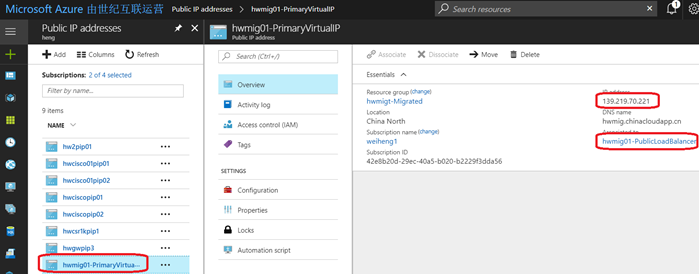
地址没有发生变化。
查看Public IP,可以看到已经迁移过来,且地址没有变化,管理在负载均衡器上:
2. 单独迁移Reserved IP
当然在做这些move的命令前,都要在订阅中注册相应的provider:
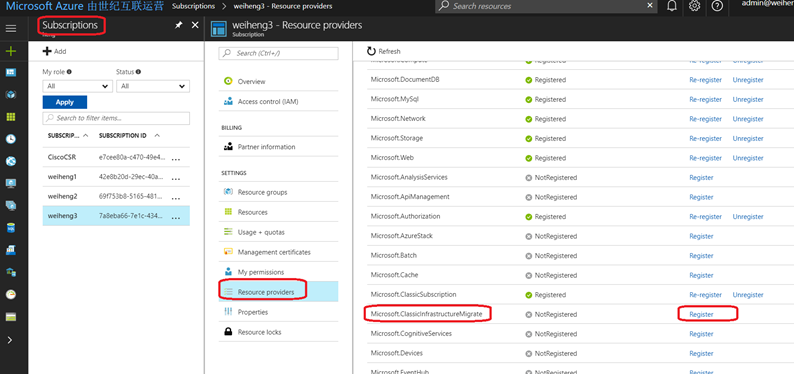
在powershell中运行如下命令:
Move-AzureReservedIP -ReservedIPName hwrip02 -Validate

Move-AzureReservedIP -ReservedIPName hwrip02 -Prepare

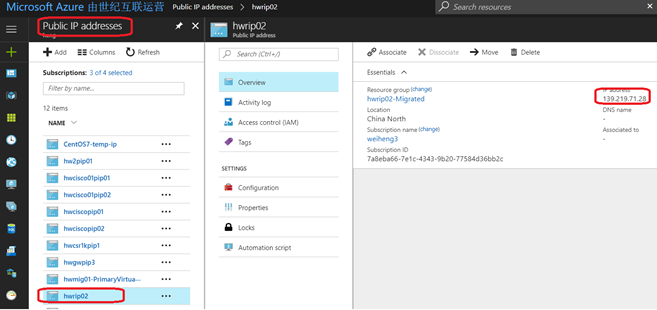
Move-AzureReservedIP -ReservedIPName hwrip02 -Commit
运行完后,这个Reserved IP就迁移到ARM模式下了。
总结:
从ASM到ARM的迁移中,IP地址的迁移可以采用两种方式实现。
- 随着VNET一起迁移
- 单独迁移
Azure ASM到ARM迁移 (三) Reserved IP的迁移的更多相关文章
- Azure Reserved IP
Azure PowerShell > Add-AzureAccount> Select-AzureSubscription "SubscriptionName"> ...
- Azure CLI对ASM,ARM资源的基本操作
本文主要介绍Windows Azure CLI对ASM及ARM资源的基本操作 1.在windows的CMD或Powershell环境下,输入命令:azure,可以查看到当前操作的模式为ASM还是ARM ...
- 使用 Azure CLI 将 IaaS 资源从经典部署模型迁移到 Azure Resource Manager 部署模型
以下步骤演示如何使用 Azure 命令行接口 (CLI) 命令将基础结构即服务 (IaaS) 资源从经典部署模型迁移到 Azure Resource Manager 部署模型. 本文中的操作需要 Az ...
- Azure SQL Database (21) 将整张表都迁移到Azure Stretch Database里
<Windows Azure Platform 系列文章目录> Azure SQL Database (19) Stretch Database 概览 Azure SQL Da ...
- 使用Json Template在Azure China创建ARM类型的虚拟机
前面几篇文章介绍过Azure的两种VM的模式,包括ASM和ARM.并且介绍了如何用Azure CLI和PowerShell创建虚拟机.本文将介绍如何采用Json的Template来创建基于ARM的VM ...
- Windows Azure Web Site (9) Web Site公网IP地址
<Windows Azure Platform 系列文章目录> 本文会同时介绍国内由世纪互联运维的Azure China和海外Azure Global. 熟悉Windows Azure平台 ...
- 保留ip: Reserved IP addresses
Reserved IP addresses From Wikipedia, the free encyclopedia In the Internet addressing architect ...
- [转]详述DHCP服务器的三种IP分配方式
DHCP就是动态主机配置协议(Dynamic Host Configuration Protocol),它的目的就是为了减轻TCP/IP网络的规划.管理和维护的负担,解决IP地址空间缺乏问题.这种网络 ...
- Azure Powershell对ARM资源的基本操作
本分主要介绍Windows Azure Powershell对ARM资源的基本操作 1.登陆ARM模式,命令:Login-AzureRmAccount -EnvironmentName AzureCh ...
随机推荐
- Nginx 常见报错
Nginx 常见报错 启动报错:[emerg]: bind() to 0.0.0.0:80 failed (98: Address already in use) 原因:这个是nginx重启时经常遇到 ...
- VMware 连接不上XSHELL
本人创建虚拟机时把网络连接模式选成了桥接,后来在VMware虚拟网络编辑器中查看了连接模式:NAT. 重新回到VMware中更改了连接模式:NAT模式 成功连接XSHELL 步骤1 打开VMware的 ...
- Vue.js学习笔记 第八篇 组件
全局注册组件 <!DOCTYPE html> <html> <head> <meta charset="utf-8"> <ti ...
- Kubernetes TLS认证
转自: https://mritd.me/2018/01/07/kubernetes-tls-bootstrapping-note/ 前段时间撸了一会 Kubernetes 官方文档,在查看 TLS ...
- 为什么可以Ping通IP地址,但Ping不通域名?
能否ping通IP地址,与能否解析域名是两回事不能ping通IP地址,说明对方禁止ICMP报文或对方没有开机等解析域名只是将域名翻译成IP地址,不论该IP地址是否能够正常访问 问题是ping域名的时候 ...
- 日志-logback
参考:http://www.importnew.com/22290.html 一 概述 1.1 LogBack.Slf4j和Log4j之间的关系 1)Slf4j(The Simple Logging ...
- linux命令:head 命令
head 与 tail 就像它的名字一样的浅显易懂,它是用来显示开头或结尾某个数量的文字区块,head 用来显示档案的开头至标准输出中,而 tail 想当然尔就是看档案的结尾. 1.命令格式: hea ...
- Virtio SCSI设备介绍
Qemu的存储栈 在KVM虚拟化环境中,当客户机的内核存储系统像在物理机上一样通过页缓存.文件系统.通用块设备层运行到实际设备驱动时,这时驱动对设备寄存器的访问会触发CPU从客户机代码切换到物理机内的 ...
- Efficient live disk backup with active blockcommit
列出当前正在使用的block device $ virsh domblklist vm1 Target Source ----------------------------------------- ...
- NovaException: Unexpected vif_type=binding_failed
nova/virt/libvirt/vif.py: _("Unexpected vif_type=%s") % vif_type) NovaException: Unexpecte ...