
Taro聊天室|react+taro仿微信聊天App界面|taro聊天实例
一、项目简述
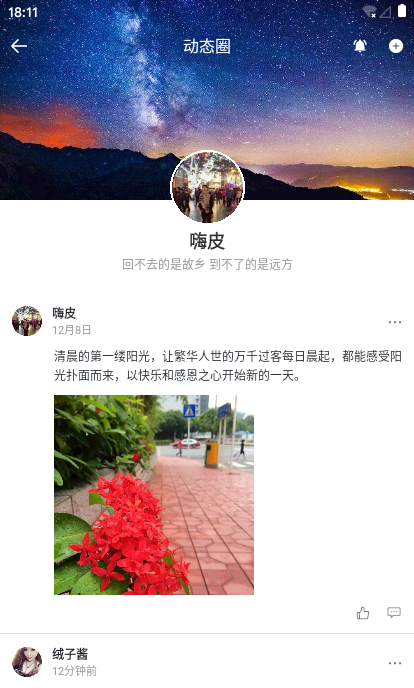
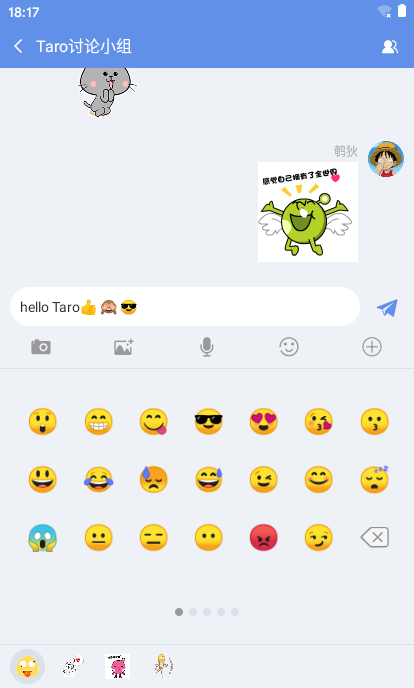
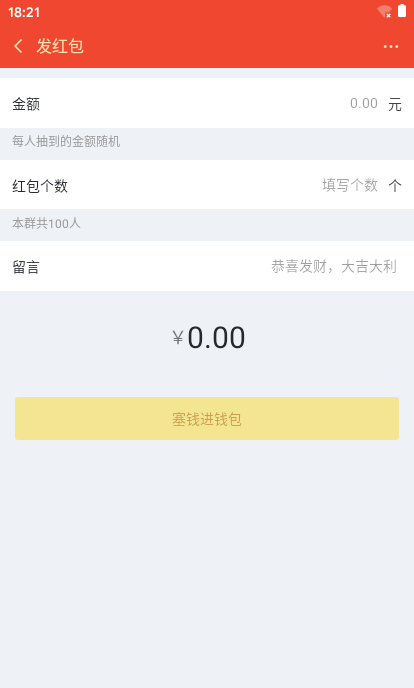
taro-chatroom是基于Taro多端实例聊天项目,运用Taro+react+react-redux+taroPop+react-native等技术开发的仿微信App界面聊天室,实现了发送消息/emoj表情、gif表情大图、图片预览、发红包、动态圈等功能。
二、预览效果
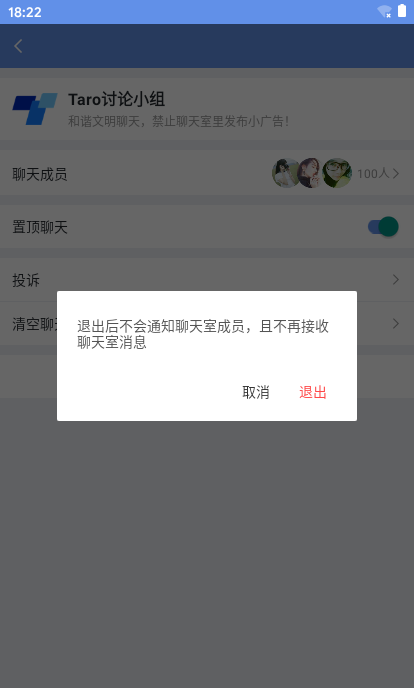
编译到H5端、小程序、App端效果如下:(后续大图均为APP端)

三、技术栈
- 编码/技术:Vscode + react/taro/redux/RN
- iconfont图标:阿里字体图标库
- 自定义导航栏Navigation + 底部Tabbar
- 弹窗组件:taroPop(基于Taro封装自定义模态框)
- 支持编译:H5端 + 小程序 + App端








/**

  * @desc   Taro入口页面 app.jsx
  * @about  Q:282310962  wx:xy190310

  */

import Taro, { Component } from '@tarojs/taro'

import Index from './pages/index'

// 引入状态管理redux

import { Provider } from '@tarojs/redux'

import { store } from './store'

// 引入样式

import './app.scss'

import './styles/fonts/iconfont.css'

import './styles/reset.scss'

class App extends Component {

  config = {

    pages: [

      'pages/auth/login/index',

      'pages/auth/register/index',

      'pages/index/index',

      ...

    ],

    window: {

      backgroundTextStyle: 'light',

      navigationBarBackgroundColor: '#fff',

      navigationBarTitleText: 'TaroChat',

      navigationBarTextStyle: 'black',

      navigationStyle: 'custom'

    }

  }

  // 在 App 类中的 render() 函数没有实际作用

  // 请勿修改此函数

  render () {

    return (

      <Provider store={store}>

        <Index />

      </Provider>

    )

  }

}

Taro.render(<App />, document.getElementById('app'))
◆ Taro自定义顶部Navigation导航条 + Tabbar菜单
- 由于项目需求,顶部导航栏/底部tabbar均为自定义组件,详情见:Taro多端自定义导航栏Navbar+Tabbar实例
- 项目中用到的弹窗插件是基于Taro自定义模态框组件,参看:Taro自定义模态框组件
◆ 登录/注册验证模块
return (

    <View className="taro__container flexDC bg-eef1f5">

        <Navigation background='#eef1f5' fixed />

        <ScrollView className="taro__scrollview flex1" scrollY>

            <View className="auth-lgreg">

                {/* logo */}

                <View className="auth-lgreg__slogan">

                    <View className="auth-lgreg__slogan-logo">

                        <Image className="auth-lgreg__slogan-logo__img" src={require('../../../assets/taro.png')} mode="aspectFit" />

                    </View>

                    <Text className="auth-lgreg__slogan-text">欢迎来到Taro-Chatroom</Text>

                </View>

                {/* 表单 */}

                <View className="auth-lgreg__forms">

                    <View className="auth-lgreg__forms-wrap">

                        <View className="auth-lgreg__forms-item">

                            <Input className="auth-lgreg__forms-iptxt flex1" placeholder="请输入手机号/昵称" onInput={this.handleInput.bind(this, 'tel')} />

                        </View>

                        <View className="auth-lgreg__forms-item">

                            <Input className="auth-lgreg__forms-iptxt flex1" placeholder="请输入密码" password onInput={this.handleInput.bind(this, 'pwd')} />

                        </View>

                    </View>

                    <View className="auth-lgreg__forms-action">

                        <TouchView onClick={this.handleSubmit}><Text className="auth-lgreg__forms-action__btn">登录</Text></TouchView>

                    </View>

                    <View className="auth-lgreg__forms-link">

                        <Text className="auth-lgreg__forms-link__nav">忘记密码</Text>

                        <Text className="auth-lgreg__forms-link__nav" onClick={this.GoToRegister}>注册账号</Text>

                    </View>

                </View>

            </View>

        </ScrollView>

        <TaroPop ref="taroPop" />

    </View>

)
/**

 * @tpl 登录模块

 */

import Taro from '@tarojs/taro'

import { View, Text, ScrollView, Image, Input, Button } from '@tarojs/components'

import './index.scss'

import { connect } from '@tarojs/redux'

import * as actions from '../../../store/action'...

class Login extends Taro.Component {

    config = {

        navigationBarTitleText: '登录'

    }

    constructor(props) {

        super(props)

        this.state = {

            tel: '',

            pwd: '',

        }

    }

    componentWillMount() {

        // 判断是否登录

        storage.get('hasLogin').then(res => {

            if(res && res.hasLogin) {

                Taro.navigateTo({url: '/pages/index/index'})

            }

        })

    }

    // 提交表单

    handleSubmit = () => {

        let taroPop = this.refs.taroPop

        let { tel, pwd } = this.state

        if(!tel) {

            taroPop.show({content: '手机号不能为空', time: 2})

        }else if(!util.checkTel(tel)) {

            taroPop.show({content: '手机号格式有误', time: 2})

        }else if(!pwd) {

            taroPop.show({content: '密码不能为空', time: 2})

        }else {

            // ...接口数据

            ...

            storage.set('hasLogin', { hasLogin: true })

            storage.set('user', { username: tel })

            storage.set('token', { token: util.setToken() })

            taroPop.show({

                skin: 'toast',

                content: '登录成功',

                icon: 'success',

                time: 2

            })

            ...

        }

    }

    render () {

        ...

    }

}

const mapStateToProps = (state) => {

    return {...state.auth}

}

export default connect(mapStateToProps, {

    ...actions

})(Login)
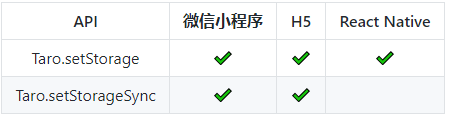
taro本地存储使用的是异步存储,由于同步存储不支持RN端
/**

 * @desc Taro本地存储

 */

import Taro from '@tarojs/taro'

export default class Storage {

    static get(key) {

        return Taro.getStorage({ key }).then(res => res.data).catch(() => '')

    }

    static set(key, data){

        return Taro.setStorage({key: key, data: data}).then(res => res)

    }

    static del(key){

        Taro.removeStorage({key: key}).then(res => res)

    }

    static clear(){

        Taro.clearStorage()

    }

}
如不希望编译到RN端,使用如下包裹即可
/*postcss-pxtransform rn eject enable*/
/*postcss-pxtransform rn eject disable*/
对于一些RN端不兼容样式,边框、超过多行...,需特殊样式处理
/*

 *  对于不兼容的样式,如RN不兼容border-right,可以通过mixin统一处理

 */

/**

 * RN 不支持针对某一边设置 style,即 border-bottom-style 会报错

 * 那么 border-bottom: 1px 就需要写成如下形式: border: 0 style color; border-bottom-width: 1px;

 */

@mixin border($dir, $width, $style, $color) {

    border: 0 $style $color;

    @each $d in $dir {

        #{border-#{$d}-width}: $width;

    }

}

/**

 * NOTE RN 无法通过 text-overflow 实现省略号,这些代码不会编译到 RN 中

 */

@mixin ellipsis {

    /*postcss-pxtransform rn eject enable*/

    overflow: hidden; white-space: nowrap; text-overflow: ellipsis;

    /*postcss-pxtransform rn eject disable*/

}

/**

 * NOTE 实现多行文本省略,RN 用 Text 标签的 numberOfLines={2},H5/小程序用 -webkit-line-clamp

 */

@mixin clamp($line) {

    /*postcss-pxtransform rn eject enable*/

    display: -webkit-box;

    overflow: hidden;

    -webkit-line-clamp:$line;

    /* autoprefixer: ignore next */

    -webkit-box-orient: vertical;

    /*postcss-pxtransform rn eject disable*/

}

/**

 * 对于不能打包到 RN 的样式,可以用 postcss 方式引入

 */

 @mixin eject($attr, $value) {

    /*postcss-pxtransform rn eject enable*/

    #{$attr}: $value;

    /*postcss-pxtransform rn eject disable*/

}
◆ Taro聊天实现消息滚动到底部

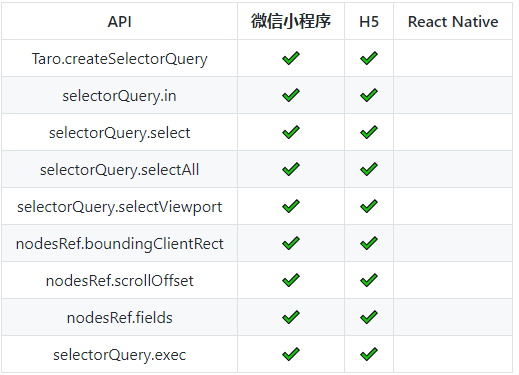
在taro中实现聊天消息滚动到最底部,由于RN端不支持 createSelectorQuery,如是做了兼容处理。
componentDidMount() {

    if(process.env.TARO_ENV === 'rn') {

        this.scrollMsgBottomRN()

    }else {

        this.scrollMsgBottom()

    }

}
// 滚动至聊天底部

scrollMsgBottom = () => {

    let query = Taro.createSelectorQuery()

    query.select('#scrollview').boundingClientRect()

    query.select('#msglistview').boundingClientRect()

    query.exec((res) => {

        // console.log(res)

        if(res[1].height > res[0].height) {

            this.setState({ scrollTop: res[1].height - res[0].height })

        }

    })

}

scrollMsgBottomRN = (t) => {

    let that = this

    this._timer = setTimeout(() => {

        that.refs.ScrollViewRN.scrollToEnd({animated: false})

    }, t ? 16 : 0)

}
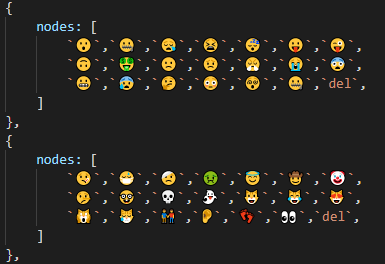
聊天中表情使用的是emoj表情符,如果使用图片做表情也是可以,不过需要一些特殊匹配处理 :12) [:高兴],使用emoj就相对简单些罢了。
// 渲染消息记录

renderMsgTpl = (data) => {

    return data.map((item, index) => (

        <View key={index}>

            {item.msgtype == 1 &&

            <View className="msgitem msg__time"><Text className="msg__text">{item.msg}</Text></View>

            }

            {item.msgtype == 2 &&

            <View className="msgitem msg__notice"><Text className="msg__text">{item.msg}</Text></View>

            }

            {item.msgtype == 3 &&

            <View className="msgitem">

                {!item.isme ? <View className="msg__avator"><Image className="msg__avator-img" src={item.avator} mode="aspectFit" /></View> : null}

                <View className={`msg__cntbox ${item.isme ? 'msg-me' : 'msg-others'}`}>

                    <Text className="msg-author">{item.author}</Text>

                    <View className={`msg__cnt ${item.isme ? 'msg__cnt-me' : 'msg__cnt-others'}`} onLongPress={this.handleLongPressMenu}>

                        <Text className="msg__cnt-text">{item.msg}</Text>

                    </View>

                </View>

                {item.isme ? <View className="msg__avator"><Image className="msg__avator-img" src={item.avator} mode="aspectFit" /></View> : null}

            </View>

            }

            {item.msgtype == 4 &&

            <View className="msgitem">

                {!item.isme ? <View className="msg__avator"><Image className="msg__avator-img" src={item.avator} mode="aspectFit" /></View> : null}

                <View className={`msg__cntbox ${item.isme ? 'msg-me' : 'msg-others'}`}>

                    <Text className="msg-author">{item.author}</Text>

                    <View className={`msg__cnt ${item.isme ? 'msg__cnt-me' : 'msg__cnt-others'} msg__lgface`} onLongPress={this.handleLongPressMenu}>

                        <Image className="msg__lgface-img" src={item.imgsrc} mode="widthFix" />

                    </View>

                </View>

                {item.isme ? <View className="msg__avator"><Image className="msg__avator-img" src={item.avator} mode="aspectFit" /></View> : null}

            </View>

            }

            {item.msgtype == 5 &&

            <View className="msgitem">

                {!item.isme ? <View className="msg__avator"><Image className="msg__avator-img" src={item.avator} mode="aspectFit" /></View> : null}

                <View className={`msg__cntbox ${item.isme ? 'msg-me' : 'msg-others'}`}>

                    <Text className="msg-author">{item.author}</Text>

                    <View className={`msg__cnt ${item.isme ? 'msg__cnt-me' : 'msg__cnt-others'} msg__picture`} onClick={this.handlePreviewPicture.bind(this, item.imgsrc)} onLongPress={this.handleLongPressMenu}>

                        <Image className="msg__picture-img" src={item.imgsrc} mode="widthFix" />

                    </View>

                </View>

                {item.isme ? <View className="msg__avator"><Image className="msg__avator-img" src={item.avator} mode="aspectFit" /></View> : null}

            </View>

            }

            ...

        </View>

    ))

}
以上就是taro开发聊天室的一些分享,今天就介绍到这里,希望能有些许的帮助~~
Taro聊天室|react+taro仿微信聊天App界面|taro聊天实例的更多相关文章
- react聊天室|react+redux仿微信聊天IM实例|react仿微信界面
一.项目概况 基于react+react-dom+react-router-dom+redux+react-redux+webpack2.0+react-photoswipe+swiper等技术混合开 ...
- uni-app聊天室|vue+uniapp仿微信聊天实例|uniapp仿微信App界面
一.介绍 运用UniApp+Vue+Vuex+swiper+uniPop等技术开发的仿微信原生App聊天室|仿微信聊天界面实例项目uniapp-chatroom,实现了发送图文消息.表情(gif图), ...
- Vue3.0聊天室|vue3+vant3仿微信聊天实例|vue3.x仿微信app界面
一.项目简介 基于Vue3.0+Vant3.x+Vuex4.x+Vue-router4+V3Popup等技术开发实现的仿微信手机App聊天实例项目Vue3-Chatroom.实现了发送图文表情消息/g ...
- vue聊天室|h5+vue仿微信聊天界面|vue仿微信
一.项目简介 基于Vue2.0+Vuex+vue-router+webpack2.0+es6+vuePhotoPreview+wcPop等技术架构开发的仿微信界面聊天室——vueChatRoom,实现 ...
- electron聊天室|vue+electron-vue仿微信客户端|electron桌面聊天
一.项目概况 基于Electron+vue+electron-vue+vuex+Nodejs+vueVideoPlayer+electron-builder等技术仿制微信电脑端界面聊天室实例,实现消息 ...
- Svelte3聊天室|svelte+svelteKit仿微信聊天实例|svelte.js开发App
基于svelte3.x+svelteKit构建仿微信App聊天应用svelte-chatroom. svelte-chatroom 基于svelte.js+svelteKit+mescroll.js+ ...
- Tauri-Vue3桌面端聊天室|tauri+vite3仿微信|tauri聊天程序EXE
基于tauri+vue3.js+vite3跨桌面端仿微信聊天实例TauriVue3Chat. tauri-chat 运用最新tauri+vue3+vite3+element-plus+v3layer等 ...
- Next.js+React聊天室|Next仿微信桌面端|next.js聊天实例
一.项目介绍 next-webchat 基于Next.js+React.js+Redux+Antd+RScroll+RLayer等技术构建的PC桌面端仿微信聊天项目.实现了消息/表情发送.图片/视频预 ...
- workerman-chat(PHP开发的基于Websocket协议的聊天室框架)(thinkphp也是支持socket聊天的)
workerman-chat(PHP开发的基于Websocket协议的聊天室框架)(thinkphp也是支持socket聊天的) 一.总结 1.下面链接里面还有一个来聊的php聊天室源码可以学习 2. ...
随机推荐
- 自学_DOM<五>
类库DOM DOM(document object medol)文档对象模型. DOM就是HTML页面的模型,将每个标签都做为一个对象,JavaScript通过调用DOM中的属性.方法就可以对网页中的 ...
- vue-cli3构建ts项目
1.构建项目 vue create xxx 上面的第一条,也就是 aaa 这一个选项在你第一次创建项目的时候是并不会出现的,只有你第一次创建完成项目后回提示你保存为默认配置模板,下次新建项目的时候就可 ...
- socket调试工具(Mac版)
基于Mac版的Socket测试功能,类似于PostMan的功能,对于Socket长链接的项目开发很有帮助. 本人也是通过好多渠道才找到这篇文章,与大家共享: 按照步骤一步一步来就对了~ 本文参考于:h ...
- jeesite3环境部署时初始化数据库注意问题
---恢复内容开始--- 首先要修改jeesite.properties下数据库连接方式,注意选择自己的数据库 其次在pom.xml文件中修改对应的数据库连接方式 最后运行db文件夹下的init-db ...
- [转载] Java的四种引用关系
目录 1 强引用 (Final Reference) 2 软引用 (Soft Reference) 2.1 案例1: 软引用的垃圾回收 2.2 案例2: 软引用缓存的使用 2.3 软引用的应用场景 3 ...
- GitHub访问速度慢的一种优化方法
GitHub是一个面向开源及私有软件项目的托管平台,因为只支持Git 作为唯一的版本库格式进行托管,故名GitHub. 由于GitHub是一个国外网站,在国内访问速度如何呢? 我们通过浏览器访问下ht ...
- [20191115]oracle实例占用内存计算.txt
[20191115]oracle实例占用内存计算.txt --//以前学习oracle数据库时,总想了解实例占用内存多少,我曾经在一些会议底下问过一位高手,对方说计算这个相对很难,许多东西是共享的.- ...
- coalesce搭配nullif使用
with t1 as ( select NUll as col1, '' as col2, 'aaa' as col3 ) --关于COALESCE用法 当col1 为 Null时候返回 col2 依 ...
- Linux—chattr 命令详解
chattr命令的用法:chattr [ -RV ] [ -v version ] [ mode ] files…最关键的是[mode]部分,[mode]部分是由+-=和[ASacDdIijsTtu] ...
- cookie和session了解吗
Cookie 和Session是什么? 彻底搞懂cookie的运行原由? 什么时候不能用Cookie,什么时候不能用Session session在什么时候创建,以及session一致性问题 Cook ...