
安装npm install app-inspector -g 提示错误
问题1:

npm WARN optional SKIPPING OPTIONAL DEPENDENCY: fsevents@^1.0. (node_modules\app-inspector\node_modules\chokidar\node_modules\fsevents):

npm WARN notsup SKIPPING OPTIONAL DEPENDENCY: Unsupported platform for fsevents@1.2.: wanted {"os":"darwin","arch":"any"} (current: {"os":"win32","arch":"x64"})

npm WARN react-syntax-highlighter@7.0. requires a peer of react@>= 0.14. but none was installed.

npm ERR! path C:\Users\yunling\AppData\Roaming\npm\node_modules\app-inspector\node_modules\any-promise

npm ERR! code ENOENT

npm ERR! errno -

npm ERR! syscall access

npm ERR! enoent ENOENT: no such file or directory, access 'C:\Users\yunling\AppData\Roaming\npm\node_modules\app-inspector\node_modules\any-promise'

npm ERR! enoent This is most likely not a problem with npm itself

npm ERR! enoent and is related to npm not being able to find a file.

npm ERR! enoent

npm ERR! A complete log of this run can be found in:

npm ERR!     F:\Appium\node-cache\_logs\--15T02_44_41_432Z-debug.log
问题2:

C:\Users\yl>npm cache clean --force

npm WARN using --force I sure hope you know what you are doing.

npm ERR! path F:\Appium\node-cache

npm ERR! code EPERM

npm ERR! errno -

npm ERR! syscall rmdir

npm ERR! Error: EPERM: operation not permitted, rmdir 'F:\Appium\node-cache'

npm ERR!  { Error: EPERM: operation not permitted, rmdir 'F:\Appium\node-cache'

npm ERR!   errno: -,

npm ERR!   code: 'EPERM',

npm ERR!   syscall: 'rmdir',

npm ERR!   path: 'F:\\Appium\\node-cache' }

npm ERR!

npm ERR! Please try running this command again as root/Administrator.     ----》权限的问题,意思大概是文件没有权限,增加文件的读写权限

npm ERR! A complete log of this run can be found in:

npm ERR!     F:\Appium\node-cache\_logs\--15T05_41_20_269Z-debug.log   ---》找到这个文件将其删除
问题3:执行app-inspector -u 设备id 提示如下
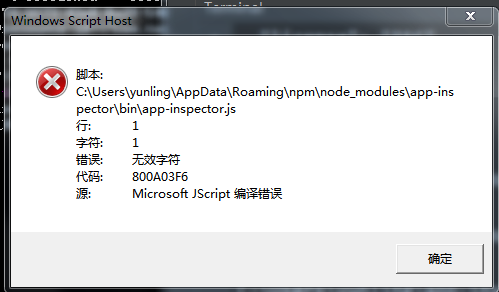
配置了app-inspector环境变量的缘故
安装npm install app-inspector -g 提示错误的更多相关文章
- 安装npm install时,长时间停留在某一处的解决方案
默认情况npm install安装时,会从 github.com 上下载文件,大部分安装不成功的原因都源自这里 因为 GitHub Releases 里的文件都托管在 s3.amazonaws.com ...
- 安装npm install时,长时间停留在fetchMetadata的解决方法
安装npm install时,长时间停留在fetchMetadata: sill mapToRegistry uri http://registry.npmjs.org/whatwg-fetch处, ...
- 安装npm install时,长时间停留在fetchMetadata: sill 解决方法——换npm的源
安装npm install时,长时间停留在fetchMetadata: sill mapToRegistry uri http://registry.npmjs.org/whatwg-fetch处, ...
- npm install @wepy/cli -g 出错
npm install @wepy/cli -g 出错:npm ERR! Unexpected end of JSON input while parsing near '...1.0.0" ...
- Mac下通过命令行安装npm install -g 报错,如何解决?
1, 使用 sudo npm install -g n2, 或者 sudo chmod -R 777 /usr/local/lib,然后 npm install -g
- VUE:使用vue-cli脚手架无法安装npm install axios 的巨坑
使用命令 npm install axios 安装axios可能会报错,无法引用, 这个时候使用淘宝的镜像cnpm安装就可以了 cnpm install axios 如果没有安装cnpm,执行以下命令 ...
- npm install -S -D -g 有什么区别
npm install module_name -S 即 npm install module_name --save 写入dependencies npm install modu ...
- 执行命令npm install XXX后仍然提示 Cannot find Module XXX
最近遇到一个问题,在服务器上配置完node环境后 执行npm start 命令后提示 Cannot find Module "Jquery" 然后就知道可能没有安装jquery 就 ...
- npm install依赖时,常见错误
1.npm install依赖时,报错:npm ERR! Unexpected end of JSON input while parsing near '...gin":"^1. ...
- npm install 报错,提示`gyp ERR! stack Error: EACCES: permission denied` 解决方法
m install 报错,提示gyp ERR! stack Error: EACCES: permission denied 猜测可能是因为没有权限读写,ls -la看下文件权限设置情况 [root@ ...
随机推荐
- jQuery实现简单的tab切换
html: <section> <nav id="nav"> <a class="on">tab1</a& ...
- 10g+: Transportable Tablespaces Across Different Platforms (Doc ID 243304.1)
10g+: Transportable Tablespaces Across Different Platforms (Doc ID 243304.1) APPLIES TO: Oracle Data ...
- 2. Linux-3.14.12内存管理笔记【系统启动阶段的memblock算法(2)】
memory:表示可用可分配的内存: 结束完memblock算法初始化前的准备工作,回到memblock算法初始化及其算法实现上面.memblock是一个很简单的算法. memblock算法的实现是, ...
- 记录Ubuntu下使用docker使用
关键词:docker.Dockerfile等等. 这里主要记录Ubuntu下docker使用细节. 首先是如何安装,然后如何创建docker镜像.搭建docker服务器.运行使用docker. 1. ...
- June 30th, 2019. Week 26th, Sunday
It's so easy to be careless, it takes courage and courage to care. 不在乎很容易,但在乎却需要很多勇气. Sometimes it w ...
- Centos 静态网络配置
cat /etc/sysconfig/network-scripts/ifcfg-ens33 DEFROUTE="yes" IPV4_FAILURE_FATAL="no& ...
- 浅谈python之利用pandas和openpyxl读取excel数据
在自学到接口自动化测试时, 发现要从excel中读取测试用例的数据, 假如我的数据是这样的: 最好是每行数据对应着一条测试用例, 为方便取值, 我选择使用pandas库, 先安装 pip instal ...
- 设计模式-Strategy Strategy将算法封装到类中,通过组合的方式 将具体算法的实现在组合对象中实现
以下代码来源: 设计模式精解-GoF 23种设计模式解析附C++实现源码 //strategy.h #pragma once class Strategy { public: Strategy(); ...
- PUT和POST区别
POST是用来提交数据的.提交的数据放在HTTP请求的正文里,目的在于提交数据并用于服务器端的存储,而不允许用户过多的更改相应数据(主要是相对于在url 修改要麻烦很多).PUT操作是幂等的.所谓幂等 ...
- 【洛谷5465】[PKUSC2018] 星际穿越(倍增)
点此看题面 大致题意: 给定\(l_{2\sim n}\),其中\(l_i\)表示\([l_i,i-1]\)的所有点与\(i\)之间存在一条长度为\(1\)的双向路径.每次询问给出\(l,r,x\), ...