
[Spring-Cloud-Alibaba] Sentinel 规则持久化
在之前的练习中,只要应用重启,就需要重新配置,这样在我们实际的项目是非常不实用的,那么有没有办法把我们配置的规则保存下来呢?答案是YES,那么接下来,给大家来介绍如何将Sentinel规则持久化。
Document: 传送门
- File Datasource(文件存储)
- Pull 模式
- Push 模式
- Nacos configuration
- Apollo
File Datasource
Pull 模式
原理:
扩展写数据源(WritableDataSource), 客户端主动向某个规则管理中心定期轮询拉取规则,这个规则中心可以是 RDBMS、文件 等
pull 模式的数据源(如本地文件、RDBMS 等)一般是可写入的。使用时需要在客户端注册数据源:将对应的读数据源注册至对应的 RuleManager,将写数据源注册至 transport 的WritableDataSourceRegistry中。
过程如下:
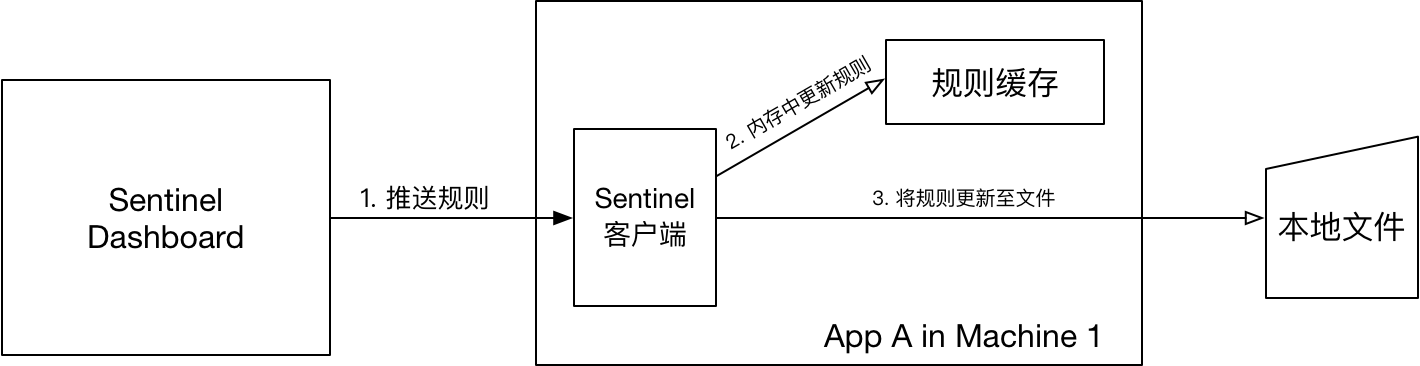
Pull Demo
Step 1: 添加配置
    <dependency>

        <groupId>com.alibaba.csp</groupId>

        <artifactId>sentinel-datasource-extension</artifactId>

    </dependency>
Step 2: 编写持久化代码,实现
com.alibaba.csp.sentinel.init.InitFunc- 代码参考自:传送门
import com.alibaba.csp.sentinel.command.handler.ModifyParamFlowRulesCommandHandler;

import com.alibaba.csp.sentinel.datasource.*;

import com.alibaba.csp.sentinel.init.InitFunc;

import com.alibaba.csp.sentinel.slots.block.authority.AuthorityRule;

import com.alibaba.csp.sentinel.slots.block.authority.AuthorityRuleManager;

import com.alibaba.csp.sentinel.slots.block.degrade.DegradeRule;

import com.alibaba.csp.sentinel.slots.block.degrade.DegradeRuleManager;

import com.alibaba.csp.sentinel.slots.block.flow.FlowRule;

import com.alibaba.csp.sentinel.slots.block.flow.FlowRuleManager;

import com.alibaba.csp.sentinel.slots.block.flow.param.ParamFlowRule;

import com.alibaba.csp.sentinel.slots.block.flow.param.ParamFlowRuleManager;

import com.alibaba.csp.sentinel.slots.system.SystemRule;

import com.alibaba.csp.sentinel.slots.system.SystemRuleManager;

import com.alibaba.csp.sentinel.transport.util.WritableDataSourceRegistry;

import com.alibaba.fastjson.JSON;

import com.alibaba.fastjson.TypeReference;

import java.io.File;

import java.io.IOException;

import java.util.List;

/**

 * FileDataSourceInit for : 自定义Sentinel存储文件数据源加载类

 *

 * @author <a href="mailto:magicianisaac@gmail.com">Isaac.Zhang | 若初</a>

 * @since 2019/7/21

 */

public class FileDataSourceInit implements InitFunc {

    @Override

    public void init() throws Exception {

        // TIPS: 如果你对这个路径不喜欢,可修改为你喜欢的路径

        String ruleDir = System.getProperty("user.home") + "/sentinel/rules";

        String flowRulePath = ruleDir + "/flow-rule.json";

        String degradeRulePath = ruleDir + "/degrade-rule.json";

        String systemRulePath = ruleDir + "/system-rule.json";

        String authorityRulePath = ruleDir + "/authority-rule.json";

        String hotParamFlowRulePath = ruleDir + "/param-flow-rule.json";

        this.mkdirIfNotExits(ruleDir);

        this.createFileIfNotExits(flowRulePath);

        this.createFileIfNotExits(degradeRulePath);

        this.createFileIfNotExits(systemRulePath);

        this.createFileIfNotExits(authorityRulePath);

        this.createFileIfNotExits(hotParamFlowRulePath);

        // 流控规则

        ReadableDataSource<String, List<FlowRule>> flowRuleRDS = new FileRefreshableDataSource<>(

                flowRulePath,

                flowRuleListParser

        );

        // 将可读数据源注册至FlowRuleManager

        // 这样当规则文件发生变化时,就会更新规则到内存

        FlowRuleManager.register2Property(flowRuleRDS.getProperty());

        WritableDataSource<List<FlowRule>> flowRuleWDS = new FileWritableDataSource<>(

                flowRulePath,

                this::encodeJson

        );

        // 将可写数据源注册至transport模块的WritableDataSourceRegistry中

        // 这样收到控制台推送的规则时,Sentinel会先更新到内存,然后将规则写入到文件中

        WritableDataSourceRegistry.registerFlowDataSource(flowRuleWDS);

        // 降级规则

        ReadableDataSource<String, List<DegradeRule>> degradeRuleRDS = new FileRefreshableDataSource<>(

                degradeRulePath,

                degradeRuleListParser

        );

        DegradeRuleManager.register2Property(degradeRuleRDS.getProperty());

        WritableDataSource<List<DegradeRule>> degradeRuleWDS = new FileWritableDataSource<>(

                degradeRulePath,

                this::encodeJson

        );

        WritableDataSourceRegistry.registerDegradeDataSource(degradeRuleWDS);

        // 系统规则

        ReadableDataSource<String, List<SystemRule>> systemRuleRDS = new FileRefreshableDataSource<>(

                systemRulePath,

                systemRuleListParser

        );

        SystemRuleManager.register2Property(systemRuleRDS.getProperty());

        WritableDataSource<List<SystemRule>> systemRuleWDS = new FileWritableDataSource<>(

                systemRulePath,

                this::encodeJson

        );

        WritableDataSourceRegistry.registerSystemDataSource(systemRuleWDS);

        // 授权规则

        ReadableDataSource<String, List<AuthorityRule>> authorityRuleRDS = new FileRefreshableDataSource<>(

                flowRulePath,

                authorityRuleListParser

        );

        AuthorityRuleManager.register2Property(authorityRuleRDS.getProperty());

        WritableDataSource<List<AuthorityRule>> authorityRuleWDS = new FileWritableDataSource<>(

                authorityRulePath,

                this::encodeJson

        );

        WritableDataSourceRegistry.registerAuthorityDataSource(authorityRuleWDS);

        // 热点参数规则

        ReadableDataSource<String, List<ParamFlowRule>> hotParamFlowRuleRDS = new FileRefreshableDataSource<>(

                hotParamFlowRulePath,

                hotParamFlowRuleListParser

        );

        ParamFlowRuleManager.register2Property(hotParamFlowRuleRDS.getProperty());

        WritableDataSource<List<ParamFlowRule>> paramFlowRuleWDS = new FileWritableDataSource<>(

                hotParamFlowRulePath,

                this::encodeJson

        );

        ModifyParamFlowRulesCommandHandler.setWritableDataSource(paramFlowRuleWDS);

    }

    /**

     * 流控规则对象转换

     */

    private Converter<String, List<FlowRule>> flowRuleListParser = source -> JSON.parseObject(

            source,

            new TypeReference<List<FlowRule>>() {

            }

    );

    /**

     * 降级规则对象转换

     */

    private Converter<String, List<DegradeRule>> degradeRuleListParser = source -> JSON.parseObject(

            source,

            new TypeReference<List<DegradeRule>>() {

            }

    );

    /**

     * 系统规则对象转换

     */

    private Converter<String, List<SystemRule>> systemRuleListParser = source -> JSON.parseObject(

            source,

            new TypeReference<List<SystemRule>>() {

            }

    );

    /**

     * 授权规则对象转换

     */

    private Converter<String, List<AuthorityRule>> authorityRuleListParser = source -> JSON.parseObject(

            source,

            new TypeReference<List<AuthorityRule>>() {

            }

    );

    /**

     * 热点规则对象转换

     */

    private Converter<String, List<ParamFlowRule>> hotParamFlowRuleListParser = source -> JSON.parseObject(

            source,

            new TypeReference<List<ParamFlowRule>>() {

            }

    );

    /**

     * 创建目录

     *

     * @param filePath

     */

    private void mkdirIfNotExits(String filePath) {

        File file = new File(filePath);

        if (!file.exists()) {

            file.mkdirs();

        }

    }

    /**

     * 创建文件

     *

     * @param filePath

     * @throws IOException

     */

    private void createFileIfNotExits(String filePath) throws IOException {

        File file = new File(filePath);

        if (!file.exists()) {

            file.createNewFile();

        }

    }

    private <T> String encodeJson(T t) {

        return JSON.toJSONString(t);

    }

}
Step 3: 启用上述代码
resource 目录下创建
resources/META-INF/services目录并创建文件com.alibaba.csp.sentinel.init.InitFunc,内容为:com.sxzhongf.sharedcenter.configuration.sentinel.datasource.FileDataSourceInit
Pull 优缺点
- 优点
- 简单,无任何依赖
- 没有额外依赖
- 缺点
- 不保证一致性(规则是使用
FileRefreshableDataSource定时更新,会有延迟) - 实时性不保证(规则是使用
FileRefreshableDataSource定时更新) - 拉取过于频繁也可能会有性能问题
- 由于文件存储于本地,容易丢失
- 不保证一致性(规则是使用
- 参考资料:
Push 模式
推荐通过控制台设置规则后将规则推送到统一的规则中心,客户端实现
ReadableDataSource接口端监听规则中心实时获取变更,流程如下:
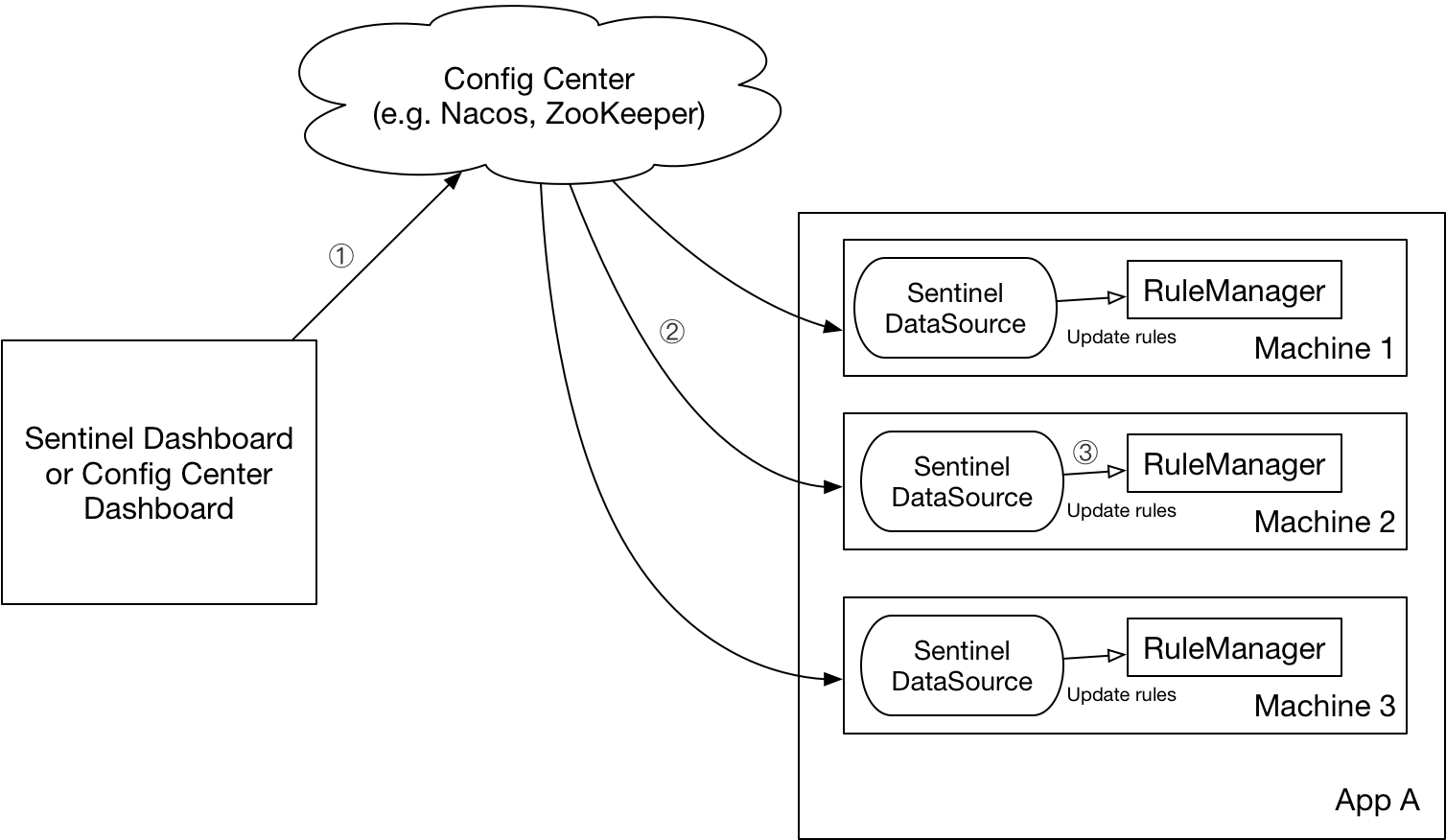
实现原理
- 控制台推送规则到Nacos/远程配置中心
- Sentinel client 舰艇Nacos配置变化,更新本地缓存
shared_center service 加工
- 添加依赖
  <dependency>

      <groupId>com.alibaba.csp</groupId>

      <artifactId>sentinel-datasource-nacos</artifactId>

  </dependency>
- 添加配置
spring:

  cloud:

    sentinel:

      datasource:

        sxzhongf_flow:

          nacos:

            server-addr: localhost:8848

            dataId: ${spring.application.name}-flow-rules

            groupId: SENTINEL_GROUP

            # 规则类型,取值见:org.springframework.cloud.alibaba.sentinel.datasource.RuleType

            rule_type: flow

        sxzhongf_degrade:

          nacos:

            server-addr: localhost:8848

            dataId: ${spring.application.name}-degrade-rules

            groupId: SENTINEL_GROUP

            rule-type: degrade
Sentinel dashboard 加工
Dashboard 规则改造主要通过2个接口:
com.alibaba.csp.sentinel.dashboard.rule.DynamicRuleProvider&com.alibaba.csp.sentinel.dashboard.rule.DynamicRulePublisherDownload Sentinel Source Code
修改原
sentinel-dashboard项目下的POM文件<!-- for Nacos rule publisher sample -->
<dependency>
<groupId>com.alibaba.csp</groupId>
<artifactId>sentinel-datasource-nacos</artifactId>
<!--注释掉原文件中的scope,让其不仅在test的时候生效-->
<!--<scope>test</scope>-->
</dependency>
偷懒模式:复制
sentinel-dashboard项目下test下的nacos包(src/test/java/com/alibaba/csp/sentinel/dashboard/rule/nacos到src/main/java/com/alibaba/csp/sentinel/dashboard/rule下修改controller中的默认provider & publisher
com.alibaba.csp.sentinel.dashboard.controller.v2.FlowControllerV2中@Autowired
// @Qualifier("flowRuleDefaultProvider")
@Qualifier("flowRuleNacosProvider")
private DynamicRuleProvider<List<FlowRuleEntity>> ruleProvider;
@Autowired
// @Qualifier("flowRuleDefaultPublisher")
@Qualifier("flowRuleNacosPublisher")
private DynamicRulePublisher<List<FlowRuleEntity>> rulePublisher;
打开
/Sentinel-1.6.2/sentinel-dashboard/src/main/webapp/resources/app/scripts/directives/sidebar/sidebar.html文件,修改代码:<!--<li ui-sref-active="active">-->
<!--<a ui-sref="dashboard.flow({app: entry.app})">-->
<!--<i class="glyphicon glyphicon-filter"></i> 流控规则 V1</a>-->
<!--</li>--> --- 改为 <li ui-sref-active="active">
<a ui-sref="dashboard.flow({app: entry.app})">
<i class="glyphicon glyphicon-filter"></i> NACOS 流控规则 V1</a>
</li>
Dashboard中要修改的代码已经好了。
重新启动 Sentinel-dashboard
mvn clean package -DskipTests测试效果
Sentinel 添加流控规则:
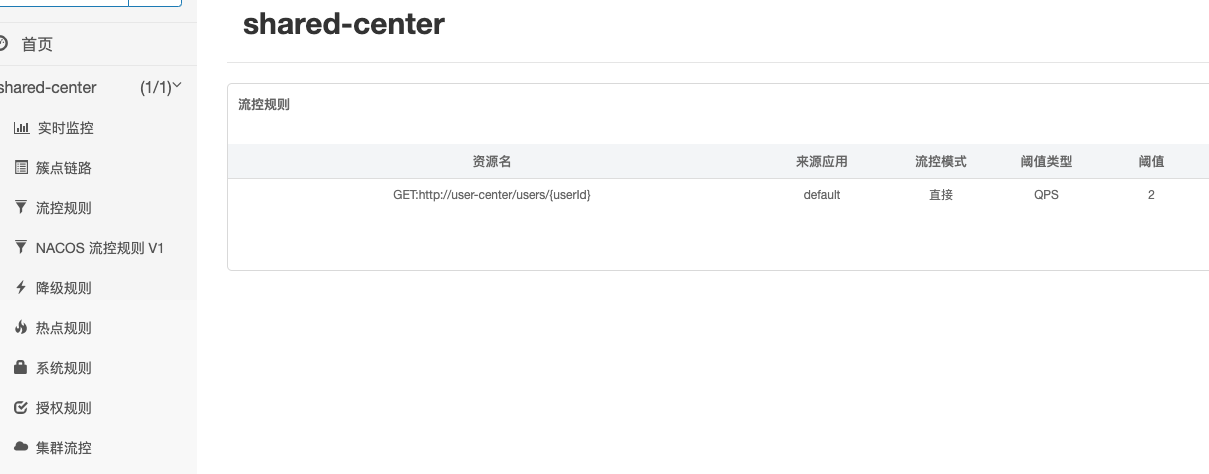
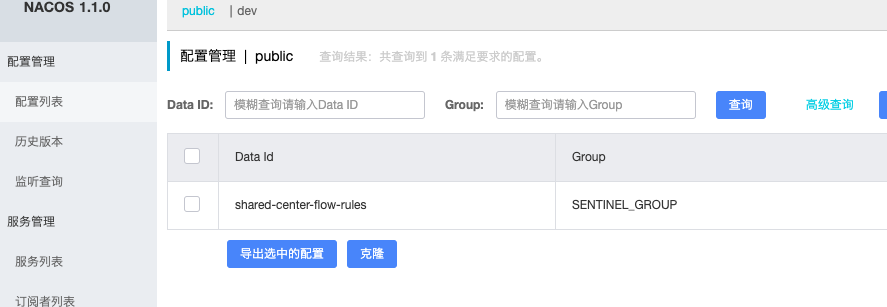
Nacos 查看同步的配置:
[Spring-Cloud-Alibaba] Sentinel 规则持久化的更多相关文章
- Spring Cloud Alibaba | Sentinel:分布式系统的流量防卫兵动态限流规则
Spring Cloud Alibaba | Sentinel:分布式系统的流量防卫兵动态限流规则 前面几篇文章较为详细的介绍了Sentinel的使用姿势,还没看过的小伙伴可以访问以下链接查看: &l ...
- Spring Cloud Alibaba | Sentinel: 分布式系统的流量防卫兵初探
目录 Spring Cloud Alibaba | Sentinel: 分布式系统的流量防卫兵初探 1. Sentinel 是什么? 2. Sentinel 的特征: 3. Sentinel 的开源生 ...
- Spring Cloud Alibaba | Sentinel: 服务限流基础篇
目录 Spring Cloud Alibaba | Sentinel: 服务限流基础篇 1. 简介 2. 定义资源 2.1 主流框架的默认适配 2.2 抛出异常的方式定义资源 2.3 返回布尔值方式定 ...
- Spring Cloud Alibaba | Sentinel: 服务限流高级篇
目录 Spring Cloud Alibaba | Sentinel: 服务限流高级篇 1. 熔断降级 1.1 降级策略 2. 热点参数限流 2.1 项目依赖 2.2 热点参数规则 3. 系统自适应限 ...
- Spring Cloud Alibaba | Sentinel:分布式系统的流量防卫兵基础实战
Spring Cloud Alibaba | Sentinel:分布式系统的流量防卫兵基础实战 Springboot: 2.1.8.RELEASE SpringCloud: Greenwich.SR2 ...
- Spring Cloud Alibaba | Sentinel:分布式系统的流量防卫兵进阶实战
Spring Cloud Alibaba | Sentinel:分布式系统的流量防卫兵进阶实战 在阅读本文前,建议先阅读<Spring Cloud Alibaba | Sentinel:分布式系 ...
- Spring Cloud Alibaba Sentinel对Feign的支持
Spring Cloud Alibaba Sentinel 除了对 RestTemplate 做了支持,同样对于 Feign 也做了支持,如果我们要从 Hystrix 切换到 Sentinel 是非常 ...
- Spring Cloud Alibaba Sentinel对RestTemplate的支持
Spring Cloud Alibaba Sentinel 支持对 RestTemplate 的服务调用使用 Sentinel 进行保护,在构造 RestTemplate bean的时候需要加上 @S ...
- 0.9.0.RELEASE版本的spring cloud alibaba sentinel限流、降级处理实例
先看服务提供方的,我们在原来的sentinel实例(参见0.9.0.RELEASE版本的spring cloud alibaba sentinel实例)上加上限流.降级处理,三板斧只需在最后那一斧co ...
- 0.9.0.RELEASE版本的spring cloud alibaba sentinel实例
sentinel即哨兵,相比hystrix断路器而言,它的功能更丰富.hystrix仅支持熔断,当服务消费方调用提供方发现异常后,进入熔断:sentinel不仅支持异常熔断,也支持响应超时熔断,另外还 ...
随机推荐
- VirtualBOX 虚拟机安装 OS X 10.9 Mavericks 及 Xcode 5,本人X220亲测(超详细截图)
http://www.cnblogs.com/yipu/p/3611611.html http://bbs.feng.com/read-htm-tid-7625465.html OS X Maveri ...
- 使用EurekaLog时遇到的问题
1.在DLL项目中千万不要加入EurekaLog,不然在主程序调用时就会出现莫名其妙的内存问题. 2.要使用EurekaLog发邮件的功能,发邮件的SMTP服务器必须支持8bit MIME编码.如SI ...
- JDK JRE JVM 分别是什么
JDK: Java Development Kit Java 开发工具包 JRE: Java Runtime Enviroment Java 运行时环境 JVM: Java Virtual Machi ...
- Powerdesigner 从Oracle到mssql2008
database->update model for database> ->系统数据源->选择用户,选择表,确定... 1.database->change Curre ...
- java编程思想之面向对象
面向对象和面向过程 面向对象(Object Oriented),简称OO,是软件开发方法的一种,我们都知道java是基于面向对象开发的,但是说到面向对象,我们不得不提一提面向过程开发,面向过程,又称结 ...
- SqlServer导入大文件Sql
sqlcmd -S "192.168.1.218" -U "sa" -P "1qaz~xsw2" -d "SispMain&quo ...
- 移动端布局(viewport)方法
viewport默认有6个属性 width: 设置viewport的宽度(即之前所提及到的,浏览器的宽度详),这里可以为一个整数,又或者是字符串"width-device" ini ...
- Python将mongodb导出的bson文件转为字典对象
Python将mongodb导出的bson文件转为字典对象 安装bson包, sudo pip install bson 示例 # 解决编码问题 import sys reload(sys) sys. ...
- Rstudio调用plot()函数时,出现错误的处理方法
按照书上的例子敲出代码后,发现Rstudio无法识别C盘user文件夹下的中文用户名.如下图所示: 按照网上的做法,尝试修改计算机user下的用户名,没修改成功. 另一种做法是在plot()函数前面加 ...
- 美化Div的边框
CSS修饰Div边框 大部分时候,Div的边框真的做的太丑了,如果不用很多样式来修饰的话,它永远都是那么的突兀.作为一个后端开发,前端菜鸡,在没有设计和前端开发自己独自做项目的时候常常会遇到Div边框 ...