
SpringCloud之Feign
【前面的话】书接上文,本文的某些知识依赖我的第一篇SpringCLoud的文章:SpringCloud之Eureka,如果没有看过可以先移步去看一下。另外在微服务架构中,业务都会被拆分成一个个独立的服务,服务与服务的通讯是基于http restful的。Spring cloud有两种服务调用方式,一种是ribbon+restTemplate,另一种是feign。上一篇文章已经讲过ribbon+rest这种方式了,这一片博文主要讲feign的应用。
壹、Feign的简介
Feign是一个声明式的伪Http客户端,它使得写Http客户端变得更简单。使用Feign,只需要创建一个接口并注解。它具有可插拔的注解特性,可使用Feign 注解和JAX-RS注解。Feign支持可插拔的编码器和解码器。Feign默认集成了Ribbon,并和Eureka结合,默认实现了负载均衡的效果。
简而言之:
- Feign 采用的是基于接口的注解
- Feign 整合了ribbon
贰、准备工作
新建一个feign子工程lovin-feign-client,用于后面的操作。下面是主要的pom依赖:
<parent>

        <artifactId>lovincloud</artifactId>

        <groupId>com.eelve.lovincloud</groupId>

        <version>1.0-SNAPSHOT</version>

    </parent>

    <modelVersion>4.0.0</modelVersion>

    <artifactId>lovin-feign-client</artifactId>

    <version>0.0.1</version>

    <name>lovinfeignclient</name>

    <description>feignclient测试</description>

    <dependencies>

        <dependency>

            <groupId>org.springframework.cloud</groupId>

            <artifactId>spring-cloud-starter-netflix-eureka-client</artifactId>

        </dependency>

        <dependency>

            <groupId>org.springframework.boot</groupId>

            <artifactId>spring-boot-starter-web</artifactId>

        </dependency>

        <dependency>

            <groupId>org.springframework.boot</groupId>

            <artifactId>spring-boot-starter-security</artifactId>

        </dependency>

        <dependency>

            <groupId>org.springframework.cloud</groupId>

            <artifactId>spring-cloud-starter-openfeign</artifactId>

        </dependency>

        <dependency>

            <groupId>org.springframework.cloud</groupId>

            <artifactId>spring-cloud-starter-hystrix</artifactId>

            <version>1.4.7.RELEASE</version>

        </dependency>

    </dependencies>

    <build>

        <plugins>

            <plugin>

                <groupId>org.springframework.boot</groupId>

                <artifactId>spring-boot-maven-plugin</artifactId>

            </plugin>

        </plugins>

    </build>
- 这里为了安全,我这里还是添加spring-boot-starter-security
server:

  port: 8806   # 服务端口号

spring:

  application:

    name: lovinfeignclient     # 服务名称

  security:

    basic:

      enabled: true

    user:

      name: lovin

      password: ${REGISTRY_SERVER_PASSWORD:lovin}

eureka:

  client:

    serviceUrl:

      defaultZone: http://lovin:lovin@localhost:8881/eureka/   # 注册到的eureka服务地址

feign:

  hystrix:

    enabled: true
- 配置spring-boot-starter-security,这里为了方便我这里放开所有请求
package com.eelve.lovin.config;

import org.springframework.context.annotation.Configuration;

import org.springframework.security.config.annotation.web.builders.HttpSecurity;

import org.springframework.security.config.annotation.web.configuration.WebSecurityConfigurerAdapter;

/**

 * @ClassName SecurityConfig

 * @Description TDO

 * @Author zhao.zhilue

 * @Date 2019/8/16 14:13

 * @Version 1.0

 **/

@Configuration

public class WebSecurityConfig extends WebSecurityConfigurerAdapter {

    @Override

    protected void configure(HttpSecurity http) throws Exception {

        http.authorizeRequests().anyRequest().permitAll()

                .and().csrf().disable();

    }

}
- 在主类上添加@EnableFeignClients和@EnableHystrix ,当然也需要注册到注册中心:
package com.eelve.lovin;

import org.springframework.boot.SpringApplication;

import org.springframework.boot.autoconfigure.SpringBootApplication;

import org.springframework.cloud.client.discovery.EnableDiscoveryClient;

import org.springframework.cloud.netflix.hystrix.EnableHystrix;

import org.springframework.cloud.openfeign.EnableFeignClients;

/**

 * @ClassName LovinFeignClientApplication

 * @Description TDO

 * @Author zhao.zhilue

 * @Date 2019/8/15 17:17

 * @Version 1.0

 **/

@SpringBootApplication

@EnableFeignClients

@EnableDiscoveryClient

@EnableHystrix

public class LovinFeignClientApplication {

    public static void main(String[] args) {

        SpringApplication.run(LovinFeignClientApplication.class,args);

    }

}
- 添加一个远程调用的服务端FeignRemoteService,并且配置feign调用信息:
package com.eelve.lovin.service;

import com.eelve.lovin.hystrix.FeignRemoteServiceImpl;

import org.springframework.cloud.openfeign.FeignClient;

import org.springframework.web.bind.annotation.RequestMapping;

import org.springframework.web.bind.annotation.RequestMethod;

/**

 * @ClassName FeignRemoteService

 * @Description TDO

 * @Author zhao.zhilue

 * @Date 2019/8/15 17:18

 * @Version 1.0

 **/

@FeignClient(value = "lovineurkaclient",fallback = FeignRemoteServiceImpl.class)

public interface FeignRemoteService {

    @RequestMapping(value = "/hello",method = RequestMethod.GET)

    public String hello();

}
- 添加熔断器调用方法:新建FeignRemoteServiceImpl实现FeignRemoteService接口:
package com.eelve.lovin.hystrix;

import com.eelve.lovin.service.FeignRemoteService;

import org.springframework.stereotype.Component;

/**

 * @ClassName FeignRemoteServiceImpl

 * @Description TDO

 * @Author zhao.zhilue

 * @Date 2019/8/15 17:31

 * @Version 1.0

 **/

@Component

public class FeignRemoteServiceImpl implements FeignRemoteService {

    @Override

    public String hello() {

        return "hystrix起作用了";

    }

}
- 最后新建FeignController,来消费服务:
package com.eelve.lovin.controller;

import com.eelve.lovin.service.FeignRemoteService;

import org.springframework.beans.factory.annotation.Autowired;

import org.springframework.web.bind.annotation.GetMapping;

import org.springframework.web.bind.annotation.RequestParam;

import org.springframework.web.bind.annotation.RestController;

/**

 * @ClassName FeignController

 * @Description TDO

 * @Author zhao.zhilue

 * @Date 2019/8/15 17:21

 * @Version 1.0

 **/

@RestController

public class FeignController {

    @Autowired

    FeignRemoteService feignRemoteService;

    @GetMapping(value = "/getHello")

    public String getHello() {

        return feignRemoteService.hello();

    }

}
叁、启动测试
- 依次启动eureka的服务端和两个客户端,以及新建的lovin-feign-client

我们可以看到服务已经全部启动成功 - 然后访问http://localhost:8806/getHello
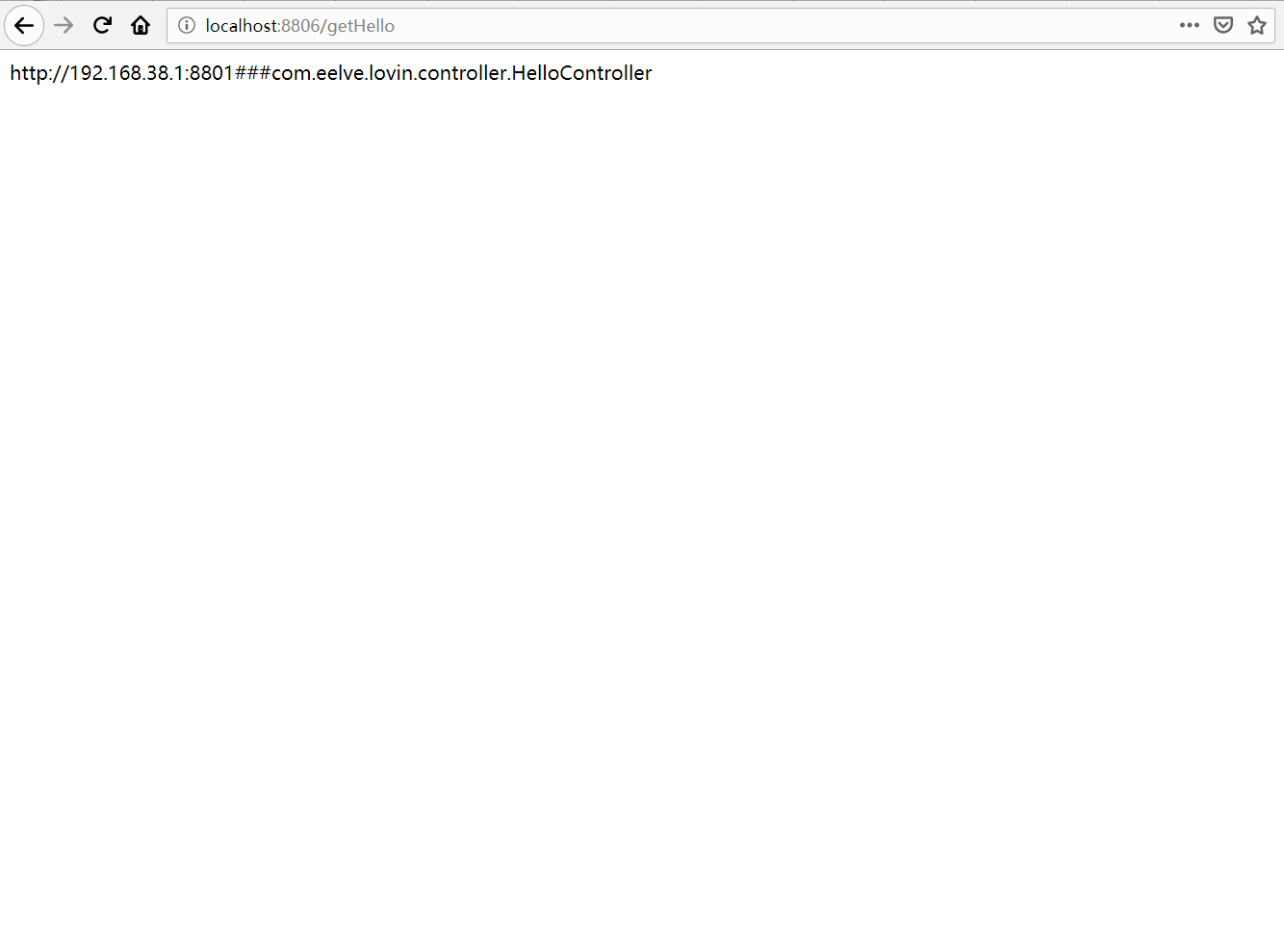
我们可以看到已经可以通过feign调到我们建立的eureka客户端了 - 再次请求接口观察返回

我们可以看到我们调到了通过feign调用ribbon负载的另外一个接口了,到这里我们就已经弄好了一个简单的ribbon负载。
肆、添加Hystrix Dashboard断路器监控
- 添加需要的pom依赖
<dependency>

    <groupId>org.springframework.boot</groupId>

    <artifactId>spring-boot-starter-actuator</artifactId>

</dependency>

<dependency>

    <groupId>org.springframework.cloud</groupId>

    <artifactId>spring-cloud-starter-netflix-hystrix-dashboard</artifactId>

    <version>2.1.2.RELEASE</version>

</dependency>
- 在主类上添加@EnableHystrixDashboard,开启断路器监控,并且配置HystrixMetricsStreamServlet
package com.eelve.lovin;

import com.netflix.hystrix.contrib.metrics.eventstream.HystrixMetricsStreamServlet;

import org.springframework.boot.SpringApplication;

import org.springframework.boot.autoconfigure.SpringBootApplication;

import org.springframework.boot.web.servlet.ServletRegistrationBean;

import org.springframework.cloud.client.discovery.EnableDiscoveryClient;

import org.springframework.cloud.netflix.hystrix.EnableHystrix;

import org.springframework.cloud.netflix.hystrix.dashboard.EnableHystrixDashboard;

import org.springframework.cloud.openfeign.EnableFeignClients;

import org.springframework.context.annotation.Bean;

/**

 * @ClassName LovinFeignClientApplication

 * @Description TDO

 * @Author zhao.zhilue

 * @Date 2019/8/15 17:17

 * @Version 1.0

 **/

@SpringBootApplication

@EnableFeignClients

@EnableDiscoveryClient

@EnableHystrix

@EnableHystrixDashboard

public class LovinFeignClientApplication {

    public static void main(String[] args) {

        SpringApplication.run(LovinFeignClientApplication.class,args);

    }

    @Bean

    public ServletRegistrationBean getServlet(){

        HystrixMetricsStreamServlet streamServlet = new HystrixMetricsStreamServlet();

        ServletRegistrationBean registrationBean = new ServletRegistrationBean(streamServlet);

        registrationBean.setLoadOnStartup(1);

        registrationBean.addUrlMappings("/actuator/hystrix.stream");

        registrationBean.setName("HystrixMetricsStreamServlet");

        return registrationBean;

    }

}
- 访问http://localhost:8806/hystrix
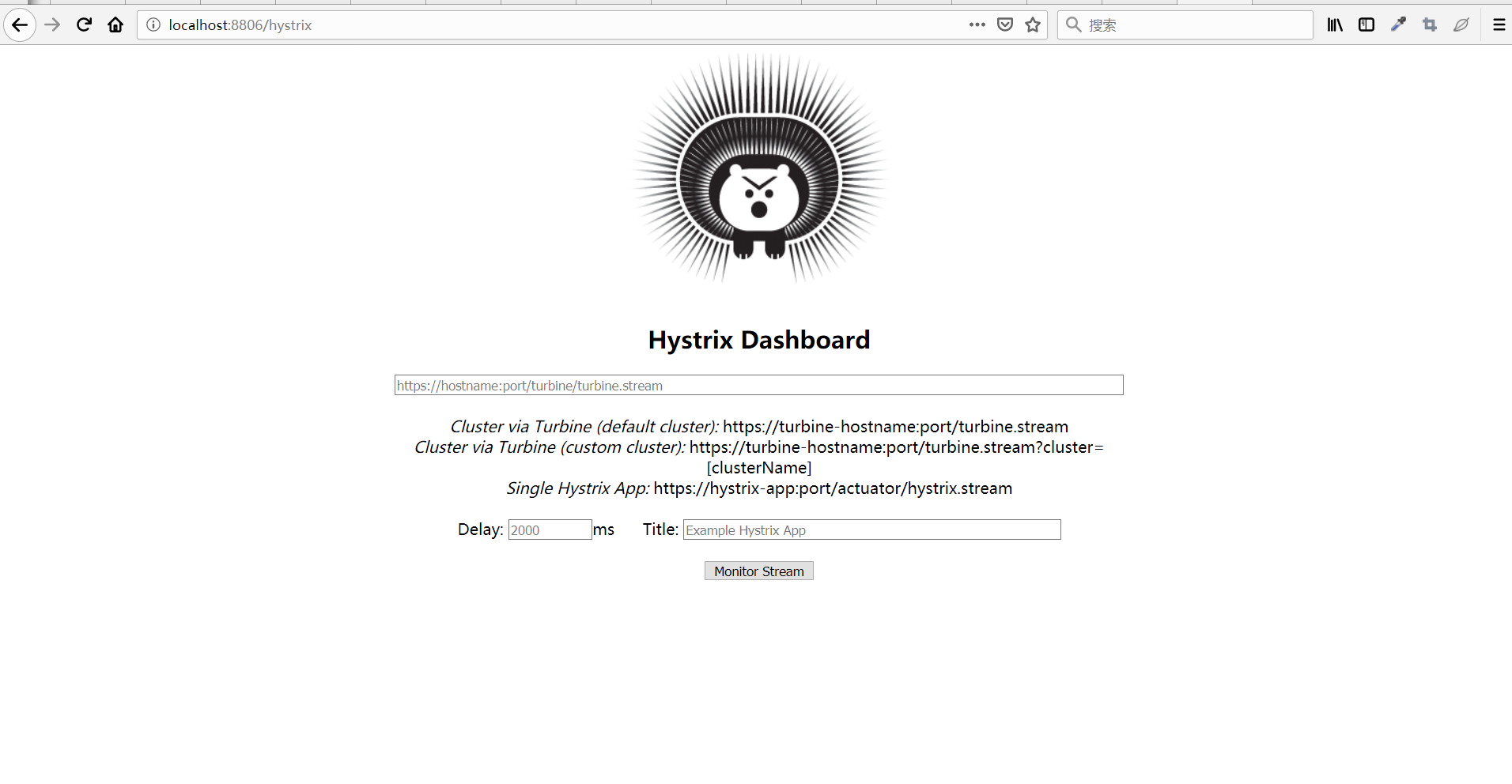
这里我们通过首页可以看到:
默认的集群监控:通过URL http://turbine-hostname:port/turbine.stream开启,实现对默认集群的监控。

指定的集群监控:通过URL http://turbine-hostname:port/turbine.stream?cluster=[clusterName]开启,实现对clusterName的监控。

单体应用监控:通过URL http://hystrix-app:port/hystrix.stream开启,实现对某个具体的服务监控
- 添加监控模式查看详情,这里选择第三个单体应用
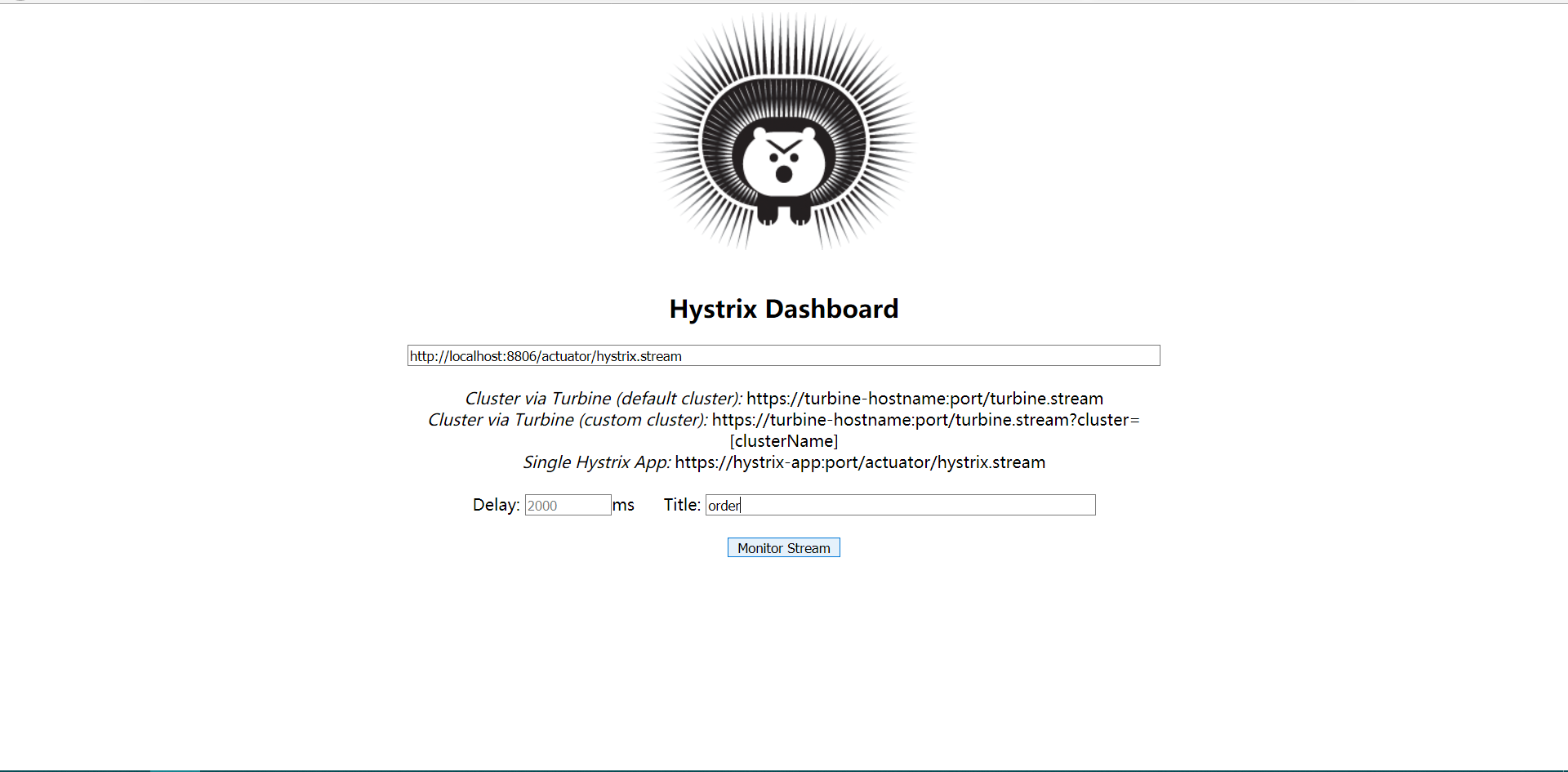
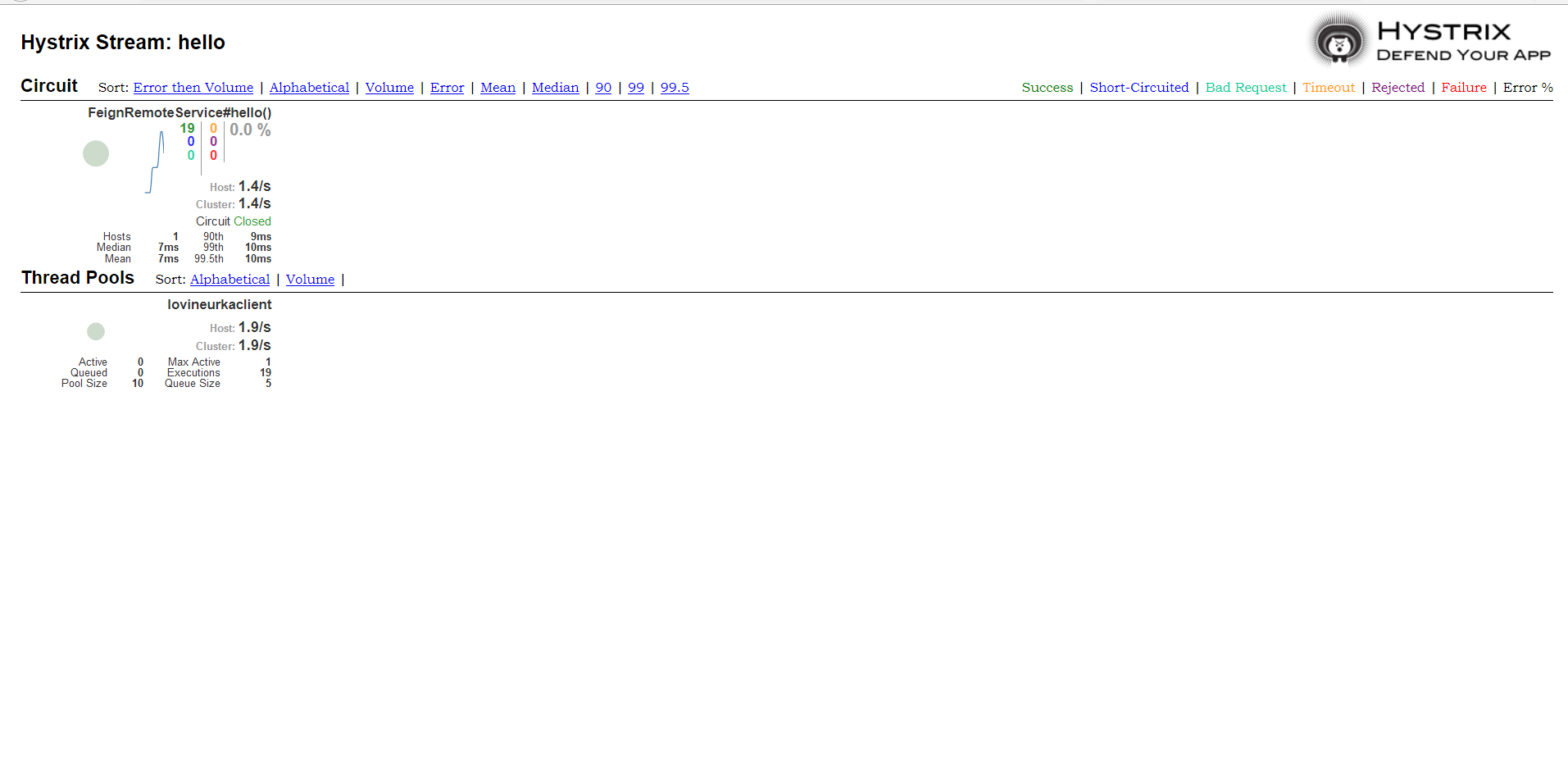
这样我们就完成了熔断器的监控,当然具体含义有待下一步深究。
伍、网络架构
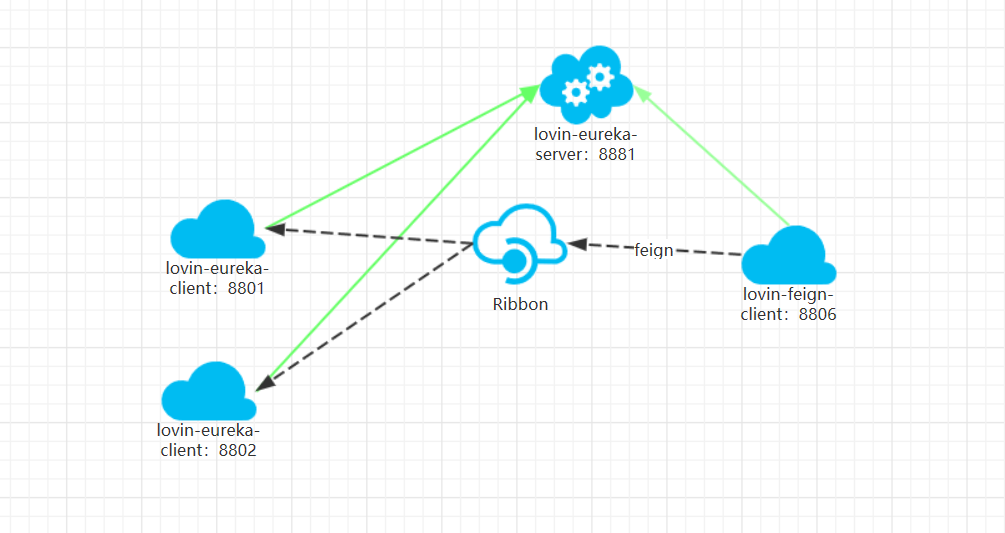
- 我们可以看到我们调用的服务不再是像再上一篇文章中的直接访问对应的服务,而是通过feign的Ribbon的负载均衡的去调用的,而且这里说明一点,Ribbon的默认机制是轮询。
SpringCloud之Feign的更多相关文章
- SpringCloud使用Feign调用其他客户端带参数的接口,传入参数为null或报错status 405 reading IndexService#del(Integer);
SpringCloud使用Feign调用其他客户端带参数的接口,传入参数为null或报错status 405 reading IndexService#del(Integer); 第一种方法: 如果你 ...
- SpringCloud 在Feign上使用Hystrix(断路由)
SpringCloud 在Feign上使用Hystrix(断路由) 第一步:由于Feign的起步依赖中已经引入了Hystrix的依赖,所以只需要开启Hystrix的功能,在properties文件中 ...
- SpringCloud(5)---Feign服务调用
SpringCloud(5)---Feign服务调用 上一篇写了通过Ribbon进行服务调用,这篇其它都一样,唯一不一样的就是通过Feign进行服务调用. 注册中心和商品微服务不变,和上篇博客一样,具 ...
- springcloud 实战 feign使用中遇到的相关问题
springcloud 实战 feign使用中遇到的相关问题 1.使用feign客户端调用其他微服务时,session没有传递成功,sessionId不一样. /** * @author xbchen ...
- springcloud 之 feign的重复性调用 优化
最近有一个springcloud的feign请求,用于获取坐标经纬度的信息,返回结果永远是固定不变的,所以考虑优化一下,不然每次转换几个坐标都要去请求feign,返回的所有坐标信息,数据量太大导致耗时 ...
- SpringCloud之Feign负载均衡(四)
整合Feign pom.xml <dependency> <groupId>org.springframework.cloud</groupId> <arti ...
- 解决SpringCloud使用Feign跨服调用时header请求头中的信息丢失
在使用SpringCloud进行Feign跨服调用时header请求头中的信息会丢失,是因为Feign是不会带上当前请求的Cookie信息和头信息的,这个时候就需要重写请求拦截. 1.需要重写Requ ...
- SpringCloud+Eureka+Feign+Ribbon的简化搭建流程,加入熔断,网关和Redis缓存[2]
目录 前提:本篇是基于 SpringCloud+Eureka+Feign+Ribbon的简化搭建流程和CRUD练习[1] 的修改与拓展 1.修改consumer的CenterFeign.java,把返 ...
- SpringCloud系列——Feign 服务调用
前言 前面我们已经实现了服务的注册与发现(请戳:SpringCloud系列——Eureka 服务注册与发现),并且在注册中心注册了一个服务myspringboot,本文记录多个服务之间使用Feign调 ...
- 31.【微服务架构】SpringCloud之Feign(五)
Feign简介 Feign 是一个声明web服务客户端,这便得编写web服务客户端更容易,使用Feign 创建一个接口并对它进行注解,它具有可插拔的注解支持包括Feign注解与JAX-RS注解,Fei ...
随机推荐
- CSS布局定位基础-盒模型和定位机制
1. 盒模型 2. 外边距合并 3. 定位机制 4. Float 5. Position:属性有哪些取值,它们的行为是什么? 无依赖绝对定位? 6. Display:常见属性值有哪些取值? 7. 对B ...
- python 简单的实现文件内容去重
文件去重 这里主要用的是set()函数,特别地,set中的元素是无序的,并且重复元素在set中自动被过滤. 测试文本为 data.txt 具体代码如下: // 文件去重 #!/usr/bin/env ...
- PID算法 旋转倒立摆与平衡车的区别。此贴后边会更新。
我做PID算法的背景和经历:本人之前电子信息科学与技术专业,对控制方向颇感兴趣,刚上大学时听到实验室老师说PID算法,那年在暑假集训准备全国电子设计竞赛,我正在练习做一个以前专科的题目,帆板角度控制系 ...
- c#小灶——使用visual studio编写第一个程序
虽然,写程序有文本编辑器和编译器就已经足够,但是,我们为了增加工作效率还是要使用IDE. 我们接下来所有的教程都将会在visual studio中实现,visual studio简称vs,是微软开发的 ...
- 利用模板生成html页面(NVelocity)
公司的网站需要有些新闻,每次的新闻格式都是一样的,而不想每次都查询操作,所以想把这些新闻的页面保存成静态的html,之后搜索了下就找到了这个模板引擎,当然其他的模板引擎可以的,例如:Razor,自己写 ...
- C#下载文件,Stream 和 byte[] 之间的转换
stream byte 等各类转换 http://www.cnblogs.com/warioland/archive/2012/03/06/2381355.html using (System.Net ...
- dotnetcore 与 hbase 之一——hbase 环境准备
转载请注明出处www.cnblogs.com/hsxian! 总述 这是一系列针对 .net core (c#) 读取 hbase 的教程.本人苦于找不到 c#的原生 hbase 客户端,多番寻觅之下 ...
- 转载 | 一种让超大banner图片不拉伸、全屏宽、居中显示的方法
现在很多网站的Banner图片都是全屏宽度的,这样的网站看起来显得很大气.这种Banner一般都是做一张很大的图片,然后在不同分辨率下都是显示图片的中间部分.实现方法如下: <html> ...
- Draw.io
如何给类图增加一个字段? 选中一个字段,然后按 Ctrl +Enter 即可. 参考:Add row to class diagram - stackoverflow
- Amazon S3
Amazon S3 是什么? Amazon S3 是亚马逊推出的一款存储服务,名为 Amazon Simple Storage Service,即亚马逊简单存储服务. 有些 S3 的概念需要了解一下: ...