
WPF Datagrid 动态生成列 并绑定数据
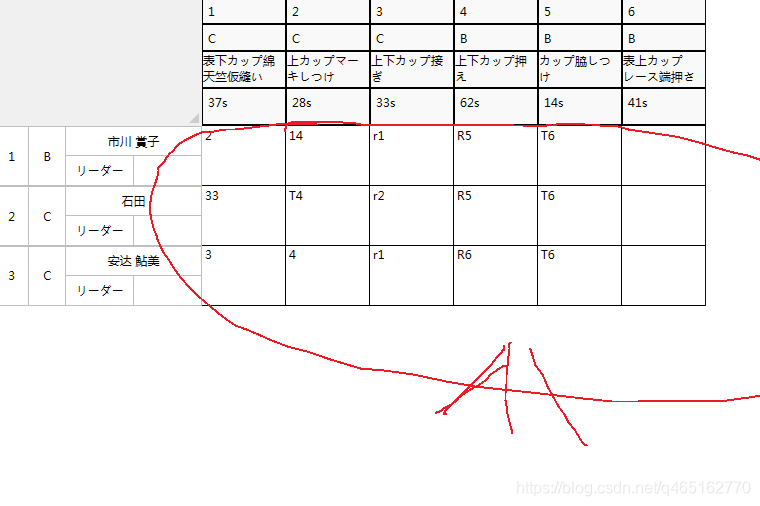
说的是这里 因为列头是动态加载的 (后台for循环 一会能看到代码)
数据来源于左侧列
左侧列数据源 当然num1 属于临时的dome使用 可以用ObservableCollection集合代表 动态创建属性
-
ObservableCollection<NameList> listName = new ObservableCollection<NameList>();
-
private ObservableCollection<NameList> GetNameData()
-
{
-
-
-
listName.Add(new NameList("市川 賞子", "リーダー", "B", 1, "2", "14", "r1", "R5", "T6"));
-
listName.Add(new NameList("石田", "リーダー", "C", 2, "33", "T4", "r2", "R5", "T6"));
-
listName.Add(new NameList("安达 鮎美", "リーダー", "C", 3,"3","4","r1","R6","T6"));
-
-
return listName;
-
-
}
-
-
}
-
public class NameList : INotifyPropertyChanged
-
{
-
public event PropertyChangedEventHandler PropertyChanged;
-
-
-
public NameList(string name, string jOb, string class_, int num, string n1, string n2, string n3, string n4, string n5) { Name = name; Class_ = class_; JOb = jOb; Num = num; Num1 = n1; Num2 = n2; Num3 = n3; Num4 = n4; Num5 = n5; }
-
private string name;
-
-
public string Name
-
{
-
get { return name; }
-
set
-
{
-
name = value;
-
if (PropertyChanged != null)
-
{
-
PropertyChanged(this, new PropertyChangedEventArgs("Name"));
-
}
-
-
}
-
}
-
private int num;
-
-
public int Num
-
{
-
get { return num; }
-
set
-
{
-
num = value;
-
if (PropertyChanged != null)
-
{
-
PropertyChanged(this, new PropertyChangedEventArgs("Num"));
-
}
-
}
-
}
-
private string class_;
-
-
public string Class_
-
{
-
get { return class_; }
-
set
-
{
-
class_ = value;
-
if (PropertyChanged != null)
-
{
-
PropertyChanged(this, new PropertyChangedEventArgs("Class_"));
-
}
-
}
-
}
-
-
-
-
private string jOb;
-
-
public string JOb
-
{
-
get { return jOb; }
-
set
-
{
-
jOb = value;
-
if (PropertyChanged != null)
-
{
-
PropertyChanged(this, new PropertyChangedEventArgs("JOb"));
-
}
-
}
-
}
-
-
private string num1;
-
-
public string Num1
-
{
-
get { return num1; }
-
set { num1 = value;
-
if (PropertyChanged != null)
-
{
-
PropertyChanged(this, new PropertyChangedEventArgs("Num1"));
-
}
-
}
-
}
-
private string num2;
-
-
public string Num2
-
{
-
get { return num2; }
-
set { num2 = value;
-
if (PropertyChanged != null)
-
{
-
PropertyChanged(this, new PropertyChangedEventArgs("Num2"));
-
}
-
}
-
}
-
private string num3;
-
-
public string Num3
-
{
-
get { return num3; }
-
set { num3 = value;
-
if (PropertyChanged != null)
-
{
-
PropertyChanged(this, new PropertyChangedEventArgs("Num3"));
-
}
-
}
-
}
-
private string num4;
-
-
public string Num4
-
{
-
get { return num4; }
-
set { num4 = value;
-
if (PropertyChanged != null)
-
{
-
PropertyChanged(this, new PropertyChangedEventArgs("Num4"));
-
}
-
}
-
}
-
private string num5;
-
-
public string Num5
-
{
-
get { return num5; }
-
set { num5 = value;
-
if (PropertyChanged != null)
-
{
-
PropertyChanged(this, new PropertyChangedEventArgs("Num5"));
-
}
-
}
-
}
-
-
}
列数据动态生成 与数据绑定
-
public MainWindow()
-
{
-
InitializeComponent();
-
-
addColumn();
-
dataGrid.ItemsSource = GetNameData();
-
}
-
-
List<string> LS = new List<string>();
-
-
public void addColumn()
-
{
-
LS.Add("表下カップ綿天竺仮縫い_37s_C_1");
-
LS.Add("上カップマーキしつけ_28s_C_2");
-
LS.Add("上下カップ接ぎ_33s_C_3");
-
LS.Add("上下カップ押え_62s_B_4");
-
LS.Add("カップ脇しつけ_14s_B_5");
-
LS.Add("表上カップレース端押さえ_41s_B_6");
-
-
for (int i = 0; i < LS.Count; i++)
-
{
-
DataGridTextColumn dl = new DataGridTextColumn();
-
dl.Header=LS[i];
-
-
dl.Binding = new Binding("Num" + (i + 1) );
-
dataGrid.Columns.Add(dl);
-
}
-
-
}
主要是 bingding 这一行
需要知道这俩块怎么做的朋友 可以看连接
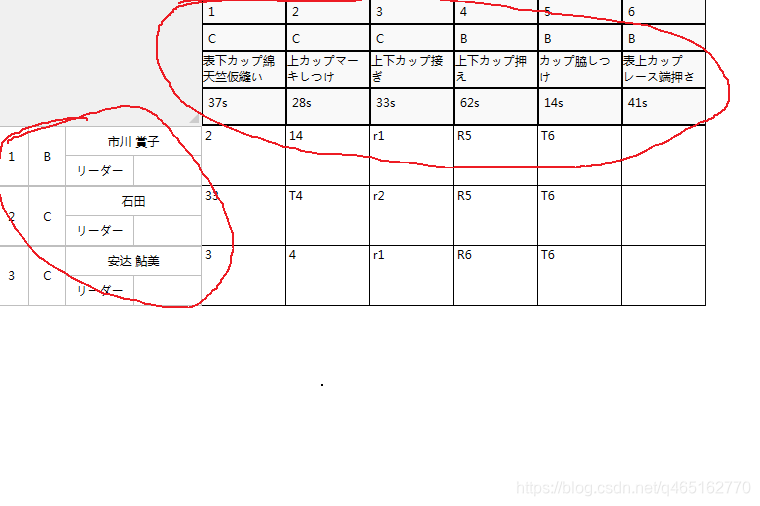
WPF (DataGridColumnHeader)实现自义定列头样式 并绑定数据
WPF (DataGridRowHeaderStyle)实现自义定行样式 并绑定数据
WPF Datagrid 动态生成列 并绑定数据的更多相关文章
- Wpf DataGrid动态添加列,行数据(一)
由于最近有这方面的需求,而且刚接触wpf不久,在网上找了很多方法,都不是使用MVVM模式的,因为DataGrid的列不能绑定 这就难受了,我想了个折中的方法,这个是使用了MVVMLight的消息机制, ...
- Wpf DataGrid动态添加列,行数据(二)
这是第二中方法,可直接绑定,我这里只是做出了一种思路,并不是最完美. 这里注意一下,因为我里面引用了MVVMLight,所以可能代码不是复制过去就能用了的. 样式也是,所以复制过去看不是我贴出来的界面 ...
- WPF DataGrid动态生成列的单元格背景色绑定
<DataTrigger Binding="{Binding RelativeSource={RelativeSource Self}, Path=Column.DisplayInde ...
- WPF datagrid 动态增加列
DataGrid动态增加列 <Window x:Class="WpfApplication1.MainWindow" xmlns="http://schemas.m ...
- EasyUI datagrid动态生成列
任务描述:根据用户选择时间段,生成列数据,如图
- WPF + RDLC + 动态生成列 + 表头合并
如下,评论超过20条,马上发代码*(੭*ˊᵕˋ)੭*ଘ,效果如下: 代码逻辑简单. WPF使用RDLC需要使用如下DLL 新建WPF 窗体,黏贴下大概如下 <Window xmlns:rv=&q ...
- easylui datagrid 动态生成列
function load(sdate) { $.getJSON("workorder/statistics.do", { sdate : sdate+'-01' }, funct ...
- WPF DataGrid自动生成列
<Window x:Class="DataGridExam.MainWindow" xmlns="http://schemas.microsoft.c ...
- easyui datagrid 动态生成列
for (var item_key in data) {//遍历json对象的每个key/value对,p为key var reg = /^score\d+/gi; for (var key in d ...
随机推荐
- Windows宏病毒利用
背景: 最近忙的飞起,各种事情,不想吐槽,因为某些事情,还吃了口屎,啧啧啧..... 常见的钓鱼,社工基本技术都是这种,什么鱼叉,水坑,社工,投毒之类的,APT 攻击惯用伎俩. 那么今天主要利用Win ...
- C# Distinct去重泛型List
List<int>去重 List<string>去重 List<T>去重 1. List<int>去重 List<int> ilist = ...
- SQL语句性能调整原则
一.问题的提出 在应用系统开发初期,由于开发数据库数据比较少,对于查询SQL语句,复杂视图的的编写等体会不出SQL语句各种写法的性能优劣,但是如果将应用系统提交实际应用后,随着数据库中数据的增加,系统 ...
- HttpClient发起Http/Https请求工具类
<dependency> <groupId>org.apache.httpcomponents</groupId> <artifactId>httpcl ...
- PyCharm 2019 2.3 软件安装教程(1.补丁破解2.破解码)
一:补丁破解 PyCharm 2019 2.3 下载地址 https://pan.baidu.com/s/1HaWFcbO-x4vZuT6mVC0AGA 提取码:elu7 更多破解教程微信公众号关注“ ...
- [译]Vulkan教程(09)窗口表面
[译]Vulkan教程(09)窗口表面 Since Vulkan is a platform agnostic API, it can not interface directly with the ...
- IT兄弟连 HTML5教程 CSS3揭秘 CSS3属性4
7 多列布局属性 通过CSS3,开发人员能够创建多列来对文本进行布局.在CSS2时代,对于多列布局的设计,大多采用浮动布局和绝对定位布局两种方式.浮动布局比较灵活,但是需要编写大量的附加样式代码,而 ...
- PHP Swoole与TCP三次握手
握手常见问题 1.连接拒绝 2.Operation now in progress 多是因为丢包.错误ip.backlog满了&阻塞&tcp_abort_on_overflow=0 3 ...
- SpringBoot2.0 基础案例(17):自定义启动页,项目打包和指定运行环境
本文源码 GitHub地址:知了一笑 https://github.com/cicadasmile/spring-boot-base 一.打包简介 springboot的打包方式有很多种.可以打war ...
- 【nodejs原理&源码赏析(5)】net模块与通讯的实现
目录 一. net模块简介 二. Client-Server的通讯 2.1 server的建立 2.2 Socket的建立 三. IPC通讯 四. 撸一个简易的cluster通讯模型 示例代码托管在: ...