
asp.net core 系列 2 启动类 Startup.CS
学无止境,精益求精
十年河东,十年河西,莫欺少年穷
学历代表你的过去,能力代表你的现在,学习代表你的将来
在探讨Startup启动类之前,我们先来了解下Asp.NET CORE 配置应用程序的执行顺序,如下图所示
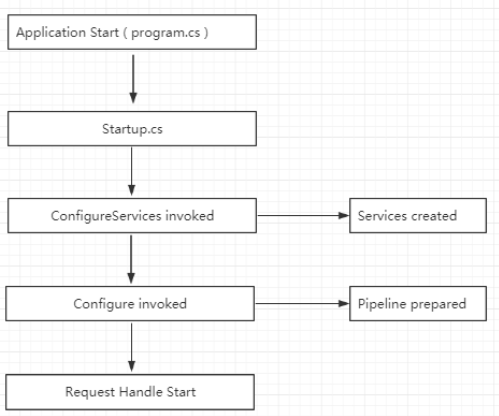
与早期版本的 ASP.NET 对比,最显著的变化之一就是配置应用程序的方式, Global.asax、FilterConfig.cs 和 RouteConfig.cs 统统消失了,取而代之的是 Program.cs 和 Startup.cs。Program.cs 作为 Web 应用程序的默认入口,不做任何修改的情况下,会调用同目录下 Startup.cs 中的 ConfigureServices 方法 和 Configure 方法。
首先我们来看下Progarm.cs,如下
    public class Program

    {

        public static void Main(string[] args)

        {

            CreateWebHostBuilder(args).Build().Run();

        }

        public static IWebHostBuilder CreateWebHostBuilder(string[] args) =>

            WebHost.CreateDefaultBuilder(args)

                .UseStartup<Startup>();

    }
我们看到Program中Main函数很像我们之前的Console应用程序,那么它当中的CreateWebHostBuilder究竟做了什么事情呢?既然.Net Core是开源的,我们看源码就方便了很多,接下来就从源码来了解下它究竟做了什么工作。
/// <summary>

        /// Initializes a new instance of the <see cref="WebHostBuilder"/> class with pre-configured defaults.

        /// </summary>

        /// <remarks>

        ///   The following defaults are applied to the returned <see cref="WebHostBuilder"/>:

        ///     use Kestrel as the web server and configure it using the application's configuration providers,

        ///     set the <see cref="IHostingEnvironment.ContentRootPath"/> to the result of <see cref="Directory.GetCurrentDirectory()"/>,

        ///     load <see cref="IConfiguration"/> from 'appsettings.json' and 'appsettings.[<see cref="IHostingEnvironment.EnvironmentName"/>].json',

        ///     load <see cref="IConfiguration"/> from User Secrets when <see cref="IHostingEnvironment.EnvironmentName"/> is 'Development' using the entry assembly,

        ///     load <see cref="IConfiguration"/> from environment variables,

        ///     load <see cref="IConfiguration"/> from supplied command line args,

        ///     configure the <see cref="ILoggerFactory"/> to log to the console and debug output,

        ///     and enable IIS integration.

        /// </remarks>

        /// <param name="args">The command line args.</param>

        /// <returns>The initialized <see cref="IWebHostBuilder"/>.</returns>

        public static IWebHostBuilder CreateDefaultBuilder(string[] args)

        {

            var builder = new WebHostBuilder();

            if (string.IsNullOrEmpty(builder.GetSetting(WebHostDefaults.ContentRootKey)))

            {

                builder.UseContentRoot(Directory.GetCurrentDirectory());

            }

            if (args != null)

            {

                builder.UseConfiguration(new ConfigurationBuilder().AddCommandLine(args).Build());

            }

            builder.ConfigureAppConfiguration((hostingContext, config) =>

            {

                var env = hostingContext.HostingEnvironment;

                config.AddJsonFile("appsettings.json", optional: true, reloadOnChange: true)

                      .AddJsonFile($"appsettings.{env.EnvironmentName}.json", optional: true, reloadOnChange: true);

                if (env.IsDevelopment())

                {

                    var appAssembly = Assembly.Load(new AssemblyName(env.ApplicationName));

                    if (appAssembly != null)

                    {

                        config.AddUserSecrets(appAssembly, optional: true);

                    }

                }

                config.AddEnvironmentVariables();

                if (args != null)

                {

                    config.AddCommandLine(args);

                }

            })

            .ConfigureLogging((hostingContext, logging) =>

            {

                logging.AddConfiguration(hostingContext.Configuration.GetSection("Logging"));

                logging.AddConsole();

                logging.AddDebug();

                logging.AddEventSourceLogger();

            }).

            UseDefaultServiceProvider((context, options) =>

            {

                options.ValidateScopes = context.HostingEnvironment.IsDevelopment();

            });

            ConfigureWebDefaults(builder);

            return builder;

        }
internal static void ConfigureWebDefaults(IWebHostBuilder builder)

        {

            builder.UseKestrel((builderContext, options) =>

            {

                options.Configure(builderContext.Configuration.GetSection("Kestrel"));

            })

            .ConfigureServices((hostingContext, services) =>

            {

                // Fallback

                services.PostConfigure<HostFilteringOptions>(options =>

                {

                    if (options.AllowedHosts == null || options.AllowedHosts.Count == )

                    {

                        // "AllowedHosts": "localhost;127.0.0.1;[::1]"

                        var hosts = hostingContext.Configuration["AllowedHosts"]?.Split(new[] { ';' }, StringSplitOptions.RemoveEmptyEntries);

                        // Fall back to "*" to disable.

                        options.AllowedHosts = (hosts?.Length >  ? hosts : new[] { "*" });

                    }

                });

                // Change notification

                services.AddSingleton<IOptionsChangeTokenSource<HostFilteringOptions>>(

                            new ConfigurationChangeTokenSource<HostFilteringOptions>(hostingContext.Configuration));

                services.AddTransient<IStartupFilter, HostFilteringStartupFilter>();

                services.AddRouting();

            })

            .UseIIS()

            .UseIISIntegration();

        }
从源码中我们可以看到,CreateDefaultBuilder执行的任务有:
1、加载主机和应用程序的配置表信息
2、配置日志记录
3、设置Web服务器
4、设置Asp.Net Core应用程序的托管形式。
Asp.Net Core应用程序的托管形式,它有两种托管形式:进程内托管InProcess和进程外托管OutOfProcess。我们知道Asp.Net Core是可以自托管的,它默认托管形式就是InProcess。那么这两种方式的区别是什么呢?
InProcess:配置进程内托管在项目.csproj文件中 <AspNetCoreHostingModel>InProcess</AspNetCoreHostingModel>,在InProcess托管情况下,CreateDefaultBuilder()方法调用UseIIS()方法并在IIS工作进程(w3wp.exe或iisexpress.exe)内托管应用程序,从性能角度,InProcess托管比OutOfProcess托管提供了更高的请求吞吐量。
OutOfProcess:有2个Web服务器-内部Web服务器和外部Web服务器,内部Web服务器是Kestrel,托管进程是dotnet.exe;外部web服务器可以是iis,nginx,apache。
总之,我们可以初步理解为Program.cs 主要用来构造,配置,并启用项目所依赖的服务器,最后设置Asp.Net Core应用程序的托管形式。
在Program.cs中,我们发现它会引用Startup.CS,如下:
  public static IWebHostBuilder CreateWebHostBuilder(string[] args) =>

            WebHost.CreateDefaultBuilder(args)

                .UseStartup<Startup>();
下面我们来看看启动类Startup.CS,如下:
    public class Startup

    {

        public Startup(IConfiguration configuration)

        {

            Configuration = configuration;

        }

        public IConfiguration Configuration { get; }

        // This method gets called by the runtime. Use this method to add services to the container.

        public void ConfigureServices(IServiceCollection services)

        {

            services.Configure<CookiePolicyOptions>(options =>

            {

                // This lambda determines whether user consent for non-essential cookies is needed for a given request.

                options.CheckConsentNeeded = context => true;

                options.MinimumSameSitePolicy = SameSiteMode.None;

            });

            services.AddMvc().SetCompatibilityVersion(CompatibilityVersion.Version_2_1);

        }

        // This method gets called by the runtime. Use this method to configure the HTTP request pipeline.

        public void Configure(IApplicationBuilder app, IHostingEnvironment env)

        {

            if (env.IsDevelopment())

            {

                //如果是开发环境,允许抛出异常

                app.UseDeveloperExceptionPage();

            }

            else

            {

                //生产环境,直接错误页

                app.UseExceptionHandler("/Error");

                app.UseHsts();

            }

            app.UseHttpsRedirection();

            app.UseStaticFiles();

            app.UseCookiePolicy();

            app.UseMvc();

        }

    }
Startup 类的作用:
1. ConfigureServices方法用于定义(注册)应用程序所使用的服务。(如:ASP.NET Core MVC,Entity Framework Core,Identity 等);
2. Configure方法用于定义请求管道的中间件,该管道将用于处理应用程序的所有请求。
3. 注册服务添加方法是无序的,ASP.NET Core在应用程序启动的时候,只要有相应服务即可,而注册中间件时方法是有序的,管道内的每一个组件都可以选择是否将请求交给下一个组件,并在管道中调用下一个组件之前或之后执行某些操作。
1. ConfigureServices
应用通过 ConfigureServices 添加服务。 然后,主机和应用服务都可以在 Configure 和整个应用中使用。
也就是说在 ConfigureServices 中,我们...
在NETCORE中,依赖注入几乎无处不在,
未完,待续...下班了,中元节,不该过多加班的。
asp.net core 系列 2 启动类 Startup.CS的更多相关文章
- 探索ASP.Net Core 3.0系列二:聊聊ASP.Net Core 3.0 中的Startup.cs
原文:探索ASP.Net Core 3.0系列二:聊聊ASP.Net Core 3.0 中的Startup.cs 前言:.NET Core 3.0 SDK包含比以前版本更多的现成模板. 在本文中,我将 ...
- asp.net core 系列 2 启动Startup类介绍
一.Startup类 ASP.NET Core 应用是一个控制台应用,它在其 Program.Main 方法中创建 Web 服务器.其中Main方法是应用的托管入口点,Main 方法调用 WebHos ...
- Asp.Net Core 入门(二)——Startup.cs做了什么
上篇介绍了Program.cs中Main做了什么,这篇我们来讨论下Startup.cs它又做了什么呢? 我们新建一个Asp.Net Core Mvc项目,先来开一下Startup的代码 public ...
- 【目录】asp.net core系列篇
随笔分类 - asp.net core系列篇 asp.net core系列 68 Filter管道过滤器 摘要: 一.概述 本篇详细了解一下asp.net core filters,filter叫&q ...
- ASP.NET Core系列(三):启动类Startup
前面讲了ASP.NET Core 的项目结构,查看完整的ASP.NET Core系列文章:https://www.cnblogs.com/zhangweizhong/category/1477144. ...
- ASP.NET CORE系列【七】分析NetCore启动原理
前言 有很久一段时间没更新了,因为工作和家里的问题导致没能坚持, 现在开始会继续每周更新,主要是记录自己所学和一起讨论解决过的问题,一起成长, 为.net圈子添砖加瓦! 介绍 到目前为止应该很多同学已 ...
- ASP.Net Core MVC6 RC2 启动过程分析[偏源码分析]
入口程序 如果做过Web之外开发的人,应该记得这个是标准的Console或者Winform的入口.为什么会这样呢? .NET Web Development and Tools Blog ASP.NE ...
- asp.net core系列 30 EF管理数据库架构--必备知识 迁移
一.管理数据库架构概述 EF Core 提供两种主要方法来保持 EF Core 模型和数据库架构同步.一是以 EF Core 模型为基准,二是以数据库为基准. (1)如果希望以 EF Core 模型为 ...
- asp.net core系列 39 Web 应用Razor 介绍与详细示例
一. Razor介绍 在使用ASP.NET Core Web开发时, ASP.NET Core MVC 提供了一个新特性Razor. 这样开发Web包括了MVC框架和Razor框架.对于Razor来说 ...
随机推荐
- 安卓开发笔记(三十二):banner轮播图的实现
一.activity.xml 我这里主要爬取的爱奇艺首页的图片进行轮播,应用了两个github上的开源库,一个banner的库,一个加载网络图片的库,用开源库能够极大地节省我们编写代码的时间. < ...
- Mysql 索引精讲
Mysql 索引精讲 开门见山,直接上图,下面的思维导图即是现在要讲的内容,可以先有个印象- 常见索引类型(实现层面) 索引种类(应用层面) 聚簇索引与非聚簇索引 覆盖索引 最佳索引使用策略 1.常见 ...
- 什么是测试系统工程师(TSE)?
深圳市共创力研发咨询 杨学明/文 TSE(Test System Engineer)简称测试系统工程师,作为系统工程(SE)团队的一员,很多公司目前还没有这样的角色,导致测试部分往往处理弱势,第一,不 ...
- BayaiM__Oracle ASM操作管理
BayaiM__Oracle ASM操作管理 BayaiM__Oracle ASM操作管理 ...
- docker安装执行问题
ubuntu14.04上安装docker问题: sudo apt-get update curl -fsSL https://get.docker.com -o get-docker.sh sh ge ...
- Apache—给一个站点绑定多个域名
前提简介: ServerAdmin:Apache服务管理员通知邮箱地址,如果有真实的邮箱地址也可以设置此值. ServerName:是服务的名字,只能填写一个域名. ServerAlias:serv ...
- springboot + shiro + mysql + mybatis 工程快速搭建
1. 新建 springboot 工程 2. 随便起个名字 3. 初始化工程 4. 导入 shiro 和 thymeleaf 依赖 <!-- thymeleaf依赖 --> <dep ...
- Jinkins自动构建
Jinkins自动构建 1.项目添加 点击左侧操作栏“新建”,填写项目基础信息,如下图: 2. General配置 2.1 丢弃旧的构建 注:此处勾选丢弃旧的构建,默认天数为1,最大个数建议填写3-5 ...
- 最长上升子序列(LIS: Longest Increasing Subsequence)
示例: 输入: [10,9,2,5,3,7,101,18] 输出: 4 解释: 最长的上升子序列是 [2,3,7,101],它的长度是 4. 从网上找的一段代码(我由java改为了C++版本),原作者 ...
- (一)JVM快速回顾总结
1,JVM内存结构(JVM体系概述,java8后的JVM) 2,GC的作用域(方法区和线程堆) 3,常见的垃圾回收算法 (1)引用计数 循环引用问题 (1) 那些对象可以作为GC_Root 虚拟机栈( ...