
利用matlab摄像机标定
(1)输入图像
“Image names”键
Matlab的图形窗口显示出20幅靶标图像
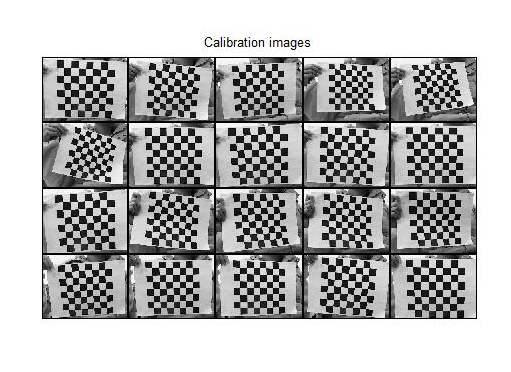
(2) 提取角点
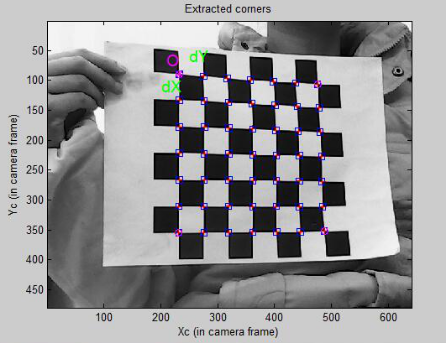
“Extract grid corners”键。
输入要进行角点提取的靶标图像的编号并回车
分别在“wintx ([] = 5) =”和“winty ([] = 5) =”输入行中输入角点提取区域的窗口半宽m和半高n。显示角点提取区域的窗口尺寸(2n+1)x(2m+1),例如,选择缺省时角点提取区域的窗口尺寸为11x11像素。
Extraction of the grid corners on the images
Number(s) of image(s) to process ([] = all images) = 17
Window size for corner finder (wintx and winty):
wintx ([] = 5) = 5
winty ([] = 5) = 5
Window size = 11x11
Do you want to use the automatic square counting mechanism (0=[]=default)
or do you always want to enter the number of squares manually (1,other)? 0
//0表示自动计算棋盘格靶标选定区域内的方格行数和列数,选择值1表示人工计算并输入棋盘格靶标选定区域内的方格行数和列数。
Processing image 17...
Using (wintx,winty)=(5,5) - Window size = 11x11 (Note: To reset the window size, run script clearwin)
Click on the four extreme corners of the rectangular complete pattern (the first clicked corner is the origin)...//点击四个极端的角落的矩形完整的模式(第一个点击的角落是原点)…
Size of each square along the X direction: dX=100mm//沿X方向每平方大小:DX = 100mm
Size of each square along the Y direction: dY=100mm (Note: To reset the size of the squares, clear the variables dX and dY)
If the guessed grid corners (red crosses on the image) are not close to the actual corners,
it is necessary to enter an initial guess for the radial distortion factor kc (useful for subpixel detection)//如果猜到的网格角(图像上的红色的十字架)不接近实际的角落,需要输入径向畸变系数Kc的初始猜测(用于亚像素检测)
Need of an initial guess for distortion? ([]=no, other=yes) []
需要一个初始猜测的失真?(=不,其他=是)
Corner extraction...角点提取…
done完成

(3) 内参数标定
“Calibration”键
一、摄像机模型:
f是摄像机焦距。针孔中的点被理解成投影中心。光轴与图像平面的交点被称为主点。
你也许认为主点即成像仪的中心,但这意味着需要极其精度的安装,实际上,通常中心不在光轴上。因此引入了两个新的参数Cx和Cy,对偏移进行建模;由于单个像素点在低价成像仪上是矩形而不是正方形,引入两个不同的焦距fx和fy(单位为像素),焦距fx实际上是透镜的物理焦距长度与成像仪每个单元尺寸Sx的乘积,fy同理。
1.x=fx(X/Z)+Cx ; y=fy(Y/Z)+Cy 【图像点(x,y);物理点(X,Y,Z)】
2.q=QM ; ;
二、内参数标定给出初始化后的标定结果和优化后的标定结果。其中,对内参数的优化采用L-M梯度下降法。优化后的结果中给出的参数不确定性,是3倍的标准方差。
fc中的两个数据分别是kx和ky,即焦距归一化成像平面上的成像点坐标到图像坐标的放大系数。
cc为光轴中心点的图像坐标(u0, v0),又称为主点坐标(光轴和像平面的交点),单位:像素。
alpha_c是对应于图像坐标v的摄像机的实际y轴与理想y轴之间的夹角ac,单位为弧度,默认值为0弧度。后续给出的图像轴之间的夹角为对应于图像坐标u、v的摄像机的x、y轴之间的夹角,默认值为90°。
est_alpha是alpha_c是否标定的标志位,只有est_alpha=1时对alpha_c进行标定。
kc为畸变系数kc1~kc5,kc(1)为二阶径向畸变系数kc1,kc(2)为4阶径向畸变系数kc2,kc(5)为6阶径向畸变系数kc5,kc(3)为图像坐标u对应于xy项的切向畸变系数kc3,kc(4)为图像坐标v对应于xy项的切向畸变系数kc4。
err为将网格角点反投影到图像空间的误差的标准方差,单位为像素。
在优化后的结果中,不确定性的数值越小,说明标定的精度越高。如果不确定性项的数值与结果值相比所占比例较大,则需要重新标定。
初始化后的标定结果:
Calibration parameters after initialization:
Focal Length: fc = [ 2261.90405 2109.71287 ]
Principal point: cc = [ 319.50000 239.50000 ]
Skew: alpha_c = [ 0.00000 ] => angle of pixel = 90.00000 degrees
Distortion: kc = [ 0.00000 0.00000 0.00000 0.00000 0.00000 ]
优化后的标定结果:
17
Calibration results after optimization (with uncertainties):
Focal Length: fc = [ 1449.63020 1465.98311 ] +/- [ 400.52656 411.89609 ]
Principal point: cc = [ 319.50000 239.50000 ] +/- [ 0.00000 0.00000 ]
Skew: alpha_c = [ 0.00000 ] +/- [ 0.00000 ] => angle of pixel axes = 90.00000 +/- 0.00000 degrees
Distortion: kc = [ -0.73547 8.76011 -0.03983 -0.03329 0.00000 ] +/- [ 0.64286 18.37382 0.02206 0.00821 0.00000 ]
Pixel error: err = [ 0.39436 0.41117 ]
16
Calibration results after optimization (with uncertainties):
Focal Length: fc = [ 1057.47799 1065.08661 ] +/- [ 179.00243 182.45017 ]
Principal point: cc = [ 319.50000 239.50000 ] +/- [ 0.00000 0.00000 ]
Skew: alpha_c = [ 0.00000 ] +/- [ 0.00000 ] => angle of pixel axes = 90.00000 +/- 0.00000 degrees
Distortion: kc = [ -0.42145 2.71172 -0.02680 -0.02733 0.00000 ] +/- [ 0.27931 4.47689 0.01235 0.00609 0.00000 ]
Pixel error: err = [ 0.39060 0.46655 ]
4
Calibration results after optimization (with uncertainties):
Focal Length: fc = [ 981.15486 990.80729 ] +/- [ 83.68588 85.72653 ]
Principal point: cc = [ 319.50000 239.50000 ] +/- [ 0.00000 0.00000 ]
Skew: alpha_c = [ 0.00000 ] +/- [ 0.00000 ] => angle of pixel axes = 90.00000 +/- 0.00000 degrees
Distortion: kc = [ -0.31958 1.45735 -0.01584 -0.02388 0.00000 ] +/- [ 0.23908 3.49317 0.00665 0.00536 0.00000 ]
Pixel error: err = [ 0.52427 0.49251 ]
(4) 显示摄像机与标定靶标之间的关系
“Show Extrinsic”键
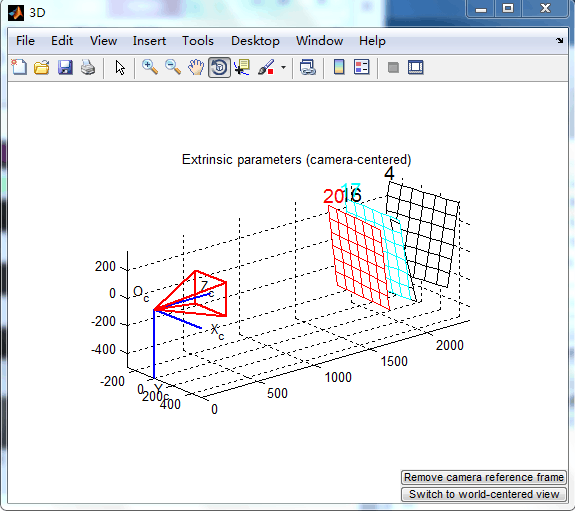
假设摄像机固定时摄像机与靶标之间的关系.
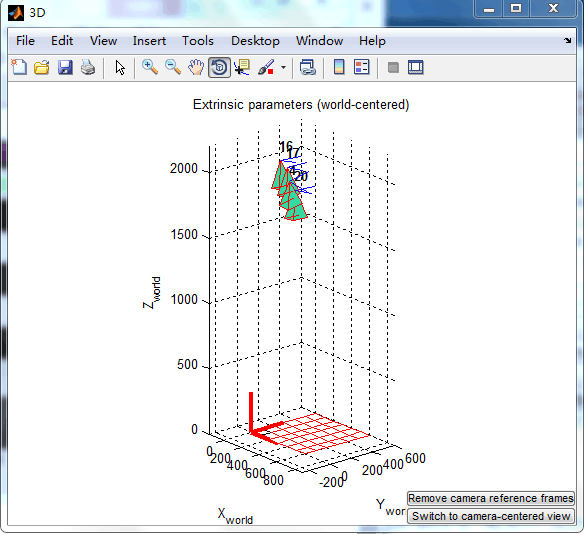
假设靶标固定时摄像机与靶标之间的关系
(5) 误差分析
“Analyse error”键
利用鼠标移动十字标尺可以选择角点,即可在命令窗口显示出该角点的信息,包括该角点所属图像、索引号、以方格为单位的坐标、图像坐标、反投影后的图像坐标误差、角点提取区域的窗口半宽m和半高n。
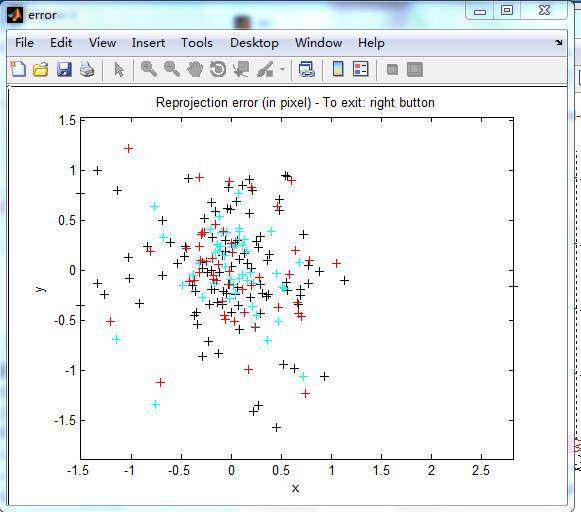
Selected image: 17
Selected point index: 22 //选择点指数:22
Pattern coordinates (in units of (dX,dY)): (X,Y)=(0,3)//图形坐标(单位(dx,dy))
Image coordinates (in pixel): (326.27,97.25)//图像坐标(像素)
Pixel error = (0.39891,0.38640)//像素误差
Window size: (wintx,winty) = (5,5)
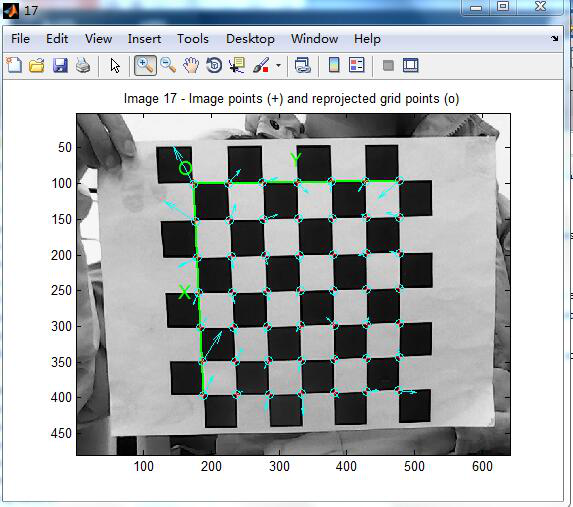
(6) 反投影到图像空间
“Project on image”键
出现“Number(s) of image(s) to process ([] = all images) =”时,输入要进行反投影的靶标图像的编号并回车:
Number(s) of image(s) to show ([] = all images) = 17
Pixel error: err = [0.52427 0.49251] (all active images)
(7) 图像畸变校正
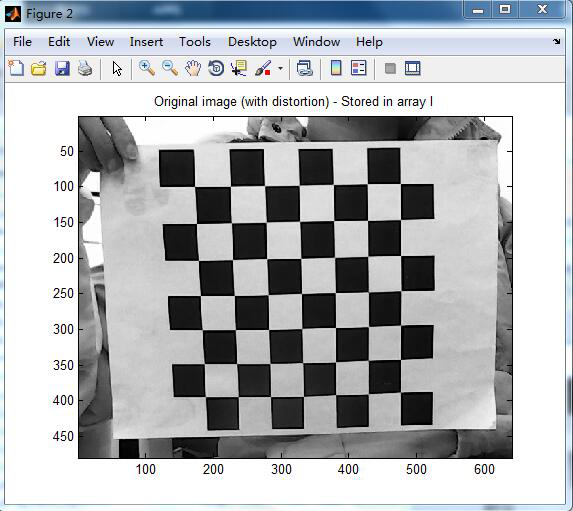
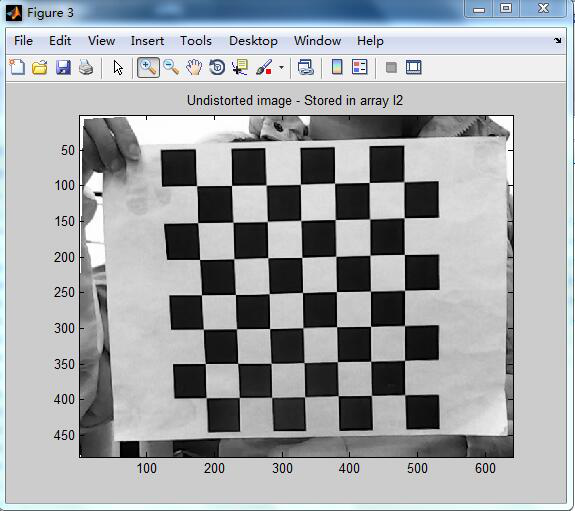
“Undistort image”键
Program that undistorts images
The intrinsic camera parameters are assumed to be known (previously computed)
Do you want to undistort all the calibration images ([],0) or a new image (1)? 1
内在的相机参数被假定为已知(先前计算)
你想所有的校正图像失真([ ],0)或一个新的图像(1)?
(8) 外参数标定
“Comp. Extrinsic”键
外参数包括:旋转矩阵;平移向量,来描述物体的相对位置
外参数标定是在内参数已知的前提下进行的。在完成摄像机的内参数标定后,或者在命令窗口输入摄像机的内参数后,可以对棋盘格靶标相对于摄像机的外参数进行标定。
Computation of the extrinsic parameters from an image of a pattern
The intrinsic camera parameters are assumed to be known (previously computed)
Image name (full name without extension): image17
Image format: ([]='r'='ras', 'b'='bmp', 't'='tif', 'p'='pgm', 'j'='jpg', 'm'='ppm') j
Extraction of the grid corners on the image
Window size for corner finder (wintx and winty):
wintx ([] = 5) =
winty ([] = 5) =
Window size = 11x11
Click on the four extreme corners of the rectangular complete pattern (the first clicked corner is the origin)...
Size dX of each square along the X direction ([]=30mm) = 100
Size dY of each square along the Y direction ([]=30mm) = 100
Corner extraction...
Extrinsic parameters:
Translation vector: Tc_ext = [ -286.312743 -270.910076 2017.432436 ]
Rotation vector: omc_ext = [ -2.148529 -2.100271 -0.134644 ] 旋转矢量
Rotation matrix: Rc_ext = [ 0.025055 0.999247 -0.029640
旋转矩阵 0.987282 -0.020077 0.157706
0.156992 -0.033214 -0.987041 ]
Pixel error: err = [ 0.34478 0.42945 ]
在外参数标定结果中,Tc_ext为靶标坐标系原点在摄像机坐标系中的位移向量,单位为mm;omc_ext为对应于姿态矩阵的rodrigues旋转向量;Rc_ext为旋转矩阵;err为将网格角点反投影到图像空间的误差的标准方差,单位为像素。
利用matlab摄像机标定的更多相关文章
- Matlab 摄像机标定+畸变校正
博客转载自:http://blog.csdn.net/Loser__Wang/article/details/51811347 本文目的在于记录如何使用MATLAB做摄像机标定,并通过opencv进行 ...
- 相机标定简介与MatLab相机标定工具箱的使用(未涉及原理公式推导)
相机标定 一.相机标定的目的 确定空间物体表面某点的三维几何位置与其在图像中对应点之间的相互关系,建立摄像机成像的几何模型,这些几何模型参数就是摄像机参数. 二.通用摄像机模型 世界坐标系.摄像机坐标 ...
- [zt]摄像机标定(Camera calibration)笔记
http://www.cnblogs.com/mfryf/archive/2012/03/31/2426324.html 一 作用建立3D到2D的映射关系,一旦标定后,对于一个摄像机内部参数K(光心焦 ...
- [OpenCV-Python] OpenCV 中摄像机标定和 3D 重构 部分 VII
部分 VII摄像机标定和 3D 重构 OpenCV-Python 中文教程(搬运)目录 42 摄像机标定 目标 • 学习摄像机畸变以及摄像机的内部参数和外部参数 • 学习找到这些参数,对畸变图像进行修 ...
- 【OpenCV】摄像机标定+畸变校正
摄像机标定 本文目的在于记录如何使用MATLAB做摄像机标定,并通过OpenCV进行校正后的显示. 首先关于校正的基本知识通过OpenCV官网的介绍即可简单了解: http://docs.open ...
- 模式识别:利用MATLAB生成模式类
近期開始了模式识别的学习,在此之前须要对模式和模式类的概念有一个了解,这里使用MATLAB实现一些模式类的生成.在此之前,引用百科上对于模式识别和模式类的定义.也算加深以下了解: 模式识别(Patte ...
- C#下的摄像机标定
前言:计算机视觉的基本任务之一是从摄像机获取的图像信息出发计算三维空间中物体的几何信息,并由此重建和识别物体,而空间物体表面某点的三维几何位置与其在图像中对应点之间的相互关系是由摄像机成像的几何模型决 ...
- 用OpenCV进行摄像机标定
用OpenCV进行摄像机标定 照相机已经存在很长时间了.然而,随着廉价针孔相机在20世纪末的引入,日常生活中变得司空见惯.不幸的是,这种廉价伴随着它的代价:显著的扭曲.幸运的是,这些常数,通过校准和一 ...
- halcon摄像机标定
摄像机标定程序: 注意:E:/calibration_image :为标定图像文件路径 'E:/calibration_description/caltab_123mm.descr:为标定 ...
随机推荐
- Asprise-OCR的使用
Asprise-OCR下载地址: http://asprise.com/product/ocr/download.php?lang=csharp 其中需要使用的3个dll是AspriseOCR.dll ...
- js实现图片无缝连接
效果图 1.首先先看看html和css代码 <style> *{padding:0;margin:0;} #div1{margin:100px auto;background:red;wi ...
- Request与session与application的区别
(1)request的setAttribute与getAttribute方法一般都是成对出现的,首先通过setAttribute方法设置属性与属性值,然后通过getAttribute方法根据属性获取到 ...
- MySQL 基础语句
MySQL 基础语句 多个知识点 ----------------------------------------------------------------------------------- ...
- sublime 工具构建
1 Sublime Text 3 配置react语法校验 原文地址:https://segmentfault.com/a/1190000004369542?_ea=585496 终端安装 npm in ...
- Openstack Day1简介及虚拟环境搭建
本文章仅作为作者本人存档记忆!恕不详细展开内容! openstack kilo版本重要组件(module)简介 ======================================= Ke ...
- Foundation框架—字符串(NSString)
一 NSString不可变字符串 1.字符串的创建 //创建字符串常量 NSString *string1 = @"hello"; string1 = @"hello w ...
- html显示时间
<html> <head> <script type="text/javascript"> function time() { var time ...
- Unix目录结构的来历(转)
原文:http://www.ruanyifeng.com/blog/2012/02/a_history_of_unix_directory_structure.html Unix(包含Linux)的初 ...
- springMVC:通配符的匹配很全面, 但无法找到元素 'mvc:annotation-driven' 的声明
转自:http://blog.csdn.net/tolcf/article/details/50845483 报错信息:通配符的匹配很全面, 但无法找到元素 'mvc:annotation-drive ...