
Docker-3:Data Volume
Sometimes, applications need to share access to data or persist data after a container is deleted. Databases, user-generated content for a web site and log files are just a few examples of data that is impractical or impossible to include in a Docker image but which applications need to access. Persistent access to data is provided with Docker Volumes.
check volume persistence
Create an independent volume and Inspect it.
docker volume create --name DV_apple #it allows you to create a volume without relating to any particular containers.

Create a container and attach it with the volume ---> Write sth to the voulme--->Exit. Note that If /dv_apple exest, the content in it will be hidden. --rm means remove the container when exiting the container.

Where it the greetings.txt? It's here

Create a new container and attach it with the same volume--->Read the same content from the volume--->Exit

VICTORY! Volume persistence is verified.
Note:
(1)-v /path:/path/in/container VS -v path:/path/in/container
the former loads a host dir while the latter loads a volume.
(2)volume can only be removed(use docker volume rm vol_name) if all containers referred to it are removed(not stopped).
(3)you can’t mount a host directory(-v /path:/path/in/container) from Dockerfile because built images should be portable while a host directory wouldn’t be available on all potential hosts.
what if /path/in/container has data?
The answer is the data will be copied into the volume. Lets see

After exiting, we start a new container that attach DV_orange
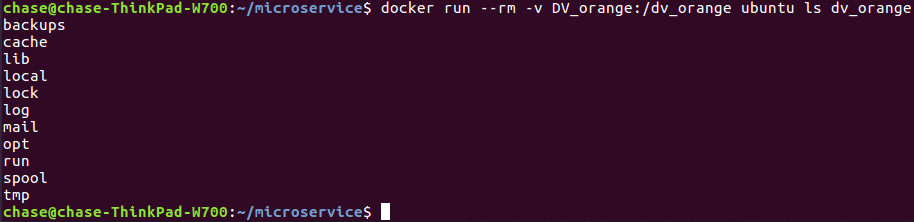
We see that DV_orange has a copy of the contents of the base image's /var dir. To further check, see

share data among multiple containers
So far, we've attached a volume to one container at a time. But often, we'll want multiple containers to attach to the same data volume. This is relatively straightforward to accomplish, but there's one critical caveat: at this time, Docker doesn't handle file locking. If you need multiple containers writing to the volume, the applications running in those containers must be designed to write to shared volume in order.
First, create container con1:

Then, create container con2:

Finally, restart con1 and check mix_msg.txt:

NOTE:
(1)The other way to avoid data corruption is to let all the other containers only have the read-only right for the shared volume.
(2)Any changes in /path will reflect in /path/in/container realtime, and any changes in /path/in/container will reflect in /path realtime.
Mount a shared-storage volume as a data volume
In addition to mounting a host directory in your container, some Docker volume plugins allow you to provision and mount shared storage, such as iSCSI, NFS, or FC. Here we use flocker plugin which is a volume plugin that provides multi-host portable volumes for Docker, enabling you to run databases and other stateful containers and move them around across a cluster of machines.
docker run -d -P --volume-driver=flocker -v my-named-volume:/webapp --name web training/webapp python app.py

#with flocker volume driver we create a shared volume named "my-named-volume" and mount it to /webapp
you may also use the docker volume create command, to create a volume before using it in a container:
Docker-3:Data Volume的更多相关文章
- docker 使用Data Volume 共享文件
Adding a data volume You can add a data volume to a container using the -v flag with the docker run ...
- Data Volume 之 bind mount - 每天5分钟玩转 Docker 容器技术(39)
storage driver 和 data volume 是容器存放数据的两种方式,上一节我们学习了 storage driver,本节开始讨论 Data Volume. Data Volume 本质 ...
- centos7下安装docker(13.1docker存储--data volume)
我们现在知道docker 有两种存储方式:storage driver和data volume stroage driver这种存储方式主要是存储那些无状态的数据,是镜像层和容器层组成的,而data ...
- Docker容器的数据卷(data volume),数据卷容器,数据卷的备份和还原。
Docker容器的数据卷(data volume),数据卷容器,数据卷的备份和还原. 数据卷就是数据(一个文件或者文件夹). Docker的理念之一是将应用与其运行的环境打包,docker容器的生命周 ...
- Docker 容器数据卷(Data Volume)与数据管理
卷(Volume)是容器中的一个数据挂载点,卷可以绕过联合文件系统,从而为Docker 提供持久数据,所提供的数据还可以在宿主机-容器或多个容器之间共享.通过卷,我们可以可以使修改数据直接生效,而不必 ...
- [转帖]Docker的数据管理(volume/bind mount/tmpfs)
Docker(十五)-Docker的数据管理(volume/bind mount/tmpfs) https://www.cnblogs.com/zhuochong/p/10069719.html do ...
- 039、Data Volume 之 bind mount (2019-02-28 周四)
参考https://www.cnblogs.com/CloudMan6/p/7142150.html Date Volume 本质上是Dokcer host文件系统中的目录或者文件,能够直接被 ...
- Docker(十五)-Docker的数据管理(volume/bind mount/tmpfs)
Docker提供了三种不同的方式用于将宿主的数据挂载到容器中:volumes,bind mounts,tmpfs volumes.当你不知道该选择哪种方式时,记住,volumes总是正确的选择. vo ...
- 第 6 章 存储 - 039 - Data Volume 之 bind mount
Data Volume Data Volume 本质上是 Docker Host 文件系统中的目录或文件,能够直接被 mount 到容器的文件系统中. Data Volume 有以下特点: 1.Dat ...
随机推荐
- windows服务器的DDOS防御,
抵御 SYN 攻击 SYN 攻击利用了 TCP/IP 连接建立机制中的安全漏洞.要实施 SYN 洪水攻击,攻击者会使用程序发送大量 TCP SYN 请求来填满服务器上的挂起连接队列.这会禁止其他用户建 ...
- 初识Promise
Promise对象 曾经用seajs开发后台管理的时候,矫情的PHPER非要JS内联到HTML文件中,方便他调用内容,还指定了jQueryFileUpload作为上传插件. 当时看到jQueryFil ...
- WPF的二维绘图(二)——几何图形Geometry
在WPF的DrawingContext对象中,提供了基本的绘制椭圆和矩形的API:DrawEllipse和DrawRectangle.但是,这些是远远不够用的,我们在日常应用中,更多的是使用DrawG ...
- xcode调试技巧
xode报错有时挺无厘头,完全不知道哪里出的问题,最后还得用排除法,记录一些工作中认为有用的调试技巧 1.左侧视图点断点视图,左下角点加号,选择exception breakpoint,类型选c++, ...
- SQL Server 数据库的维护(四)__游标(cursor)
--维护数据库-- --游标(cursor)-- --概述: 注:使用select语句查询结果的结果集是一个整体,如果想每次处理一行或一部分行数据,游标可以提供这种处理机制.可以将游标理解为指针.指针 ...
- LDA(文档主题模型)
LSA latent semantic analysis 映射词-文档到一个低维隐语义空间 比较词和文档在低纬空间的相似性 topic 是 Vocab 上的概率分布(符合多项式分布) 文档到主题的一个 ...
- EventBus 优化广播的传播
需要在onEventMainThread方法上,添加@Subscribe,程序才能执行. http://blog.csdn.net/harvic880925/article/details/40787 ...
- cursor中的url整理
浏览器中如何做才能使鼠标改变成自定义的图片,即用curosr:url属性,格式为{cursor:url('路径'),auto;}//IE,FF,chrome浏览器都可以,其中前面的url是自定义鼠标图 ...
- HTML之电话: 邮箱: 网址
<p> 电话: <a href="tel:电话">电话</a> </p> <p> 邮箱: <a href=&quo ...
- 使用PHP发送email进行账号激活或者密码修改操作
使用PHPMailer编写发送邮件 PHPMailer需PHP的socket扩展支持,而PHPMailer链接qq域名邮箱时需要ssl加密方式(qq邮箱最近做了限制,新开域名邮箱不再允许通过smtp协 ...