
Docker-3:Data Volume
Sometimes, applications need to share access to data or persist data after a container is deleted. Databases, user-generated content for a web site and log files are just a few examples of data that is impractical or impossible to include in a Docker image but which applications need to access. Persistent access to data is provided with Docker Volumes.
check volume persistence
Create an independent volume and Inspect it.
docker volume create --name DV_apple #it allows you to create a volume without relating to any particular containers.

Create a container and attach it with the volume ---> Write sth to the voulme--->Exit. Note that If /dv_apple exest, the content in it will be hidden. --rm means remove the container when exiting the container.

Where it the greetings.txt? It's here

Create a new container and attach it with the same volume--->Read the same content from the volume--->Exit

VICTORY! Volume persistence is verified.
Note:
(1)-v /path:/path/in/container VS -v path:/path/in/container
the former loads a host dir while the latter loads a volume.
(2)volume can only be removed(use docker volume rm vol_name) if all containers referred to it are removed(not stopped).
(3)you can’t mount a host directory(-v /path:/path/in/container) from Dockerfile because built images should be portable while a host directory wouldn’t be available on all potential hosts.
what if /path/in/container has data?
The answer is the data will be copied into the volume. Lets see

After exiting, we start a new container that attach DV_orange
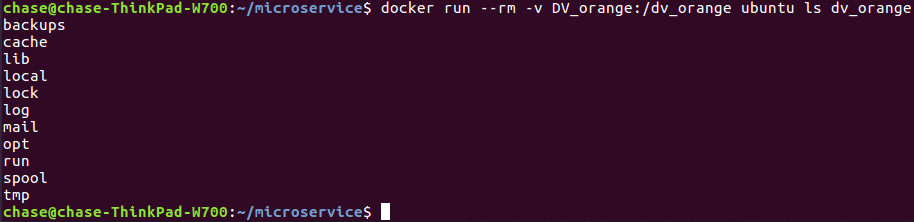
We see that DV_orange has a copy of the contents of the base image's /var dir. To further check, see

share data among multiple containers
So far, we've attached a volume to one container at a time. But often, we'll want multiple containers to attach to the same data volume. This is relatively straightforward to accomplish, but there's one critical caveat: at this time, Docker doesn't handle file locking. If you need multiple containers writing to the volume, the applications running in those containers must be designed to write to shared volume in order.
First, create container con1:

Then, create container con2:

Finally, restart con1 and check mix_msg.txt:

NOTE:
(1)The other way to avoid data corruption is to let all the other containers only have the read-only right for the shared volume.
(2)Any changes in /path will reflect in /path/in/container realtime, and any changes in /path/in/container will reflect in /path realtime.
Mount a shared-storage volume as a data volume
In addition to mounting a host directory in your container, some Docker volume plugins allow you to provision and mount shared storage, such as iSCSI, NFS, or FC. Here we use flocker plugin which is a volume plugin that provides multi-host portable volumes for Docker, enabling you to run databases and other stateful containers and move them around across a cluster of machines.
docker run -d -P --volume-driver=flocker -v my-named-volume:/webapp --name web training/webapp python app.py

#with flocker volume driver we create a shared volume named "my-named-volume" and mount it to /webapp
you may also use the docker volume create command, to create a volume before using it in a container:
Docker-3:Data Volume的更多相关文章
- docker 使用Data Volume 共享文件
Adding a data volume You can add a data volume to a container using the -v flag with the docker run ...
- Data Volume 之 bind mount - 每天5分钟玩转 Docker 容器技术(39)
storage driver 和 data volume 是容器存放数据的两种方式,上一节我们学习了 storage driver,本节开始讨论 Data Volume. Data Volume 本质 ...
- centos7下安装docker(13.1docker存储--data volume)
我们现在知道docker 有两种存储方式:storage driver和data volume stroage driver这种存储方式主要是存储那些无状态的数据,是镜像层和容器层组成的,而data ...
- Docker容器的数据卷(data volume),数据卷容器,数据卷的备份和还原。
Docker容器的数据卷(data volume),数据卷容器,数据卷的备份和还原. 数据卷就是数据(一个文件或者文件夹). Docker的理念之一是将应用与其运行的环境打包,docker容器的生命周 ...
- Docker 容器数据卷(Data Volume)与数据管理
卷(Volume)是容器中的一个数据挂载点,卷可以绕过联合文件系统,从而为Docker 提供持久数据,所提供的数据还可以在宿主机-容器或多个容器之间共享.通过卷,我们可以可以使修改数据直接生效,而不必 ...
- [转帖]Docker的数据管理(volume/bind mount/tmpfs)
Docker(十五)-Docker的数据管理(volume/bind mount/tmpfs) https://www.cnblogs.com/zhuochong/p/10069719.html do ...
- 039、Data Volume 之 bind mount (2019-02-28 周四)
参考https://www.cnblogs.com/CloudMan6/p/7142150.html Date Volume 本质上是Dokcer host文件系统中的目录或者文件,能够直接被 ...
- Docker(十五)-Docker的数据管理(volume/bind mount/tmpfs)
Docker提供了三种不同的方式用于将宿主的数据挂载到容器中:volumes,bind mounts,tmpfs volumes.当你不知道该选择哪种方式时,记住,volumes总是正确的选择. vo ...
- 第 6 章 存储 - 039 - Data Volume 之 bind mount
Data Volume Data Volume 本质上是 Docker Host 文件系统中的目录或文件,能够直接被 mount 到容器的文件系统中. Data Volume 有以下特点: 1.Dat ...
随机推荐
- C语言typedef的用法(转)
http://www.cnblogs.com/afarmer/archive/2011/05/05/2038201.html 一.基本概念剖析 int* (*a[5])(int, char*); ...
- python基础知识---迭代器、生成器、装饰器
一.迭代器 二.生成器 http://www.cnblogs.com/huxi/archive/2011/07/14/2106863.html def func(): #定义生成器,和普通函数的区别是 ...
- shell判断FTP传输是否成功
#!/bin/bash ##判断FTP传输文件是否成功 exec 6>&1 1>/tmp/lzc.txt ##打开一个文件描述符6,保存文件描述符1的属性,然后将描述1重定向到lz ...
- WPS for Linux,系统缺失字体
启动WPS for Linux后,出现提示"系统缺失字体" . 出现提示的原因是因为WPS for Linux没有自带windows的字体,只要在Linux系统中加载字体即可. 具 ...
- Vim特定行行尾追加
python print 替换 logging 1.print语句最后追加")". :%s/\(.*\)print \(.*\)/\1print \2)/g 2." ...
- CentOS平台部署vsftp(基于虚拟用户)
1. 安装FTP 1 2 [root@task ~]# yum install vsftpd –y [root@task ~]# chkconfig vsftpd on # 配置开机 ...
- Activiti开发环境配置
Ubuntu安装 1.下载Ubuntu安装镜像 http://www.ubuntu.com/download/ 2.制作ISO U盘安装镜像 不能用Ultraiso制作U盘启动镜像,新版的Ubunt ...
- WEB测试方法及注意地方
1页面部分(1) 页面清单是否完整(是否已经将所需要的页面全部都列出来了)(2) 页面是否显示(在不同分辨率下页面是否存在,在不同浏览器版本中页面是是否显示)(3) 页面在窗口中的显示是否正确.美观( ...
- python爬虫:一些常用的爬虫技巧
python爬虫:一些常用的爬虫技巧 1.基本抓取网页 get方法: post方法: 2.使用代理IP 在开发爬虫过程中经常会遇到IP被封掉的情况,这时就需要用到代理IP; 在urllib2包中有Pr ...
- C++设计模式-Adapter适配器模式(转)
Adapter适配器模式作用:将一个类的接口转换成客户希望的另外一个接口.Adapter模式使得原本由于接口不兼容而不能一起工作的那些类可以一起工作. 分为类适配器模式和对象适配器模式. 系统的数据和 ...