
LGLTagsView
做项目的时候经常会用到标签,比如说现在很多项目中搜索历史用标签展示 和 选择某个产品的不同属性用标签展示...。网上的有很多封装好的标签,但是作为一个上进的程序员,都希望能有一个自己写的。其实也是一种积累知识的过程。现在的这个标签是根据你的标签的搜字母来排序的。下载地址:https://github.com/liguoliangiOS/LGLTagsView.git先来看下效果:
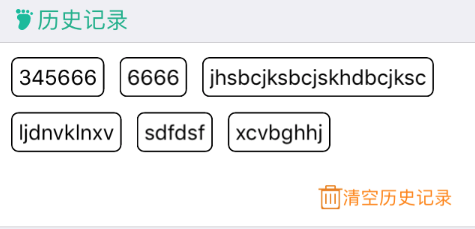
下面的是代码说明和代码:
(1)包括两个部分:LGLTagsFrame(计算标签的frame) LGLTagsView(标签的展示的view)
(2)使用注意:请先把标签数组输入LGLTagsFrame计算出标签的总高度 再来利用创建LGLTagsView。
LGLTagsFrame.h
//  Created by 李国良 on 2016/10/15.

//  Copyright © 2016年 李国良. All rights reserved.

//

#import <Foundation/Foundation.h>

#import <UIKit/UIKit.h>

@interface LGLTagsFrame : NSObject

/*

 *  @params tagsArray 标签名称数组

 */

@property (nonatomic, strong) NSArray * tagsArray;

/*

 *  @params tagsTotalHeight 标签的总高度

 */

@property (nonatomic, assign) CGFloat tagsTotalHeight;

/*

 *  @params tagsFrames 每个标签的frame数组

 */

@property (nonatomic, strong) NSMutableArray *tagsFrames;

/*

 *  @params tagsMargin 标签左右之间的间隔 默认是10  (请在给tagsArray赋值之前设置)

 */

@property (nonatomic, assign) CGFloat tagsMargin;

/*

 *  @params tagdPadding 标签上下之间的间隔 默认是10 (请在给tagsArray赋值之前设置)

 */

@property (nonatomic, assign) CGFloat tagsLineMargin;

/*

 *  @params tagdPadding 标签内部的上下左右的间隔 (默认是10) (请在给tagsArray赋值之前设置)

 */

@property (nonatomic, assign) CGFloat tagdPadding;

@end
LGLTagsFrame.m
//  Created by 李国良 on 2016/10/15.

//  Copyright © 2016年 李国良. All rights reserved.

//

#import "LGLTagsFrame.h"

#define WIDTH  ([UIScreen mainScreen].bounds.size.width)

#define HEIGHT  ([UIScreen mainScreen].bounds.size.height)

@interface LGLTagsFrame ()

@property (nonatomic, strong) UIButton * startButton;

@end

@implementation LGLTagsFrame

- (instancetype)init {

    self = [super init];

    if (self) {

        self.tagsFrames = [NSMutableArray array];

        self.tagsMargin = ;

        self.tagsLineMargin = ;

        self.tagdPadding = ;

    }

    return self;

}

- (void)setTagsArray:(NSArray *)tagsArray {

    _tagsArray = tagsArray;

    // 去掉重复的title

    NSSet * set = [NSSet setWithArray:tagsArray];

    NSArray * titleArray = [set  allObjects];

    NSArray *sortDesc = @[[[NSSortDescriptor alloc] initWithKey:nil ascending:YES]];

    NSArray *sort1Array = [titleArray sortedArrayUsingDescriptors:sortDesc];

    CGFloat tagsWidth = ;

    CGFloat tagY = ;

    NSMutableArray * frameA = [NSMutableArray array];

    for (NSString * title in sort1Array) {                     //计算出每个标题的Size

        CGSize titleSize = [self sizeWithText:title font:[UIFont systemFontOfSize:] maxW:];

        [frameA addObject:NSStringFromCGSize(titleSize)];

    }

    for (NSInteger i = ; i < frameA.count; i ++) {

        CGSize size = CGSizeFromString(frameA[i]);

        CGFloat width = size.width + self.tagdPadding;

        CGFloat height = size.height + self.tagdPadding;

        if ((WIDTH - tagsWidth - self.tagsMargin) < (width)) {

            tagY = tagY + height + self.tagsLineMargin;

            tagsWidth = ;

        }

        UIButton * btn = [UIButton buttonWithType:UIButtonTypeCustom];

        btn.frame = CGRectMake(self.tagsMargin + tagsWidth, tagY, width, height);

        [btn setTitle:sort1Array[i] forState:UIControlStateNormal];

        [btn setTitleColor:[UIColor blackColor] forState:UIControlStateNormal];

        [btn setTitleColor:[UIColor whiteColor] forState:UIControlStateSelected];

        btn.titleLabel.font = [UIFont systemFontOfSize:];

        btn.layer.masksToBounds = YES;

        btn.layer.cornerRadius = ;

        btn.layer.borderWidth = ;

        btn.layer.borderColor = [UIColor blackColor].CGColor;

        [self.tagsFrames addObject:btn];

        tagsWidth = CGRectGetMaxX(btn.frame);

        if (i == frameA.count - ) {

            self.tagsTotalHeight = CGRectGetMaxY(btn.frame) + self.tagsLineMargin;

        }

    }

}

//计算文字的大小 maxW限制最大宽度 maxW 传MAXFLOAT,没有限制最大的宽度

- (CGSize)sizeWithText:(NSString *)text font:(UIFont *)font maxW:(CGFloat)maxW

{

    NSMutableDictionary *attrs = [NSMutableDictionary dictionary];

    attrs[NSFontAttributeName] = font;

    CGSize maxSize = CGSizeMake(maxW, MAXFLOAT);

    return [text boundingRectWithSize:maxSize options:NSStringDrawingUsesLineFragmentOrigin attributes:attrs context:nil].size;

}

- (void)setTagsMargin:(CGFloat)tagsMargin {

    _tagsMargin = tagsMargin;

}

- (void)setTagsLineMargin:(CGFloat)tagsLineMargin {

    _tagsLineMargin = tagsLineMargin;

}

- (void)setTagdPadding:(CGFloat)tagdPadding {

    _tagdPadding = tagdPadding;

}

@end
展开
LGLTagsView.h
//  Created by 李国良 on 2016/10/17.

//  Copyright © 2016年 李国良. All rights reserved.

//

#import <UIKit/UIKit.h>

typedef void(^TagSelectBlock)(NSString * tagName);

@interface LGLTagsView : UIView

/**

 *  @params frame 高度请传 LGLTagsFrame的  tagsTotalHeight

 *  @params tagsFrame 请传 LGLTagsFrame 的 tagsFrames

 */

- (instancetype)initWithFrame:(CGRect)frame tagsFrame:(NSMutableArray *)tagsFrame selectTagBlock:(TagSelectBlock)block;

/*

 *  @params isSelected 是是否要有选中的效果 默认有选中的效果

 */

@property (nonatomic, assign) BOOL isSelected;

/*

 *  @params tagsSelectedColor 是修改选中tag的背景色颜色(默认 orange) 在没有选中效果的时候设置无效

 */

@property (nonatomic, strong) UIColor * tagsSelectedColor;

@end
展开
LGLTagsView.m
//  Created by 李国良 on 2016/10/17.

//  Copyright © 2016年 李国良. All rights reserved.

//

#import "LGLTagsView.h"

@interface LGLTagsView ()

@property (nonatomic, strong) NSMutableArray * tagsFrame;

@property (nonatomic, strong) UIButton * startButton;

@property (nonatomic, copy) TagSelectBlock block;

@end

@implementation LGLTagsView

- (instancetype)initWithFrame:(CGRect)frame tagsFrame:(NSMutableArray *)tagsFrame selectTagBlock:(TagSelectBlock)block {

    self = [super initWithFrame:frame];

    if (self) {

        self.tagsFrame = tagsFrame;

        self.isSelected = YES;

        self.tagsSelectedColor = [UIColor orangeColor];

        self.block = block;

        [self createTagsView];

    }

    return self;

}

- (void)createTagsView {

    for (UIButton * tags in self.tagsFrame) {

        [tags addTarget:self action:@selector(tagsClink:) forControlEvents:UIControlEventTouchUpInside];

        [self addSubview:tags];

    }

}

- (void)tagsClink:(UIButton *)button {

    if (self.isSelected) {

        if(button !=self.startButton){

            self.startButton.selected = NO;

            [self.startButton setBackgroundColor:[UIColor whiteColor]];

            self.startButton.layer.borderColor = [UIColor blackColor].CGColor;

            self.startButton = button;

        }

        self.startButton.selected=YES;

        if (self.startButton.selected) {

            [self.startButton setBackgroundColor:self.tagsSelectedColor];

            self.startButton.layer.borderColor = [UIColor whiteColor].CGColor;

        }

    }

    self.block(button.titleLabel.text);

}

- (void)setIsSelected:(BOOL)isSelected {

    _isSelected = isSelected;

}

- (void)setTagsSelectedColor:(UIColor *)tagsSelectedColor {

    _tagsSelectedColor = tagsSelectedColor;

}

- (NSMutableArray *)tagsFrame {

    if (!_tagsFrame ) {

        _tagsFrame = [NSMutableArray array];

    }

    return _tagsFrame;

}

@end
展开
文件到此结束
下面说明一下具体使用的方法:
 LGLTagsFrame * frame = [[LGLTagsFrame alloc] init];

    frame.tagsArray = [dataSource copy];

    LGLTagsView  * tagView = [[LGLTagsView alloc] initWithFrame:CGRectMake(, , WIDTH, frame.tagsTotalHeight) tagsFrame:frame.tagsFrames selectTagBlock:^(NSString *tagName) {

        // 在这里获得标签的点击回调的值

        }

    }];

[self.view addSubview:tagView];
有修改意见的欢迎来骚扰!
LGLTagsView的更多相关文章
随机推荐
- Atititi tesseract使用总结
Atititi tesseract使用总结 消除bug,优化,重新发布.当前版本为3.02 项目下载地址为:http://code.google.com/p/tesseract-ocr. Window ...
- salesforce 零基础开发入门学习(六)简单的数据增删改查页面的构建
VisualForce封装了很多的标签用来进行页面设计,本篇主要讲述简单的页面增删改查.使用的内容和设计到前台页面使用的标签相对简单,如果需要深入了解VF相关知识以及标签, 可以通过以下链接查看或下载 ...
- C#教程(1) -- .Net与C#简介
(1).Net .Net指.Net平台或者是.Net Framework框架. 如果你把.Net平台想象成一个厨房,那么.Net Framework框架就是其中的柴米油盐酱醋茶. 如果你把.Net平台 ...
- 汇编程序的Hello world
原文链接:http://www.orlion.ga/989/ 一.汇编程序的Hello world x86 AT&T: .data msg: .ascii "Hell ...
- hibernate(四)ID生成策略
一.ID生成策略配置 1.ID生成方式在xml中配置方式: <?xml version="1.0"?> <!DOCTYPE hibernate-mapping P ...
- run命令
1.打开IIS %SystemRoot%\system32\inetsrv\iis.msc 2.打开EventView eventvwr 3.打开程序和功能 appwiz.cpl 4.打开intern ...
- 关于未捕获异常的处理(WPF)
这一篇文章来谈谈对于WPF应用程序开发中的未捕获异常的处理. 首先,我们当然是要求应用程序开发人员,尽可能地在程序可能出现异常的地方都去捕捉异常,使用try-catch的方式.但是总是有一些意外的情况 ...
- 简单的小工具wordlight——让VS变量高亮起来
前段时间一直在使用matlab,今天需要使用vs2008,而用惯了matlab,习惯了其中一项选中变量高亮的设置,突然回来使用VS,感到各种不适应,顿时想到了一个词:矫情 呵呵,于是在网上找各种插件, ...
- .Net Request.Form含有危险字符的处理办法
今天我们的网站遇到一个问题,下标就类似于化学分子式这样的是需要用"<sub></sub>"这个标签括起来的,当时没有转义,有部分标签就显示不出来了, 后来我 ...
- Spring MVC 学习总结(五)——校验与文件上传
Spring MVC不仅是在架构上改变了项目,使代码变得可复用.可维护与可扩展,其实在功能上也加强了不少. 验证与文件上传是许多项目中不可缺少的一部分.在项目中验证非常重要,首先是安全性考虑,如防止注 ...