
#8.12.16总结#background transition、animation、transform
background-origin
设置元素背景图片的原始起始位置。必须保证背景是background-repeat为no-repeat此属性才会生效。
background-origin :border-box | padding-box | content-box;
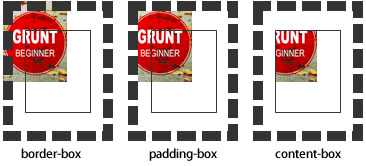
padding-box:从padding区域(含padding)开始显示背景图像。
border-box:从border区域(含border)开始显示背景图像。
content-box:从content区域开始显示背景图像。

background-clip
设定背景图像向外裁剪的区域。
background-clip : border-box | padding-box | content-box | text
background-size
设置背景图片的大小,以长度值或百分比显示,还可以通过cover和contain来对图片进行伸缩。

background
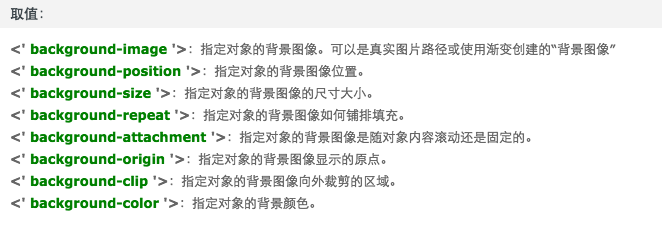
例如:

background:url(test1.jpg) no-repeat scroll 10px 20px/50px 60px padding-box,

       url(test1.jpg) no-repeat scroll 10px 20px/70px 90px padding-box,

       url(test1.jpg) no-repeat scroll 10px 20px/110px 130px padding-box #aaa;
transition
简写格式如下:
- transition:<transition-property><transition-duration><transition-timing-function><transition-delay>
- <' transition-property '>:检索或设置对象中的参与过渡的属性
- <' transition-duration '>:检索或设置对象过渡的持续时间
- <' transition-timing-function '>:检索或设置对象中过渡的动画类型
- <' transition-delay '>:检索或设置对象延迟过渡的时间
animation
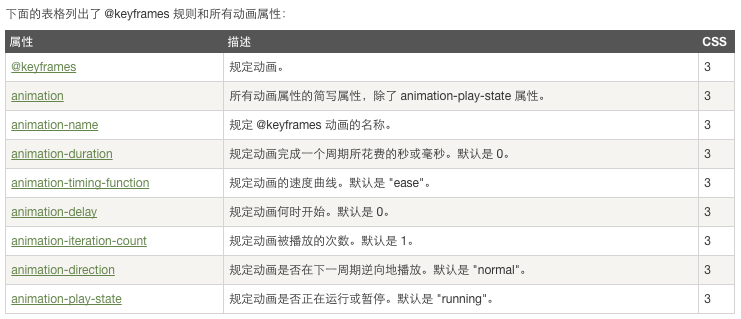
当在 @keyframes 创建动画,把它绑定到一个选择器,否则动画不会有任何效果。
指定至少这两个CSS3的动画属性绑定向一个选择器:
- 规定动画的名称
- 规定动画的时长
 <!DOCTYPE html>

 <html>

 <head>

 <meta charset="utf-8">

 <title>菜鸟教程(runoob.com)</title>

 <style>

 div

 {

     width:100px;

     height:100px;

     background:red;

     position:relative;

     animation:myfirst 5s linear 2s infinite alternate;

     /* Firefox: */

     -moz-animation:myfirst 5s linear 2s infinite alternate;

     /* Safari and Chrome: */

     -webkit-animation:myfirst 5s linear 2s infinite alternate;

     /* Opera: */

     -o-animation:myfirst 5s linear 2s infinite alternate;

 }

 @keyframes myfirst

 {

     0%   {background:red; left:0px; top:0px;}

     25%  {background:yellow; left:200px; top:0px;}

     50%  {background:blue; left:200px; top:200px;}

     75%  {background:green; left:0px; top:200px;}

     100% {background:red; left:0px; top:0px;}

 }

 @-moz-keyframes myfirst /* Firefox */

 {

     0%   {background:red; left:0px; top:0px;}

     25%  {background:yellow; left:200px; top:0px;}

     50%  {background:blue; left:200px; top:200px;}

     75%  {background:green; left:0px; top:200px;}

     100% {background:red; left:0px; top:0px;}

 }

 @-webkit-keyframes myfirst /* Safari and Chrome */

 {

     0%   {background:red; left:0px; top:0px;}

     25%  {background:yellow; left:200px; top:0px;}

     50%  {background:blue; left:200px; top:200px;}

     75%  {background:green; left:0px; top:200px;}

     100% {background:red; left:0px; top:0px;}

 }

 @-o-keyframes myfirst /* Opera */

 {

     0%   {background:red; left:0px; top:0px;}

     25%  {background:yellow; left:200px; top:0px;}

     50%  {background:blue; left:200px; top:200px;}

     75%  {background:green; left:0px; top:200px;}

     100% {background:red; left:0px; top:0px;}

 }

 </style>

 </head>

 <body>

 <p><b>注意:</b> 该实例在 Internet Explorer 9 及更早 IE 版本是无效的。</p>

 <div></div>

 </body>

 </html>
transform

#8.12.16总结#background transition、animation、transform的更多相关文章
- css 动画 transform transition animation
1.transform transform 是通过在浏览器里面让网页元素 移动 旋转 透明 模糊 等方法来实现改变其外观的技术 -webkit-transform : translate(3em,0 ...
- CSS动画:animation、transition、transform、translate
https://blog.csdn.net/px01ih8/article/details/80780470 一.区分容易混淆的几个属性和值 先区分一下css中的几个属性:animation(动画). ...
- css3之transition、transform、animation比较
css3动画多少都有些了解,但是对于transition.transform.animation这几个属性一直是比较模糊的,所以啊,这里做一个总结,也希望大家都可以对此有一个更好地理解. 其实, ...
- css3 transition animation nick
时光转眼即逝,又到周六了,今天写点某部分人看不起的css玩玩! 转换 转换属性transform: 浏览器前缀: -webkit-transform;-o-transform;-moz-transfo ...
- Atitti css transition Animation differ区别
Atitti css transition Animation differ区别 1.1. transition的优点在于简单易用,但是它有几个很大的局限. 1 1.2. Transition ...
- Atitti css transition Animation differ区别
Atitti css transition Animation differ区别 1.1. transition的优点在于简单易用,但是它有几个很大的局限. 1 1.2. js 动态改变 st ...
- A transition animation compatible Library.
Android5.0之后为我们提供了许多炫酷的界面过渡效果,其中共享元素过渡也是很有亮点的一个效果,但这个效果只能在Android5.0之后使用,那今天我们就来将共享元素过渡效果兼容到Android4 ...
- CSS3 & transition & animation
CSS3 & transition & animation https://developer.mozilla.org/en-US/docs/Web/CSS/transition-ti ...
- css3动画transition animation
CSS动画简介 transition animation transition过渡:css3通过transitions属性引入时间概念,通过开始.结束状态自动计算中间状态,实现状态改变的过渡效果 ...
随机推荐
- FlashFXP(强大的FXP/ftp上传工具)V5.0.0.3722简体中文特别版
flashfxp是功能强大的fxp/ftp软件,融合了一些其他优秀ftp软件的优点,如像cuteftp一样可以比较文件夹, FlashFXP是一款功能强大的FXP/ftp上传工具, FlashFXP集 ...
- 自制jQuery标签插件
在项目中需要一个添加标签的小插件,查看了一些已有插件后,发现很现成的高级插件,也有比较简单的插件.最后还是决定自己来写,这样能控制代码,以后与其他插件结合使用的时候能更好的把控.初步在IE6 7 8, ...
- apache解析多个域名
之前搭建了一个网站在这台服务器上,今天心血来潮准备搭建个word press 博客,准备使用二级域名 blog.xdlxb.cn 来解析. 只需要设置httpd.conf 文件就可以了 如下 开启重定 ...
- 1.Visual FoxPro 基础
1.菜单栏的使用 ******************************* 方法一:鼠标点击 方法二:快捷键 Alt+F打开文件菜单 Alt+E打开编辑菜单 Alt+V打开显示菜单 Alt+P ...
- [Java 基础]运算符和表达式
Java运算符 (1)赋值操作符 赋值操作符(=)表示:取右边的值(即右值),把它复制给左边(即左值). 右值可以是任意的常量.变量或表达式(只要可以生成一个值). 左值必须是一个明确的.已命名的变量 ...
- js基础篇——encodeURI 和encodeURIComponent
转自zccst的又一次掉进encodeURIComponent的坑里了 问题: ajax.get ( url+'?k1'=v1+'&k2'=v2+'&k3'=v3, ... ); 由于 ...
- rtf格式的一些说明,转载的
RTF是Rich TextFormat的缩写,意即多文本格式.这是一种类似DOC格式(Word文档)的文件,有很好的兼容性,使用Windows"附件"中的"写字板&quo ...
- LINQ的Intersect方法
找到两个集合中交集部分: source code: IEnumerable<int> a = new List<int>{ { }, { }, { } }; IEnumerab ...
- svn无法创建分支的解决方法
创建分支时出现错误 Access to '/svn/project01/!svn/rvr/18022/trunk' forbidden 解决方法: 找到project01仓库的根目录,假如在d:\sv ...
- ASP.NET 缓存
(一)什么是缓存 缓存是指临时数据或者文件交换区.比方说CPU上的L1或是L2缓存,内存上被划分出来的缓冲区.我们知道CPU的速度是最快的,其次是内存,最后是硬盘,各个部件之间运算速度有很大的差距,但 ...