
flex+java+blazeds 多通道好文
http://www.cnblogs.com/noam/archive/2010/08/05/1793504.html
blazeds, spring3整合实现RPC服务和消息服务
环境:
MyEclipse 7.5
Flash Builder 4 plugin for eclipse
Tomcat 6
BlazeDS 4.0.0
springframework 3.0.3
Spring-flex整合 org.springframework.flex-1.0.3.RELEASE.jar (适用于spring2.5.6+,blazeds3.2+)
步骤:
1. 创建带有Flex支持的Web工程,见通过J2EE Web工程添加Flex项目,进行BlazeDS开发。
2. 导入spring包和spring-flex集成包。
3. 配置web.xml,配置DispatcherServlet,使用spring进行管理,并将请求映射到MessageBroker。
4. 创建web-application-config.xml,配置flex服务,主要是在spring中配置MessageBroker。
5. 创建remoting-destination和 message-destination,修改channel属性。
6. 创建mxml文件,定义channelSet,注册remote-object和定义Productor, Consumer.
注意:
当不使用spring直接配置blazeDS实现RPC和消息服务时,仅需要在remoting-config.xml和messaging-config.xml中配置destination,只要在这些文件中配置了默认通道,mxml文件中不需要再定义channelSet即可执行。而使用spirng时,仅当将default-channels定义在services-config.xml的services标签中才有效,若在services-config.xml的services标签中加载其他配置文件,在这些文件中配置各自的default-channels,会报如下错误:[MessagingError message='×××'artgallerydataservice' either does not exist or the destination has no channels defined (and the application does not define any default channels.)'],原因是没有找到通道。如果仅将通道定义在<flex:message-destination>或<flex:remoting-destination>中,也会出现同样的情况。
对于以上的两个问题,我觉得几乎不可理解,解决方案是在mxml文件中定义channelSet以找到amf通道。
项目代码:
目录结构:
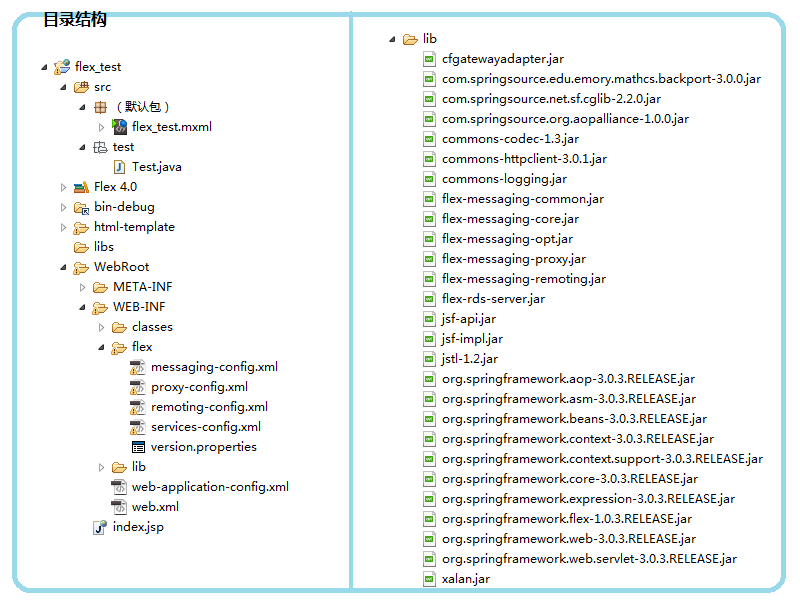
Web.xml:
web.xml

<?xml version="1.0" encoding="UTF-8"?>

<web-app version="2.4"

    xmlns="http://java.sun.com/xml/ns/j2ee"

    xmlns:xsi="http://www.w3.org/2001/XMLSchema-instance"

    xsi:schemaLocation="http://java.sun.com/xml/ns/j2ee

    http://java.sun.com/xml/ns/j2ee/web-app_2_4.xsd">


    <servlet>

      <servlet-name>Spring MVC Dispatcher Servlet</servlet-name>

      <servlet-class>org.springframework.web.servlet.DispatcherServlet</servlet-class>

      <init-param>

        <param-name>contextConfigLocation</param-name>

        <param-value>/WEB-INF/web-application-config.xml</param-value>

      </init-param>

      <load-on-startup>1</load-on-startup>

    </servlet>


    <servlet-mapping>

      <servlet-name>Spring MVC Dispatcher Servlet</servlet-name>

      <url-pattern>/messagebroker/*</url-pattern>

    </servlet-mapping>


  <welcome-file-list>

    <welcome-file>index.jsp</welcome-file>

  </welcome-file-list>

</web-app>
web-application-config.xml:
<flex:message-broker/>是非常重要的,它还有其它的几种表示方法,但以这种最为简单,它通过MessageBrokerHandlerAdapter和HandlerMapping将请求发送给spring管理的MessageBroker。
注意这里一定要导入spring-flex集成的schemaLocation,remoting-destination和 message-destination也在这里定义。
web-application-config.xml
<?xml version="1.0" encoding="UTF-8"?>

<beans xmlns="http://www.springframework.org/schema/beans"

    xmlns:flex="http://www.springframework.org/schema/flex"

    xmlns:xsi="http://www.w3.org/2001/XMLSchema-instance"

    xsi:schemaLocation="

        http://www.springframework.org/schema/beans

        http://www.springframework.org/schema/beans/spring-beans-2.5.xsd

        http://www.springframework.org/schema/flex

        http://www.springframework.org/schema/flex/spring-flex-1.0.xsd">

    <flex:message-broker/>

    <flex:message-destination id="msg_dest"/>

    <bean id="flex_test" class="test.Test">

        <flex:remoting-destination/>

    </bean>

</beans>
services-config.xml:
这里最重要的是channels的定义和配置。
services-config.xml
<?xml version="1.0" encoding="UTF-8"?>

<services-config>

    <services>

      <default-channels>

        <channel ref="my-amf"/>

      </default-channels>

    </services>

    <security>

        <login-command class="flex.messaging.security.TomcatLoginCommand" server="Tomcat"/>

        <!-- Uncomment the correct app server

        <login-command class="flex.messaging.security.TomcatLoginCommand" server="JBoss">

        <login-command class="flex.messaging.security.JRunLoginCommand" server="JRun"/>

        <login-command class="flex.messaging.security.WeblogicLoginCommand" server="Weblogic"/>

        <login-command class="flex.messaging.security.WebSphereLoginCommand" server="WebSphere"/>

        -->

        <!--

        <security-constraint id="basic-read-access">

            <auth-method>Basic</auth-method>

            <roles>

                <role>guests</role>

                <role>accountants</role>

                <role>employees</role>

                <role>managers</role>

            </roles>

        </security-constraint>

         -->

    </security>

    <channels>

        <channel-definition id="my-amf" class="mx.messaging.channels.AMFChannel">

            <endpoint url="http://{server.name}:{server.port}/{context.root}/messagebroker/amf" class="flex.messaging.endpoints.AMFEndpoint"/>

        </channel-definition>

        <channel-definition id="my-secure-amf" class="mx.messaging.channels.SecureAMFChannel">

            <endpoint url="https://{server.name}:{server.port}/{context.root}/messagebroker/amfsecure" class="flex.messaging.endpoints.SecureAMFEndpoint"/>

            <properties>

                <add-no-cache-headers>false</add-no-cache-headers>

            </properties>

        </channel-definition>

        <channel-definition id="my-polling-amf" class="mx.messaging.channels.AMFChannel">

            <endpoint url="http://{server.name}:{server.port}/{context.root}/messagebroker/amfpolling" class="flex.messaging.endpoints.AMFEndpoint"/>

            <properties>

                <polling-enabled>true</polling-enabled>

                <polling-interval-seconds>1</polling-interval-seconds>

            </properties>

        </channel-definition>

        <!--

        <channel-definition id="my-http" class="mx.messaging.channels.HTTPChannel">

            <endpoint url="http://{server.name}:{server.port}/{context.root}/messagebroker/http" class="flex.messaging.endpoints.HTTPEndpoint"/>

        </channel-definition>

        <channel-definition id="my-secure-http" class="mx.messaging.channels.SecureHTTPChannel">

            <endpoint url="https://{server.name}:{server.port}/{context.root}/messagebroker/httpsecure" class="flex.messaging.endpoints.SecureHTTPEndpoint"/>

            <properties>

                <add-no-cache-headers>false</add-no-cache-headers>

            </properties>

        </channel-definition>

        -->

    </channels>

    <logging>

        <target class="flex.messaging.log.ConsoleTarget" level="Error">

            <properties>

                <prefix>[BlazeDS] </prefix>

                <includeDate>false</includeDate>

                <includeTime>false</includeTime>

                <includeLevel>false</includeLevel>

                <includeCategory>false</includeCategory>

            </properties>

            <filters>

                <pattern>Endpoint.*</pattern>

                <pattern>Service.*</pattern>

                <pattern>Configuration</pattern>

            </filters>

        </target>

    </logging>

    <system>

        <redeploy>

            <enabled>false</enabled>

            <!--

            <watch-interval>20</watch-interval>

            <watch-file>{context.root}/WEB-INF/flex/services-config.xml</watch-file>

            <watch-file>{context.root}/WEB-INF/flex/proxy-config.xml</watch-file>

            <watch-file>{context.root}/WEB-INF/flex/remoting-config.xml</watch-file>

            <watch-file>{context.root}/WEB-INF/flex/messaging-config.xml</watch-file>

            <watch-file>{context.root}/WEB-INF/flex/data-management-config.xml</watch-file>

            <touch-file>{context.root}/WEB-INF/web.xml</touch-file>

             -->

        </redeploy>

    </system>

</services-config>
messaging-config.xml, proxy-config.xml, remoting-config.xml:
略。和blazeDS提供的几乎一样。
test.Test.java:
这里只定义了一个方法,用以测试远程方法调用。
package test;

public class Test {

    public void done(){

        System.out.println("OK.");

    }

}
flex_test.mxml:
这个不做过多解释。 这里定义了AMFChannel和ChannelSet,避免找不到通道的问题。Productor和Consumer是实现BlazeDS消息服务的两个组件,AsyncMessage是用来发送消息的。
flex_test.mxml

<?xml version="1.0" encoding="utf-8"?>

<s:Application xmlns:fx="http://ns.adobe.com/mxml/2009"

               xmlns:s="library://ns.adobe.com/flex/spark"

               xmlns:mx="library://ns.adobe.com/flex/mx" minWidth="955" minHeight="600"

               creationComplete="consumer.subscribe();">


    <fx:Script>

        <![CDATA[

            import mx.controls.Alert;

            import mx.messaging.messages.*;

            import mx.messaging.events.*;

            import mx.rpc.events.FaultEvent;

            import mx.rpc.events.ResultEvent;


            // Write received message to TextArea control.

            private function messageHandler(event: MessageEvent):void {

            ta.text += event.message.body + "\n";

            }


            // Compose the message as an instance of AsyncMessage,

            // then use the Producer.send() method to send it.

            private function sendMessage():void {

                var message: AsyncMessage = new AsyncMessage();

                message.body = userName.text + ": " + msg.text;

                producer.send(message);

                msg.text = "";

            }


            protected function button_clickHandler(event:MouseEvent):void

            {

                // TODO Auto-generated method stub

                object.done();

            }


            protected function resulth(event:ResultEvent):void

            {

                label.text="succeed!";

            }


            protected function faulth(event:FaultEvent):void

            {

                label.text="failed!";

                Alert.show("远程对象调用失败:\n"+event.fault);

            }


        ]]>

    </fx:Script>


    <fx:Declarations>

        <!-- 将非可视元素(例如服务、值对象)放在此处 -->

        <mx:AMFChannel id="polling_amf" url="../messagebroker/amfpolling" />

        <mx:ChannelSet id="polling_channel" channels="{[polling_amf]}" />

        <mx:AMFChannel id="amf" url="../messagebroker/amf" />

        <mx:ChannelSet id="amf_channel" channels="{[amf]}" />


        <mx:Producer id="producer" destination="msg_dest" channelSet="{polling_channel}"/>

        <mx:Consumer id="consumer" destination="msg_dest" channelSet="{polling_channel}"

                     message="messageHandler(event)"/>


        <mx:RemoteObject id="object" destination="flex_test"

                         channelSet="{amf_channel}"

                         result="resulth(event);" fault="faulth(event);" />


    </fx:Declarations>

    <s:TextArea x="42" y="56" width="289" height="163" id="ta"/>

    <s:Label x="42" y="244" text="User Name"/>

    <s:Label x="43" y="272" text="Message"/>

    <s:TextInput x="120" y="237" width="128" id="userName"/>

    <s:TextInput x="120" y="267" id="msg"/>

    <s:Button x="261" y="237" label="Send" height="52" click="sendMessage();"/>

    <s:Label x="42" y="26" text="Message Content"/>

    <mx:VRule x="411" y="26" height="263"/>

    <s:Button x="468" y="54" label="RPC Service Test" width="148" height="39" id="button" click="button_clickHandler(event)"/>

    <s:Label y="140" text="Guess the Result!" verticalAlign="middle" textAlign="center" width="177" height="79" x="456" id="label"/>

</s:Application>
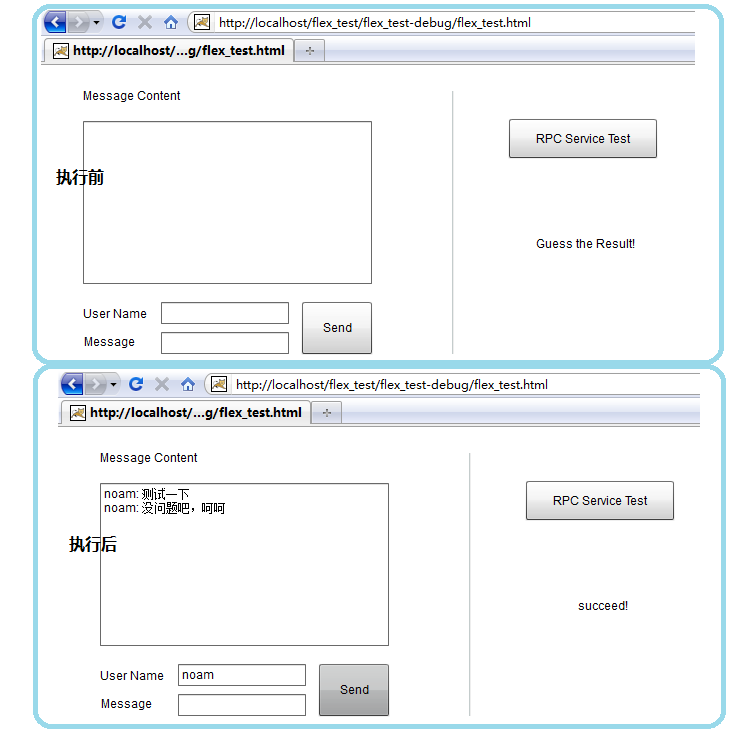
执行结果:
flex+java+blazeds 多通道好文的更多相关文章
- Flex+Java+Blazeds
1.环境:jdk1.6,Flex4.6 2.工具:MyEclipse10 3.server:Tomcat7 4.连接方式:Blazeds 5.项目类型:Flex项目 6.步骤 (1)新建Flex项目一 ...
- Flex使用Blazeds与Java交互及自定义对象转换详解-DATAGRID读取ORACLE数据
http://www.cnblogs.com/RocD-DuPeng/articles/1751040.html 一.建立Flex与Java交互的工程. 本文中讲到的交互是利用Blazeds的,因为这 ...
- 利用Java动态生成 PDF 文档
利用Java动态生成 PDF 文档,则需要开源的API.首先我们先想象需求,在企业应用中,客户会提出一些复杂的需求,比如会针对具体的业务,构建比较典型的具备文档性质的内容,一般会导出PDF进行存档.那 ...
- Java 后台创建word 文档
---恢复内容开始--- Java 后台创建 word 文档 自己总结 网上查阅的文档 分享POI 教程地址:http://www.tuicool.com/articles/emqaEf6 方式一. ...
- Java解析word,获取文档中图片位置
前言(背景介绍): Apache POI是Apache基金会下一个开源的项目,用来处理office系列的文档,能够创建和解析word.excel.ppt格式的文档. 其中对word文档的处理有两个技术 ...
- 《Java开发学习大纲文档》V7.0
<Java开发学习大纲文档>V7.0简介: 本文档是根据企业开发所需要掌握的知识点大纲进行总结汇编,是Java开发工程师必备知识体系,系统化学习针对性非常强,逻辑分析能力非常清晰;技术方面 ...
- 《Java开发学习大纲文档》V6.0(已经不公布了,请查看第七版)
<Java开发大纲学习文档第六版>简介: 有需要的私聊作者QQ:253173641.
- 001-Java®语言规范、Java平台标准版文档、JVM概述
一.概述 相关api地址:JDK10 JDK 9 JDK 8 JDK 7 JDK 6 Java语言和虚拟机规范: https://docs.oracle.com/javase/spec ...
- java实现简单回文算法
算法要求 编写一个程序,判断一个字符串是否为"回文".回文串:字符串字符从前往后与从后往前一致(中心对称). 算法思路 首先将字符串等分左右两块,然后依次对称比较每一对字符是否相同 ...
随机推荐
- 利用SPM工具运行自己创建的小组件(使用common-model向后台接口请求数据)
步骤如下: 1.安装依赖:spm install -e 2.编译:spm build (编译好的东西会放在trunk-dist里面) 3.发布:spm app -d (会出来一个export端口,一般 ...
- 【新手】python爬虫遍历贴吧用户
想法是遍历学校贴吧的用户,获取用户的数据用来分析,因为是初学python,就一点一点的写,变量命名也不规范,见谅 系统:windows 版本:python 3.5 #获取河北大学工商学院吧1000页以 ...
- Linux常用的安全工具 转自https://yq.aliyun.com/articles/52540?spm=5176.100239.blogcont24250.8.CfBYE9
摘要: 原创作品,允许转载,转载时请务必以超链接形式标明文章 原始出处 .作者信息和本声明.否则将追究法律责任.http://chenguang.blog.51cto.com/350944/85790 ...
- winform中dataGridView单元格根据值设置新值,彻底解决绑定后数据类型转换的困难
// winform中dataGridView单元格在数据绑定后,数据类型更改困难,只能迂回实现.有时候需要将数字变换为不同的文字描述,就会出现int32到string类型转换的异常,借助CellFo ...
- WPF中的image控件的Source赋值
WPF中的Image控件Source的设置 1.XAML中 简单的方式(Source="haha.png"); image控件的Source设置为相对路径后(Source=&quo ...
- vs2010 安装mvc3
下载链接如下:MVC 3安装包:http://www.microsoft.com/downloads/zh-cn/details.aspx?familyid=d2928bc1-f48c-4e95-a0 ...
- 黄聪:GeckoFX如何引用jquery文件并执行自定义JS
var jquery_script = gwb.Document.CreateElement("script"); jquery_script.SetAttribute(" ...
- Python 网络编程(一)
Python 网络编程 socket通常也称作"套接字",用于描述IP地址和端口,是一个通信链的句柄,应用程序通常通过"套接字"向网络发出请求或者应答网络请求. ...
- 对c语言中malloc和free函数的理解
最近在复习c语言的时候再次用到了malloc函数和free函数,此处着讲解一下自己对这两个函数的理解和认识. 一. malloc函数和free函数的基本概念和基本的用法 对于malloc函数: 1. ...
- [HTML5]HTML表单(Forms)
表单是HTML最主要的用户输入元素 用户和网页的交互动作有鼠标悬停.点击链接(或移动触摸)和页面滚动等,这些交互方式一般只是服务器单向信息输出. 有时候用户需要输入一些信息给服务器来完成双向交互,这类 ...